
PHILIPS ADD6926WH/37
Philips Reverse Osmosis Water Filter Countertop User Manual
Model: ADD6926WH/37
Brand: PHILIPS
Important Safety Information
Please read this manual carefully before using the appliance and save it for future reference. Failure to follow these instructions may result in electric shock, fire, or serious injury.
- This appliance is designed for countertop use only. Do not attempt to plumb it into your water supply.
- The system provides ambient temperature water only. It does not have hot or cold water dispensing functions.
- Ensure the power source is a standard corded electric outlet. Do not use damaged cords or plugs.
- Keep the appliance away from direct sunlight, heat sources, and corrosive substances.
- Do not immerse the main unit in water or other liquids.
- This product is certified to NSF/ANSI 372 for lead-free materials, ensuring safety and quality.
Product Overview
The Philips Reverse Osmosis Water Filter Countertop system (Model ADD6926WH/37) provides advanced 6-stage deep filtration with Aquaporin Inside technology, designed to reduce Total Dissolved Solids (TDS) and lead, ensuring clean and great-tasting water. It features a plug-and-play setup, real-time TDS monitoring, and comes with two portable pitchers for convenience.

Figure 1: Philips Countertop RO Water Filter System.

Figure 2: Key features of the Philips RO Water Dispenser, including its 3:1 pure to drain ratio.
Setup and Installation
1. Unpacking
- Carefully remove all components from the packaging.
- Verify that all parts are present: main unit, water tank, filter cartridge, two portable pitchers, and power adapter.
- Remove any protective films or packaging materials.
2. Placement
- Place the main unit on a stable, flat, and dry countertop surface.
- Ensure there is adequate space around the unit for ventilation and easy access to the water tank and filter compartment.
- The unit dimensions are approximately 9.06"L x 16.64"W x 12.8"H.

Figure 3: Product dimensions and water tank capacity.
3. Filter Installation
- Locate the filter compartment on the top of the main unit.
- Unpack the 6-stage filter cartridge.
- Insert the filter into the compartment and twist it clockwise until it locks into place. The "QuickTwist" design ensures easy installation.

Figure 4: Easy QuickTwist filter replacement.

Figure 5: Detailed view of the 6-stage filtration process.

Figure 6: Aquaporin Inside Technology overview.
4. Power Connection and Initial Fill
- Connect the power adapter to the unit and plug it into a suitable electrical outlet.
- Fill the large 1.6-gallon (25-cup) water tank with tap water and place it securely on the main unit.
- The system will perform an initial flush. Dispense and discard the first tank of filtered water to prime the system and ensure optimal performance.

Figure 7: Plug and Use setup and efficient 3:1 pure to drain ratio.
Operating Instructions
1. Filling the Water Tank
- Remove the water tank from the back of the unit.
- Fill the tank with clean tap water. The tank has a capacity of 1.6 gallons (approximately 25 cups).
- Place the filled tank back onto the main unit securely.
2. Dispensing Water
- Place a glass or pitcher under the dispenser spout.
- Use the touch control panel to select your desired volume. Preset options include 8oz, 12oz, 24oz, and 32oz.
- For custom volumes, use the '+' and '-' buttons to adjust the dispensing amount between 6oz and 40oz.
- Press the dispense button to start the water flow. Press again to stop.
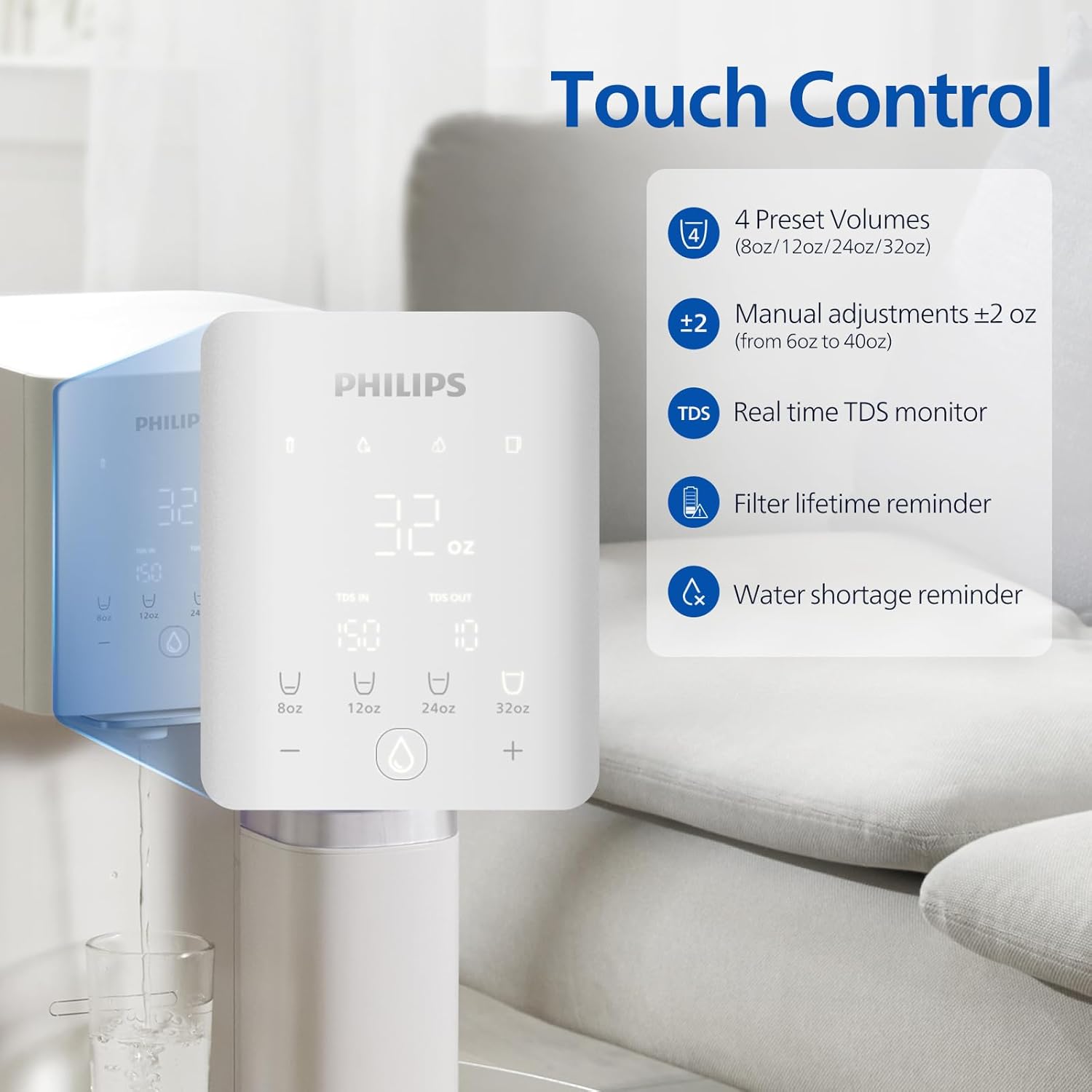
Figure 8: Touch control panel with volume selection and indicators.

Figure 9: Customizable dispensing volumes.
3. Real-time TDS Monitoring
- The display panel shows real-time Total Dissolved Solids (TDS) readings for both inlet (tap) and outlet (filtered) water.
- This feature provides assurance of the water quality and filtration performance.

Real-time TDS monitoring icon.
4. Using Portable Pitchers
- The system includes two 7-cup portable water pitchers.
- These pitchers can be filled directly from the dispenser and stored in the refrigerator for chilled water, used for cooking, or for humidifiers.

Figure 10: Versatile use of the two portable pitchers.

Figure 11: Automatic pure water filling for pitchers.
Maintenance
1. Filter Replacement
- The filter cartridge has a life cycle of approximately 12 months, depending on usage and water quality.
- The system provides a filter lifetime reminder on the display:
- Constant white light: Filter lifetime > 10% remaining.
- Flashing red light: Filter lifetime < 10% remaining.
- Constant red light: Filter lifetime < 7 days or has ended. Replace filter immediately.
- To replace, simply twist the old filter counter-clockwise to remove, and insert a new filter by twisting clockwise until secure.

Filter lifetime reminder icon.

Figure 12: Replacement filter cartridge.
2. Cleaning the Water Tank and Unit
- Regularly clean the water tank with mild soap and water. Rinse thoroughly.
- Wipe the exterior of the main unit with a soft, damp cloth. Do not use abrasive cleaners or solvents.
- Ensure the drip tray is emptied and cleaned regularly to prevent water overflow and bacterial growth.
Troubleshooting
| Problem | Possible Cause | Solution |
|---|---|---|
| No water dispensed. | Water tank empty; power disconnected; filter not installed correctly. | Refill water tank; check power connection; re-install filter. |
| Slow water flow. | Filter nearing end of life or clogged; air in system. | Check filter lifetime reminder and replace if necessary; dispense a full tank to flush air. |
| Unusual taste or odor. | New filter needs flushing; filter expired; tank needs cleaning. | Discard first tank of water after new filter installation; replace filter; clean water tank. |
| TDS readings are high. | Filter expired or faulty; system not operating correctly. | Replace filter; contact customer support if issue persists. |
| Water shortage reminder active. | Water tank is low or empty. | Refill the water tank. |
Specifications
| Attribute | Detail |
|---|---|
| Brand | PHILIPS |
| Model Name | ADD6926WH/37 |
| Product Dimensions | 9.06"L x 16.64"W x 12.8"H |
| Item Weight | 15.8 Pounds |
| Installation Type | Countertop |
| Power Source | Corded Electric |
| Filter Life Cycle | 12 Months |
| Special Feature | Reduce TDS |
| UPC | 840181302308, 840181303121 |
| Water Tank Capacity | 1.6 Gallons (approx. 25 cups) |
| Portable Pitcher Capacity | 0.48 Gallons (approx. 7 cups) |
| Filtration Stages | 6-stage (integrated into 1 filter) |
| Filtration Accuracy | Down to 0.0001 micron |
| Water Ratio (Pure:Drain) | 3:1 |
Warranty and Support
For specific warranty details, please refer to the warranty card included with your product or visit the official Philips Water Solutions website. Standard warranty terms typically cover manufacturing defects for a specified period from the date of purchase.
For customer support, technical assistance, or to purchase replacement filters, please visit the official PHILIPS Store on Amazon or contact Philips customer service directly.
Visit the Official PHILIPS Store
Note: No relevant product videos were available in the provided data to embed as per the specified criteria (seller-created, non-preview, or genuinely useful preview videos).
Related Documents - ADD6926WH/37
 |
Philips AUT7005/97 Under-Sink Water Filtration System User Manual This user manual provides comprehensive instructions for the Philips AUT7005/97 under-sink reverse osmosis water filtration system, covering installation, daily usage, maintenance, troubleshooting, and warranty information. |
 |
Philips AUT4030R Series Under-Sink Water Filtration System User Manual Comprehensive user manual for the Philips AUT4030R400 and AUT4030R600 under-sink reverse osmosis water filtration systems. Covers product introduction, specifications, installation, usage, maintenance, and troubleshooting. |
 |
Philips AUT7006 Under-the-Sink Water Filtration System User Manual Comprehensive user manual for the Philips AUT7006 under-the-sink reverse osmosis water filtration system. Learn about product introduction, specifications, installation, usage, maintenance, and troubleshooting. |
 |
Philips RO Water Dispenser ADD6928/37 User Manual Comprehensive user manual for the Philips RO Water Dispenser, model ADD6928/37. Provides detailed instructions on setup, operation, maintenance, and troubleshooting for clean, filtered water at home. |
 |
Philips AUT7006 Under-the-Sink Reverse Osmosis Water Filtration System User Manual Comprehensive user manual for the Philips AUT7006 under-the-sink reverse osmosis water filtration system. Learn about installation, operation, maintenance, and troubleshooting for high-quality filtered water. |
 |
Philips AUT9028DG/90 櫥下型淨水系統產品概述 Philips AUT9028DG/90 櫥下型淨水系統產品概述,包含 Aquaporin Inside™ 5 重過濾、智能冷熱水龍頭、TDS 監測及多段水溫控制功能介紹。 |
Ask a question about this manual
Ask about setup, troubleshooting, compatibility, parts, safety, or missing instructions. Manuals+ will review the question and use this page’s manual context to help answer it.