
1. Product Overview
The Black Shark S3 Smartwatch is a versatile wearable device designed for fitness tracking, health monitoring, and seamless communication. It features a vibrant AMOLED display, long battery life, and robust water resistance, making it suitable for various activities and daily use.
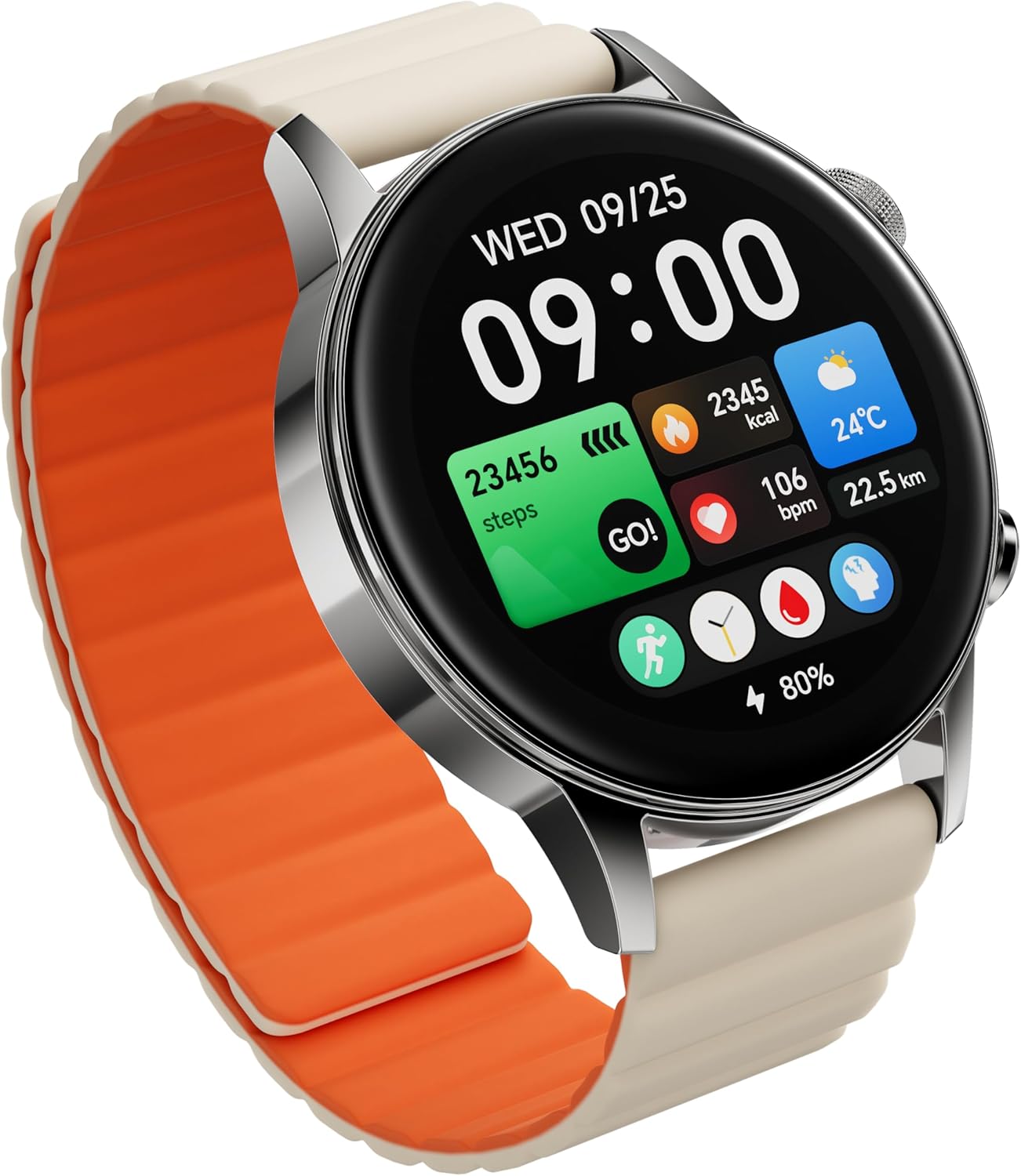
Image: The Black Shark S3 Smartwatch, showcasing its round display and magnetic strap. The screen displays the date, time, steps, calories, heart rate, and weather information.
Key Features:
- 1.43" AMOLED Display: High-resolution (466x466) with 326 PPI and 60Hz refresh rate for vivid clarity.
- Magnetic Strap: Double-sided magnetic silicone strap for secure and effortless wear.
- 150+ Sport Modes: Comprehensive tracking for various physical activities.
- Built-in GPS: Standalone GPS for real-time movement recording without a phone.
- 15-Day Battery Life: Extended usage with high-density battery and smart power-saving algorithms.
- ENC Bluetooth Calling: Make and receive calls directly from your wrist with noise reduction.
- All-Day Health Monitoring: 24/7 tracking of heart rate, blood oxygen (SpO₂), stress, steps, calories, distance, and advanced sleep tracking.
- 5ATM Water Resistance: Safe for swimming, showering, or training in various weather conditions.
2. Setup Guide
2.1 Unboxing and Initial Inspection
Carefully open the product packaging. Verify that all components are present and undamaged:
- Black Shark S3 Smartwatch
- Magnetic Charging Cable
- User Manual (this document)
2.2 Charging the Smartwatch
Before first use, fully charge your Black Shark S3 Smartwatch.
- Connect the magnetic charging cable to the charging contacts on the back of the smartwatch. Ensure a secure connection.
- Plug the USB-A end of the charging cable into a compatible USB power adapter (5V/1A recommended) or a computer's USB port.
- The watch display will indicate charging status. A full charge typically takes approximately 2.5 hours.
2.3 Attaching the Magnetic Strap
The Black Shark S3 features a double-sided magnetic silicone strap for easy attachment and removal.
- Hold the watch with the display facing up.
- Align one end of the magnetic strap with the watch lug and allow the magnets to snap into place.
- Repeat for the other side of the strap.
- To wear, simply wrap the strap around your wrist and let the magnetic ends connect. Adjust for a comfortable and secure fit.

Image: Illustration demonstrating the quick and easy attachment of the magnetic strap to the smartwatch.
2.4 Pairing with Your Smartphone
To unlock the full functionality of your Black Shark S3 Smartwatch, pair it with your smartphone via the companion application.
- Download the App: Search for the official Black Shark Smartwatch app on your smartphone's app store (Google Play Store for Android, Apple App Store for iOS). Install the application.
- Enable Bluetooth: Ensure Bluetooth is enabled on your smartphone.
- Open the App: Launch the Black Shark Smartwatch app and follow the on-screen instructions to create an account or log in.
- Add Device: Within the app, navigate to the 'Add Device' or 'Pair Device' section. The app will search for nearby Black Shark S3 devices.
- Confirm Pairing: Select your Black Shark S3 from the list. A pairing request may appear on both your phone and the watch. Confirm the pairing on both devices.
- Complete Setup: Once paired, the app will guide you through initial settings, such as personal information, notification preferences, and watch face customization.
3. Operating Instructions
3.1 Display and Navigation
The Black Shark S3 features a 1.43-inch AMOLED touchscreen display and two physical buttons for intuitive navigation.
- Touchscreen: Swipe up, down, left, or right to navigate through menus, notifications, and widgets. Tap to select items.
- Top Button (Smart Crown): Press to wake the screen, return to the watch face, or enter the app list. Rotate to scroll through menus and lists.
- Bottom Button: Customizable shortcut button, typically used for quick access to sport modes or a frequently used feature.

Image: The Black Shark S3 display, showcasing its clarity and vibrant colors, with specifications like 1.43" AMOLED, 466x466 resolution, 60Hz refresh rate, and 326 PPI.
3.2 Sport Modes and GPS
The S3 Smartwatch supports over 150 sport modes and features built-in GPS for accurate activity tracking.
- Access Sport Modes: From the watch face, press the bottom button (if configured) or navigate through the app list to find the 'Workout' or 'Sport Modes' icon.
- Select Activity: Choose your desired sport (e.g., running, cycling, swimming).
- GPS Acquisition: For outdoor activities, wait for the GPS signal to be acquired before starting your workout. The watch will indicate when GPS is ready.
- Start/End Workout: Tap 'Go' or the equivalent to start. During the workout, you can pause or end it by swiping or pressing a button as indicated on screen.
- Review Data: After ending a workout, the watch will display a summary. Detailed data can be viewed in the companion app.

Image: The Black Shark S3 supports over 150 sports modes, providing advanced algorithms for precise workout tracking and automatic activity detection.
3.3 Health Monitoring
The Black Shark S3 continuously monitors various health metrics.
- Heart Rate: The watch tracks your heart rate 24/7. View real-time data on the watch or historical trends in the app.
- Blood Oxygen (SpO₂): Measure your blood oxygen saturation. Ensure the watch is snug on your wrist for accurate readings.
- Stress Monitoring: The watch estimates your stress levels throughout the day.
- Sleep Tracking: Automatically monitors your sleep stages (deep, light, REM) and provides insights into your sleep quality.
- Steps, Calories, Distance: Daily activity metrics are tracked and displayed on the watch and in the app.

Image: The Black Shark S3 features enhanced 8-channel PPG monitoring for tracking heart rate, blood oxygen saturation, sleep status, and stress levels with precision.
3.4 Bluetooth Calling
With its built-in speaker and microphone, the S3 allows you to make and receive calls directly from your wrist.
- Answering Calls: When a call comes in, tap the green phone icon on the watch screen to answer.
- Making Calls: Access the 'Phone' or 'Contacts' app on your watch to dial a number or select a contact.
- ENC Noise Reduction: The Environmental Noise Cancellation (ENC) technology helps ensure clear conversations.

Image: The Black Shark S3 enables clear Bluetooth calls with noise reduction, allowing users to manage calls effortlessly from their wrist.
3.5 Watch Faces and Customization
Personalize your Black Shark S3 with a variety of watch faces.
- Changing Watch Face: Long-press on the current watch face, then swipe left or right to browse available options. Tap to select.
- More Watch Faces: Use the companion app to download additional watch faces and customize existing ones.

Image: A selection of free, built-in multifunctional watch faces for the Black Shark S3, offering both practical information and visual appeal.
4. Maintenance
Proper maintenance ensures the longevity and optimal performance of your Black Shark S3 Smartwatch.
4.1 Cleaning the Smartwatch
- Watch Body: Wipe the watch body with a soft, lint-free cloth. If necessary, dampen the cloth slightly with water. Avoid using harsh chemicals or abrasive materials.
- Strap: Clean the silicone strap with mild soap and water, then rinse thoroughly and dry completely before reattaching to the watch.
- Charging Contacts: Periodically clean the charging contacts on the back of the watch and the charging cable with a dry, soft cloth to ensure good connection.
4.2 Software Updates
Regularly check for and install software updates through the companion app. Updates often include performance improvements, bug fixes, and new features.
- Ensure your watch is sufficiently charged before starting an update.
- Keep the watch connected to your smartphone and within Bluetooth range during the update process.
4.3 Storage
When not in use for extended periods, store the smartwatch in a cool, dry place away from direct sunlight and extreme temperatures. It is recommended to charge the watch to about 50% before long-term storage to preserve battery health.
5. Troubleshooting
If you encounter issues with your Black Shark S3 Smartwatch, refer to the following common problems and solutions.
| Problem | Possible Cause | Solution |
|---|---|---|
| Watch does not turn on | Low battery | Charge the watch for at least 10-15 minutes. |
| Cannot pair with smartphone | Bluetooth off, app issue, watch not discoverable | Ensure Bluetooth is on. Restart both watch and phone. Reinstall the app. Reset watch to factory settings if necessary. |
| Inaccurate health data (HR, SpO₂) | Loose fit, sensor obstruction | Ensure the watch is snug on your wrist. Clean the sensor on the back of the watch. |
| GPS signal loss or inaccuracy | Environmental interference, initial acquisition time | Ensure you are in an open area. Wait for GPS signal acquisition before starting activities. Update watch firmware. |
| Short battery life | High usage, frequent notifications, AOD enabled | Reduce screen brightness, disable Always-On Display (AOD), limit notifications, disable continuous health monitoring if not needed. |
If the problem persists, please refer to the official Black Shark support website or contact customer service.
6. Specifications
| Feature | Specification |
|---|---|
| Model Name | Black Shark S3 |
| Display | 1.43" AMOLED, 466x466 resolution, 326 PPI, 60Hz Refresh Rate |
| Battery Life (Typical Use) | Up to 15 days |
| Battery Life (Ultra-Long Standby) | Up to 30 days |
| Water Resistance | 5ATM (equivalent to 50 meters) |
| Connectivity | Bluetooth |
| GPS | Built-in GNSS Five-Satellite Positioning (BeiDou, GPS, GALILEOGPS, QZSS, GLONASS) |
| Sensors | Heart Rate, Blood Oxygen (SpO₂), Accelerometer, Gyroscope |
| Calling Feature | ENC Bluetooth Calls (Built-in speaker & microphone) |
| Sport Modes | 150+ |
| Item Weight | 7 ounces |
| Included in Box | Smartwatch, Charging Cable |
7. Warranty and Support
7.1 Warranty Information
The Black Shark S3 Smartwatch comes with a standard manufacturer's warranty. For detailed information regarding warranty terms, duration, and coverage, please refer to the warranty card included in your product packaging or visit the official Black Shark website.
7.2 Customer Support
For technical assistance, troubleshooting beyond this manual, or warranty claims, please contact Black Shark customer support through their official channels:
- Official Website: Visit the Black Shark official website for FAQs, support articles, and contact forms.
- Email Support: Refer to the website for specific email addresses for support inquiries.
- Phone Support: Check the official website for available phone support numbers in your region.
Please have your product model (S3) and purchase information ready when contacting support.