
Introduction
Thank you for choosing the Kuulaa Magsafe 10000mAh Qi2 15W Wireless Power Bank. This device provides convenient and fast wireless and wired charging for your compatible devices. This manual will guide you through the setup, operation, maintenance, and troubleshooting of your power bank to ensure optimal performance and safety.
Safety Information
Please read all safety instructions carefully before using this product. Failure to follow these instructions may result in electric shock, fire, or personal injury.
- Do not expose the power bank to extreme temperatures (above 45°C or below 0°C), direct sunlight, or high humidity.
- Do not disassemble, modify, or attempt to repair the device yourself. Contact qualified service personnel for assistance.
- Keep the power bank away from water and other liquids.
- Avoid dropping or subjecting the power bank to strong impacts.
- Do not use the power bank if it is damaged, swollen, or leaking.
- Keep out of reach of children.
- The integrated smart chip provides protection against overcharge, overcurrent, and short-circuiting, ensuring a safer charging experience.

Image: The Kuulaa power bank displaying its Qi2 certification and highlighting its safety and reliability features.
Product Overview
The Kuulaa Magsafe Power Bank (Model YC628) is designed for portable and efficient charging. Key features include:
- Qi2 Certified 15W Wireless Charging: Provides fast wireless charging for compatible devices, charging an iPhone 16 Pro to 50% in approximately 30 minutes.
- 10000mAh High Capacity: Offers sufficient power for multiple charges, capable of charging an iPhone 15 Pro approximately 1.8 times.
- Strong Magnetic Force (12N): Ensures secure and precise alignment for MagSafe-compatible devices, enabling instant and stable wireless charging.
- Smart Digital LED Display: An integrated LED screen accurately monitors the power bank's battery level and charging status.
- USB-C In/Out Port: Supports both fast recharging of the power bank (up to 18W) and fast wired charging of devices (up to 20W).
- Airline Approved: Suitable for travel.

Image: The 10000mAh Kuulaa power bank, highlighting its capacity to charge devices multiple times and its airline approval for travel.
Setup
1. Charging the Power Bank
Before initial use, fully charge your Kuulaa power bank. Use a USB-C cable and a compatible power adapter (not included) to connect the power bank's USB-C port to a power source.
- The LED display will show the charging progress.
- The power bank supports up to 18W input for fast recharging.
2. Attaching to a Device (Wireless Charging)
For MagSafe-compatible iPhones (iPhone 12 series and newer), simply align the power bank with the back of your phone. The strong magnetic force will snap it into place, initiating wireless charging automatically.

Image: Illustration of the power bank's 12N strong magnetic force, showing how it securely attaches to an iPhone for wireless charging.
Operating Instructions
1. Wireless Charging
- Ensure your device is MagSafe-compatible (iPhone 12 series or newer) or supports Qi wireless charging.
- Attach the power bank to the back of your phone. The LED display will indicate that wireless charging has begun.
- The power bank delivers up to 15W Qi2 certified wireless charging.

Image: The Kuulaa power bank wirelessly charging an iPhone 16 Pro, demonstrating its 15W Qi2 certified fast charging capability.
2. Wired Charging
- Use a USB-C to USB-C cable (or appropriate cable for your device) to connect your device to the power bank's USB-C port.
- The power bank supports up to 20W wired output for fast charging.
- The USB-C port functions as both input and output.

Image: The USB-C port on the Kuulaa power bank, illustrating its dual function for recharging the power bank (Max. 18W) and charging a device (Max. 20W).
3. Compatibility
The power bank is widely compatible:
- Wireless Use: Compatible with iPhone 12-17 series and other Qi-enabled devices.
- USB-C Connection: Compatible with a wide range of devices that charge via USB-C, including smartphones, tablets, and other portable electronics.
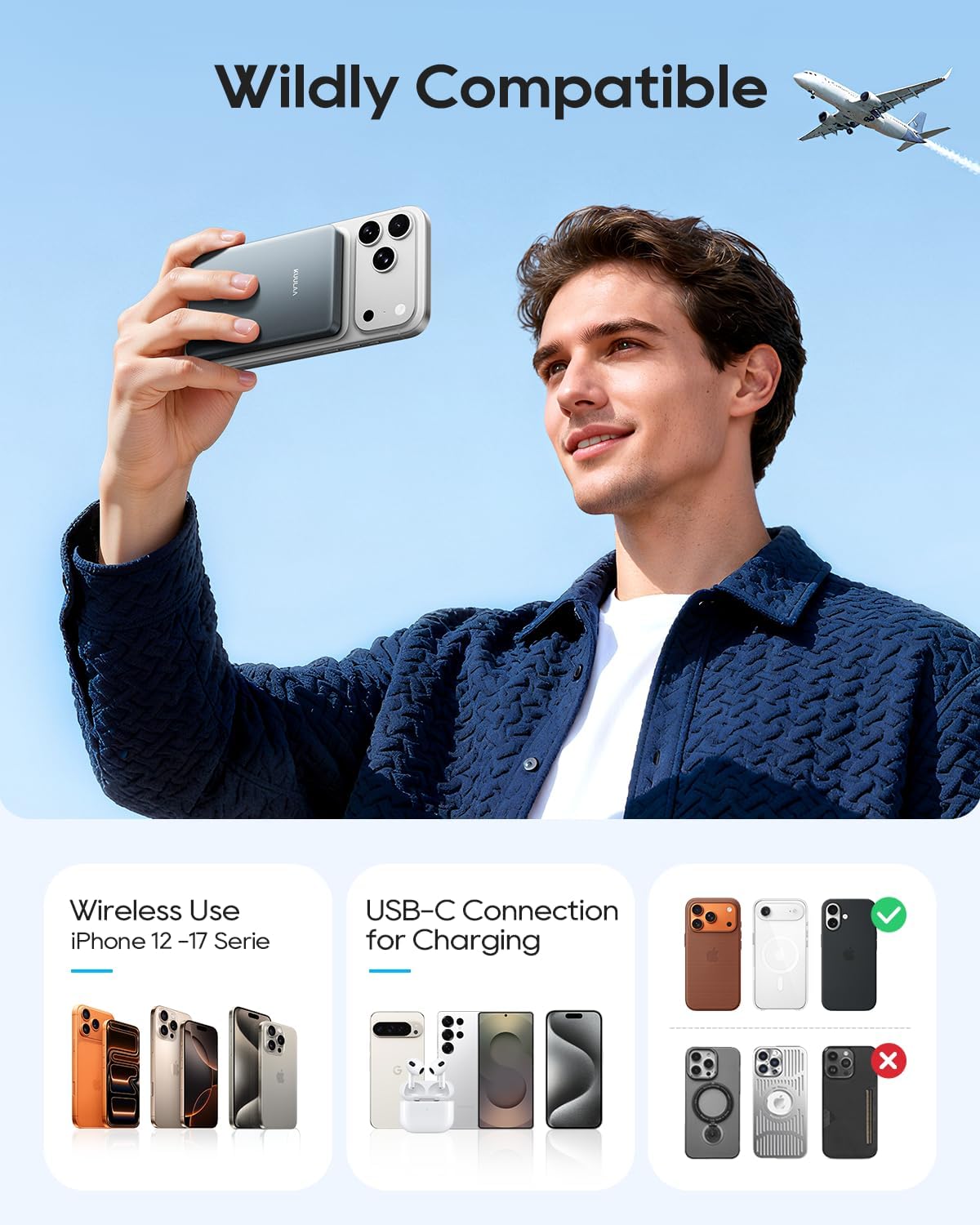
Image: The power bank's compatibility, showing wireless charging for iPhone 12-17 series and wired charging for various USB-C devices.
Maintenance
To ensure the longevity and optimal performance of your power bank, follow these maintenance guidelines:
- Cleaning: Use a soft, dry cloth to clean the surface of the power bank. Do not use harsh chemicals or abrasive cleaners.
- Storage: Store the power bank in a cool, dry place away from direct sunlight and extreme temperatures. If storing for extended periods, charge the power bank to about 50-75% capacity every 3-6 months to preserve battery health.
- Avoid Over-Discharging: Do not allow the power bank to completely drain its battery frequently, as this can reduce its lifespan.
Troubleshooting
If you encounter issues with your Kuulaa power bank, refer to the following common problems and solutions:
| Problem | Possible Cause | Solution |
|---|---|---|
| Power bank not charging | Low battery; Faulty cable or adapter; Loose connection. | Ensure the power bank is connected to a working power source with a functional USB-C cable and adapter. Check connections. |
| Device not charging wirelessly | Misalignment; Non-compatible device/case; Power bank low on charge. | Ensure proper alignment with MagSafe area. Remove thick phone cases. Check power bank battery level. Confirm device supports Qi/MagSafe. |
| Device not charging via cable | Faulty cable; Loose connection; Device not compatible with USB-C output. | Try a different USB-C cable. Ensure connections are secure. Verify your device charges via USB-C. |
| Power bank gets warm during use | Normal operation; High power output. | A slight warmth is normal during charging/discharging. If it becomes excessively hot, discontinue use and contact support. |
| LED display not working | Power bank is off; Malfunction. | Ensure the power bank is turned on (if applicable, though typically auto-on for charging). If still not working, contact support. |
Specifications
| Feature | Specification |
|---|---|
| Model Number | YC628 |
| Battery Capacity | 10000mAh |
| Battery Type | Lithium-ion |
| Wireless Output | Up to 15W (Qi2 Certified) |
| Wired Output (USB-C) | Up to 20W |
| Input (USB-C) | Up to 18W |
| Magnetic Force | 12N |
| Dimensions (L x W x H) | 10.4 x 6.75 x 1.45 cm |
| Weight | 110 g |
| Number of Ports | 1 (USB-C In/Out) |
Warranty and Support
For warranty information and customer support, please refer to the documentation provided with your purchase or contact Kuulaa customer service directly. Keep your proof of purchase for any warranty claims.


