
Introduction
The DIEBA 5-in-1 Educational Robot Building Kit (Model K96164) is designed to provide an engaging and educational experience for users aged 6 and up. This kit allows for the construction of five distinct robot models, fostering creativity, problem-solving skills, and an understanding of STEM principles. The assembled robots can be controlled via a 2.4GHz remote controller or a dedicated mobile application, offering various interactive modes including programming, path following, and gyroscope control.

Image: The product packaging alongside five different robot configurations that can be built from the kit.
Safety Information
- Small Parts Warning: This kit contains small parts and is not suitable for children under 3 years due to choking hazards.
- Battery Safety: Do not mix old and new batteries. Do not mix alkaline, standard (carbon-zinc), or rechargeable (nickel-cadmium) batteries. Insert batteries with correct polarity. Remove batteries if the product is not used for an extended period.
- Supervision: Adult supervision is recommended during assembly and operation, especially for younger users.
- Electrical Components: Keep electrical components dry and away from water or excessive moisture.
Package Contents
Before beginning assembly, please verify that all components are present. The kit includes 603 building pieces, a main control unit with a built-in rechargeable battery, a 2.4GHz remote controller, a USB charging cable, and a detailed instruction manual.
- 603 Building Blocks and Connectors
- 1 Main Control Unit (with built-in Lithium Metal battery)
- 1 2.4GHz Remote Controller (requires 2 AAA batteries, not included)
- 1 USB Charging Cable
- 1 Detailed Instruction Manual
- Sticker Sheet for Customization
Setup
1. Assembly
Follow the step-by-step instructions provided in the included manual to assemble your desired robot model. Each model is designed for clear and logical construction. Ensure all pieces snap securely into place.

Image: Children and an adult engaged in assembling the robot kit, demonstrating the educational aspect.
2. Battery Installation (Remote Controller)
The remote controller requires 2 AAA batteries (not included). Open the battery compartment on the back of the remote controller, insert the batteries according to the polarity markings, and close the compartment securely.
3. Charging the Robot
The robot's main control unit has a built-in rechargeable Lithium Metal battery. Connect the provided USB charging cable to the charging port on the robot and to a standard USB power source (e.g., computer, wall adapter). The charging indicator light will show the charging status. A full charge typically takes approximately 2-3 hours.
Operating Instructions
1. Power On/Off
To power on the robot, press and hold the power button on the main control unit until the LED display illuminates. To power off, press and hold the power button again.
2. Remote Control Operation
Ensure the remote controller has fresh AAA batteries installed. Turn on both the robot and the remote. They should automatically pair. Use the joysticks and buttons on the 2.4GHz remote controller to move the robot in all directions (forward, backward, left, right) and activate specific functions as per the model's design. The remote has a range of approximately 65 feet.

Image: Illustration of dual control modes, showing a robot being operated by a physical remote control and another by a smartphone application.
3. App Control (Bluetooth Connection)
Download the official DIEBA robot control application from your device's app store. Once installed, enable Bluetooth on your mobile device and open the app. The app will guide you through connecting to your robot via Bluetooth. The app offers several control modes:
- APP Remote Control Mode: Control the robot's movement directly from your device's screen.
- Path Mode: Draw a path on your screen, and the robot will follow it.
- Gyro Mode: Control the robot by tilting your mobile device.
- STEM Programming Mode: Utilize a block-based coding interface to program custom movements and actions for your robot.

Image: A robot following a programmed path, demonstrating the app's path mode and programming capabilities.
4. LED Expressions
The robot's LED display can show various dynamic expressions, adding an interactive and emotional element to play. These expressions can often be controlled via the app or specific remote commands, allowing the robot to blink, smile, or display other visual cues.
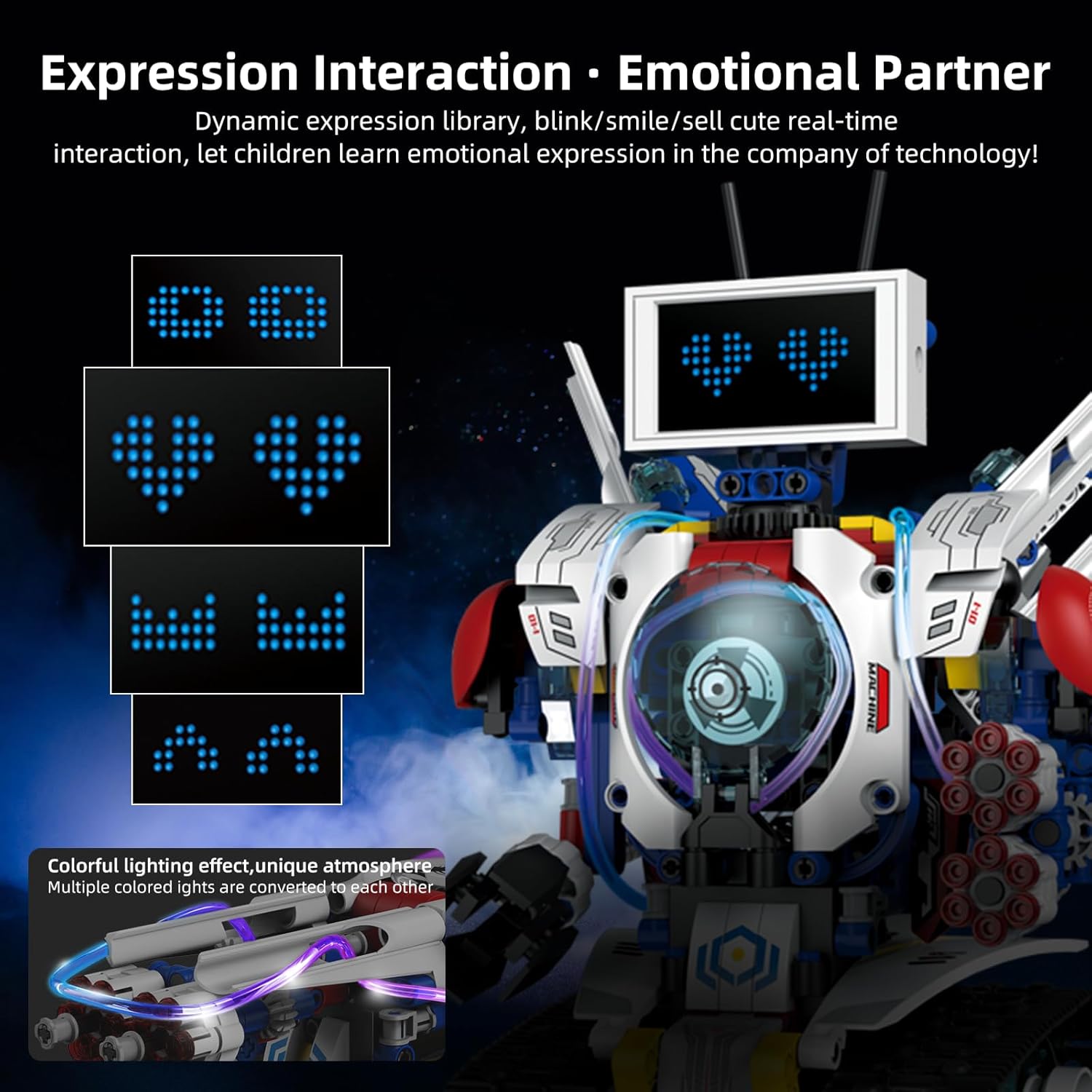
Image: A detailed view of the robot's LED screen, showcasing different animated expressions like eyes and hearts.
Maintenance
- Cleaning: Use a soft, dry cloth to clean the robot and its components. Avoid using harsh chemicals or abrasive materials.
- Storage: Store the robot and its parts in a cool, dry place away from direct sunlight when not in use.
- Battery Care: Recharge the robot's internal battery regularly, even if not in frequent use, to maintain battery health. Remove AAA batteries from the remote if storing for extended periods.
Troubleshooting
- Robot Not Responding:
- Ensure the robot is fully charged.
- Check if the remote controller has fresh batteries and is powered on.
- Verify that the robot and remote/app are properly paired.
- Restart both the robot and the remote/app.
- App Connection Issues:
- Ensure Bluetooth is enabled on your device.
- Make sure the robot is powered on and within range.
- Try closing and reopening the app.
- Check for app updates.
- Movement Problems:
- Inspect for any obstructions in the robot's gears or tracks.
- Ensure all assembled parts are securely connected.
Specifications
| Feature | Detail |
|---|---|
| Model Number | K96164 |
| Product Dimensions | 11.5 x 2.5 x 7.5 inches |
| Item Weight | 1.8 pounds |
| Recommended Age | 6 years and up |
| Robot Battery | 1 Lithium Metal battery (included, built-in) |
| Remote Battery | 2 AAA batteries (not included) |
| Control Methods | 2.4GHz Remote Control, Bluetooth App Control |
| Number of Pieces | 603 |
Warranty and Support
DIEBA is committed to providing high-quality products and excellent customer service. All products undergo strict testing before shipment. If you encounter any issues or have questions regarding your DIEBA 5-in-1 Educational Robot Building Kit, please do not hesitate to contact our customer service team. We aim to respond within 24 hours and provide a satisfactory solution.
For support, please refer to the contact information provided on the product packaging or the official DIEBA website.