
1. Introduction
The XAUCY BM580 Car Battery Tester is a professional automotive diagnostic tool designed to analyze the health status of 6V and 12V vehicle batteries. It accurately measures the actual cold cranking amps (CCA) capability, assesses the battery's overall health, and identifies common faults within the vehicle's starting and charging systems. This manual provides detailed instructions for the proper setup, operation, maintenance, and troubleshooting of your BM580 battery tester.
Key features include:
- Support for a wide range of 6V/12V batteries.
- Easy and intuitive operation.
- Ability to test batteries both in and out of the vehicle.
- Accurate results delivered in milliseconds.
- Battery life analysis and health percentage display.
- Analysis results indicating Good, Recharge, or Replace.
2. Product Overview

Figure 2.1: The BM580 Car Battery Tester with its main unit and detachable red (positive) and black (negative) test clamps.
The BM580 features a 2.4-inch TFT color screen for clear display of test results and menu navigation. It is equipped with robust test clamps for secure connection to battery terminals.
3. Setup and Connection
3.1 Connecting the Tester to the Battery
- Ensure the vehicle's ignition is off and all accessories are turned off.
- Connect the red positive (+) clamp of the BM580 to the positive (+) terminal of the battery.
- Connect the black negative (-) clamp of the BM580 to the negative (-) terminal of the battery.
- The device will power on automatically once a secure connection is established.
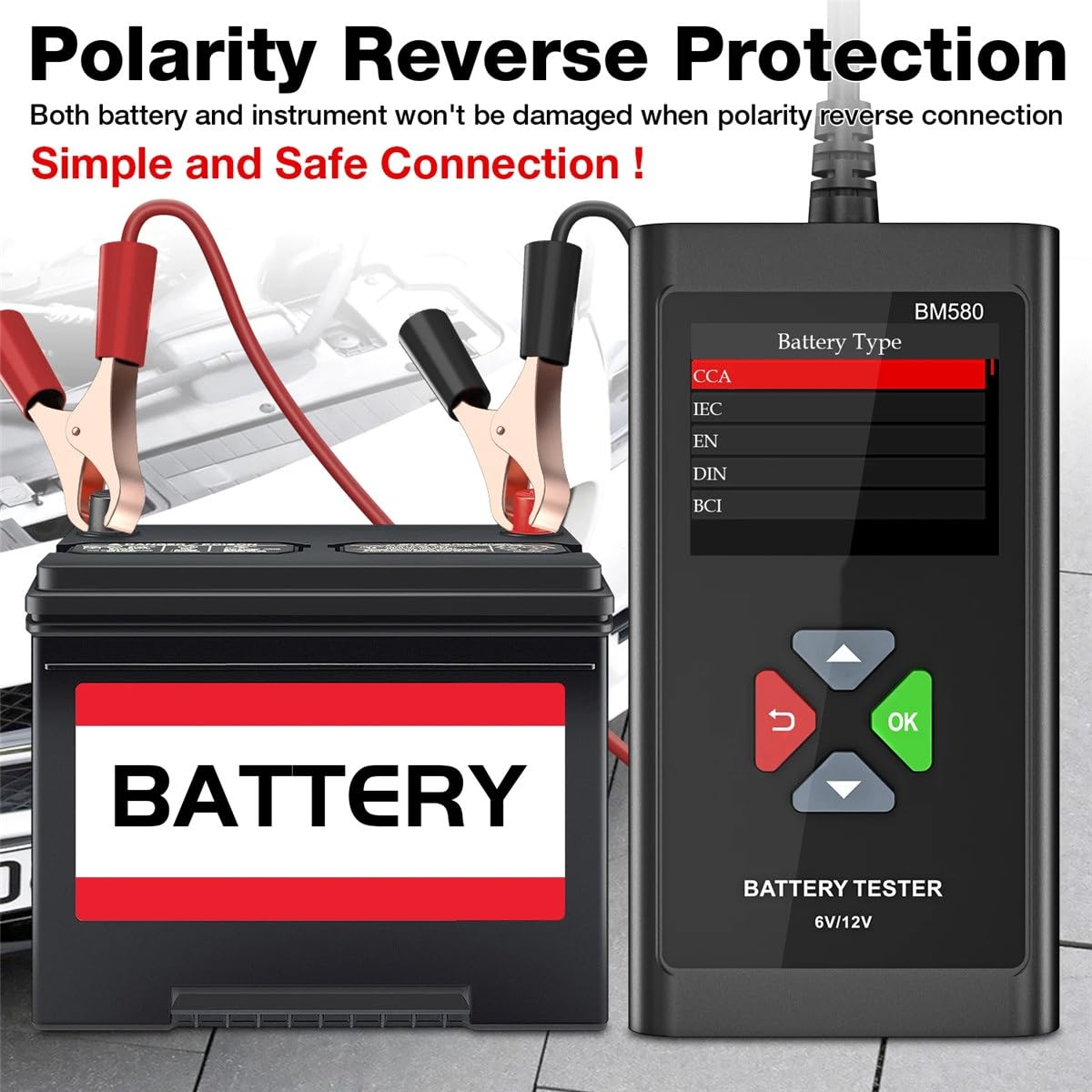
Figure 3.1: Proper connection of the BM580 tester to a vehicle battery, demonstrating polarity reverse protection.
3.2 Safety Features
- Polarity Reverse Protection: The BM580 is designed with polarity reverse protection. If the positive and negative clamps are connected incorrectly, the device will still power on normally, and neither the device nor the battery will be damaged.
- Overvoltage Input Protection: The device can be tested with input voltages below 20V without damaging its internal circuit board, even if a short circuit occurs.
- Poor Contact Prompt: If the test clamps do not securely connect to the battery terminals, the display will show a prompt indicating poor contact. Ensure a firm connection for accurate readings.
4. Operating Instructions
4.1 Navigation and Menu
The BM580 features a user-friendly interface with dedicated buttons for navigation:
- OK Button: Confirms selections and proceeds to the next step.
- Return/Back Button: Returns to the previous menu or screen.
- Up/Down Arrows: Navigate through menu options.

Figure 4.1: The BM580's main menu displaying various test functions.
4.2 Performing a Battery Test
This function assesses the overall health of the battery.
- From the main menu, select "Battery Test" and press OK.
- The tester will prompt you to select the battery type (e.g., Regular Flooded, AGM Flat Plate, AGM Spiral, GEL, EFB).
- Enter the battery's rated CCA (Cold Cranking Amps) value, usually found on the battery label.
- The BM580 will perform the test and display results including: Battery Life, Voltage, Measured CCA, and Internal Resistance.
- The analysis result will be displayed as "Good", "Recharge", or "Replace". A built-in buzzer will sound if the battery is in poor condition.

Figure 4.2: Example of a battery test result indicating a low State of Charge (SOC) and a recommendation for replacement.
4.3 Cranking Test (Start Test)
This test evaluates the battery's discharge performance during engine cranking.
- Select "Cranking Test" from the main menu and press OK.
- Follow the on-screen prompts to start the vehicle's engine.
- The tester will record the lowest voltage during cranking and assess the starting system's performance.
4.4 Charging Test
This function checks the vehicle's charging system, including the alternator and voltage regulator.
- Select "Charging Test" from the main menu and press OK.
- Follow the on-screen instructions, which typically involve starting the engine and revving it to a specified RPM.
- The BM580 will measure the charging voltage and ripple voltage to determine if the charging system is operating correctly.
4.5 Load Test
The load test assesses the battery's ability to maintain voltage under a simulated load, indicating engine performance.
- Select "Load Test" from the main menu and press OK.
- Follow the prompts to apply a load (e.g., turn on headlights or other high-draw accessories).
- The tester will monitor the battery's voltage drop under load.
4.6 Multimeter Function
The BM580 includes a multimeter function for real-time voltage monitoring and other electrical measurements.

Figure 4.3: The BM580's multimeter display, also illustrating the wide range of supported vehicle types.
4.7 Low Frequency Constant Current Test
The BM580 utilizes a low frequency constant current test method. This technique applies a fixed frequency and current test signal to the battery, samples and rectifies its voltage, and then calculates the internal resistance. This method is gentle on the battery, avoiding instantaneous high currents that can damage electrodes, making it suitable for almost all battery types, including large-capacity batteries.

Figure 4.4: Comparison of the BM580's low frequency constant current test method versus other devices.
5. Maintenance
- Cleaning: Wipe the device with a soft, dry cloth. Do not use abrasive cleaners or solvents.
- Storage: Store the BM580 in a dry, cool place, away from direct sunlight and extreme temperatures. Ensure the clamps are clean and free of corrosion before storage.
- Cable Care: Avoid bending or crimping the test cables excessively to prevent internal damage.
6. Troubleshooting
- Device Not Powering On: Ensure the test clamps are securely connected to the battery terminals. Check the battery voltage; if it's too low, the tester may not power on.
- "Poor Contact" Prompt: Re-attach the clamps firmly to the battery terminals, ensuring good metal-to-metal contact. Clean any corrosion from the battery terminals if necessary.
- Inaccurate Readings: Ensure the battery type and CCA value entered match the battery being tested. Verify that the battery terminals are clean and connections are secure.
- Buzzer Sounds: If the buzzer sounds during a test, it indicates a poor battery condition (e.g., low voltage, high internal resistance, or a recommendation to replace). Refer to the on-screen analysis result for details.
7. Specifications
| Feature | Specification |
|---|---|
| Model | BM580 |
| Supported Battery Voltage | 6V, 12V |
| CCA Range | 100-2000 CCA |
| AH Range | 2AH-220AH |
| Display | 2.4 inch TFT Color Screen |
| Supported Standards | CCA, IEC, EN, DIN, BCI |
| Dimensions (Parcel) | 2.54 x 2.54 x 2.54 cm |
| Item Weight | 500 Grams |
| Manufacturer | XAUCY |
8. Warranty and Support
For warranty information and technical support, please refer to the documentation provided with your purchase or contact the seller directly. Keep your proof of purchase for any warranty claims.