
1. Introduction
This manual provides detailed instructions for the proper setup, operation, and maintenance of your new Loakdsa replacement remote control. This remote is designed to be compatible with various Panasonic Mini CD Stereo Component Systems, ensuring seamless control over your audio equipment. Please read this manual thoroughly before use to ensure optimal performance and longevity of your remote control.
2. Product Overview
The Loakdsa replacement remote control is a direct-use device, requiring no programming. It features a comprehensive layout of buttons for controlling various functions of your compatible Panasonic Mini CD Stereo Component System, including power, disc playback, tuner, tape, auxiliary input, volume, and navigation.
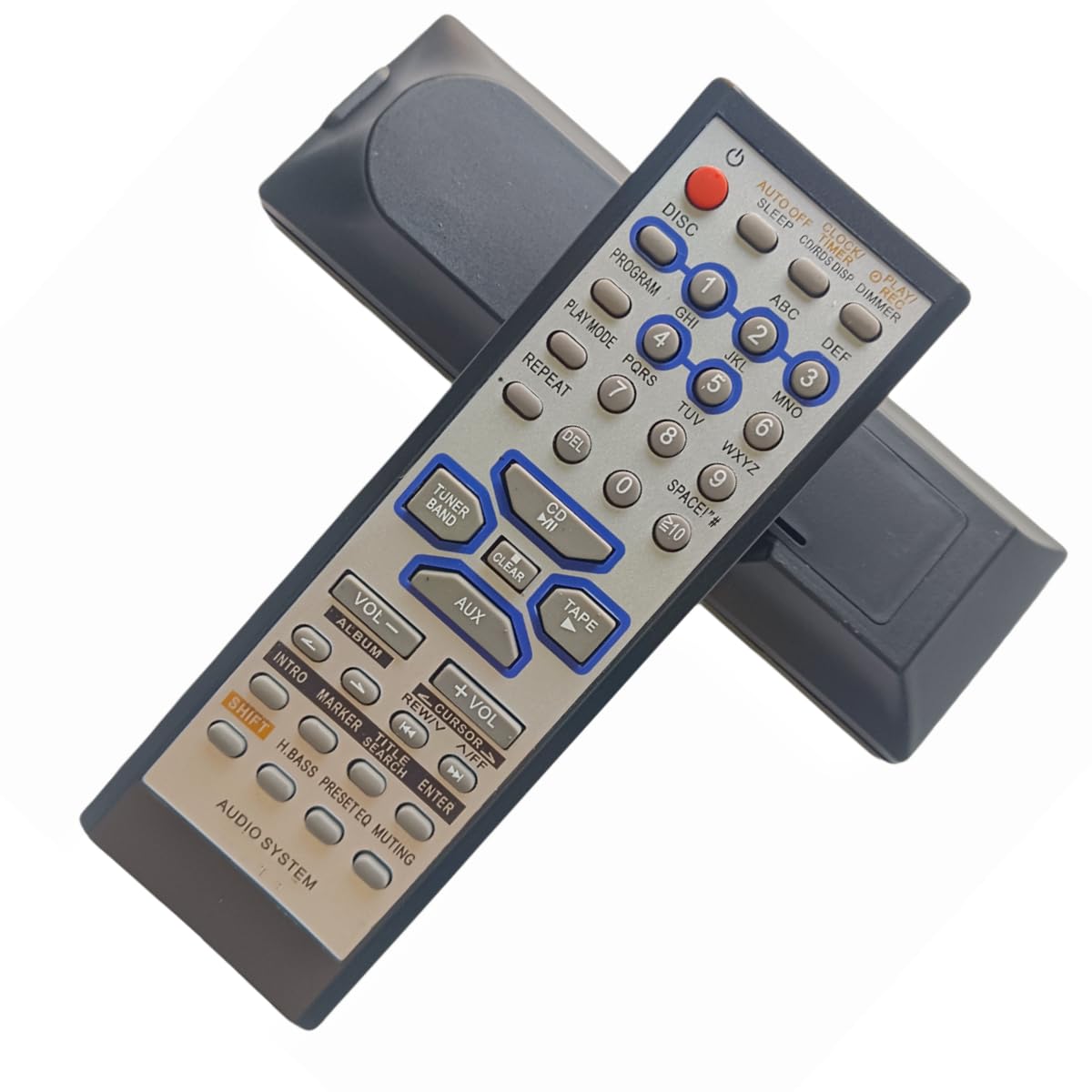
Figure 2.1: Front view of the Loakdsa replacement remote control, showing all buttons and their labels.
3. Setup
3.1 Battery Installation
- Locate the battery compartment on the back of the remote control.
- Slide the battery compartment cover downwards or press the latch and lift to open.
- Insert two new AAA batteries (not included) into the compartment, ensuring the positive (+) and negative (-) terminals align correctly with the markings inside.
- Close the battery compartment cover by sliding it back into place until it clicks securely.
Important: Always use new batteries for optimal performance. Do not mix old and new batteries, or different types of batteries. Remove batteries if the remote will not be used for an extended period.

Figure 3.1: Back view of the remote control, highlighting the battery compartment.
4. Operating Instructions
This remote control requires no programming. Once batteries are installed, it is ready for use. Point the remote directly at the signal receiving window of your Panasonic Mini CD Stereo Component System.
4.1 Basic Operation
- Power On/Off: Press the POWER button (red button at the top left) to turn the system on or off.
- Source Selection: Use the DISC, TUNER BAND, TAPE, or AUX buttons to select the desired audio source.
- Volume Control: Press VOL + to increase volume and VOL - to decrease volume.
- Muting: Press the MUTING button to temporarily silence the audio. Press again to restore sound.
4.2 Button Functions Overview
| Button | Function |
|---|---|
| POWER | Turns the system on or off. |
| DISC | Selects the CD/Disc player as the audio source. |
| PROGRAM | Used for programming CD tracks or radio presets. |
| PLAY MODE | Cycles through different playback modes (e.g., normal, random, repeat). |
| REPEAT | Repeats the current track or disc. |
| 0-9, ≥10 | Numeric input for track selection, radio frequencies, or time settings. |
| CD /II | Play/Pause control for the CD player. |
| TUNER BAND | Selects the radio tuner and cycles through AM/FM bands. |
| TAPE | Selects the tape deck as the audio source. |
| AUX | Selects the auxiliary input as the audio source. |
| VOL - / VOL + | Decreases / Increases the system volume. |
| ALBUM | Navigates between albums or folders on compatible media. |
| REW / FF | Rewind / Fast Forward during playback. |
| CURSOR | Navigation buttons (up, down, left, right) for menu or track selection. |
| INTRO | Plays the first few seconds of each track. |
| MARKER | Marks specific points during playback. |
| TITLE SEARCH | Initiates a search for specific titles or tracks. |
| ENTER | Confirms selections or enters menu options. |
| SHIFT | Activates secondary functions of certain buttons (if applicable). |
| H.BASS | Enhances bass output. |
| PRESET EQ | Cycles through preset equalizer settings. |
| MUTING | Mutes or unmutes the audio output. |
5. Maintenance
- Cleaning: Wipe the remote control with a soft, dry cloth. Do not use liquid cleaners or abrasive materials, as they may damage the surface or internal components.
- Battery Care: If the remote control will not be used for an extended period (e.g., one month or more), remove the batteries to prevent leakage and potential damage to the remote.
- Storage: Store the remote control in a cool, dry place away from direct sunlight and extreme temperatures.
6. Troubleshooting
- Remote not responding:
- Ensure new batteries are correctly installed with the correct polarity.
- Check if the remote is pointed directly at the system's infrared receiver.
- Ensure there are no obstructions between the remote and the system.
- Replace batteries with a fresh set.
- Intermittent response:
- Batteries may be low; replace them.
- Ensure the remote's infrared emitter and the system's receiver are clean and free of dust.
7. Specifications
| Feature | Detail |
|---|---|
| Brand | Loakdsa |
| Special Feature | No Programming Required |
| Max Number of Supported Devices | 1 |
| Compatible Devices | CD Stereo Component System (Panasonic RAK-SC981WK, SA-PM47, SC-PM47, SA-AK65, SC-AK14, SC-AK18, SA-AK25, SA-AK45, SC-AK25, SC-AK45, SA-AK22, SC-AK22) |
| Connectivity Technology | Infrared |
| Controller Type | Infrared |
| Maximum Range | 10 Feet |
| Number of Batteries Required | AAA batteries (2) |
| UPC | 763464357126 |
| ASIN | B0F92QVFYG |
8. Warranty and Support
This product is designed for reliability and ease of use. For any questions or concerns regarding your remote control, please contact the seller directly. Please refer to your purchase documentation for specific warranty details, as warranty terms may vary.
We strive for customer satisfaction. If you encounter any issues, please reach out to the seller before leaving feedback, and they will endeavor to assist you within 24 hours.