1. Introduction and Overview
This manual provides essential information for the safe and effective use of your Generic 18V 5500mAh Li-ion Battery. This high-capacity battery is designed to be compatible with a wide range of Black & Decker 18V and 20V cordless power tools, offering reliable and consistent power output.

Image 1.1: The Generic 18V 5500mAh Li-ion Battery, featuring a black and grey casing with red accents, clearly labeled "LITHIUM ION 5.5Ah 18v".
Key Features:
- High Capacity: 5500mAh (5.5Ah) for extended runtime.
- Li-ion Technology: Provides consistent power without memory effect.
- Integrated Protection: Built-in microchip prevents overcharging, over-discharge, short-circuit, and includes automatic thermal cut-off for enhanced safety and longevity.
- Wide Compatibility: Designed to replace various Black & Decker 18V and 20V Li-ion batteries and work with compatible tools and chargers.
2. Safety Information
Always observe the following safety precautions to prevent injury or damage to the battery and tools.
- Do not immerse the battery in water or other liquids.
- Do not store or use the battery in extreme temperatures (above 60°C/140°F or below -20°C/-4°F).
- Do not short-circuit the battery terminals.
- Do not disassemble, crush, or incinerate the battery.
- Keep the battery away from children and pets.
- Use only compatible chargers specified for Li-ion batteries.
- If the battery shows signs of damage, leakage, or overheating, discontinue use immediately.
- Dispose of batteries responsibly according to local regulations.

Image 2.1: Diagram illustrating the multiple protection features of the battery, including no-memory effects, over-charge protection, short-circuit protection, automatic thermal cut-off, and over-voltage protection.
3. Setup and First Use
3.1 Initial Charging
Before first use, fully charge the battery. Use only compatible Black & Decker 18V Li-ion original chargers such as BDC1A-QW, BDC2A-QW, BDC2A20-QW, or equivalent compatible chargers.
- Insert the battery into the compatible charger, ensuring it clicks into place.
- Connect the charger to a power outlet.
- Monitor the charger's indicator lights for charging status. The battery is fully charged when the indicator shows completion (refer to your charger's manual for specific light patterns).
- Once fully charged, disconnect the charger from the power outlet and remove the battery.
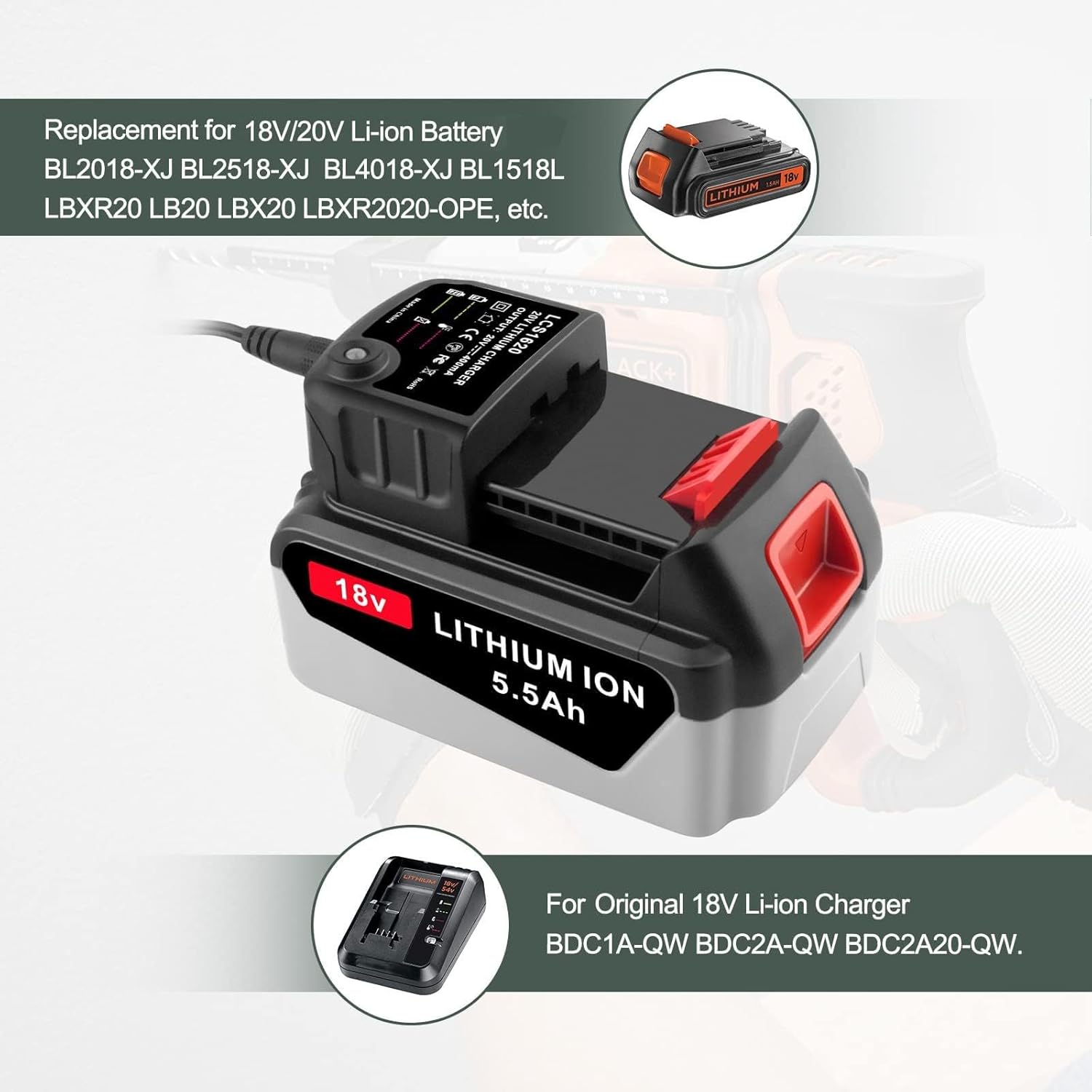
Image 3.1: The 18V 5.5Ah Lithium Ion battery connected to a compatible charger, demonstrating the charging process.
3.2 Battery Installation and Removal
This battery is designed for seamless replacement and compatibility with various Black & Decker 18V and 20V cordless power tools.

Image 3.2: Detailed view of the battery's precise interface design, highlighting the PC+ABS case and the release button for secure attachment and removal.
- Installation: Align the battery with the battery port on your Black & Decker tool. Slide the battery firmly into place until you hear a click, indicating it is securely locked.
- Removal: Press the battery release button (typically red) and slide the battery out of the tool.
Compatible 18V Li-ion Batteries for Replacement: BL2018, BL2018-XJ, BL2518-XJ, BL1518-XJ, BL4018-XJ, BL1518L
Compatible 20V Li-ion Batteries for Replacement: LBXR20, LB20, LBX20, LBXR2020-OPE, LBXR20B-2, LB2X4020, LB2X4020-OPE, LST220
Compatible 18V Li-ion Tools: GKC1825L20-QW, GPC1820L20-QW, STC1820-QW, BCD900B-XJ, BL188KB-QW, BCD001C1-GB, BDCDD18N-XJ, BDCJS18N-XJ, BCK23S1S-QW, BL188K-QW, GWC1820PC-QW, BDCCS18N-XJ, GKC1820L20-QW, GTC1845L20-QW, STC1820PCB-XJ, BCG720N-XJ, BCASK81D-QW, BL71B-XJ, BDCH188N-XJ, BDCDD186-QW, BCASBL71B-XJ, BDCHD18KB2-QW, BCSS18D1-QW, BDCIM18N-XJ, STC1840EPC-QW, BCBL200B-XJ, GTC18502PC-QW, BDCDS18N-XJ, BDCDS18-QW, GTC18452PCB-XJ, etc.
Compatible 20V Li-ion Tools: BDC120VA100, BDCDMT120, BDCDMT120-2, BDCDMT120F, BDCDMT120IA, BDCF20, BDH2000SL, CHH2220, EPL188KB, LD3K220, LCC220, LCS120, LCS120B, LD120VA, LDX120C, LDX120PK, LDX120SB, LDX220SB, LDX220SBFC, LGC120, LHT2220, LPHT120, LPHT120B, LPP120, LPP120B, LST120, LST220, LSW20, LSW120, SSL20SB, SSL20SB-2, etc.

Image 3.3: An illustration demonstrating the wide compatibility of the battery with various Black & Decker 18V and 20V cordless power tools, including drills, grinders, jigsaws, and impact drivers.
4. Operating Instructions
Once the battery is fully charged and securely installed in a compatible tool, the tool is ready for operation. Refer to your specific power tool's instruction manual for detailed operating procedures.
- Ensure the battery is fully charged for optimal performance.
- Always use the correct battery for your tool model.
- Do not force the battery into the tool or charger.
- If the tool's performance decreases, it indicates the battery needs recharging.
5. Maintenance and Storage
5.1 Charging Practices
- Charge the battery in a well-ventilated area.
- Avoid charging in direct sunlight or extremely hot/cold environments.
- Do not leave the battery on the charger indefinitely after it is fully charged.
- Allow the battery to cool down before charging if it has been heavily used.
5.2 Cleaning
- Keep battery terminals clean and free from dirt or debris. Use a dry cloth to wipe them if necessary.
- Do not use water or cleaning solvents on the battery.
5.3 Storage
- Store the battery in a cool, dry place, away from direct sunlight and moisture.
- For long-term storage, charge the battery to approximately 50-70% capacity.
- Avoid storing the battery in a completely discharged state, as this can reduce its lifespan.
- Store separately from metal objects to prevent short-circuiting.
6. Troubleshooting
| Problem | Possible Cause | Solution |
|---|---|---|
| Battery not charging. |
|
|
| Tool not operating with charged battery. |
|
|
| Reduced runtime. |
|
|
7. Specifications

Image 7.1: Visual representation of the battery's key specifications: Type, Voltage, and Capacity.
| Specification | Detail |
|---|---|
| Model Number | battery-20250517-200 |
| Battery Type | Lithium-Ion (Li-ion) |
| Voltage | 18V |
| Capacity | 5500mAh (5.5Ah) |
| Manufacturer | Generic |
| Protection Features | Overcharge, Over-discharge, Short-circuit, Over-voltage, Automatic Thermal Cut-off, No Memory Effect |
| Case Material | PC+ABS |
8. Warranty and Support
Your Generic 18V 5500mAh Li-ion Battery is backed by comprehensive customer support.
- Money-Back Guarantee: 30-day money-back guarantee from the date of purchase.
- Warranty: 12-month warranty covering manufacturing defects.
- Customer Service: 24-hour customer service is available to address any questions or concerns you may have. Please refer to your purchase documentation for contact details.
For additional protection, consider purchasing an extended protection plan:
- 2-Year Protection Plan: Available for $4.99.
- 3-Year Protection Plan: Available for $6.99.
- Complete Protect: A monthly plan for $16.99 covering eligible past and future purchases.


