
1. Introduction
Thank you for choosing the PUSUN PT MINI PRO Tennis Ball Machine. This portable and lightweight device is designed to enhance your tennis training by providing consistent and customizable ball feeds. It features adjustable speed, frequency, and angle, along with remote and APP control for a versatile practice experience. This manual provides essential information for safe operation, setup, maintenance, and troubleshooting.

Figure 1.1: The PUSUN PT MINI PRO Tennis Ball Machine is designed for portability, comparable in size to a basketball and weighing approximately 8 kg (11 Kilograms as per specifications).
2. Safety Instructions
Please read and understand all safety instructions before operating the PUSUN PT MINI PRO Tennis Ball Machine. Failure to follow these instructions may result in injury or damage to the product.
- Adult Supervision: Always supervise children when the machine is in use.
- Proper Ball Type: Use only standard tennis balls. Do not use wet, damaged, or non-tennis balls, as this may cause jamming or damage to the machine.
- Clear Area: Ensure the practice area is clear of people, pets, and obstacles before starting the machine.
- Power Source: Use only the provided charger. Do not attempt to charge with incompatible power adapters.
- Water Exposure: Do not expose the machine to rain or excessive moisture. This product is not waterproof.
- Maintenance: Disconnect power before performing any maintenance or cleaning.
- Battery Safety: Do not attempt to open or replace the internal battery. Contact customer support for battery-related issues.
- Moving Parts: Keep hands, hair, and loose clothing away from the ball launching port and internal mechanisms during operation.
3. What's in the Box
Verify that all components are present upon unpacking:
- PUSUN PT MINI PRO Tennis Ball Machine
- Remote Control
- Charger
- User Manual (this document)
4. Product Overview
Familiarize yourself with the various parts and controls of your PUSUN PT MINI PRO Tennis Ball Machine.
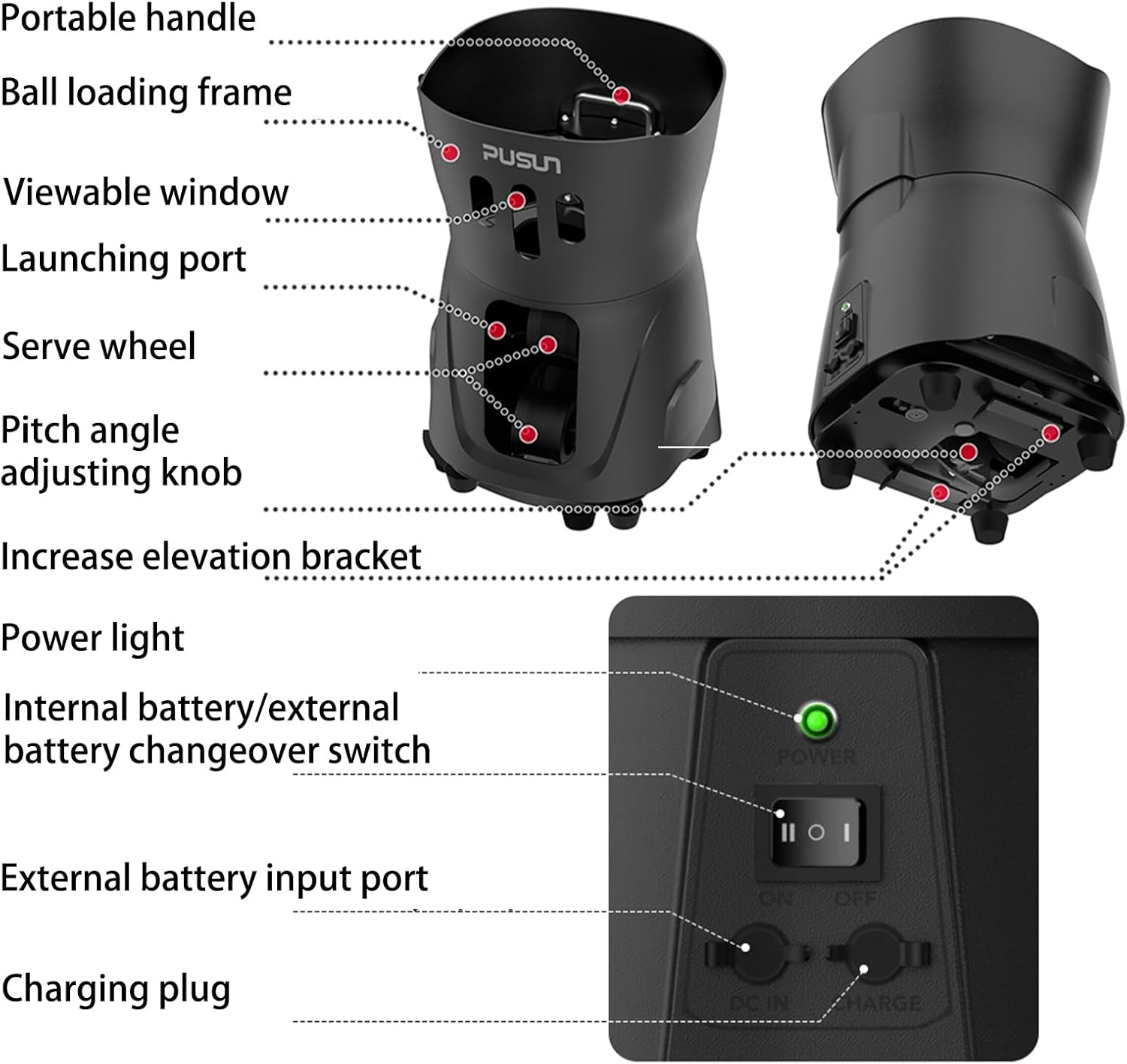
Figure 4.1: Key components of the PUSUN PT MINI PRO Tennis Ball Machine, including the portable handle, ball loading frame, viewable window, launching port, serve wheel, pitch angle adjusting knob, elevation bracket, power light, battery switch, and charging port.
Key Components:
- Portable Handle: For easy transportation.
- Ball Loading Frame: Area where tennis balls are placed.
- Viewable Window: Allows visibility of the ball count.
- Launching Port: Where balls are ejected.
- Serve Wheel: Internal mechanism for launching balls.
- Pitch Angle Adjusting Knob: Manual adjustment for ball trajectory.
- Increase Elevation Bracket: For higher ball trajectories.
- Power Light: Indicates power status.
- Internal/External Battery Changeover Switch: Selects power source.
- External Battery Input Port: For connecting an optional external battery.
- Charging Plug: For connecting the charger.
Ball Capacity Expansion:
The machine's standard ball capacity can be expanded. An optional expansion fence can increase the capacity from 30+ balls to over 65 balls, allowing for longer practice sessions without frequent refilling.

Figure 4.2: Illustration of adding an expansion fence to increase the ball loading capacity of the machine.
5. Setup
Follow these quick steps to set up your PUSUN PT MINI PRO Tennis Ball Machine for training.
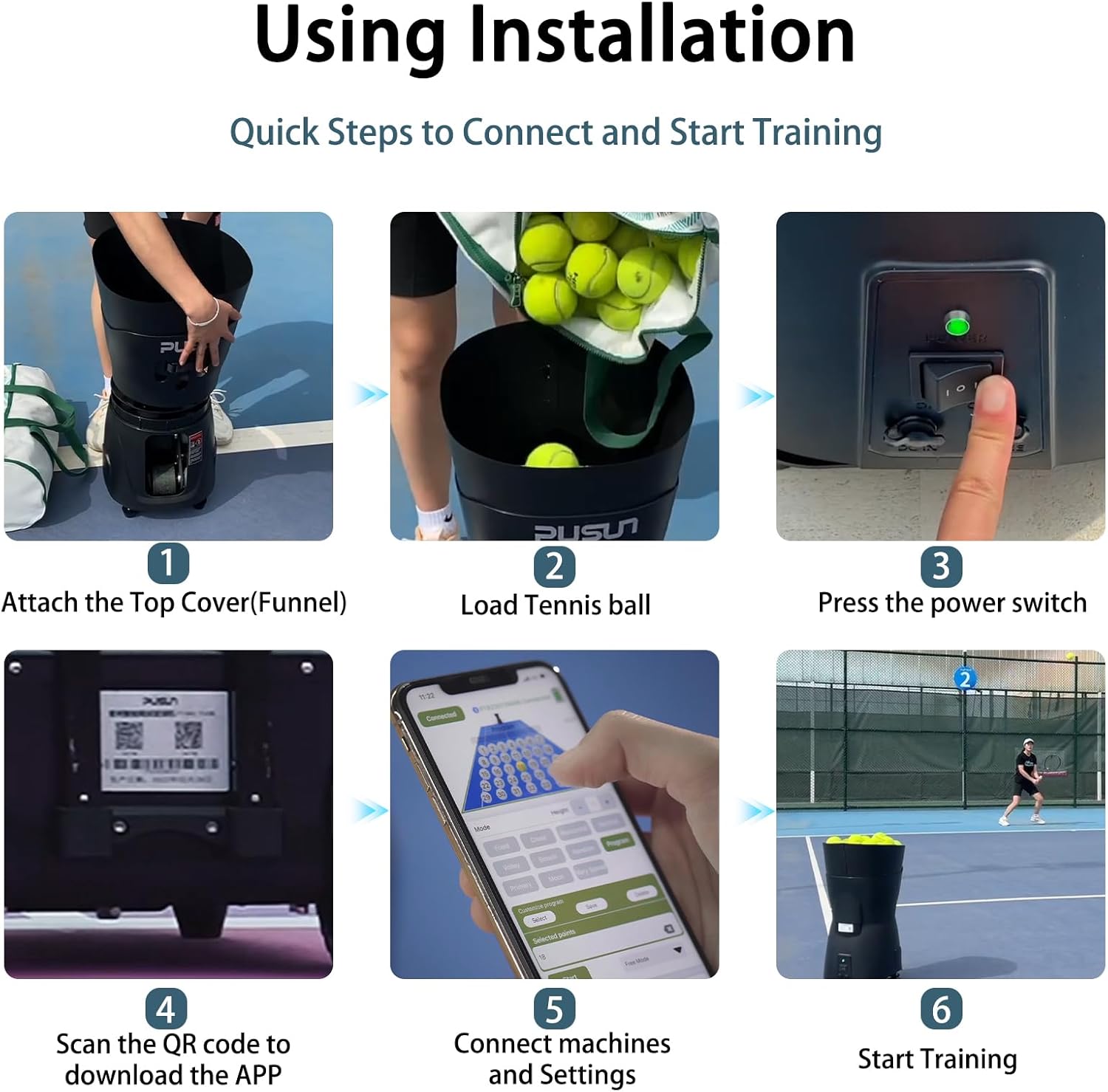
Figure 5.1: Quick steps for connecting and starting training with the PUSUN PT MINI PRO Tennis Ball Machine.
- Attach the Top Cover (Funnel): Securely place the top cover onto the machine.
- Load Tennis Balls: Fill the ball loading frame with standard tennis balls. The machine has a capacity of 65+ balls.
- Press the Power Switch: Locate the power switch (refer to Figure 4.1) and turn the machine ON. The power light will illuminate.
- Scan QR Code to Download APP: For APP control, scan the QR code provided on the machine or in the manual to download the dedicated mobile application.
- Connect Machine and Settings: Open the APP or use the remote control to connect to the machine via Bluetooth and adjust your desired training settings.
- Start Training: Once settings are configured, initiate the ball feed to begin your training session.
6. Operating Instructions
The PUSUN PT MINI PRO offers flexible control options and various training modes to suit your needs.
6.1 Control Methods: Remote and APP
You can control the machine using either the included remote control or a dedicated mobile application.

Figure 6.1: Dual control options: Mobile APP interface and physical remote control.
- APP Control: Connect your smartphone via Bluetooth. The APP allows for precise adjustments of frequency, speed, and spin. It also provides a visual representation of training modes and settings.
- Remote Control: The remote control provides quick access to essential functions like starting/stopping, adjusting speed, interval (frequency), and spin.
6.2 Adjustable Settings
Customize your training experience with the following adjustable parameters:
- Ball Speed: Adjustable from 8-60 km/h (approximately 5-37 mph).
- Serve Frequency: Adjustable from 1.8-8 seconds per ball.
- Angle (Pitch): Adjustable from 25-60 degrees. This controls the height and trajectory of the ball.
- Spin Control: Adjust for topspin or backspin.
6.3 Multiple Training Modes
The machine supports various training modes to simulate different shot types and improve specific skills.

Figure 6.2: Visual representation of multiple training modes available, including fixed point, random, volley, and spin variations.
Available modes may include:
- Fixed Point Ball: Delivers balls to a consistent spot.
- Random Ball: Delivers balls to various points across the court.
- High Pressure Ball: Simulates fast-paced shots.
- Volley Ball: For practicing volleys at the net.
- Throwing: Simulates lobs or high balls.
- Forehand/Backhand Ball: Alternates shots to forehand and backhand sides.
- Topspin Ball: Delivers balls with topspin.
- Underspin Ball: Delivers balls with underspin (slice).
6.4 Video Demonstration
Watch this official product video for a visual guide on the machine's features and operation.
Video 6.1: An official demonstration of the PUSUN PT MINI PRO Tennis Ball Machine, showcasing its portable design, various training modes, and remote/APP control capabilities. This video provides a comprehensive overview of the machine in action, including ball speed, frequency, and oscillation features.
7. Maintenance
Regular maintenance ensures the longevity and optimal performance of your tennis ball machine.
7.1 Cleaning
- Exterior: Wipe the exterior with a soft, damp cloth. Do not use harsh chemicals or abrasive cleaners.
- Ball Loading Area: Periodically remove any debris, dirt, or fuzz from the ball loading frame and launching mechanism.
- Internal Components: Avoid spraying water directly into the machine. If internal cleaning is required, consult customer support.
7.2 Battery Care
- Charging: Charge the battery fully before first use and after each training session to maintain battery health.
- Storage: If storing the machine for an extended period, ensure the battery is charged to approximately 50-70% and recharge every 3-6 months to prevent deep discharge.
- Operating Temperature: Avoid operating or charging the machine in extreme temperatures.
7.3 Storage
- Store the machine in a dry, cool place away from direct sunlight and moisture.
- Ensure the power is OFF before storing.
8. Troubleshooting
Refer to the following table for common issues and their solutions.
| Problem | Possible Cause | Solution |
|---|---|---|
| Machine does not power on. | Battery is depleted. Power switch is OFF. Charger not connected properly. | Charge the battery. Ensure the power switch is in the ON position. Verify charger connection. |
| Balls are not launching. | Ball loading frame is empty. Jammed balls. Launching mechanism obstructed. | Load more tennis balls. Turn off power, clear any jammed balls from the launching port. Ensure no debris is obstructing the serve wheel. |
| Remote/APP not connecting. | Bluetooth is off. Machine is too far from control device. Battery in remote is low. | Ensure Bluetooth is enabled on your device. Move closer to the machine. Replace remote control batteries. Restart both machine and control device. |
| Inconsistent ball speed/trajectory. | Balls are wet or damaged. Settings are incorrect. | Use dry, standard tennis balls. Adjust speed, frequency, and angle settings via APP or remote. |
If the problem persists after attempting these solutions, please contact PUSUN customer support.
9. Specifications
Technical details for the PUSUN PT MINI PRO Tennis Ball Machine.

Figure 9.1: Overview of key specifications for the PUSUN PT MINI PRO Tennis Ball Machine.
| Feature | Detail |
|---|---|
| Model Name | PT MINI PRO |
| Brand | PUSUN |
| Material | ABS |
| Item Weight | 11 Kilograms (approx. 23 Pounds package weight) |
| Item Package Dimensions (L x W x H) | 18 x 15 x 15 inches |
| Ball Capacity | 65+ pcs |
| Speed Range | 8-60 km/h |
| Serve Frequency | 1.8-8 seconds/ball |
| Height Angle Control | 25-60 degrees |
| Maximum Distance | 12 meters (approx. 12.5M throwing distance) |
| Full Battery Life | 3-5 hours |
| Power Adapter | 110v-240v |
| Rated Voltage | DC14.6V4AH |
| Product Power | 100W |
| Suggested Users | Unisex-adult |
| Sport Type | Tennis |
10. Warranty and Support
10.1 Manufacturer Warranty
The PUSUN PT MINI PRO Tennis Ball Machine comes with a 3-year manufacturer warranty. This warranty covers defects in materials and workmanship under normal use. It does not cover damage caused by misuse, accidents, unauthorized modifications, or normal wear and tear.
Please retain your proof of purchase for warranty claims.
10.2 Customer Support
For technical assistance, warranty claims, or any questions regarding your PUSUN PT MINI PRO Tennis Ball Machine, please contact PUSUN customer support. Refer to the contact information provided with your purchase or visit the official PUSUN website.
When contacting support, please have your product model name (PT MINI PRO) and purchase date available.
