
1. Introduction
This manual provides detailed instructions for the setup, operation, and maintenance of your Guiheng K68 Wired 60% Mechanical Feeling Gaming Keyboard. Please read this manual thoroughly before using the product to ensure optimal performance and longevity.
2. Package Contents
- Guiheng K68 Wired Keyboard (Grey and Black)
- USB-A to USB-C Cable
- User Manual
3. Setup
3.1 Connecting the Keyboard
- Locate the USB-C port on the keyboard and the USB-A port on your computer.
- Connect the USB-C end of the provided cable to the keyboard.
- Connect the USB-A end of the cable to an available USB port on your computer.
- The keyboard is plug-and-play and should be recognized automatically by your operating system.

Image: Guiheng K68 keyboard connected via USB-C cable, illustrating the connection process.
4. Operating Instructions
4.1 Backlight Control
The Guiheng K68 keyboard features a rainbow LED backlight. Use the following key combinations to control the backlight effects:

Image: Diagram showing various FN key combinations for backlight control, including speed and brightness adjustments.
- FN + ON/OFF key: Turn backlight on/off.
- FN + ;' : Adjust backlight speed (three levels).
- FN + M: Cycle through backlight extrusion effects.
- FN + Backspace/Bslash: Adjust backlight brightness (four levels: 0x0, 0x3f, 0x7f, 0xff).
- FN + Left/Right Arrow: Adjust backlight flow direction.
- FN + B: Monochrome Cyclic Breathing effect.
- FN + Up/Down Arrow: Adjust color (red, green, blue, purple, yellow, cyan, white). Note: This adjusts the color of the entire backlight, not individual zones, as the keyboard has fixed rainbow zones.
- FN + Z: Dazzling Breath, rainbow style (different colors for each light zone).
- FN + X: Single-color cyclic pulsating running water (running lights).
- FN + C: Single-color loop roll-up effect.
- FN + <: Two-color flashing effect.
- FN + =: Manually adjust each light color (red, green, blue, yellow, purple, green, white, black).
- FN + N: Dazzling Breath (same color at the same time: red, purple, blue, green, yellow).
- FN + ?: Spot color, changes color automatically every time you light up.
4.2 Multimedia Functions
The keyboard includes 10 multimedia keys accessible via the FN key:

Image: Diagram illustrating FN key combinations for various multimedia controls such as volume, playback, and web functions.
- FN + E: Media Player
- FN + R: Volume Down
- FN + T: Volume Up
- FN + Y: Mute
- FN + U: Previous Track
- FN + I: Play/Pause
- FN + O: Next Track
- FN + P: Mail
- FN + [[ : Web Home
- FN + ]]: Calculator
- FN + W: Refresh
5. Compatibility
The Guiheng K68 keyboard is compatible with a wide range of operating systems and devices:

Image: Icons indicating compatibility with Windows XP, 7, 10, 11, Mac, and Linux operating systems.
- Windows XP, Windows 7, Windows 10, Windows 11
- macOS
- Linux
- Android
- iOS
- Gaming Consoles (PS4, PS5, etc.)
6. Maintenance
6.1 Cleaning the Keyboard
To maintain the keyboard's appearance and functionality:
- Disconnect the keyboard from your computer before cleaning.
- Use a soft, damp cloth to wipe the surface of the keyboard.
- For dust and debris between keys, use compressed air or a small brush.
- The keycaps are detachable for deeper cleaning. Gently pull them upwards to remove.
- Avoid using harsh chemicals or abrasive materials.
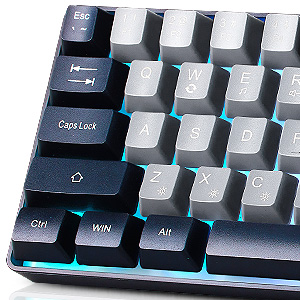
Image: Close-up view of the detachable keycaps, highlighting the ease of removal for cleaning.
6.2 Storage
Store the keyboard in a cool, dry place away from direct sunlight and extreme temperatures.
7. Troubleshooting
| Problem | Possible Cause | Solution |
|---|---|---|
| Keyboard not responding | Loose USB connection, faulty USB port, driver issue. | Ensure the USB cable is securely connected. Try a different USB port. Restart your computer. |
| Backlight not working | Backlight turned off, brightness set to minimum. | Press FN + ON/OFF key. Adjust brightness using FN + Backspace/Bslash. |
| Keys not registering or ghosting | Dust/debris under keycap, software conflict. | Clean under the keycap. Ensure no conflicting software is running. |
8. Specifications
- Model: K68
- Brand: Guiheng
- Connectivity: Wired (USB-A to USB-C)
- Key Count: 68 Keys
- Switch Type: Mechanical Feeling (Linear)
- Backlight: Rainbow LED Backlit
- Anti-Ghosting: All 68 keys
- Keycap Type: Double-shot injection, non-slip suspension
- Lifespan: 50 Million Keystrokes
- Dimensions: Approximately 35.5 cm x 12.8 cm x 3.6 cm (13.9 x 5 x 1.4 inches)
- Weight: Approximately 1.1 pounds
- Compatibility: Windows, macOS, Linux, Android, iOS, PS4, PS5

Image: Detailed dimensions of the Guiheng K68 keyboard, including length, width, and height measurements.
9. Warranty and Support
Guiheng products are designed for reliability and performance. For warranty information or technical support, please refer to the contact details provided with your purchase or visit the official Guiheng website. Please retain your proof of purchase for warranty claims.