
Introduction
The Meki Acua Week Aqua V Series WRGB Aquarium Plant Grow Light is engineered for optimal plant growth and vibrant aquatic environments. This manual provides essential information for the setup, operation, maintenance, and troubleshooting of your V1200SE-K model, ensuring healthy plant development and enhanced viewing of your freshwater aquarium.
What's in the Box
Upon unboxing your Week Aqua V Series WRGB Aquarium Plant Grow Light, you will find the following components:
- Light body
- Power adapter
- External button controller
- Mounting brackets (extendable)
- User manual

Image: The Week Aqua V Series WRGB Aquarium Plant Grow Light, showing the main light unit, power adapter, controller, and mounting brackets.
Product Features
- Full-Spectrum RGB+W Light Source: Enriches the growth environment for plants and promotes photosynthesis.
- External Button Control: Offers features like maximum gradient, stepless dimming, sunrise-sunset, and cyclic timed on-off.
- Healthy Plant Growth: Effectively stimulates plant pigment formation for various aquatic plants.
- Unique Lighting Effects: Combination of full-spectrum and control features provides diverse aesthetic options.
- Enhanced Aquarium Clarity: High-efficiency lighting improves water clarity for better viewing.
- IP68 Waterproof Rating: The LED components are sealed to withstand submersion, ensuring durability in aquatic environments.
- Extendable Brackets: Designed to fit various freshwater aquarium sizes from 30cm to 110cm.
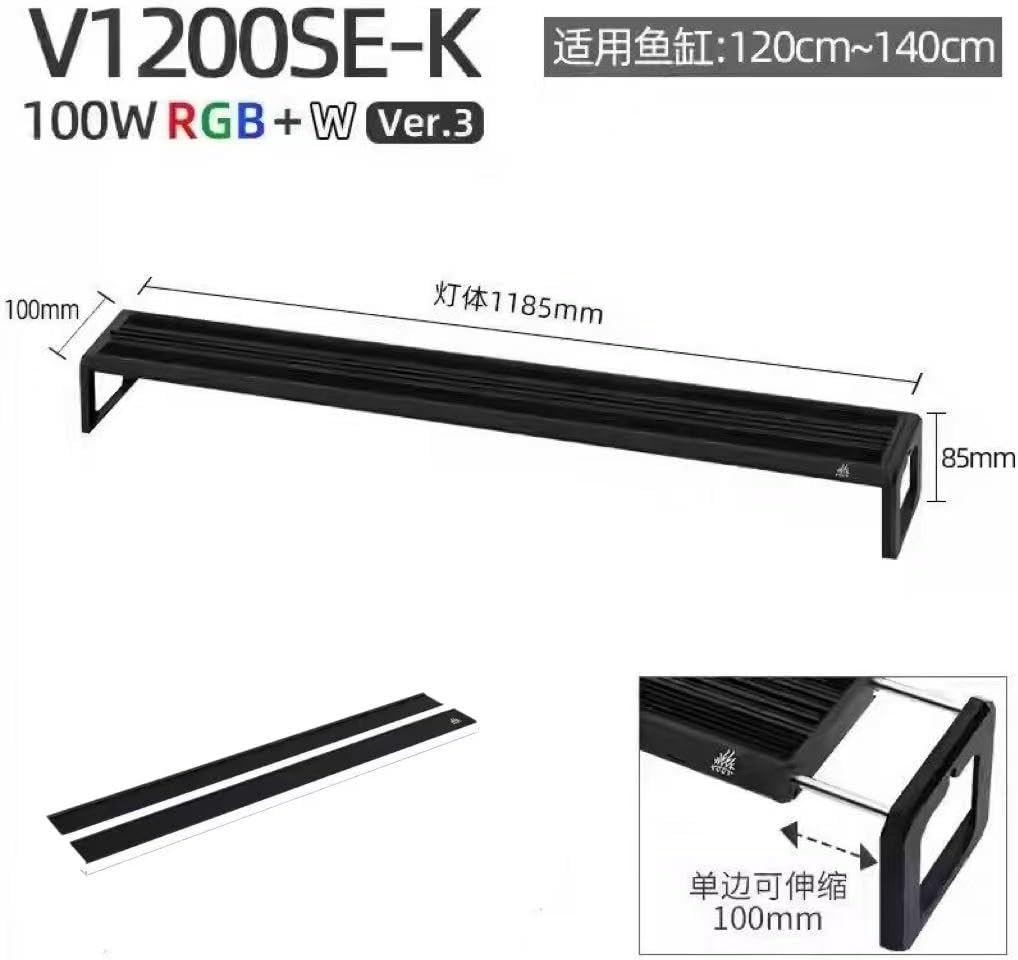
Image: A detailed view of the LED array, highlighting the RGB and white light sources for full-spectrum illumination.

Image: Side profile of the light unit, illustrating key features such as LED full spectrum, aluminum cooling, ON/OFF, separate adaptor, color-gradient, sunrise and sunset, dimming, and timing.
Setup
Follow these steps to set up your aquarium light:
- Carefully unpack all components from the box.
- Attach the extendable mounting brackets to both ends of the light body. Ensure they are securely fastened.
- Adjust the brackets to match the length of your aquarium.
- Place the light unit securely on top of your aquarium.
- Connect the external button controller to the light body.
- Connect the power adapter to the controller, then plug the adapter into a suitable power outlet.

Image: Various installation methods including standard style, amphibious style, single-pendant style, and double-pendant style.
Operation
The external button controller provides comprehensive control over your aquarium light. Refer to the image below for button functions.

Image: The external button controller, showing buttons for cycle timing (6H, 8H, 10H), timing selection, brightness adjustment, sunrise/sunset mode, and On/Off.
Setting the Current Time
To set the current time on the controller, refer to the following video for a step-by-step guide:
Video: This video demonstrates how to program the timer on a NICREW ClassicLED Plus controller, which uses a similar interface for setting the current time and timer functions.
Adjusting Brightness
Use the brightness adjustment buttons on the controller to increase or decrease the light intensity. The light offers stepless dimming for precise control.
Changing Colors
The controller allows you to cycle through various color options (Red, Green, Blue, Purple, Orange, Cyan, Yellow, White, and a color cycle mode) to achieve unique lighting effects. This feature helps enhance the coloration of fish and certain plants.
Video: This video showcases the various lighting effects and color changes available with the NICREW C10 24/7 light, demonstrating similar color customization options.
Timer Settings (6H, 8H, 10H)
Select from 6, 8, or 10-hour cyclic timed on-off settings. The light will turn on at the time you activate the timer and turn off after the selected duration.
24/7 Lighting Mode
The 24/7 mode simulates a natural light cycle with gradual sunrise and sunset effects, providing a natural rhythmic light cycle for your aquarium inhabitants. This mode also includes a moonlight feature.
Video: This video provides instructions on how to set up the 24/7 cycle mode, illustrating the sunrise, daylight, sunset, and moonlight phases.
Memory Function
The controller retains your last settings even after a power interruption, ensuring your preferred light cycle resumes automatically.
Maintenance
The light features a smooth metal aluminum housing. To clean, simply use a piece of dry towel to wipe it clean. Avoid abrasive cleaners or harsh chemicals. The IP68 rating ensures the LED components are protected from water, but it is recommended to keep the external controller dry.
Troubleshooting
- Light not turning on: Ensure all connections are secure and the power adapter is plugged into a working outlet. Check if the timer is set correctly or if the light is in an 'Off' cycle.
- Incorrect time/settings: If power was interrupted, the memory function should restore settings. If not, reset the time and desired modes using the controller.
- Inconsistent light output: Ensure the light is clean and free from debris. Check for any visible damage to the LEDs or wiring.
Specifications
| Feature | Detail |
|---|---|
| Model Number | V SE-K |
| Product Dimensions | 15D x 15W x 15H Centimetres |
| Brand | Meki Acua |
| Color | Black |
| Material | Plastic |
| Included Components | Light body |
| Manufacturer | Week Aqua |
| UPC | 762849072456 |
For detailed power, LED quantity, lumen, and application size for various V Series models, please refer to the product packaging or manufacturer's website.

Image: A table detailing model, power, output, LED quantity, lumen, and dimensions for various V Series-K models.
Warranty & Support
This product comes with a 1-year manufacturer's warranty. For any support inquiries or warranty claims, please contact Week Aqua directly.