1. Important Safety Instructions
Please read and understand all instructions before beginning installation. Failure to follow these instructions may result in electric shock, fire, or personal injury.
- Ensure the power is turned off at the circuit breaker before installation or servicing.
- All wiring must be in accordance with national and local electrical codes.
- Consult a qualified electrician if you are unsure about wiring procedures.
- The ceiling fan must be mounted to a ceiling joist or support capable of withstanding a minimum of 35 lbs (15.9 kg).
- Do not bend the blade holders during installation or cleaning.
- Keep children away from the fan during operation.
2. Package Contents
Verify all components are present and undamaged before proceeding with installation.

This image displays the various components included in the package, such as the fan body assembly, canopy, downrod, blades, lamp shade, blades arm, screws, remote control, and instructions.
- Fan Body Assembly
- 5 Wood Blades
- Blade Arms
- Downrod (various lengths)
- Canopy
- Mounting Bracket
- LED Light Kit
- Remote Control
- Hardware Pack (screws, wire nuts, etc.)
- Instruction Manual
3. Product Features
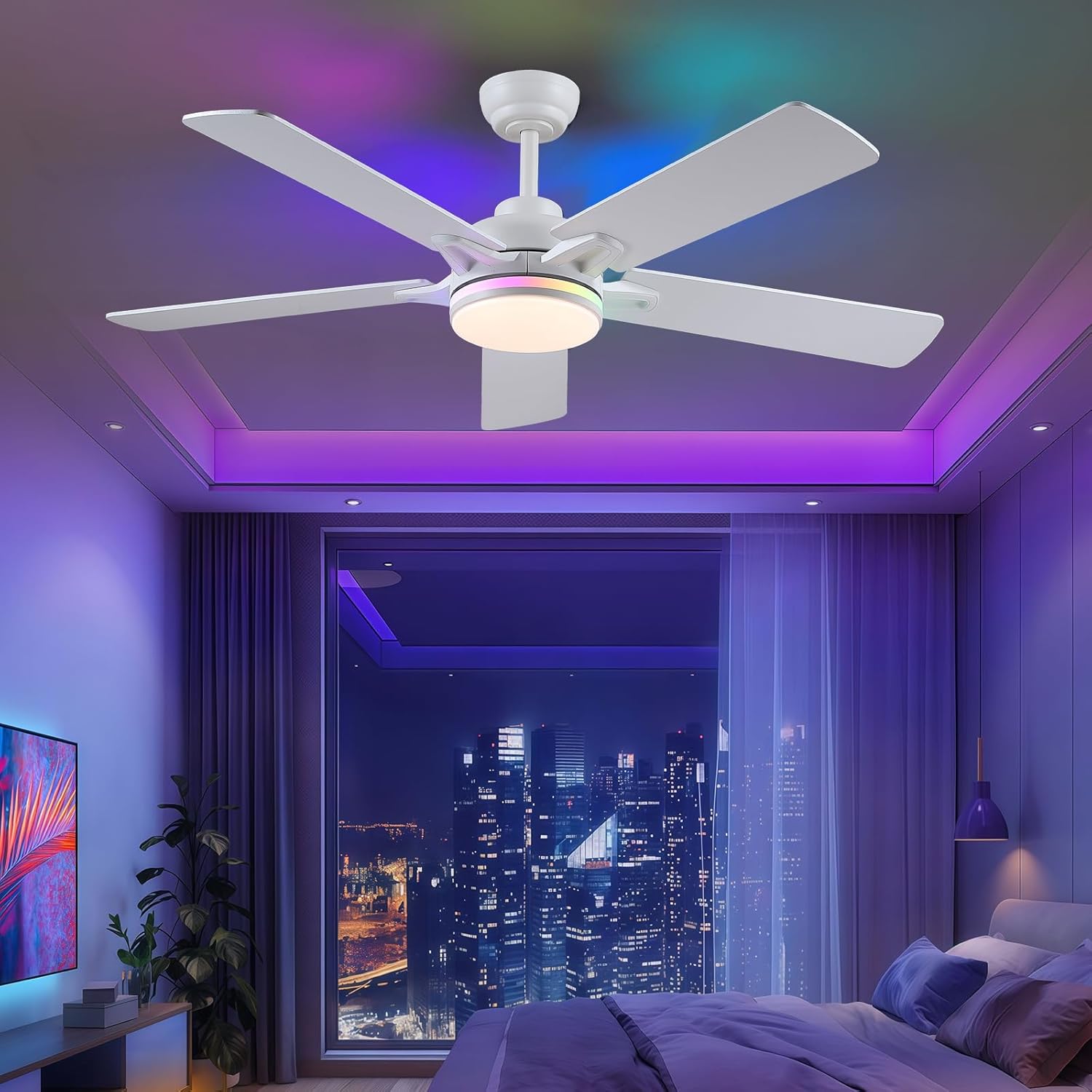
- 52 Inch Design: Suitable for bedrooms, living rooms, covered patios, and other indoor/outdoor spaces.
- Remote + APP Dual Smart Control: Convenient adjustment of wind speed and lighting.
- Dimmable RGB LED Light: Adjustable brightness and color temperature (warm/neutral/cool white), with built-in RGB lighting for ambiance.
- Dual-Finish Wooden Blades: 5 reversible blades with a silent operation motor for quiet, even airflow.
- Reversible Motor: Allows for both downward airflow (summer) and upward airflow (winter) for year-round comfort.
4. Installation Guide
Professional installation is recommended. Refer to the detailed installation video below for visual guidance.
Video Description: This official Kviflon installation video provides a step-by-step guide for assembling and mounting the 8903 RGB ceiling fan with light. It covers attaching blades, assembling the light kit, connecting the downrod, and preparing for ceiling mounting.
4.1 Blade Assembly
Attach the 5 wood blades to the blade arms using the provided screws. Ensure they are securely fastened. The blades are dual-finish, allowing you to choose between two aesthetic styles.

This image illustrates the dual-finish wooden blades and the process of attaching them to the fan motor housing.
4.2 Light Kit Assembly
Connect the LED light module to the fan body wiring. Secure the light module and then attach the lamp shade. Ensure all connections are firm.
4.3 Downrod Assembly
Insert the downrod through the canopy and cover. Feed the fan wires through the downrod. Secure the downrod to the fan motor assembly using the provided pin and screws.
4.4 Mounting Bracket Installation
Secure the mounting bracket to the ceiling junction box using appropriate screws. Ensure the bracket is firmly attached to a structural support.
4.5 Wiring
Connect the fan's electrical wires to the household wiring according to the color codes (typically black to black, white to white, and green/bare copper to ground). Install the remote receiver unit within the mounting bracket, connecting its wires to the fan and household wiring as per the diagram in the full manual.
4.6 Canopy Installation
Carefully lift the fan assembly and hang it on the mounting bracket. Slide the canopy up to cover the mounting bracket and wiring, securing it with the provided screws.
5. Operating Instructions
The Kviflon ceiling fan offers versatile control options via remote and a dedicated mobile application.
Video Description: This official Kviflon video demonstrates the various scene displays and lighting effects of the 8903 RGB white ceiling fan, showcasing its functionality and ambiance.
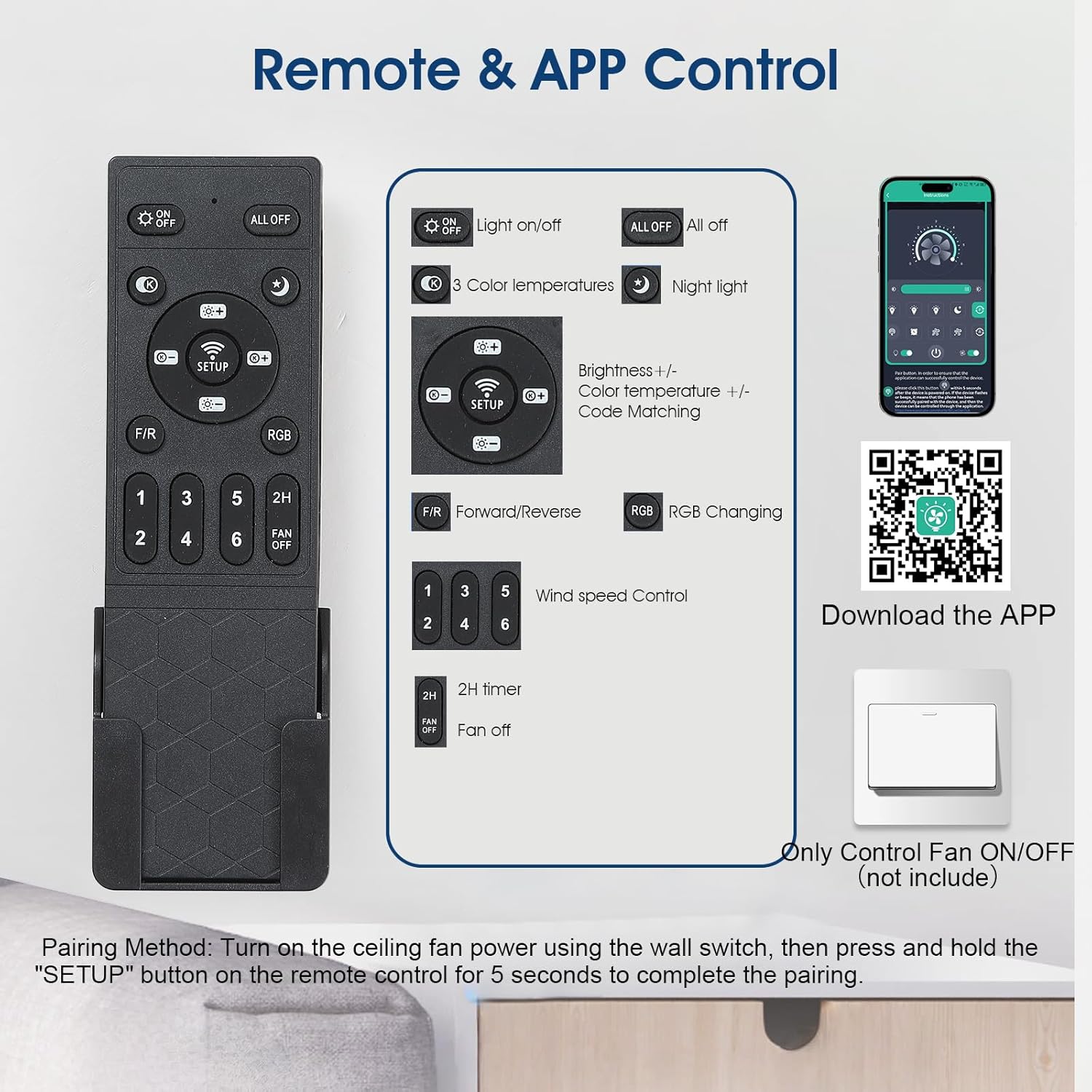
5.1 Remote Control Functions
The included remote control provides convenient access to all fan and light functions.
This image displays the remote control layout with labeled buttons for light on/off, color temperatures, night light, brightness adjustment, code matching, forward/reverse, RGB changing, wind speed control (1-6), and timer functions (2H).
- Light On/Off: Toggles the main light.
- Color Temperatures: Cycles through warm, neutral, and cool white light.
- Night Light: Activates a low-brightness setting.
- Brightness +/-: Adjusts the main light's intensity.
- Code Matching (SETUP): Used to pair the remote with the fan.
- F/R (Forward/Reverse): Changes the fan's rotation direction.
- RGB: Cycles through RGB lighting colors and modes.
- Wind Speed Control (1-6): Selects desired fan speed.
- Timer (2H): Sets the fan to turn off after 2 hours.
5.2 APP Control Setup and Functions
Control your fan conveniently from your smartphone using the dedicated app.
Video Description: This official Kviflon video demonstrates the process of installing and connecting the mobile application to the 8903 RGB ceiling fan, showcasing its smart control features.
To download the app: Scan the QR code provided in the product packaging or visit https://www.jasonghost.com/fanlamppro/ to download the "Fan Lamp Pro" app.
Pairing Method: Turn on the ceiling fan power using the wall switch, then open the app and follow the on-screen instructions to connect. The fan light will blink twice to indicate a successful connection.
5.3 Fan Speed Adjustment
The fan features 6 adjustable speeds to suit various comfort levels.

This image illustrates the 6-speed adjustment feature, categorizing speeds 1-2 as comfortable wind for sleep, 3-4 as natural wind for daily life, and 5-6 as strong wind for hot summer.
- Levels 1-2: Comfortable wind, ideal for sleep.
- Levels 3-4: Natural wind, suitable for daily use.
- Levels 5-6: Strong wind, for maximum cooling.
5.4 Lighting Control
The integrated LED light offers dimmable white light and vibrant RGB options.

This image showcases the side RGB light multi-mode effects, including various RGB colors, white light, and combinations of both.
This image displays the three main light color temperature options: 3000K Warm Light, 4500K Natural Light, and 6000K White Light, along with a brightness adjustment scale.
- Dimmable White Light: Adjust brightness from 0% to 100% and choose between 3000K (warm), 4500K (natural), and 6000K (cool white).
- RGB Lighting: Activate the side RGB lights to create various atmospheric effects.
5.5 Reverse Rotation (Summer/Winter Mode)
The reversible motor allows for optimal air circulation year-round.
This image illustrates the forward rotation (downward airflow for cooling in summer) and reverse rotation (upward airflow for circulating warm air in winter).
- Summer Mode (Forward Rotation): Air flows downward, creating a cooling breeze.
- Winter Mode (Reverse Rotation): Air flows upward, circulating warm air trapped near the ceiling.
5.6 Timer Function
Set the fan to automatically turn off after a specified period using the remote control's timer button.
6. Maintenance
Regular maintenance ensures optimal performance and longevity of your ceiling fan.
- Cleaning: Use a soft, damp cloth to clean the fan blades and motor housing. Do not use abrasive cleaners or solvents.
- Tighten Screws: Periodically check and tighten all screws on the fan blades and mounting hardware.
- Lubrication: The motor is permanently lubricated and does not require additional oiling.
7. Troubleshooting
If you experience issues with your fan, refer to the following common problems and solutions.
| Problem | Possible Cause | Solution |
|---|---|---|
| Fan does not start | No power to the fan; loose wire connections; remote not paired. | Check circuit breaker; ensure all wire connections are secure; re-pair remote control. |
| Fan wobbles | Loose blade screws; unbalanced blades; loose mounting bracket. | Tighten all blade screws; ensure blades are balanced; secure mounting bracket. |
| Light does not work | Loose wire connection; faulty LED module. | Check light kit wiring; contact customer support for replacement if faulty. |
| Remote not working | Dead batteries; remote not paired; interference. | Replace batteries; re-pair remote; ensure no obstructions. |
8. Product Specifications
| Feature | Detail |
|---|---|
| Brand | Kviflon |
| Color | White-RGB |
| Electric fan design | Ceiling Fan |
| Power Source | AC/DC |
| Style | Modern |
| Product Dimensions | 52"D x 52"W x 11"H |
| Room Type | Bedroom, Living Room, Patio, Porch, Outdoor (Covered) |
| Special Feature | App Operable, LED Light, Quiet Operation, Remote Controlled |
| Recommended Uses | Air Circulation, Cooling |
| Wattage | 66 watts |
| Number of Blades | 5 |
| Air Flow Capacity | 350 Cubic Meters Per Minute |
| Blade Length | 20.3 Inches |
| Voltage | 110 Volts |
| Included Components | Light Kit, Remote |
| Indoor/Outdoor Usage | Indoor |
| Control Method | App, Remote |
| Efficiency | 5.3 cubic meters per minute per watt |
| Number of Power Levels | 6 |
| Motor Type | Brushless |
| Installation Type | Professional Installation |
| Item Weight | 13.84 pounds |
| Batteries | 2 AAA batteries required (included) |
9. Warranty and Support
For warranty information or technical support, please refer to the contact details provided with your purchase or visit the official Kviflon website. Keep your purchase receipt for warranty claims.


