
1. Introduction
This manual provides detailed instructions for the installation, operation, and maintenance of the ICUIXIAN 4K60Hz 8x8 Seamless HDMI Matrix Switch Video Wall Controller (Model MP88U). This device is designed for professional video distribution and display applications, offering seamless switching, video wall capabilities, and multi-viewer functions.
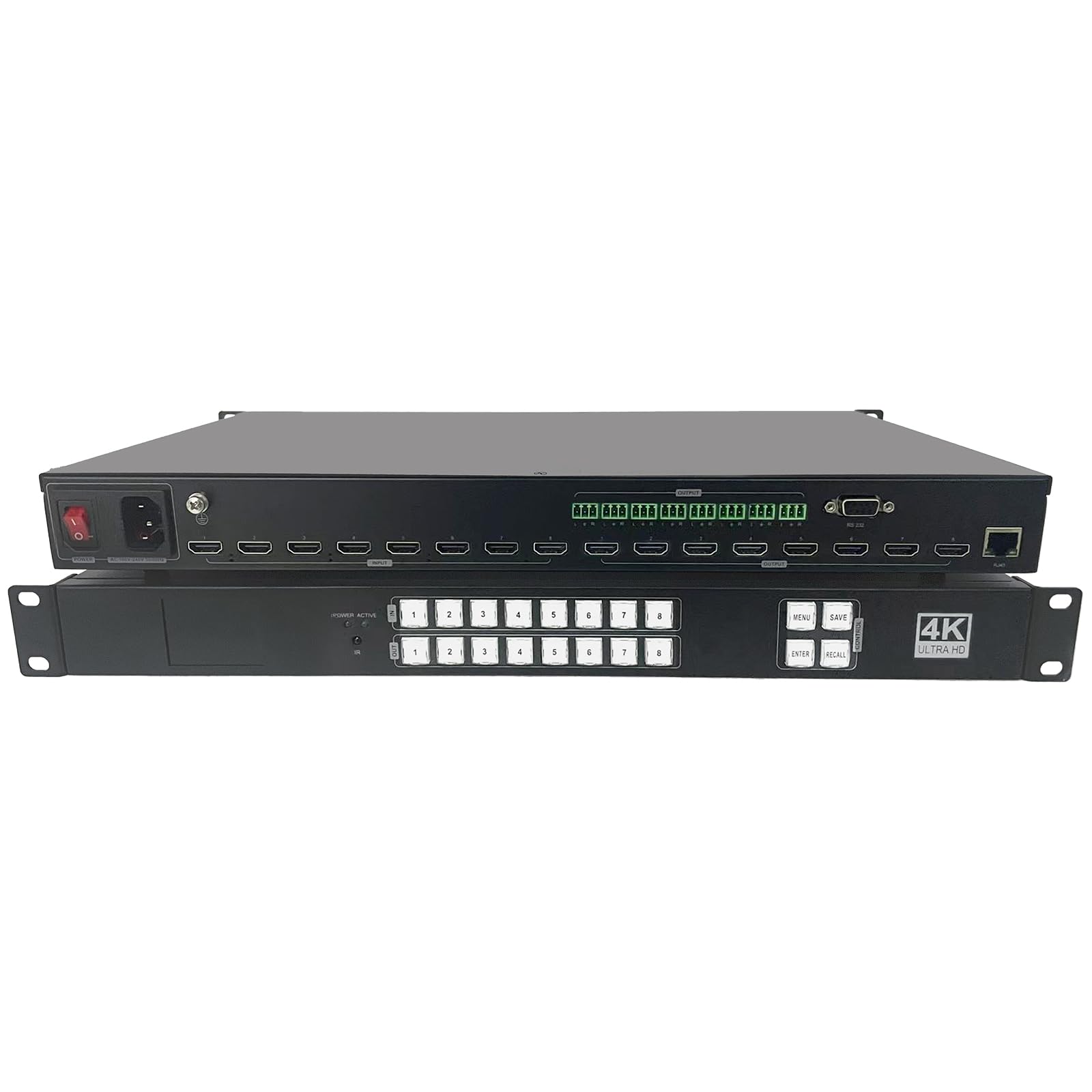
Image 1: Front and rear view of the ICUIXIAN 8x8 HDMI Matrix Switch and Video Wall Controller, alongside a multi-screen display example.
2. Key Features
- 8x8 Seamless HDMI Matrix and 4x2 Video Wall: Supports seamless switching between 8 HDMI inputs and 8 HDMI outputs. Configurable as an 8x8 matrix or a 4x2 video wall.
- Multi-Viewer and Picture-In-Picture (PiP): Features PiP functionality and screen overlay with up to 4 window roaming, suitable for conference rooms, exhibition halls, and monitoring centers.
- 4K@60Hz Ultra HD Resolution: Fully compatible with HDMI 2.0/HDCP 2.2 protocol, supporting 18Gbps bandwidth. Input and output resolutions up to 4K@60Hz HDR, 4096x2160@60Hz/3840x2160@60Hz RGB4:4:4.
- Custom Resolution Support: Offers EDID custom resolution up to 7680x2160@30Hz for ultra-wide screens and special splicing scenarios without compression or delay.
- Flexible Video Wall Modes: Supports various video wall configurations including 4x2, 2x4, 3x2, 2x2, 1x2, 2x1, 1x3, 3x1, 1x4, 4x1, with PiP functionality and unlimited 4 windows on a single screen.
- HDMI Splitter Mode: Can operate as an 8x8 seamless HDMI matrix, displaying the same image on all 8 TVs or switching between 8 independent sources.
- Multiple Control Methods: Control via infrared remote, front panel buttons, LAN, RS-232 serial port, and Web GUI. Features crystal backlit keys and an LCD screen for real-time device information.
- EDID Management: Custom EDID management ensures device compatibility and signal stability, simplifying system integration.
- Independent Audio De-Embedding: Supports HDMI output audio de-embedding, providing 7.1-channel LPCM, Dolby Digital/TrueHD, DTS/DTS-HD, and other mainstream audio format outputs.
3. Package Contents
Verify that all items are present in the package:
- 1x ICUIXIAN 8x8 Seamless HDMI Matrix Video Wall Controller
- 1x RS232 Connecting Cable
- 1x Power Adapter
- 1x Infrared Remote Control
- 1x User Manual (physical and electronic version via QR code)
Note: HDMI cables are not included and must be purchased separately.
4. Setup and Connection
Follow these steps to connect your ICUIXIAN MP88U device:
- Ensure all devices (source players, displays, and the matrix switch) are powered off before making any connections.
- Connect your HDMI source devices (e.g., DVD player, PC, laptop, cameras) to the HDMI input ports on the matrix switch using high-quality HDMI 2.0 cables.
- Connect your HDMI display devices (e.g., televisions, projectors) to the HDMI output ports on the matrix switch using high-quality HDMI 2.0 cables.
- For analog audio output, connect external loudspeakers or an audio system to the analog audio output port.
- For network control, connect an Ethernet cable from the LAN port on the matrix switch to your network router or switch.
- For RS-232 control, connect the RS-232 cable from the matrix switch to your control system.
- Connect the power adapter to the matrix switch and then to a power outlet.
- Power on all connected devices, starting with the displays, then the matrix switch, and finally the source devices.

Image 2: Rear view of the device, highlighting HDMI input/output ports, power, and control interfaces.

Image 3: A diagram illustrating the flow of HDMI signals from various input sources through the matrix switch to multiple output displays.
5. Operating Modes
The ICUIXIAN MP88U supports various operating modes to suit different display requirements.
5.1. HDMI Matrix Mode
In matrix mode, any of the 8 HDMI input sources can be routed to any of the 8 HDMI output displays independently. This allows for flexible signal distribution, where different displays can show different sources, or multiple displays can show the same source.
5.2. Video Wall Mode
The device can be configured to create a video wall using up to 4 output displays (4x2 configuration). This mode allows a single source to be stretched across multiple screens, creating a larger, unified display. Various video wall layouts are supported, including 4x2, 2x4, 3x2, 2x2, 1x2, 2x1, 1x3, 3x1, 1x4, and 4x1. Video wall configurations are typically managed via the Web GUI or RS-232 control.

Image 4: Examples of various video wall configurations, such as 2x4, 2x3, 3x2, and 4x2 splicing modes.
5.3. Multi-Viewer / Picture-In-Picture (PiP) Mode
The multi-viewer function allows displaying multiple input sources simultaneously on a single screen. The Picture-In-Picture (PiP) feature enables one video source to be displayed as a smaller inset window over another main video source. The device supports screen overlay with up to 4 window roaming, providing dynamic display options.

Image 5: A single screen displaying four distinct video sources in a split-screen layout.
6. Control Methods
The ICUIXIAN MP88U offers multiple ways to control its functions:
- Front Panel Buttons: The device features crystal backlit keys on the front panel for direct control of input/output switching and menu navigation. An LCD screen displays real-time device information.
- Infrared (IR) Remote Control: Use the included IR remote control for convenient wireless operation. Point the remote directly at the IR receiver on the front panel of the device.
- LAN Control (Web GUI): Connect the device to your network via the LAN port. Access the Web Graphical User Interface (GUI) through a web browser on a connected computer or mobile device for comprehensive control and configuration.
- RS-232 Serial Port: For integration with professional control systems, use the RS-232 serial port. Refer to the detailed RS-232 command set in the electronic user manual for programming instructions.

Image 6: Illustration of different control methods including infrared remote, PC software, handheld computer, web interface, and front panel buttons.
Video 1: Demonstrates common switching modes for the ICUIXIAN HDMI Matrix Switch/Splitter.
7. Specifications
Detailed technical specifications for the ICUIXIAN MP88U:
| Interface | HDMI-A |
| HDMI Version Information | HDMI2.0, HDCP2.2 |
| Bandwidth | 18Gbps |
| Video Resolution (Input) | 800x600@60Hz, 1024x768@60Hz, 1280x768@60Hz, 1280x800@60Hz, 1280x1024@60Hz, 1360x768@60Hz, 1366x768@60Hz, 1400x1050@60Hz, 1440x900@60Hz, 1600x1200@60Hz, 1680x1050@60Hz, 1920x1200@60Hz, 480p, 576p, 720p, 1920x1080i, 1920x1080p, 3840x2160@24Hz/25Hz/30Hz/50Hz/60Hz, 4096x2160@24Hz/25Hz/30Hz/50Hz/60Hz. |
| Video Resolution (Output) | 1920x1080@60Hz, 3840x2160@30Hz, 3840x2160@60Hz, 1280x720@60Hz, 1920x1080@30Hz, 1360x768@60Hz, 1900x1200@60Hz, 4096x2160@60Hz. |
| HDMI Signal Amplitude | T.M.D.S +/- 0.4Vpp |
| Differential Impedance | 100±15ohm |
| Serial Port RS232/Ethernet WEB Control | Baud rate and protocol: 115200, data bits: 8, stop bits: 1, no parity bits. Browser: IE10.0+, HTML5. |
| Power Supply | 110-240VAC |
| Maximum Power Consumption | 50W |
| Dimensions (L x W x H) | 430(L)x260(W)x45(H) mm (16.9 x 10.2 x 1.8 inches) |
| Weight | 5kg (approx. 11 pounds) |
| Working Temperature | -20 to 50°C |
| Storage Temperature | -20 to 70°C |
| Working Humidity | 10%-70% |

Image 7: A table detailing the technical specifications and parameters of the device.
8. Troubleshooting
If you encounter issues with your ICUIXIAN MP88U, please refer to the following common troubleshooting steps:
- No Signal/Black Screen:
- Verify all HDMI cables are securely connected to both source and display devices, and the matrix switch.
- Ensure the correct input source is selected for the corresponding output display.
- Check if the source device is powered on and outputting a signal.
- Try reducing the resolution of the source device if it exceeds the capabilities of the display or the matrix switch.
- Ensure EDID settings are correctly configured for compatibility.
- Intermittent Signal/Flickering:
- Use shorter, high-quality HDMI 2.0 cables, especially for 4K@60Hz signals.
- Check for electromagnetic interference from other electronic devices.
- Ensure the power adapter is securely connected and providing stable power.
- Control Issues (IR Remote/LAN/RS-232):
- For IR remote: Ensure line of sight to the IR receiver and check battery levels.
- For LAN/Web GUI: Verify network connection, IP address settings, and firewall configurations. Try accessing the Web GUI from a different browser or device.
- For RS-232: Confirm correct cable wiring, baud rate, and protocol settings in your control software.
- Audio Problems:
- Check audio settings on both source and display devices.
- Ensure the correct audio output format is selected if using audio de-embedding.
- Verify external audio system connections.
If problems persist, please contact ICUIXIAN technical support for assistance.
9. Warranty and Support
ICUIXIAN products are designed for reliability and performance. This product comes with a standard manufacturer's warranty. For specific warranty terms and conditions, please refer to the warranty card included with your product or visit the official ICUIXIAN website.
For technical support, troubleshooting assistance, or any inquiries regarding your ICUIXIAN MP88U, please contact our dedicated technical staff. Contact information can be found in the electronic version of the user manual (accessible via QR code) or on the ICUIXIAN brand store page.
We are committed to providing a satisfying experience and prompt resolution to any issues you may encounter.