
Introduction
The BAOFENG F22 is a portable FRS two-way radio designed for reliable communication. It features 22 FRS channels, NOAA weather alerts, a built-in flashlight, and a 1400mAh rechargeable battery with USB-C charging. This manual provides essential information for the proper setup, operation, and maintenance of your device.
Package Contents
Verify that all items are present in your package:
- 4 x BAOFENG F22 Two-Way Radios
- 4 x Belt Clips
- 4 x Hand Straps
- 4 x 1400mAh Batteries
- 2 x 2-in-1 Type-C Chargers
- 2 x User Manuals
Product Overview
Familiarize yourself with the components and features of your BAOFENG F22 radio.

Figure 1: BAOFENG F22 Radio Components
- Antenna
- Belt Clip Lock Tab
- PTT (Push-to-Talk) Button
- Flashlight Emergency Button
- Backlit LCD Display
- Weather Monitor Button
- Scan Button
- Menu/Lock Button
- Power/Call Button
- Up Button
- Down Button
- Speaker
- Flashlight
- Accessory Port
- Type-C Port
- Battery Release Latch

Figure 2: Key Features - FRS, NOAA, LED Flashlight, Channel Monitor, Call Alert, Type-C USB Jack, Keypad Lock, VOX
Setup
Battery Installation
Before first use, ensure the battery is properly installed and charged.
- Locate the battery compartment on the back of the radio.
- Remove the battery cover.
- Important: If there is an insulating sheet at the bottom of the battery, tear it off before inserting the battery. Failure to do so will prevent the radio from powering on or charging.
- Insert the 1400mAh Li-ion battery pack into the compartment, ensuring the contacts align.
- Replace the battery cover.

Figure 3: Battery Installation - Remember to remove the insulating gasket.
Charging the Battery
The BAOFENG F22 uses a convenient Type-C USB charging port.
- Connect the Type-C USB cable to the Type-C port on the side of the radio.
- Connect the other end of the cable to a compatible USB power source (e.g., PC, car charger, power bank, or wall adapter).
- The charging indicator on the radio will show the charging status.
- A full charge typically takes several hours. The 1400mAh battery supports long standby times.
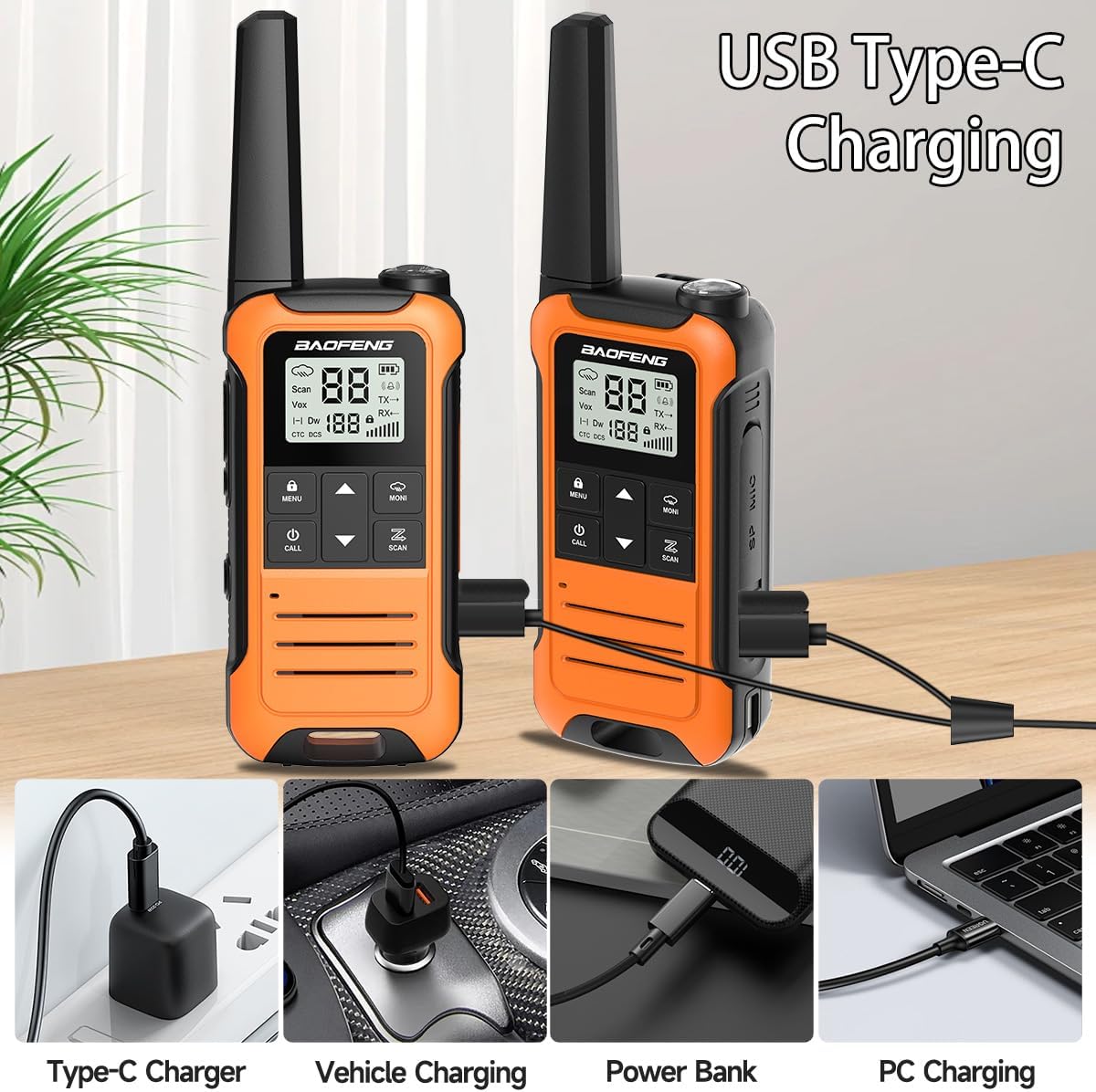
Figure 4: USB Type-C Charging Options
Operating Instructions
Power On/Off
- To power on, press and hold the Power/Call Button (9) until the display illuminates.
- To power off, press and hold the Power/Call Button (9) until the display turns off.
Channel Selection
The F22 radio operates on 22 FRS channels.
- Use the Up Button (10) and Down Button (11) to select your desired channel.
- Ensure all radios you wish to communicate with are set to the same channel.
Privacy Codes (CTCSS/DCS)
The F22 supports 50 CTCSS and 105 DCS privacy codes to minimize interference from other users on the same channel.
- To set a privacy code, press the Menu/Lock Button (8) twice.
- Use the Up Button (10) or Down Button (11) to select OFF, CTC, or DCS.
- If selecting CTC or DCS, use the Up/Down buttons to choose the specific code.
- Press the Menu/Lock Button (8) again to confirm and exit.
- For communication, all radios must be on the same channel and have the same privacy code setting.
Transmitting and Receiving
- To transmit, press and hold the PTT (Push-to-Talk) Button (3) on the side of the radio. Speak clearly into the microphone.
- Release the PTT Button (3) to receive messages.
NOAA Weather Radio
The F22 includes NOAA weather alert functionality, scanning 12 NOAA Weather channels (available in the United States and Canada).
- To activate the weather alert function, press the Weather Monitor Button (6).
- When activated, the radio will alert you to severe weather conditions, providing time to prepare for events like tornadoes, hurricanes, or floods.

Figure 5: NOAA Weather Channels and Alert Function
Flashlight
- Press the Flashlight Emergency Button (4) to turn the built-in LED flashlight (13) on or off.
VOX (Voice Operated Exchange) Function
The VOX function allows for hands-free operation, transmitting when it detects your voice.
- Refer to the detailed user manual for specific steps to enable and adjust VOX sensitivity.
Keypad Lock
The keypad lock prevents accidental changes to your radio settings.
- To lock the keypad, press and hold the Menu/Lock Button (8).
- To unlock, press and hold the Menu/Lock Button (8) again.
Maintenance
- Keep the radio dry. If it gets wet, wipe it dry immediately.
- Do not expose the radio to extreme temperatures.
- Clean the radio with a soft, damp cloth. Avoid using harsh chemicals or solvents.
- Ensure the Type-C port cover is securely closed when not charging to protect against dust and moisture.
Troubleshooting
| Problem | Possible Cause / Solution |
|---|---|
| Radio does not power on or charge. | Ensure the insulating sheet at the bottom of the battery has been removed. Verify the battery is correctly inserted and charged. Check the charging cable and power source. |
| Cannot communicate with other radios. | Ensure all radios are on the same channel and have identical privacy code (CTCSS/DCS) settings. If privacy codes are enabled on one radio and not another, or if they differ, communication will not occur. Try setting privacy codes to OFF on all radios. |
| Poor communication range or static. | Obstructions like buildings, dense foliage, or terrain can reduce range. Move to a more open area. Ensure batteries are fully charged. |
| Sub-tone function interference. | If experiencing interference or difficulty connecting, try turning off the Sub-tone function. Press the Menu/Lock Button (8) twice to access sub-tone settings, then use the Up/Down buttons to select OFF. |
Specifications
| Feature | Specification |
|---|---|
| Model Number | Baofeng F22 |
| Number of Channels | 22 FRS Channels |
| Privacy Codes | 50 CTCSS, 105 DCS |
| Frequency Range | 462-467 MHz |
| Battery Capacity | 1400mAh (Li-ion) |
| Voltage | 3.7 Volts |
| Charging Port | Type-C USB |
| Maximum Talking Range | Up to 5 miles (in open areas) |
| Special Features | NOAA Weather Radio, Flashlight, VOX, Keypad Lock |
| Water Resistance Level | Not Water Resistant |
| Item Weight | Approximately 1.79 pounds (for the pack of 4) |
Warranty Information
Warranty information for this product is not explicitly provided in the product details. Please refer to your purchase documentation or contact the seller for specific warranty terms.
Support
For technical assistance or customer service inquiries, please refer to the contact information provided with your purchase or reach out to the seller. Customer service is available to assist with product-related questions.