
1. Introduction
This manual provides comprehensive instructions for the safe and efficient operation of your Retevis RB66S Fast Charging Walkie Talkie. The RB66S is a rechargeable two-way radio designed for reliable communication in various environments, featuring an LCD screen, fluorescent design, USB-C charging, and a built-in flashlight. Please read this manual thoroughly before using the device.
2. What's in the Box
Verify that all items are present upon unpacking:
- 3x RB66S Walkie-Talkies
- 3x Lithium Ion Batteries
- 3x USB Charging Bases
- 3x Charger Adapters
- 3x Hand Straps
- 1x User Manual

Figure 2.1: Package Contents of the Retevis RB66S Walkie Talkie set.
3. Setup
3.1 Battery Installation
- Ensure the walkie-talkie is powered off.
- Locate the battery compartment cover on the back of the unit.
- Slide the cover downwards or unclip it to open.
- Insert the Lithium Ion battery, ensuring the contacts align correctly.
- Replace the battery compartment cover and secure it.
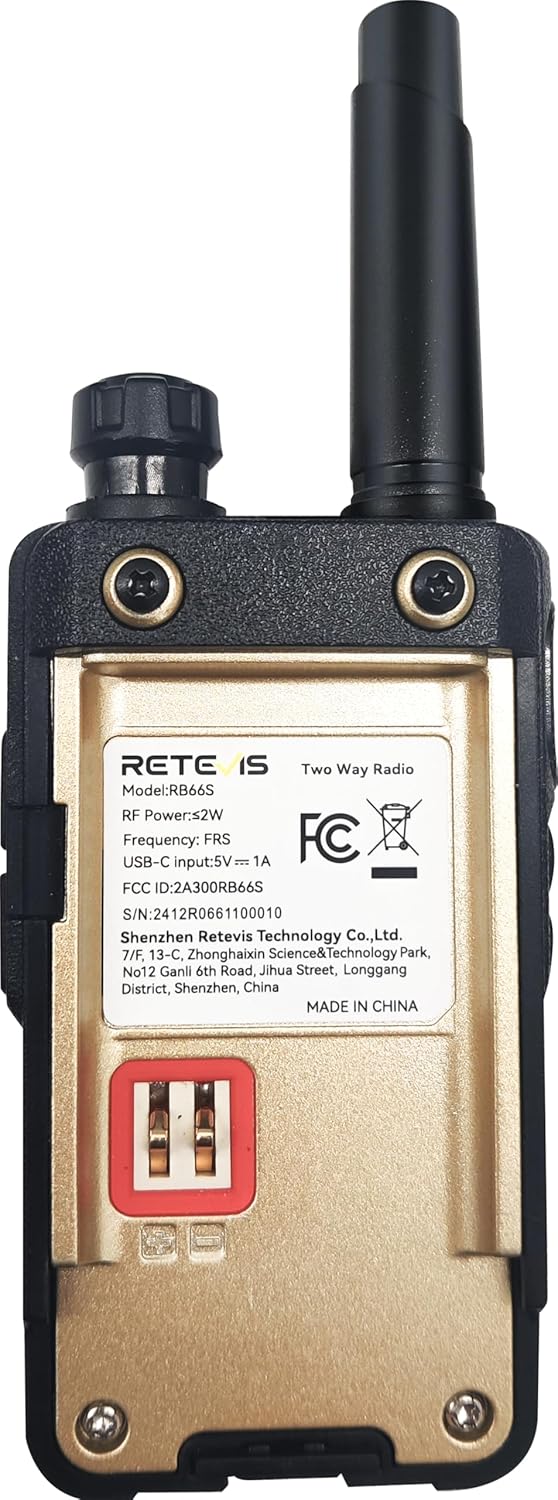
Figure 3.1: Rear view of the RB66S, indicating the battery area.
3.2 Charging the Walkie Talkie
The RB66S offers two charging methods: via the USB charging base or directly via a USB-C cable.
- Using the Charging Base: Place the walkie-talkie into the provided USB charging base. Ensure the charging contacts on the radio align with those on the base. Connect the charger adapter to the base and a power outlet.
- Using USB-C Cable: Connect a USB-C cable (provided) directly to the USB-C port on the side of the walkie-talkie and to a compatible USB power source (e.g., wall adapter, power bank, computer).
A full charge typically takes approximately 1 hour for the 1000mAh battery, providing over 12 hours of talk time and 46 hours of standby time.

Figure 3.2: Fast charging features of the RB66S.

Figure 3.3: USB Charging Base.

Figure 3.4: USB-C Charging Cable.
Video 3.1: Demonstration of the RB66S fast charging capabilities.
4. Operating Instructions
4.1 Controls Overview

Figure 4.1: RB66S Walkie Talkie Controls and Features.
4.2 Power On/Off and Volume
To power on or off the device, rotate the On/Off/Volume knob located at the top of the radio. Turn clockwise to power on and increase volume; turn counter-clockwise to decrease volume and power off.
4.3 Channel Selection
Use the Up Button/Channel + and Down Button/Channel - to navigate through the available channels. The selected channel will be displayed on the 1.3-inch LCD screen.
4.4 Push-to-Talk (PTT)
To transmit, press and hold the PTT button on the side of the radio. Speak clearly into the microphone. Release the PTT button to listen.
4.5 VOX Function (Hands-Free Communication)
The Voice Operated Exchange (VOX) function allows for hands-free transmission. When VOX is enabled, the radio will automatically transmit when it detects your voice. You can adjust the VOX sensitivity level (0-9) through the menu. A higher level requires a louder voice to activate transmission.

Figure 4.2: Hands-free communication using VOX.
Video 4.1: Overview of Retevis RB66S features, including VOX.
4.6 Flashlight Function
The RB66S includes a built-in LED flashlight for illumination in low-light conditions. This can be activated via a short press of a designated side key (Side Key 2 by default, configurable in menu).

Figure 4.3: Using the built-in LED flashlight.
4.7 Emergency Alarm
In an emergency, press and hold Side Key 1 (by default, configurable in menu) to activate the emergency alarm. This will emit a loud alert signal to notify others in your group.

Figure 4.4: Activating the emergency alarm.
4.8 LCD Screen Display
The 1.3-inch LCD screen provides real-time information including the current channel, battery level, and signal strength. This allows for quick monitoring of the radio's status.

Figure 4.5: LCD screen displaying operational information.
Video 4.3: Detailed view of the RB66S LCD screen and its displayed information.
4.9 Fluorescent Design
The RB66S features a fluorescent design that enhances visibility in low-light environments, making it easier to locate the radio during night activities.
Video 4.4: Demonstration of the RB66S fluorescent design.
5. Maintenance
5.1 Cleaning
Wipe the radio's exterior with a soft, damp cloth. Do not use harsh chemicals or abrasive cleaners. Ensure the USB-C port cover is securely closed to prevent dust and moisture ingress.
5.2 Battery Care
To prolong battery life, avoid fully discharging the battery frequently. Charge the battery regularly, even if the radio is not in active use. Store the radio and batteries in a cool, dry place.
5.3 Storage
When storing the radio for extended periods, remove the battery. Store the radio in a dry, dust-free environment away from extreme temperatures.
6. Troubleshooting
| Problem | Possible Cause | Solution |
|---|---|---|
| Radio does not power on. | Battery is low or not installed correctly. | Charge the battery or re-install it, ensuring proper contact. |
| Cannot communicate with other radios. | Radios are on different channels or privacy codes (CTCSS/DCS). Out of range. | Ensure all radios are set to the same channel and privacy code. Move closer to the other radio. |
| Poor audio quality or static. | Weak signal, interference, or squelch level too low/high. | Move to an open area. Adjust squelch level in the menu. |
| Battery drains quickly. | Frequent transmission, high volume, or battery nearing end of life. | Reduce transmission time. Lower volume. Consider replacing the battery if it's old. |
7. Specifications
| Feature | Detail |
|---|---|
| Model Number | RB66S with LCD Screen |
| Item Weight | 4.3 ounces |
| Product Dimensions | 0.98 x 2.1 x 5.51 inches |
| Batteries | 3 Lithium Ion batteries required (included) |
| Number of Channels | 22 |
| Special Features | 1 Hour Fast Charging, Emergency Alarm, LCD Screen, Luminous design |
| Frequency Range | FRS |
| Talking Range Maximum | 2 Mile |
| Voltage | 3.7 Volts |
| Water Resistance Level | Water Repellent |
8. Warranty and Support
Retevis provides a 2-year warranty for the radio body and a 1-year warranty for accessories. Additionally, a 30-day no-reason return policy is offered. Beyond the warranty period, maintenance services are available, with buyers responsible for associated costs.
For any inquiries or support, please contact Retevis customer service via Amazon. Responses are typically provided within 12 hours.
For more information, visit the official Retevis store on Amazon: Retevis Amazon Store.


