
1. Product Overview
The Tech Drive RC-30 is a 12-inch high-velocity floor fan designed for both indoor and outdoor use. It features adjustable fan speeds, a durable all-metal construction with individually balanced aluminum blades, and a 360-degree adjustable tilting head. This portable, battery-operated fan provides significant airflow and includes a built-in rechargeable battery with an output for mobile device charging.
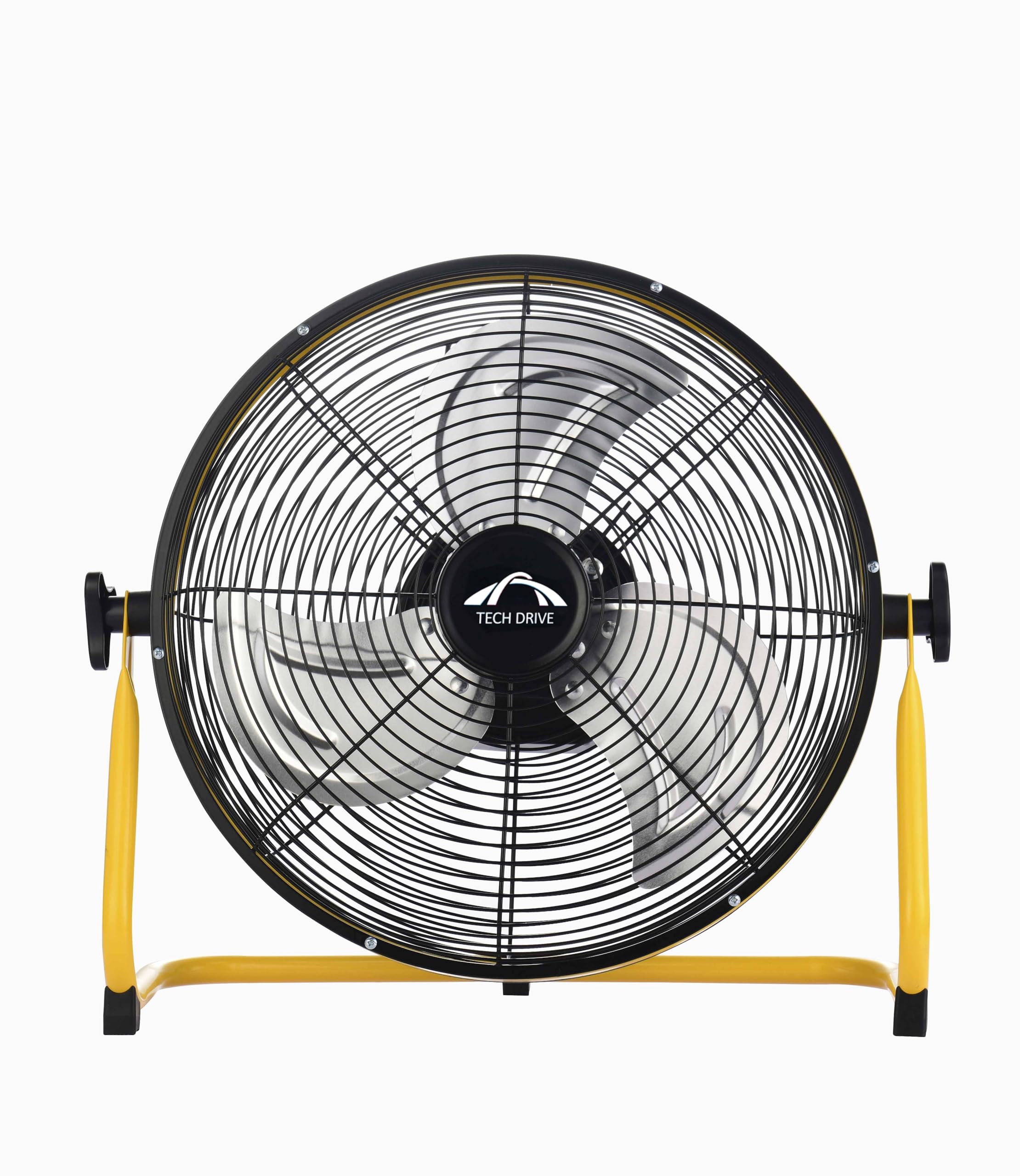
Figure 1: Tech Drive RC-30 12-inch Battery Floor Fan
Key Features:
- Adjustable Fan Speeds: Customize airflow with a rotary switch.
- Durable Construction: All-metal design with individually balanced aluminum blades.
- 360° Adjustable Tilting: Direct airflow precisely where needed.
- Portable & Rechargeable: Built-in battery for cordless operation, ideal for indoor, outdoor, camping, garages, and workshops.
- Long-Lasting Battery: Up to 10 hours of operation at maximum speed on a full charge.
- Quiet Performance: Operates at 36dB at low speed and 53dB at high speed.
- Mobile Device Charging: Includes an output for charging mobile devices.
- No Assembly Required: Ready to use right out of the box.

Figure 2: Versatile applications of the Tech Drive Floor Fan
2. Safety Information
Please read and understand all safety instructions before using this fan. Failure to follow these instructions may result in electric shock, fire, or serious injury.
- Electrical Safety: Always unplug the fan from the power source before cleaning, performing maintenance, or when not in use. Do not operate the fan with a damaged cord or plug.
- Blade Protection: Never insert fingers or any objects through the fan guards while the fan is operating. Keep loose clothing, hair, and jewelry away from moving parts.
- Placement: Place the fan on a stable, flat surface to prevent it from tipping over. Do not use the fan near water or in excessively humid environments.
- Ventilation: Ensure adequate ventilation around the fan to prevent overheating. Do not cover the fan.
- Children and Pets: Keep the fan out of reach of children and pets to prevent accidents.
- Power Source: Use only with the specified DC 5V power source for charging.
3. Setup
The Tech Drive RC-30 fan comes fully assembled and ready for immediate use. No additional assembly steps are required.
Adjusting the Fan Angle:
The fan head can be tilted 360 degrees to direct airflow. Simply grasp the fan housing firmly and adjust it to your desired angle. The robust design ensures it stays in position.
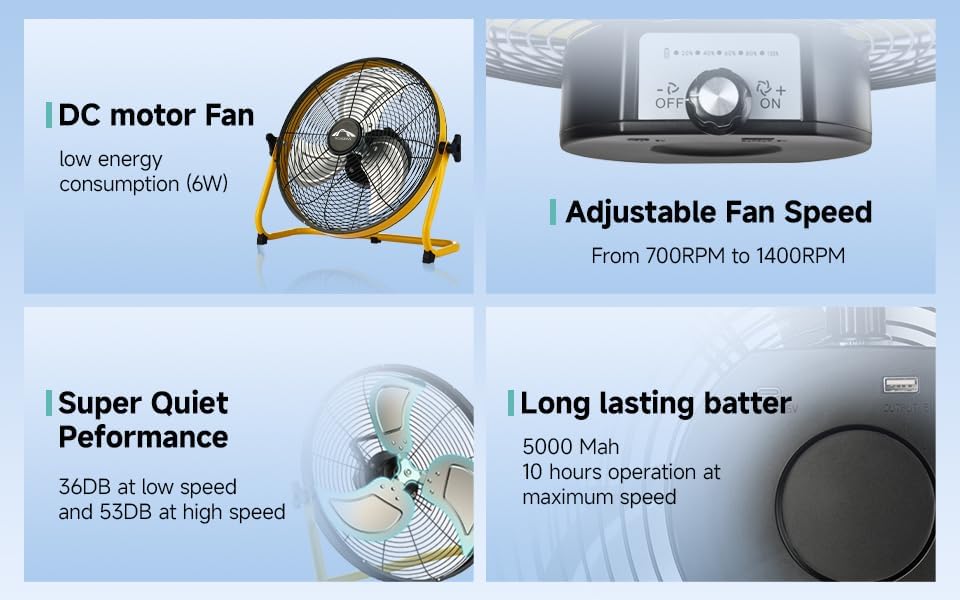
Figure 3: Fan features including adjustable tilt and charging ports
4. Operation
Powering On/Off and Speed Adjustment:
Locate the rotary switch on the back of the fan housing. Turn the switch to select your desired fan speed (Low, Medium, High) or to turn the fan off. The fan operates on a DC 5V power source, either directly via the power cord (not included) or using its built-in rechargeable battery.
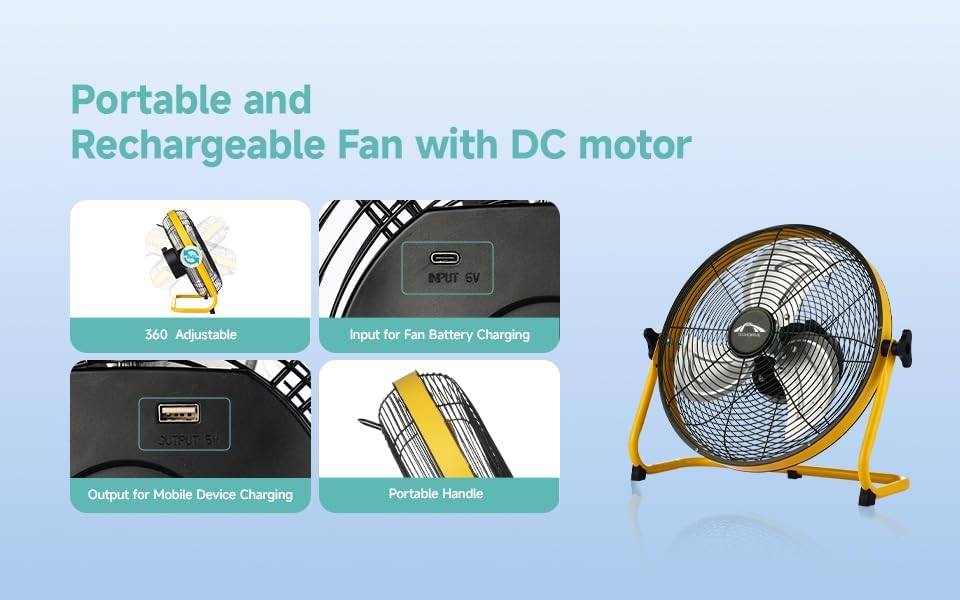
Figure 4: Fan speed control and battery features
Battery Charging and Mobile Device Output:
The fan features an input port for battery charging and an output port to charge your mobile devices. Ensure the fan is connected to a compatible DC 5V power adapter for charging. The built-in battery provides up to 10 hours of operation at maximum speed after a full recharge.
Operational Demonstration:
Video 1: Demonstration of fan speeds and features, including cleaning instructions.
5. Maintenance
Regular cleaning and maintenance will ensure optimal performance and longevity of your Tech Drive fan. Always unplug the fan before any cleaning or maintenance.
Cleaning the Fan Blades and Grille:
- Unplug the Fan: Ensure the fan is completely disconnected from any power source.
- Remove Front Grille: Locate the small clips around the edge of the fan grille. Carefully pry them open using a tool like pliers. There is also a screw at the bottom of the grille that needs to be removed.
- Clean Blades: Once the front grille is removed, gently wipe the aluminum blades with a soft, damp cloth to remove dust and debris. Keeping the blades clean is crucial for efficient airflow.
- Clean Grille: Wipe down the front and rear grilles with a damp cloth.
- Reassemble: Align the front grille with the fan housing, ensuring the clips snap back into place securely. Reinsert and tighten the screw at the bottom.
Refer to Video 1 in the Operation section for a visual guide on disassembling and cleaning the fan.
Replacing the Fuse:
The power plug contains a replaceable fuse. If the fan stops working unexpectedly, check the fuse in the plug. To replace it, carefully open the fuse compartment on the plug, remove the old fuse, and insert a new one of the exact same type and rating. Always ensure the fan is unplugged before attempting to replace the fuse.
6. Troubleshooting
If you encounter any issues with your Tech Drive fan, please refer to the following troubleshooting guide:
| Problem | Possible Cause | Solution |
|---|---|---|
| Fan does not turn on. | No power supply. Blown fuse in plug. Battery depleted. | Ensure the fan is properly plugged into a working outlet. Check and replace the fuse in the power plug if necessary (see Maintenance). Charge the fan battery. |
| Weak airflow. | Dust accumulation on blades/grille. Fan speed set too low. | Clean the fan blades and grilles (see Maintenance). Increase the fan speed using the rotary switch. |
| Unusual noise or vibration. | Loose parts. Fan not on a stable surface. Obstruction. | Check for any loose screws or components and tighten them. Place the fan on a firm, level surface. Ensure no objects are interfering with the fan blades. |
| Battery not charging. | Faulty charging cable/adapter. Charging port issue. | Try a different compatible DC 5V charging cable and adapter. Contact customer support if the issue persists. |
7. Specifications
| Feature | Detail |
|---|---|
| Brand | Tech Drive |
| Model Name | RC-30 |
| Electric Fan Design | Floor Fan |
| Power Source | Battery Powered |
| Style | Modern |
| Product Dimensions (D x W x H) | 6.89"D x 16.73"W x 14.96"H |
| Recommended Uses | Ventilating |
| Mounting Type | Floor Mount |
| Material | Metal |
| Wattage | 6 watts |
| Finish Type | Powder Coated |
| Voltage | 5 Volts (DC) |
| Indoor/Outdoor Usage | Indoor, Outdoor |
| Is Product Cordless | Yes |
| Item Weight | 2.97 Kilograms |

Figure 5: Product dimensions of the Tech Drive Floor Fan
8. Warranty and Support
Tech Drive products are manufactured to the highest quality standards. For specific warranty information, please refer to the documentation included with your purchase or contact Tech Drive customer support directly.
Customer Support:
If you have any questions, require technical assistance, or need to report an issue with your product, please visit the official Tech Drive website or contact their customer service department. Contact details can typically be found on the product packaging or the brand's official online store.


