
TACTACAM RV-SP-V02
TACTACAM Reveal Folding Solar Panel (Model RV-SP-V02) Instruction Manual
Model: RV-SP-V02 | Brand: TACTACAM
Introduction
The TACTACAM Reveal Folding Solar Panel is designed to provide continuous power to your TACTACAM Reveal and Defend series trail cameras, as well as most other 12V trail and cellular cameras. Featuring dual 3.6W panels for a total of 7.2W output and a built-in 4900mAh lithium battery, this portable and rugged solar panel ensures extended camera operation in remote locations. Its foldable design and versatile mounting options make it an ideal accessory for outdoor enthusiasts.
Package Contents
- TACTACAM Reveal Folding Solar Panel (RV-SP-V02) with built-in 4900mAh lithium battery
- DC power cable
- USB-C charging cable
- Mounting strap
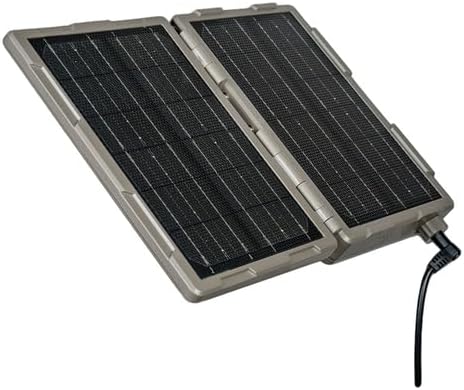
Image: The TACTACAM Reveal Folding Solar Panel in its compact, folded state.
Setup
1. Initial Charging
Before first use, fully charge the internal 4900mAh lithium battery using the provided USB-C charging cable. Connect the USB-C cable to the solar panel and a suitable USB power source. The LED indicators on the panel will show the charging status. Ensure the panel is fully charged until all LEDs indicate full charge.

Image: The solar panel connected to a trail camera, mounted on a tree.
2. Mounting the Solar Panel
The solar panel offers multiple mounting options for flexibility in various outdoor environments:
- Strap Mounting: Use the included mounting strap to secure the panel to a tree or pole. Ensure the panel is positioned to receive maximum direct sunlight.
- Bracket Mounting: The panel features a new bracket design that folds out from the back. This bracket can be used with 1/4-20 threaded mounts (e.g., HME mounts) or can be secured using nails or screws to a fence post or other stable surface.
- Cable Lock: The bracket also includes a slot to run a cable lock through, providing added security when mounted in the field.

Image: A user demonstrating how to open the folding solar panel.
3. Connecting to Your Camera
Connect the provided DC power cable from the solar panel to the 12V DC input port on your TACTACAM Reveal or Defend camera. The solar panel will automatically begin charging the camera's internal battery or providing direct power, depending on the camera model and its power management system. This panel is compatible with most 12V trail and cellular cameras.

Image: Close-up of hands connecting the power cable from the solar panel to a trail camera.
Operating Instructions
1. Power Management
The TACTACAM Reveal Folding Solar Panel is designed for efficient power delivery. It first charges its internal 4900mAh lithium battery. Once the internal battery is sufficiently charged, it then provides power to the connected trail camera. This ensures a consistent power supply, even during periods of low sunlight, by utilizing the stored energy.
The dual 3.6W panels (7.2W total output) offer faster charging capabilities, delivering up to 5000 photos per day in direct sunlight, significantly extending the operational life of your trail camera.
2. Checking Battery Status
Press the button located on the side of the solar panel to check the charge level of the internal battery. LED indicators will illuminate to show the remaining battery capacity.
3. Optimal Placement
For best performance, position the solar panel in an area that receives maximum direct sunlight throughout the day. Avoid shaded areas or locations where obstructions might block sunlight. Adjust the panel's angle to optimize sun exposure, especially during different seasons.
Maintenance
- Cleaning: Periodically clean the solar panels with a soft, damp cloth to remove dirt, dust, or debris that may accumulate and reduce charging efficiency. Do not use harsh chemicals or abrasive materials.
- Connections: Regularly inspect all cable connections to ensure they are secure and free from damage.
- Weather Resistance: The panel has an IPX66 weather rating, making it resistant to dust and powerful water jets. While designed for outdoor use, prolonged exposure to extreme weather conditions may affect its lifespan.
- Storage: When not in use for extended periods, store the solar panel in a cool, dry place. Ensure the internal battery is partially charged (around 50%) before storage to prolong battery life.
Troubleshooting
- Panel Not Charging:
- Ensure the panel is exposed to direct sunlight.
- Check for any obstructions (leaves, dirt) on the solar cells and clean them if necessary.
- Verify that the USB-C charging cable is securely connected if charging via an external power source.
- Camera Not Receiving Power:
- Confirm that the DC power cable is properly connected between the solar panel and the camera.
- Check the solar panel's internal battery status using the LED indicators. If low, allow more time for charging in direct sunlight.
- Ensure your camera is compatible with a 12V DC power input.
- Inspect cables for any visible damage.
- LED Indicators Not Working:
- Press the battery status button firmly.
- If the panel is completely drained, the LEDs may not light up immediately. Connect it to a power source or place it in direct sunlight for a period.
Specifications
| Brand | TACTACAM |
| Model Number | RV-SP-V02 |
| Material | Aluminum, Monocrystalline Silicon |
| Product Dimensions (Folded) | 7.9"L x 6.1"W x 1.6"H |
| Item Weight | 2.9 Pounds |
| Maximum Power Output | 7.2 Watts (Dual 3.6W panels) |
| Output Voltage | 12 Volts (DC) |
| Connector Type | USB (for charging internal battery) |
| Internal Battery | 4900mAh Lithium Battery |
| Weather Rating | IPX66 |
| Included Components | Solar Panel, DC power cable, USB-C charging cable, Mounting strap |
| UPC | 810126750693 |
Official Product Video
Video: An overview of the TACTACAM Reveal Folding Solar Panel, highlighting its features, dual solar cells, and various mounting options. This video demonstrates how the panel charges other TACTACAM products and provides tips for installation in the field.
Warranty Information
For detailed warranty information regarding your TACTACAM Reveal Folding Solar Panel, please refer to the official TACTACAM website or contact their customer support directly. Warranty terms typically cover manufacturing defects and material flaws under normal use conditions.
Support
Should you require further assistance, technical support, or have questions not covered in this manual, please visit the official TACTACAM support page or contact their customer service team. Contact information can typically be found on the TACTACAM website or product packaging.
Related documentsRV-SP-V02

Ask a question about this manual
Ask about setup, troubleshooting, compatibility, parts, safety, or missing instructions. Manuals+ will review the question and use this page’s manual context to help answer it.