1. Introduction
This manual provides essential information for the safe and efficient installation, operation, and maintenance of your ClimaTek SV9500 OEM Upgraded Furnace Control Gas Valve. Please read these instructions thoroughly before attempting any installation or service. Retain this manual for future reference.
2. Safety Information
WARNING: Improper installation, adjustment, alteration, service, or maintenance can cause property damage, injury, or death. Read the installation, operating, and maintenance instructions thoroughly before installing or servicing this equipment.
- Professional Installation Required: Installation and service must be performed by a qualified installer, service agency, or gas supplier.
- Gas Leaks: If you smell gas, immediately follow the "What to Do If You Smell Gas" instructions provided by your gas supplier. Do not attempt to light any appliance, touch any electrical switch, or use any phone in your building. Evacuate everyone from the building and call your gas supplier from a neighbor's phone.
- Electrical Hazards: Disconnect all electrical power to the furnace before installing or servicing the gas valve to prevent electrical shock.
- Component Compatibility: Ensure all replacement parts are compatible with your furnace model and local codes.
- Personal Protective Equipment: Always wear appropriate personal protective equipment (PPE) during installation and service.
3. Product Overview
The ClimaTek SV9500 is an OEM upgraded furnace control gas valve designed to regulate the flow of gas to the furnace burner. This component is a direct replacement for various furnace models, including those originally equipped with Honeywell SV9500 series valves. It ensures reliable and safe operation of your heating system by controlling ignition and gas delivery.
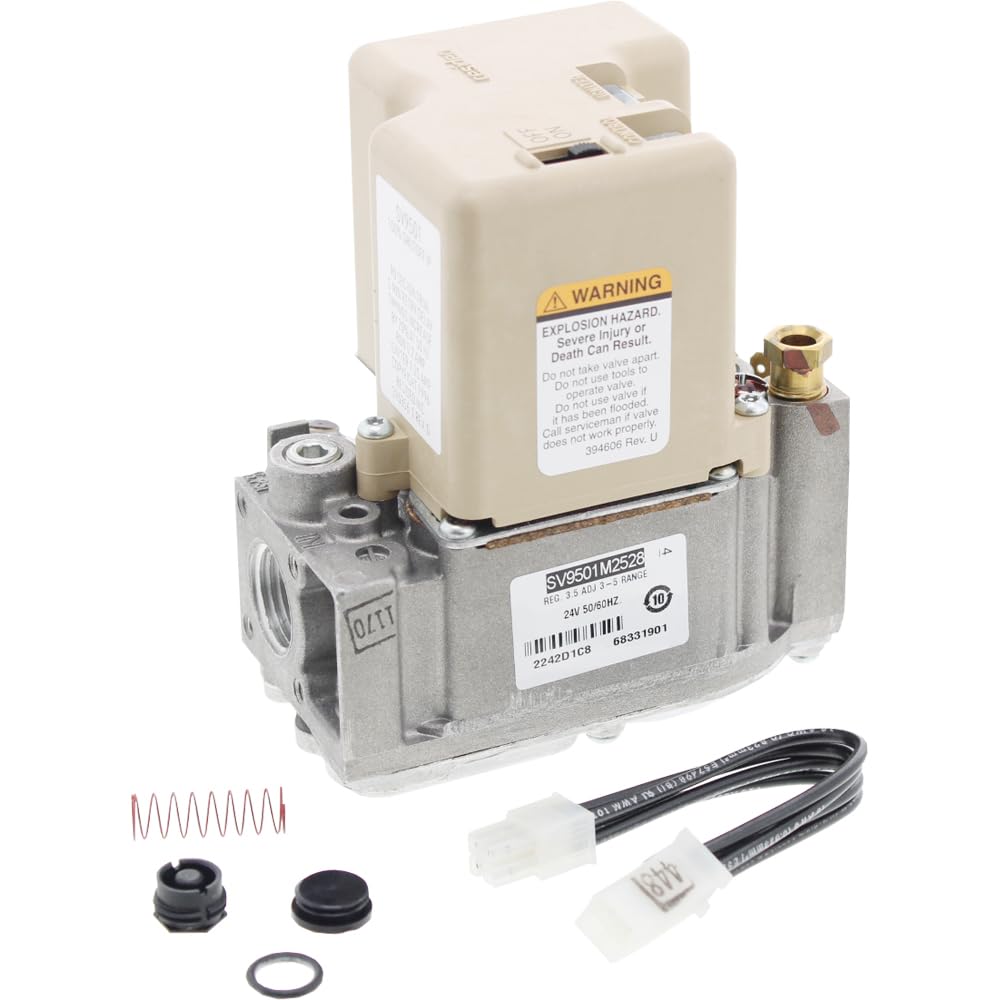
Image 1: ClimaTek SV9500 OEM Upgraded Furnace Control Gas Valve. This image displays the main unit of the gas valve, showing its general shape and connection points.
Key Features:
- Direct OEM replacement for SV9500 series.
- Ensures precise gas flow control.
- Designed for durability and long-lasting performance.
- Compatible with various furnace systems.
4. Setup and Installation
IMPORTANT: Installation must be performed by a qualified HVAC technician or gas professional. Failure to do so can result in serious injury, property damage, or death.
- Power and Gas Shut-off: Turn off all electrical power to the furnace at the main service panel. Close the manual gas shut-off valve to the furnace.
- Access the Gas Valve: Open the furnace access panel to locate the existing gas valve.
- Disconnect Wiring: Carefully disconnect all electrical wiring from the old gas valve, noting their positions for re-connection.
- Disconnect Gas Lines: Using appropriate tools, disconnect the gas supply lines from the old valve. Be prepared for residual gas in the lines.
- Remove Old Valve: Unmount and remove the old gas valve from the furnace.
- Install New Valve: Mount the ClimaTek SV9500 gas valve in the same position as the old one. Ensure it is securely fastened.
- Connect Gas Lines: Reconnect the gas supply lines to the new valve. Use new pipe sealant (suitable for gas) on all threaded connections.
- Connect Wiring: Reconnect all electrical wiring to the new gas valve according to the furnace manufacturer's wiring diagram.
- Leak Test: Slowly open the manual gas shut-off valve. Apply a leak detection solution (e.g., soapy water) to all gas connections. Bubbles indicate a leak. If a leak is detected, tighten connections or reapply sealant until no bubbles appear.
- Restore Power: Restore electrical power to the furnace.
- Test Operation: Follow the furnace manufacturer's instructions to test the furnace operation and ensure the gas valve functions correctly.
5. Operating Instructions
The ClimaTek SV9500 gas valve operates in conjunction with your furnace's control board and thermostat. Once properly installed and tested, its operation is largely automatic.
Normal Operation Sequence:
- The thermostat calls for heat.
- The furnace control board initiates the heating cycle.
- The igniter (pilot or hot surface) is energized.
- Once ignition is proven, the control board sends a signal to the SV9500 gas valve.
- The SV9500 opens, allowing gas to flow to the main burner.
- The main burner ignites, and the furnace begins heating.
- When the thermostat's set temperature is reached, the control board closes the SV9500, shutting off the gas flow to the burner.
Refer to your specific furnace manufacturer's manual for detailed operating procedures and safety precautions related to your heating system.
6. Maintenance
The ClimaTek SV9500 gas valve is designed for reliable operation and generally requires minimal direct maintenance. However, regular professional furnace maintenance is crucial for the longevity and safety of your entire heating system, including the gas valve.
Recommended Maintenance Practices:
- Annual Professional Inspection: Have a qualified HVAC technician inspect your furnace annually. This inspection should include checking the gas valve for proper operation, gas leaks, and any signs of wear or damage.
- Cleanliness: Ensure the area around the furnace and gas valve is kept clean and free of dust, debris, and flammable materials.
- Filter Replacement: Regularly replace or clean your furnace air filter as recommended by your furnace manufacturer. A clean filter helps maintain efficient operation and reduces strain on components.
Do not attempt to disassemble or repair the gas valve yourself. If a malfunction is suspected, contact a qualified service technician.
7. Troubleshooting
This section provides general troubleshooting tips. For specific issues or if you are unsure, always contact a qualified HVAC technician.
| Problem | Possible Cause | Action |
|---|---|---|
| Furnace not heating / No ignition |
|
|
| Smell of gas |
|
|
| Intermittent heating |
|
|
8. Specifications
- Model: SV9500 (OEM Upgraded Replacement)
- Product Dimensions: 5 x 7 x 6 inches
- Item Weight: 2.06 pounds
- Manufacturer: HYWL (for ClimaTek)
- Compatibility: Direct replacement for various Honeywell SV9500 series gas valves.
- Application: Furnace Control Gas Valve
9. Warranty and Support
For warranty information regarding your ClimaTek SV9500 OEM Upgraded Furnace Control Gas Valve, please refer to the documentation provided at the time of purchase or contact your supplier. ClimaTek products are designed for quality and reliability.
For technical support or assistance, please contact the vendor or a qualified HVAC professional. Always provide your product model number (SV9500) when seeking support.


