
Victrola VTS-1300-WLN
Victrola Harmony Turntable System User Manual
Model: VTS-1300-WLN
Introduction
The Victrola Harmony turntable system combines classic mid-century design with modern audio technology to provide a rich and immersive listening experience. This system features a full-size, belt-driven turntable and matching stereo bookshelf speakers, designed to deliver warm, detailed vinyl playback with deep bass and crisp highs. It also includes versatile connectivity options such as VINYLSTREAM Bluetooth output, standard Bluetooth input, RCA output, and a 3.5mm auxiliary input.

Figure 1: Victrola Harmony Turntable System (Walnut finish)
What's in the Box
Please ensure all components are present before proceeding with setup:
- Record Player Unit
- Stereo Bookshelf Speakers (2 units)
- Speaker Cables (for connecting speakers to the main unit)
- Removable Dust Cover
- 47 RPM Adaptor (for 7-inch records with large center holes)
Setup
Follow these steps to set up your Victrola Harmony Turntable System:
- Unpacking: Carefully remove all components from the packaging. Place the turntable unit and speakers on a stable, flat surface.

Figure 2: Key components and connection points of the turntable system.
- Connecting Speakers: Connect the included speaker cables to the speaker output terminals on the rear of the main turntable unit and to the corresponding input terminals on each bookshelf speaker. Ensure correct polarity (positive to positive, negative to negative).
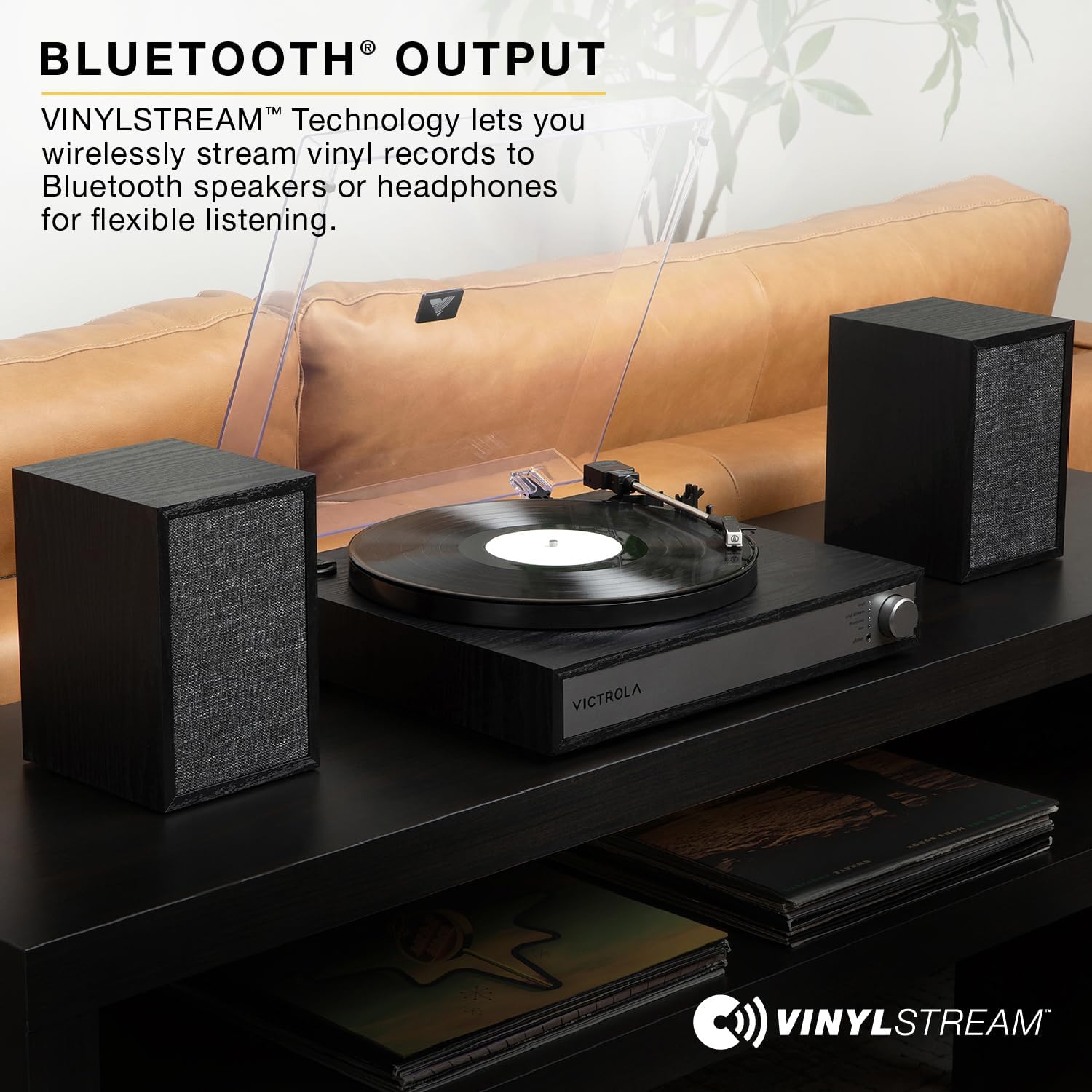
Figure 3: Rear panel connections, including speaker outputs.
- Power Connection: Plug the power cord into the power input on the rear of the turntable unit, then plug the other end into a standard wall outlet.
- Dust Cover Installation: Place the removable dust cover onto the hinges at the back of the turntable unit.
- Cartridge Protection: Before first use, remove the stylus protector from the Audio-Technica ATN3600L moving magnet cartridge.

Figure 4: Audio-Technica ATN3600L moving magnet cartridge.
Operating Instructions
Powering On/Off and Mode Selection
- To power on the unit, press and hold the main control knob for a few seconds. Repeat to power off.
- Rotate the main control knob to select between different modes: Vinyl, VINYLSTREAM (Bluetooth Output), Bluetooth (Input), Auxiliary (AUX), and Headphone.
Playing Vinyl Records
- Select "Vinyl" mode using the control knob.
- Place a record on the turntable platter. For 7-inch records with a large center hole, use the included 47 RPM adaptor.
- Select the appropriate speed (33 1/3, 45, or 78 RPM) using the speed selector switch.
- Gently lift the tonearm using the cueing lever and position it over the desired track on the record.
- Lower the tonearm slowly onto the record using the cueing lever. The record will begin to play.
- To stop playback, lift the tonearm, return it to the tonearm rest, and lower the cueing lever.
Bluetooth Input (Streaming from Device)
- Select "Bluetooth" mode. The unit will enter pairing mode, indicated by a flashing LED.
- On your Bluetooth-enabled device (smartphone, tablet, etc.), search for "Victrola Harmony" in the Bluetooth settings and select it to pair.
- Once paired, the LED will become solid, and you can stream audio wirelessly to the turntable's speakers.

Figure 5: Seamless wireless streaming from your Bluetooth device.
VINYLSTREAM Bluetooth Output (Streaming Records to External Bluetooth Devices)
- Select "VINYLSTREAM" mode. The unit will begin searching for external Bluetooth speakers or headphones.
- Put your external Bluetooth speaker or headphones into pairing mode.
- Once connected, the audio from your playing vinyl record will be streamed wirelessly to the external Bluetooth device.

Figure 6: Wirelessly stream vinyl records to Bluetooth speakers or headphones.
Auxiliary Input (3.5mm AUX)
- Select "Auxiliary" mode.
- Connect an external audio device (e.g., MP3 player, CD player) to the 3.5mm AUX IN port on the rear of the turntable unit using a 3.5mm audio cable (not included).
- Audio from the connected device will play through the turntable's speakers.
Headphone Output
- Connect headphones to the headphone output jack on the front of the turntable unit for private listening.
- When headphones are connected, audio will typically mute from the main speakers.
RCA Output
- The RCA output jacks on the rear of the unit allow you to connect the turntable to an external stereo system or powered speakers (cables not included).
- Ensure your external system is set to the correct input source.
Maintenance
- Cleaning the Unit: Use a soft, dry cloth to wipe down the turntable and speakers. Do not use abrasive cleaners, waxes, or solvents.
- Dust Cover: Keep the dust cover closed when not in use to protect the turntable and records from dust and debris.
- Stylus Care: The stylus (needle) is delicate. Avoid touching it with your fingers. Use a soft brush (not included) to gently clean the stylus from back to front. A worn or dirty stylus can damage records and degrade sound quality. Replace the stylus if sound quality deteriorates significantly.
- Record Care: Keep records clean and free of dust. Store them vertically in their sleeves to prevent warping.
Troubleshooting
| Problem | Possible Cause | Solution |
|---|---|---|
| No power | Power cord not connected; Power outlet not active | Ensure power cord is securely plugged in; Try a different outlet |
| No sound from speakers | Speakers not connected; Volume too low; Incorrect mode selected; Headphones connected | Check speaker cable connections; Increase volume; Select correct mode (Vinyl, Bluetooth, AUX); Disconnect headphones |
| Turntable speed incorrect | Incorrect speed selected | Adjust the speed selector switch to match the record's RPM (33 1/3, 45, or 78) |
| Bluetooth pairing issues | Device too far; Not in pairing mode; Already paired with another device | Ensure device is within range (approx. 30 ft); Confirm unit is in Bluetooth pairing mode; Disconnect from other devices and try again |
| Skipping or distorted sound during vinyl playback | Dirty record; Dirty or worn stylus; Turntable not level; Excessive vibration | Clean record; Clean or replace stylus; Place turntable on a level, stable surface; Avoid placing near vibrating sources |
Specifications
| Feature | Detail |
|---|---|
| Model Name | Harmony |
| Model Number | VTS-1300-WLN |
| Brand | Victrola |
| Turntable Speeds | 33 1/3, 45, 78 RPM |
| Cartridge Type | Audio-Technica ATN3600L Moving Magnet |
| Connectivity Technology | Bluetooth (Input & VINYLSTREAM Output) |
| Audio Inputs | 3.5mm AUX Input |
| Audio Outputs | RCA Output, Headphone Output, VINYLSTREAM Bluetooth Output |
| Included Components | Record Player, Speakers, Speaker Cables, Dust Cover, 47 RPM Adaptor |
| Material | Engineered Wood |
| Color | Walnut |
| Item Weight | 16.27 pounds (7.38 kg) |
| Package Dimensions | 17 x 16 x 12.5 inches (43.18 x 40.64 x 31.75 cm) |
| Manufacturer | Innovative Technology Electronics LLC |
| Country of Origin | China |
Warranty and Support
For warranty information, technical support, or service inquiries, please refer to the official Victrola website or contact their customer service department. Keep your purchase receipt as proof of purchase for warranty claims.
Online Support: Visit the official Victrola website for FAQs, product registration, and support resources.
Contact Information: Refer to the contact details provided in your product packaging or on the official Victrola website for direct assistance.
Related Documents - VTS-1300-WLN
 |
Victrola Harmony VTS-1300 Turntable System Instruction Manual This manual provides detailed instructions for setting up, operating, and maintaining the Victrola Harmony VTS-1300 turntable system. Learn about its various playback modes, including vinyl, Bluetooth streaming, and auxiliary input, along with safety precautions and specifications. |
 |
Victrola Harmony VTS-1300 Turntable Instruction Manual Learn how to set up, operate, and maintain your Victrola Harmony VTS-1300 record player with this comprehensive instruction manual. Discover playback modes, troubleshooting, and specifications. |
 |
Victrola V50-200 50's Retro Bluetooth Record Player & Multimedia Center User Manual Comprehensive user manual for the Victrola V50-200 50's Retro Bluetooth Record Player and Multimedia Center. Learn about its 3-speed turntable, CD player, AM/FM radio, Bluetooth streaming, and Vinyl to MP3 recording features, along with setup and safety instructions. |
 |
Victrola V1 Stereo Turntable (VPA-583) User Manual and Setup Guide Comprehensive guide for the Victrola V1 Stereo Turntable (Model VPA-583), covering setup, operation, features like Bluetooth and Vinyl Stream, cartridge replacement, specifications, and safety information. |
 |
Victrola Avery 3-in-1 Turntable (VTA-320B) User Manual User manual for the Victrola Avery 3-in-1 Turntable (Model VTA-320B), detailing setup, operation, maintenance, troubleshooting, specifications, and warranty information for versatile audio playback. |
 |
Victrola V50-200 Bluetooth Stereo Turntable with CD Player: Instruction Manual Comprehensive instruction manual for the Victrola V50-200 Bluetooth Stereo Turntable with CD Player, covering setup, operation, safety, and troubleshooting for vinyl, CD, radio, and Bluetooth audio playback. |
Ask a question about this manual
Ask about setup, troubleshooting, compatibility, parts, safety, or missing instructions. Manuals+ will review the question and use this page’s manual context to help answer it.