1. Introduction
Thank you for choosing the ONBRILL 58-inch Mobile Kitchen Island. This manual provides essential information for the safe assembly, operation, and maintenance of your new kitchen island. Please read these instructions carefully before use and retain them for future reference.

Figure 1: ONBRILL 58 Inch Mobile Kitchen Island (Black)
This image displays the complete ONBRILL 58-inch Mobile Kitchen Island, showcasing its overall design and features in a kitchen setting.
2. Safety Information
To ensure safe operation and prevent injury or damage, please observe the following safety guidelines:
- Ensure all parts are properly secured before use.
- Do not allow children to play on, with, or around the cart.
- Use caution when moving the island on uneven surfaces to prevent tipping.
- Be careful around sharp edges during assembly and use.
- Do not overload shelves or drawers. Refer to the specifications for weight limits.
- Always lock the wheels when the island is stationary to prevent accidental movement.
- When using the power outlet, ensure appliances do not exceed the 1500W capacity.
3. Package Contents
Before beginning assembly, please verify that all components are present and undamaged. Refer to the packing list included in your product packaging for a detailed inventory of parts and hardware. If any parts are missing or damaged, please contact customer support.
4. Assembly Instructions
The ONBRILL Mobile Kitchen Island requires assembly. Each part is marked with a letter or number for easy identification. Follow the step-by-step instructions provided in the included assembly manual. An electric drill may assist with assembly, but exercise caution to avoid damaging components.
Estimated Assembly Time: Approximately 3-6 hours, depending on experience and assistance.
4.1 Assembly Video Guide
For visual guidance, please refer to the official assembly video below. This video demonstrates the assembly process step-by-step.
Video 1: ONBRILL Mobile Kitchen Island Assembly Guide (5:24)
This video provides a comprehensive walkthrough of the assembly process for the ONBRILL Mobile Kitchen Island, detailing each step from unboxing to final construction. It is approximately 5 minutes and 24 seconds long.
4.2 Key Assembly Steps
- Unpack and Identify Parts: Lay out all components and hardware. Match them against the packing list.
- Assemble the Base Frame: Connect the main structural elements.
- Install Wheels: Attach the five metal universal wheels, ensuring the middle wheel is securely fastened for stability.
- Construct Cabinets and Drawers: Assemble the cabinet boxes and drawer slides.
- Attach Shelves: Insert adjustable shelves into the desired positions.
- Mount Power Outlet: Secure the power outlet unit into its designated slot.
- Install Towel and Spice Racks: Attach the side racks.
- Final Checks: Ensure all screws are tightened and the island is stable.

Figure 2: Product Dimensions and Component Details
This image illustrates the overall dimensions of the kitchen island, including the countertop, drawers, and side racks, providing a visual guide for assembly and placement.
5. Operating Instructions
5.1 Storage and Organization
The kitchen island features two large storage cabinets and two large drawers, designed to accommodate various kitchen items such as tableware, kitchenware, spices, and utensils. The spacious countertop and flexible shelves provide ample storage.
- Adjustable Shelves: The internal shelves within the cabinets can be adjusted to different heights to suit your storage needs. To adjust, remove the shelf, reposition the shelf pins, and reinsert the shelf.
- Spice Rack & Towel Rack: Conveniently located on both sides of the island for easy access to spices and towels. The knife holder is integrated for safe storage of knives.

Figure 3: Storage Features Overview
This image displays the various storage components of the kitchen island, including open drawers, cabinets, and side racks for spices and towels, highlighting its organizational capabilities.

Figure 4: Adjustable Shelves in Cabinets
This image focuses on the adjustable shelves within the kitchen island's cabinets, demonstrating how they can be configured to accommodate items of various sizes.
5.2 Mobility and Stability
The island is equipped with five metal universal wheels, including one in the middle for enhanced stability. Four of these wheels are lockable, providing both flexibility and stability.
- Moving the Island: To move the island, ensure all four lockable wheels are in the unlocked position. Gently push the island to your desired location.
- Securing the Island: To stabilize the island, engage the brakes on all four lockable wheels. This will prevent unintended movement during use.
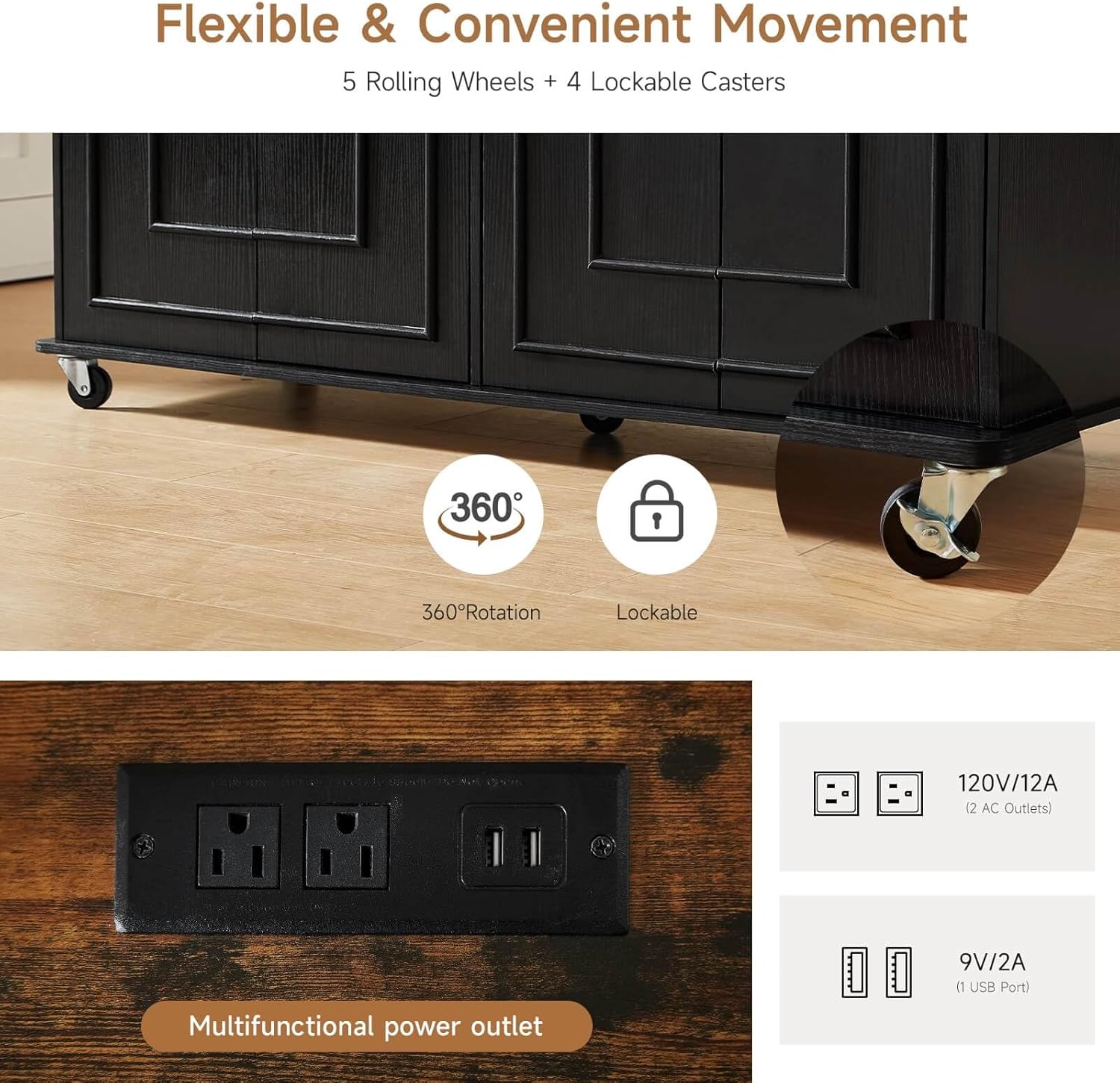
Figure 5: Wheel Locking Mechanism and Power Outlet Detail
This image provides a detailed view of the universal wheels, illustrating their 360-degree rotation and lockable feature, alongside a close-up of the integrated power outlet.
5.3 Power Outlet Usage
The island features a multipurpose power outlet with 2 USB ports and 3-hole sockets. This allows for convenient charging of devices and powering of small kitchen appliances.
- Specifications: The power outlet supports 120V/12A (2 AC Outlets) and 9V/2A (1 USB Port). The total capacity is 1500W.
- Usage: Plug in coffee makers, toasters, blenders, or charge your phone and tablet directly from the island. Do not exceed the maximum wattage.
6. Maintenance
Proper maintenance will extend the life and appearance of your ONBRILL Mobile Kitchen Island.
- Cleaning: The worktop is made of high-quality MDF wood with a surface treatment, making it easy to clean. Wipe surfaces with a soft, damp cloth and mild detergent. Avoid abrasive cleaners or harsh chemicals.
- Spills: Wipe up spills immediately to prevent staining or damage to the wood finish.
- Hardware: Periodically check all screws and fasteners to ensure they are tight. Retighten if necessary.
- Power Outlet: Keep the power outlet clean and dry. Do not expose it to liquids.
7. Troubleshooting
This section addresses common issues you might encounter.
| Problem | Possible Cause | Solution |
|---|---|---|
| Island is wobbly or unstable. | Loose fasteners; uneven floor; wheels not locked. | Ensure all screws are tightened. Adjust the island's position on an even surface. Lock all four universal wheels. |
| Drawers do not slide smoothly. | Improper assembly of drawer slides; obstruction. | Check assembly of drawer slides. Ensure no items are obstructing the drawer's path. |
| Power outlet not working. | Not plugged into wall; circuit breaker tripped; appliance exceeding wattage. | Ensure the island's power cord is securely plugged into a functional wall outlet. Check your home's circuit breaker. Verify the appliance's wattage does not exceed 1500W. |
| Doors are misaligned. | Hinges not properly adjusted. | Adjust the door hinges according to the assembly manual to align them correctly. |
If you encounter issues not listed here or require further assistance, please contact ONBRILL customer support.
8. Specifications
Detailed specifications for the ONBRILL 58-inch Mobile Kitchen Island:
| Model Number | ON OB-LTL-TA-014 |
| Product Dimensions | 17.7"D x 58"W x 35.4"H |
| Item Weight | 104.1 pounds |
| Materials | Engineered Wood (MDF & P2 Particle Board) |
| Color | Black (with brown countertop) |
| Desktop Load Capacity | 220 lbs |
| Total Load Capacity | 220 lbs |
| Countertop Size | 17.7" x 58" x 35.4" (DxWxH) |
| Drawer Size | 20.3" x 11" x 3.7" (DxWxH) |
| Power Outlet | 2 AC Outlets (120V/12A), 1 USB Port (9V/2A), Max 1500W |
| Number of Shelves | 3 (Adjustable) |
| Assembly Required | Yes |

Figure 6: Detailed Product Specifications and Dimensions
This image provides a visual summary of the product's key specifications, including materials, load capacities, and precise measurements for various components.
9. Warranty Information
For detailed warranty information regarding your ONBRILL Mobile Kitchen Island, please refer to the warranty card included with your product or visit the official ONBRILL website. Warranty terms typically cover manufacturing defects under normal use.
10. Customer Support
If you have any questions, require assistance with assembly, or need to report missing/damaged parts, please contact ONBRILL customer support. Contact information can typically be found on the product packaging or the official ONBRILL website.
You can also visit the ONBRILL Store on Amazon for more product information and support resources.


