
1. Introduction
This manual provides essential information for the safe and efficient operation of your DUMOS Air Purifier, Model JHQ-D22-WT. Please read these instructions thoroughly before using the appliance and retain them for future reference.
The DUMOS Air Purifier is designed to improve indoor air quality by filtering various airborne particles and odors. It features a multi-stage filtration system, real-time air quality monitoring, and a quiet sleep mode.
2. Safety Instructions
- Always unplug the air purifier before cleaning, performing maintenance, or when not in use.
- Do not operate the appliance with a damaged cord or plug. If the cord or plug is damaged, contact customer support.
- Keep the air purifier away from water or other liquids. Do not use it in wet environments such as bathrooms.
- Ensure proper ventilation around the unit. Do not block air inlets or outlets.
- Do not insert any objects into the openings.
- This appliance is for indoor use only.
- Keep out of reach of children and pets.
3. Package Contents
Upon unpacking, please verify that all items listed below are present and in good condition:
- DUMOS Air Purifier Unit (Model JHQ-D22-WT)
- Built-in Filter (pre-installed)
- Replacement Filter (additional)

Image: The DUMOS Air Purifier unit shown alongside two cylindrical replacement filters.
4. Product Features
- Coverage Area: Purifies up to 1200 sq ft per hour with a Clean Air Delivery Rate (CADR) of 210m³/H.
- Compact Design: Dimensions of 8.86" x 8.86" x 14.3" and a weight of 5.9 lbs.
- 3-Stage Advanced Filtration: Includes a Primary filter, True HEPA filter, and Activated Carbon filter to effectively remove pet dander, dust, smoke, odors, and other contaminants.
- Real-time Air Quality Monitoring: Built-in PM2.5 sensor with a color-changing light indicator (Blue: Good, Green: Moderate, Red: Poor) and automatic fan speed adjustment.
- Quiet Sleep Mode: Operates at a low noise level of 25 dB, featuring a display off function and timer options (2, 4, 6, 8 hours).
- 360° Air Intake: Ensures efficient air purification from all directions.
- Functional Child Lock: Prevents unintended operation by children or pets.

Image: The DUMOS Air Purifier positioned in a living room, illustrating its 360-degree air intake capability.

Image: A diagram illustrating the three stages of the DUMOS air purifier's filtration system: Primary Filter, True HEPA Filter, and Activated Carbon Filter.
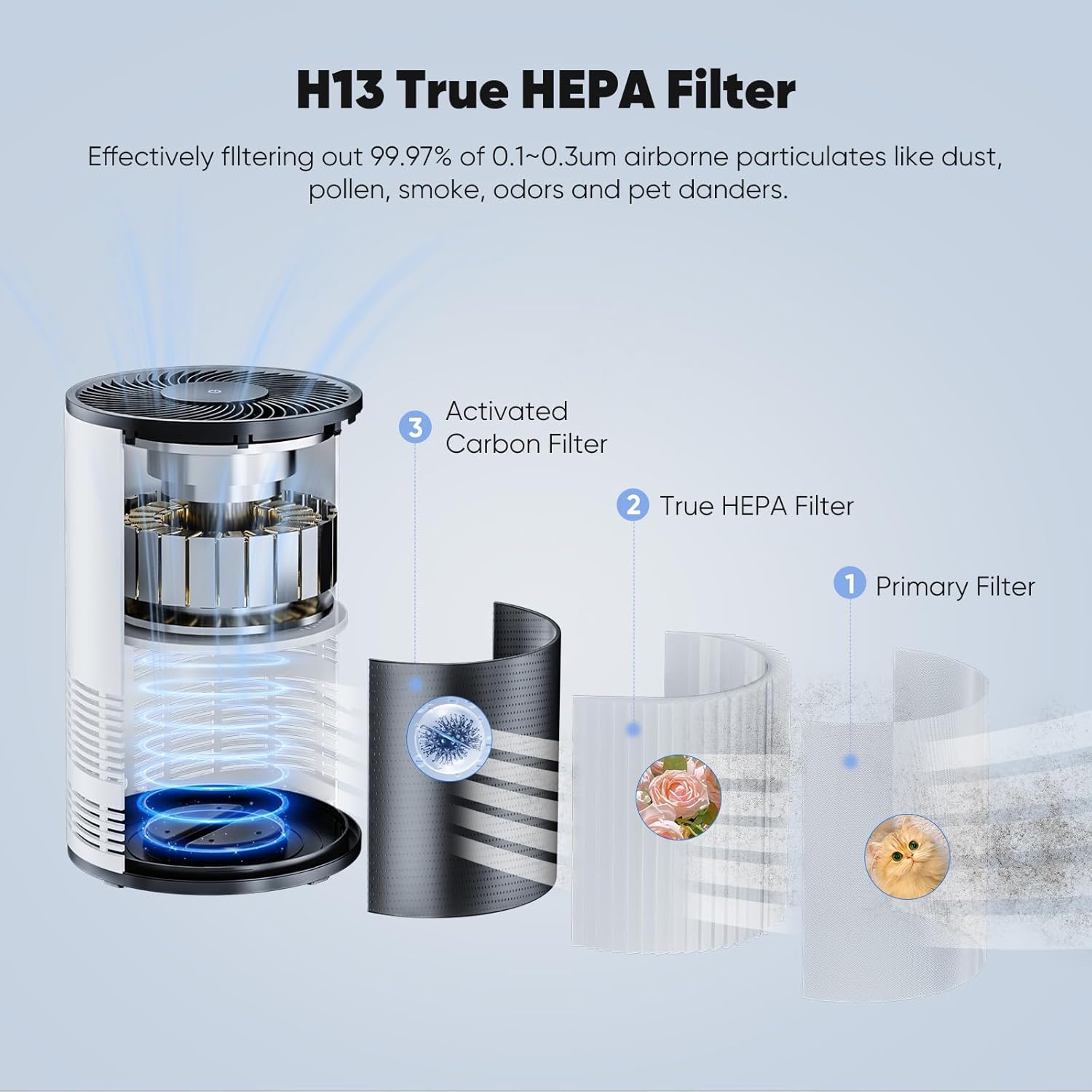
Image: Visual representation of various airborne contaminants the air purifier targets, including pollen, smoke, odors, pet dander, dust, and wildfire particles.
5. Setup and Installation
- Unpack the Unit: Carefully remove the air purifier and all components from the packaging.
- Remove Filter Packaging: Before first use, open the bottom cover of the air purifier and remove the plastic packaging from the filter. Reinsert the filter and secure the bottom cover.
- Placement: Place the air purifier on a flat, stable surface. Ensure there is at least 15 cm (6 inches) of space around the unit for optimal air circulation. Avoid placing it near heat sources or in direct sunlight.
- Power Connection: Plug the power cord into a standard electrical outlet.
6. Operating Instructions
The DUMOS Air Purifier features a touch control panel on its top surface.
Power On/Off
- Touch the power icon to turn the unit on or off.
Fan Speed Adjustment
- Touch the fan speed icon to cycle through 4 available wind speed modes.
- The unit will automatically adjust fan speed based on detected air quality when in auto mode.
Sleep Mode
- Activate Sleep Mode for ultra-quiet operation (25 dB). In this mode, the display lights will dim or turn off.

Image: The DUMOS Air Purifier operating in Sleep Mode, highlighting its low noise level of 25 dB and control options for display, night light, and timer.
Timer Function
- Set the operating time for 2, 4, 6, or 8 hours using the timer button. The unit will automatically shut off after the set duration.
Air Quality Indicator
- The color-changing light indicates current air quality:
- Blue: Good air quality
- Green: Moderate air quality
- Red: Poor air quality
Child Lock
- Activate the child lock feature to prevent accidental changes to settings. Refer to the control panel for the specific child lock icon and activation method (usually a long press).

Image: The DUMOS Air Purifier with a visual representation of its functional child lock feature, designed to prevent unintended operation.
7. Maintenance
Filter Replacement
The air purifier's filter is not washable. The recommended service life for the filter is 6 months, depending on usage and air quality.
- The machine will emit 10 continuous rapid alarm sounds, and the indicator light will flash to remind you that the filter needs to be replaced. The unit will continue to operate.
- To replace the filter:
- Unplug the air purifier from the power outlet.
- Turn the unit upside down and twist the bottom cover counter-clockwise to unlock and remove it.
- Carefully remove the old filter.
- Insert the new filter, ensuring it is seated correctly.
- Replace the bottom cover and twist clockwise to lock it securely.
- Plug the air purifier back in.
Cleaning the Unit
- Wipe the exterior of the air purifier with a soft, dry cloth.
- Do not use abrasive cleaners or solvents.
- Periodically clean the air intake and outlet vents with a soft brush or vacuum cleaner to remove dust accumulation.
8. Troubleshooting
| Problem | Possible Cause | Solution |
|---|---|---|
| Unit does not turn on | No power supply; Power cord not properly connected | Check if the power cord is securely plugged into the outlet and the unit. Try a different outlet. |
| Reduced airflow or purification efficiency | Filter is dirty or clogged; Air inlets/outlets are blocked | Replace the filter as indicated by the alarm. Ensure no obstructions are blocking the air vents. |
| Unusual noise during operation | Filter not installed correctly; Foreign object inside the unit; Unit not on a stable surface | Unplug the unit and check if the filter is properly seated. Remove any foreign objects. Place the unit on a flat, stable surface. |
| Air quality indicator always red/green/blue | Sensor is dirty; Extreme air quality conditions | Gently clean the PM2.5 sensor area with a dry cotton swab. If the issue persists, contact customer support. |
9. Specifications
| Specification | Detail |
|---|---|
| Model Number | JHQ-D22-WT |
| Product Dimensions (L x W x H) | 22.5 x 22.5 x 36.32 cm (8.86" x 8.86" x 14.3") |
| Item Weight | 2.68 kg (5.9 lbs) |
| Clean Air Delivery Rate (CADR) | 210 m³/H |
| Recommended Floor Area | Up to 1200 sq ft per hour |
| Noise Level (Sleep Mode) | 25 Decibels |
| Filter Type | 3-in-1 HEPA (Primary, True HEPA, Activated Carbon) |
| Control Method | Touch Control |
| Power Source | AC |
| Included Components | Air purifier, Built-in filter, Replacement filter |

Image: The DUMOS Air Purifier and its filter, displaying their respective dimensions.
10. Warranty and Support
For warranty information or technical support, please refer to the product packaging or contact DUMOS customer service. Keep your purchase receipt as proof of purchase.