
1. Introduction
Thank you for choosing the TRALT Ergonomic Office Chair Model YX001-3. This manual provides essential information for the safe assembly, proper operation, and effective maintenance of your new office chair. Please read these instructions carefully before use and retain them for future reference.

Image 1.1: TRALT Ergonomic Office Chair Model YX001-3.
2. Product Features
The TRALT Ergonomic Office Chair Model YX001-3 is designed for comfort and support during extended periods of sitting. Key features include:
- Ergonomic Support: Adjustable lumbar support and headrest promote natural posture and alleviate back pain.
- Comfortable Seating: Features a 3.5-inch high-density sponge cushion for balanced softness and support, covered in skin-friendly leather.
- Breathable Design: Mesh backrest enhances air circulation, reducing heat buildup.
- Adjustable Armrests: Flip-up armrests allow for space-saving storage under desks.
- Multi-Scenario Use: Suitable for home offices, corporate workspaces, study rooms, and gaming setups.
- Durable Construction: High-quality frame and metal base support up to 330 lbs, with a Class-3 gas lift for stable height adjustments.
- Smooth Mobility: Quiet castors ensure easy movement without scratching floors.

Image 2.1: Ergonomic design elements including soft seat cushion, back support, and breathable backrest fabric.
3. Assembly Instructions
The TRALT Ergonomic Office Chair is designed for quick and straightforward assembly, typically taking 25-30 minutes. All necessary components and tools are included in the package. Please follow the detailed assembly guide provided with your product for step-by-step instructions.
Before You Begin:
- Unpack all components and verify against the parts list in your assembly guide.
- Ensure you have adequate space for assembly.
- Keep small parts away from children.

Image 3.1: Illustration of the chair's sturdy and silent base components, including the Level 3 gas cylinder, silent universal wheels, solid base, and tilt control mechanism.
4. Operating Instructions
Your TRALT office chair offers multiple adjustments to customize your seating experience for optimal comfort and ergonomic support.
4.1. Seat Height Adjustment
- To raise the seat: While seated, lift the adjustment lever located under the right side of the seat. The seat will rise. Release the lever at the desired height.
- To lower the seat: While seated, lift the adjustment lever. Apply slight body weight to lower the seat. Release the lever at the desired height.
4.2. Backrest Tilt Function
- Adjusting Tilt Tension: Rotate the round knob located under the front of the seat to increase or decrease the resistance when reclining. Turn clockwise for more tension, counter-clockwise for less.
- Locking/Unlocking Tilt: Use the lever on the left side of the seat. Push in to lock the backrest in an upright position (90 degrees). Pull out to unlock and allow the backrest to recline (up to 120 degrees).

Image 4.1: Illustration of the tilt function, showing adjustment of backrest tension and the push-in/push-out mechanism for locking and unlocking the tilt.
4.3. Lumbar Support Adjustment
- The lumbar support can be adjusted by rotating the knob located on the rear of the chair's backrest. Turn the knob to move the lumbar support in or out, providing customized support for your lower back.
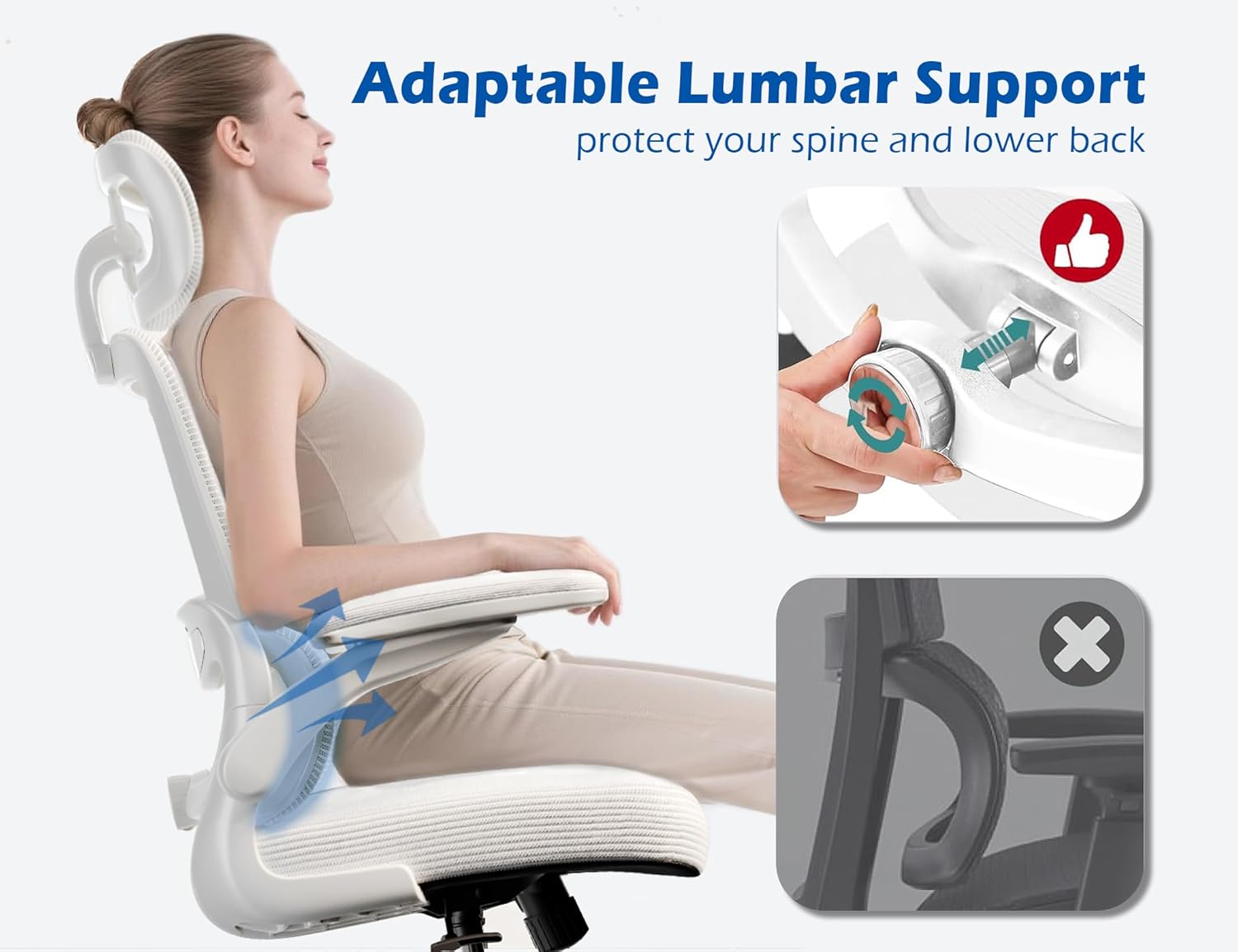
Image 4.2: Detailed view of the adaptable lumbar support adjustment mechanism.
4.4. Headrest Adjustment
- The headrest can be adjusted vertically and pivoted to support your neck and head comfortably. Gently push or pull the headrest to adjust its height and angle.
4.5. Armrest Adjustment
- The armrests feature a flip-up design. To raise them, simply lift them upwards until they lock into a vertical position. To lower them, pull them down. This allows the chair to be tucked closer to a desk.

Image 4.3: Overview of the chair's multi-adjustable features, including headrest, armrests, and lumbar support.
5. Maintenance and Care
Regular maintenance will prolong the life and appearance of your TRALT office chair.
5.1. Cleaning
- Leather Cushion: Wipe with a soft, damp cloth. For tougher stains, use a mild leather cleaner. Avoid harsh chemicals or abrasive materials.
- Mesh Backrest: Gently vacuum or wipe with a damp cloth. Do not saturate the mesh.
- Base and Frame: Wipe with a damp cloth and mild detergent if necessary. Dry thoroughly.
5.2. General Care
- Periodically check all bolts and screws to ensure they are tight. Retighten if necessary.
- Avoid exposing the chair to direct sunlight for prolonged periods to prevent material degradation.
- Do not use the chair on uneven surfaces.
6. Troubleshooting
If you encounter any issues with your TRALT office chair, please refer to the following common solutions:
- Chair feels unstable: Ensure all assembly bolts are securely tightened. Verify the chair is on a flat, stable surface.
- Height adjustment not working: Check if the gas lift lever is fully engaged. Ensure no obstructions are preventing the gas lift from operating.
- Squeaking noises: Apply a small amount of silicone lubricant to moving parts or connections if persistent squeaking occurs after checking all bolts.
- Wheels not rolling smoothly: Check for debris (hair, dust) caught in the castor wheels and clean as needed.
If problems persist, please contact customer support.
7. Specifications
Detailed specifications for the TRALT Ergonomic Office Chair Model YX001-3:
| Feature | Detail |
|---|---|
| Brand | TRALT |
| Model Name | YX001-3 |
| Color | Angel White |
| Product Dimensions (D x W x H) | 27"D x 50"W x 49.2"H |
| Seat Dimensions (W x D x H) | 20" W x 17.3" D x 18.5"-21.3" H |
| Maximum Weight Recommendation | 330 Pounds |
| Back Style | Mesh Back |
| Special Feature | Adjustable Backrest, Adjustable Headrest, Adjustable Lumbar Support, Flip-up Armrests |
| Fill Material | High-density Sponge |
| Cushion Style | Leather |
| Item Weight | 27.3 pounds |

Image 7.1: Detailed size specifications and maximum weight recommendation for the chair.
8. Safety Information
To ensure safe use of your TRALT Ergonomic Office Chair, please observe the following:
- Always follow the assembly instructions provided.
- Do not exceed the maximum weight capacity of 330 pounds.
- Be cautious when adjusting the lumbar support, headrest, and height to avoid injury.
- Keep the chair on a stable, level surface to prevent tipping.
- Do not stand on the chair or use it as a ladder.
9. Warranty and Support
The TRALT Ergonomic Office Chair Model YX001-3 comes with a 5-year warranty service, covering manufacturing defects and major component failures under normal use. For any questions, concerns, or warranty claims, please contact our customer support team. We offer a 24-hour response system to assist you promptly.
For support, please refer to the contact information provided in your product packaging or visit the official TRALT website.


