1. Introduction
The JOYROOM Bluetooth 6.0 Car Adapter FM Transmitter (Model: JR-CCB01) is designed to enhance your in-car audio experience by providing Bluetooth connectivity, hands-free calling, and fast charging capabilities. This device allows you to stream audio from your smartphone or USB drive to your car's FM radio, ensuring clear sound and convenient communication while driving.
Video: An overview of the JOYROOM Bluetooth FM Transmitter, showcasing its design and various features.
2. Safety Information
- Ensure the device is securely plugged into the 12V-24V cigarette lighter socket.
- Do not expose the device to extreme temperatures, direct sunlight, or moisture.
- Avoid disassembling or modifying the device, as this may void the warranty and pose safety risks.
- Keep the device away from children.
- Operate the device responsibly and avoid distractions while driving.
3. Product Features
- Bluetooth 6.0 Connectivity: Provides faster, more stable, and safer wireless audio transmission.
- 81W Fast Charging: Equipped with 45W PD3.0 and 36W QC3.0 ports for simultaneous fast charging of two devices.
- Dual Microphones & Hands-Free Calling: Features upgraded dual microphones with CVC noise reduction and echo cancellation for clear calls.
- Bass Boosted & Hi-Fi Stereo: One-click "b" button for powerful bass and high-fidelity stereo sound.
- Multiple Playback Methods: Supports Bluetooth streaming and U-Disk (USB drive) playback.
- 7-Color LED Light Bar & LED Indicator: Customizable ambient lighting and voltage detection display.
- Safety Protections: Built-in safeguards against over-current, over-voltage, over-heat, and short-circuit.
4. Product Diagram

Image: Detailed diagram of the JOYROOM Bluetooth Car Adapter, labeling key components such as dual microphones, LED display, BASS button, Previous/Next buttons, multifunctional button, Light Button, Type-C 45W charging port, QC3.0 36W charging port, and USB flash drive port.
5. Setup Instructions
- Insert into Cigarette Lighter: Plug the JOYROOM FM Transmitter into your car's 12V-24V cigarette lighter socket. The LED display will light up, indicating it is powered on.
- Find an Unused FM Frequency: Tune your car's FM radio to an empty station with no music or vocals, only static. A frequency between 88.1MHz-107.9MHz is supported.
- Match FM Transmitter Frequency: Press and hold the multi-function knob on the transmitter until the FM frequency on its display starts flashing. Rotate the knob to adjust the transmitter's frequency to match the empty FM station on your car radio.
- Pair via Bluetooth: On your mobile phone, enable Bluetooth and search for the device named "JR-CCB01". Select it to pair. Once paired, you will hear a confirmation sound, and the static on your car radio will disappear.
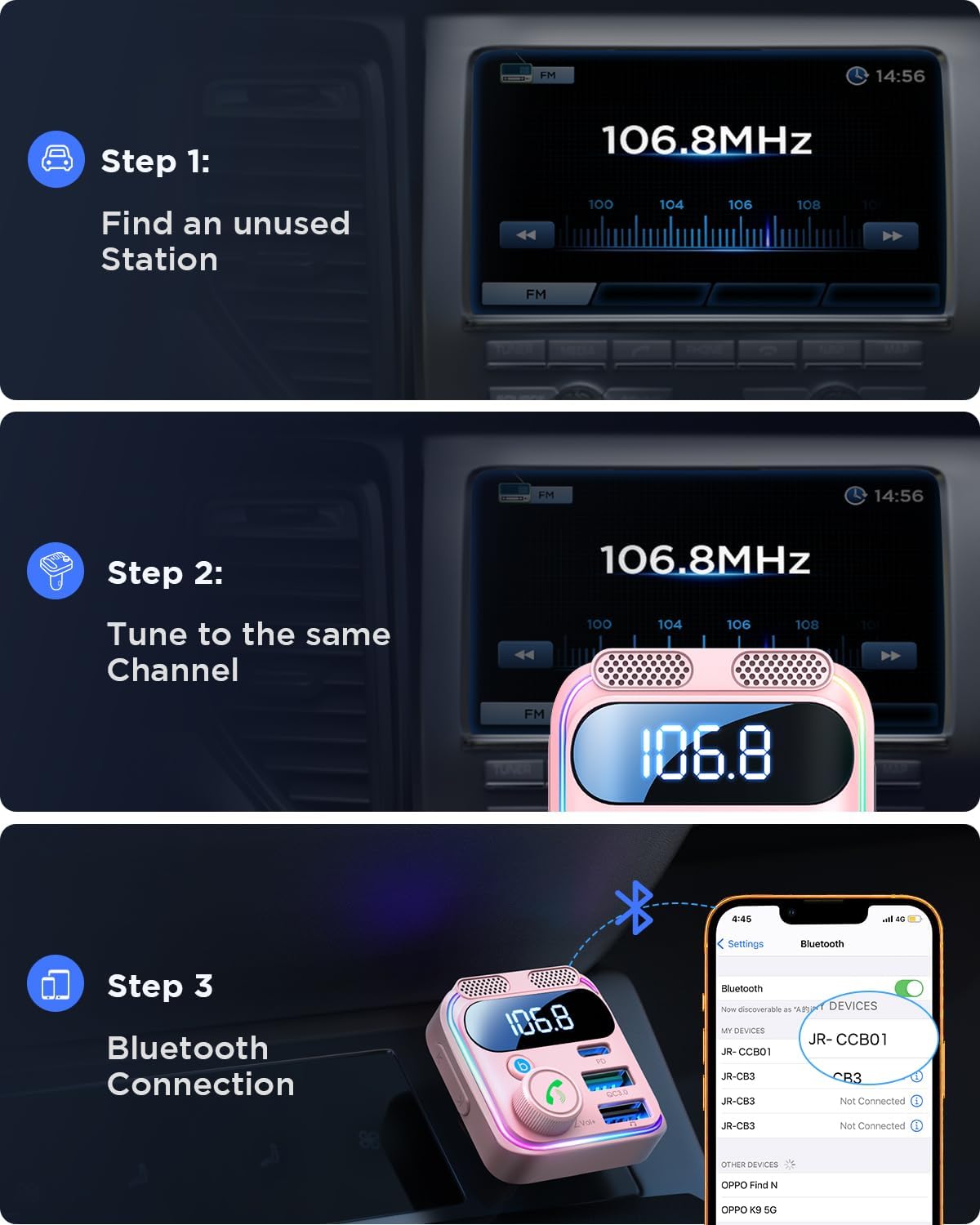
Image: Visual guide demonstrating the three setup steps: 1) Find an unused FM station on your car radio, 2) Tune the FM transmitter to the same channel, and 3) Connect your phone via Bluetooth to "JR-CCB01".
6. Operating Instructions
6.1. Playing Music
- Bluetooth Streaming: Once paired, open your phone's music player and start playback. Audio will stream through your car's speakers.
- U-Disk Playback: Insert a USB drive containing MP3/WMA/WAV/FLAC files into the designated USB port (marked with a music note symbol). The device will automatically detect and play music from the U-Disk.
- Track Control: Use the Previous/Next buttons (left and right arrows) on the transmitter to skip tracks.
- Volume Adjustment: Rotate the multi-function knob to adjust the volume.
- Bass Boost: Press the "b" button to activate the Bass Boost effect for enhanced low frequencies. Press again to deactivate.

Image: The JOYROOM Bluetooth Car Adapter displaying the "b" button for activating powerful bass, surrounded by vibrant light effects, indicating an immersive audio experience.
6.2. Hands-Free Calling
- Answer Call: Short press the multi-function knob (phone icon) to answer an incoming call.
- Reject Call: Long press the multi-function knob to reject an incoming call.
- Hang Up: Short press the multi-function knob during a call to hang up.
- Redial: Double-press the multi-function knob to redial the last number.

Image: A woman driving, demonstrating the hands-free calling feature of the JOYROOM Bluetooth Car Adapter, with on-screen prompts for Answer, End, and Reject calls.
6.3. LED Light Bar Control
- The device features a 7-color LED light bar. Press the dedicated Light Button (usually on the side) to cycle through colors or turn the lights off.
6.4. Charging Devices
- The adapter includes a 45W PD3.0 (Type-C) port and a 36W QC3.0 (USB-A) port. Connect your compatible devices using appropriate charging cables for fast charging.
- The LED indicator automatically detects and displays the car's voltage upon startup.

Image: The JOYROOM Bluetooth Car Adapter simultaneously fast charging two smartphones (Samsung S25 and iPhone 17 Pro) with 81W total power (PD45W + QC36W).
7. Maintenance
- Clean the device regularly with a soft, dry cloth. Avoid using harsh chemicals or abrasive materials.
- Ensure the cigarette lighter socket and USB ports are free from dust and debris to maintain optimal performance.
- Store the device in a cool, dry place when not in use for extended periods.
8. Troubleshooting
8.1. Static Noise or Poor Audio Quality
- Check FM Frequency: Ensure both the car radio and the FM transmitter are tuned to an unused frequency with only static. Avoid frequencies near strong radio stations.
- Adjust Volume: Adjust the volume on both your phone, the transmitter, and your car radio to find the optimal balance.
- Relocate Transmitter: Sometimes, moving the transmitter slightly within the cigarette lighter socket can improve signal quality.
- Interference: Other electronic devices in the car might cause interference. Try disconnecting other devices to isolate the issue.
Video: This video provides instructions on how to connect the device to avoid static noise and ensure the best sound quality, covering FM frequency adjustment and Bluetooth pairing.
8.2. Device Not Powering On
- Check Car Socket: Ensure the car's cigarette lighter socket is functioning correctly. Test it with another device if possible.
- Secure Connection: Make sure the transmitter is firmly seated in the cigarette lighter socket.
8.3. Bluetooth Disconnection
- Restart Device/Phone: Turn off and on both the transmitter and your phone's Bluetooth.
- Re-pair: Delete "JR-CCB01" from your phone's Bluetooth list and attempt to pair again.
- Distance: Ensure your phone is within close proximity to the transmitter.
9. Specifications
| Feature | Detail |
|---|---|
| Model Number | JR-CCB01 Bluetooth Car Adapter |
| Brand | JOYROOM |
| Connectivity Technology | Bluetooth 6.0 |
| Power Source | Corded Electric (12V-24V Car Cigarette Lighter) |
| Charging Ports | 1x 45W PD3.0 (Type-C), 1x 36W QC3.0 (USB-A) |
| Total Output Power | 81W Max |
| FM Frequency Range | 88.1MHz-107.9MHz |
| Material | Plastic |
| Item Weight | 2.08 ounces |
| Package Dimensions | 3.5 x 2.48 x 2.13 inches |
10. Warranty and Support
For warranty information and customer support, please refer to the product packaging or contact JOYROOM customer service directly. Keep your purchase receipt for any warranty claims.


