
1. Introduction
This manual provides instructions for the setup, operation, and maintenance of your HISTTON H4-T Mini PC. The H4-T is a compact, fanless industrial mini PC designed for various applications, featuring an Intel Core i7-10710U processor, Windows 11 Pro, and extensive connectivity options including triple 4K display support.
2. What's in the Box
Verify that all items listed below are included in your package. If any items are missing or damaged, please contact customer support.
- 1 x HISTTON H4-T Mini PC
- 1 x Power Adapter
- 1 x User Manual
- 1 x HDMI Cable
- 1 x VESA Mount
- 6 x Screws
- 4 x WiFi Antennas
- 2 x SATA Cables

Image: Package contents of the HISTTON H4-T Mini PC.
3. Product Overview
3.1 Key Features
- Processor: Intel Core i7-10710U (10th Gen), 6 Cores, 12 Threads, up to 4.70 GHz, 12MB Smart Cache.
- Graphics: Intel UHD Graphics for 10th Gen Processors, supporting 4K resolution.
- Memory: 2 x DDR4 SO-DIMM slots, expandable up to 64GB.
- Storage: 1 x M.2 2280 NVMe PCIe 3.0x4 / SATA 3 SSD slot, 1 x 2.5-inch SATA HDD/SSD bay.
- Display Output: HD, DisplayPort (DP), and Type-C for triple 4K display support.
- Network: 2 x RJ45 Intel I210/211 Gigabit LAN ports, Dual-band WiFi (2.4G+5.0G), Bluetooth 4.2.
- Ports: 4 x USB 3.0, 4 x USB 2.0, 6 x DB9 COM ports (configurable for RS232/RS422/RS485), 2 x 6-pin GPIO, 1 x SIM card slot, 1 x SPK, 1 x MIC.
- Cooling: Fanless design for silent operation and enhanced durability.
- Operating System: Pre-installed Windows 11 Pro 64-bit (activated), supports Ubuntu.
3.2 Component Layout

Image: Overview of the Intel Core i7-10710U processor specifications.

Image: Internal component layout, showing memory and storage expansion slots.

Image: Detailed view of the multiple interfaces available on the Mini PC.
4. Setup Instructions
4.1 Connecting Peripherals
- Connect Display: Use an HDMI, DisplayPort, or Type-C cable to connect your monitor(s) to the corresponding ports on the Mini PC.
- Connect USB Devices: Plug in your USB keyboard, mouse, and any other USB peripherals into the available USB 2.0 or USB 3.0 ports.
- Connect Network: For a wired connection, connect an Ethernet cable from your router or modem to one of the RJ45 LAN ports. For wireless, ensure the WiFi antennas are securely attached.
- Connect Audio: If using external speakers or headphones, connect them to the SPK (speaker) port. A microphone can be connected to the MIC port.
4.2 Powering On
- Connect the power adapter to the DC 19V 5A input port on the Mini PC.
- Plug the power adapter into a wall outlet.
- Press the power button located on the front or side of the Mini PC. The power indicator light will illuminate.
4.3 Initial Operating System Setup
The Mini PC comes with Windows 11 Pro pre-installed and activated. Upon first boot, you may be guided through the standard Windows setup process to configure language, region, network, and user accounts. Follow the on-screen prompts to complete the setup.
5. Operating Instructions
5.1 Triple Display Configuration
The HISTTON H4-T supports up to three independent 4K displays simultaneously using the HD, DisplayPort (DP), and Type-C outputs. To configure multiple displays:
- Connect your monitors to the available HD, DP, and Type-C ports.
- Once Windows 11 Pro has loaded, right-click on the desktop and select "Display settings."
- In the Display settings, you can detect, identify, and arrange your displays. Choose your preferred display mode (e.g., Extend these displays, Duplicate these displays).

Image: Triple 4K display setup with the Mini PC.
5.2 Network and Wireless Connectivity
The Mini PC offers both wired and wireless network options.
- Wired LAN: Connect an Ethernet cable to either of the two RJ45 ports for a stable Gigabit network connection.
- WiFi: Ensure the WiFi antennas are connected. In Windows, click the network icon in the taskbar, select your desired WiFi network, enter the password, and connect. The Mini PC supports dual-band WiFi (2.4G and 5.0G).
- Bluetooth: Bluetooth 4.2 is integrated. To pair devices, go to Windows Settings > Bluetooth & devices, turn on Bluetooth, and select "Add device."
- SIM Card Slot: A SIM card slot is provided for an optional 4G/5G module (not included by default). If a module is installed, insert a compatible SIM card for mobile data connectivity.

Image: High-speed network connectivity options.
5.3 Storage Expansion
The Mini PC supports additional storage devices:
- M.2 SSD: An M.2 2280 NVMe PCIe 3.0x4 / SATA 3 SSD can be installed in the dedicated M.2 slot.
- 2.5-inch SATA Drive: A 2.5-inch SATA HDD or SSD can be installed in the internal drive bay using the provided SATA cables and screws.
Note: Installation of internal components requires opening the chassis. If you are unsure, seek professional assistance.
6. Maintenance
6.1 Fanless Design Benefits
The HISTTON H4-T Mini PC features a fanless design, which offers several advantages:
- Silent Operation: No moving parts for cooling means completely silent operation, ideal for quiet environments.
- Dust Resistance: Without a fan, dust and debris are less likely to enter the chassis, reducing maintenance needs and improving longevity.
- Enhanced Durability: Fewer moving parts reduce the risk of mechanical failure.
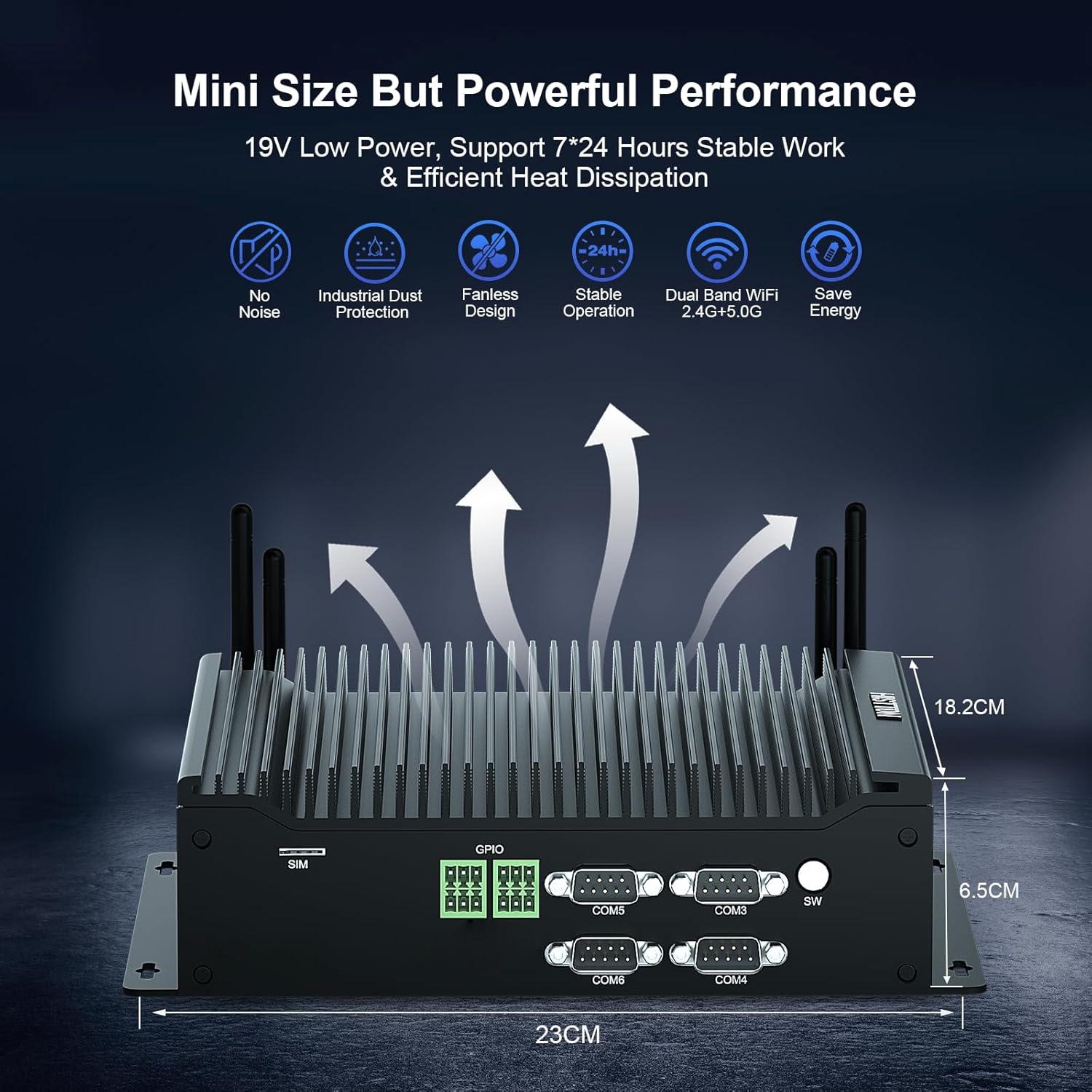
Image: Fanless cooling design and performance benefits.
6.2 General Cleaning
To maintain optimal performance and appearance:
- Wipe the exterior of the Mini PC with a soft, dry cloth.
- Avoid using liquid cleaners or abrasive materials.
- Ensure the device is powered off and unplugged before cleaning.
6.3 Software Updates
Regularly update your Windows 11 Pro operating system and drivers to ensure security, stability, and optimal performance. You can check for updates via Windows Settings > Windows Update.
7. Troubleshooting
If you encounter issues with your HISTTON H4-T Mini PC, refer to the following common troubleshooting steps:
7.1 No Power
- Ensure the power adapter is securely connected to both the Mini PC and a working power outlet.
- Verify that the power outlet is functional by plugging in another device.
- Check the power adapter for any visible damage.
7.2 No Display Output
- Confirm that the monitor is powered on and set to the correct input source (HDMI, DP, or Type-C).
- Ensure display cables are securely connected to both the Mini PC and the monitor.
- Try connecting to a different display port or using a different cable.
- If using multiple displays, try connecting only one display at a time to isolate the issue.
7.3 Network Connectivity Issues
- Wired: Check the Ethernet cable connection and ensure your router/modem is working correctly.
- Wireless: Ensure WiFi antennas are properly attached. Verify that WiFi is enabled in Windows settings and you are connected to the correct network with the correct password. Restart your router/modem.
7.4 System Performance Issues
- Close unnecessary applications running in the background.
- Ensure Windows and drivers are up to date.
- Check for malware or viruses using reputable antivirus software.
- Monitor system resource usage (CPU, RAM, Disk) in Task Manager to identify bottlenecks.
8. Specifications
| Feature | Specification |
|---|---|
| Brand | HISTTON |
| Model Number | H4-T |
| Processor | Intel Core i7-10710U (4.7 GHz max turbo frequency) |
| Processor Cores/Threads | 6 Cores / 12 Threads |
| Cache Size | 12 MB |
| Graphics Coprocessor | Intel UHD Graphics for 10th Gen Intel Processors |
| RAM | 16 GB DDR4 SDRAM (2 SO-DIMM slots, up to 64GB) |
| Hard Drive | 1 TB Solid State (M.2 NVMe/SATA, plus 2.5-inch SATA bay) |
| Operating System | Windows 11 Pro |
| Display Output | HD, DisplayPort, Type-C (Triple 4K Display) |
| Network | 2 x RJ45 Gigabit LAN, Dual-band WiFi (2.4G+5.0G), Bluetooth 4.2 |
| USB Ports | 4 x USB 3.0, 4 x USB 2.0 |
| COM Ports | 6 x DB9 (supports RS232, RS422, RS485) |
| Other Ports | 2 x 6-pin GPIO, 1 x SIM card slot, 1 x SPK, 1 x MIC |
| Dimensions (LxWxH) | 9.06 x 7.17 x 2.56 inches (23 x 18.2 x 6.5 cm) |
| Item Weight | 6.38 pounds |
| Power Supply | DC 19V 5A |
| Power Consumption | 15W-20W |
9. Warranty and Support
HISTTON provides a standard warranty for its products. For specific warranty terms and conditions, please refer to the warranty card included in your package or contact HISTTON customer support directly. If you require technical assistance or have questions not covered in this manual, please reach out to the seller or HISTTON support team for prompt service.
Contact Information: Refer to the product packaging or the official HISTTON website for the most current support contact details.
