
Korfile DDHK-CD-039-CL-93-1-B
Korfile 93-inch Two Person Office Desk Instruction Manual
Model: DDHK-CD-039-CL-93-1-B | Brand: Korfile
1. Introduction
This manual provides detailed instructions for the assembly, operation, and maintenance of your Korfile 93-inch Two Person Office Desk. Please read all instructions carefully before beginning assembly and retain this manual for future reference.

Image 1: Korfile 93-inch Two Person Office Desk in an L-shape configuration.
2. Important Safety Information
WARNING:
- Do not exceed the maximum weight recommendation of 180 pounds on the desk surface.
- Ensure the desk is stable on uneven floors or carpets by adjusting the feet before use.
- Follow the assembly instructions carefully to maintain structural integrity and prevent injury.
- Keep small parts away from children during assembly to prevent choking hazards.
3. Package Contents
Before assembly, verify that all components are present and undamaged. Refer to the included paper instructions for a detailed parts list and corresponding labels. If any parts are missing or damaged, please contact customer support.

Image 2: Desk dimensions and component overview.
4. Setup and Assembly
The Korfile 93-inch Two Person Office Desk can be assembled in various configurations (L-shape or long straight desk). Follow the steps below and refer to the assembly video for visual guidance.
4.1 Assembly Video Instructions
Video 1: Step-by-step assembly guide for the Korfile 93-inch Two Person Office Desk. This video demonstrates the process of connecting frames, attaching boards, and installing features like power outlets and drawers.
4.2 General Assembly Steps
- Prepare Components: Unpack all components and identify them using the provided parts list.
- Assemble Base Frames: Begin by attaching the adjustable feet to the base frames. Secure the bottom boards to the frames using the designated screws.
- Connect Frames: Join the various frame sections together using the provided screws and connectors. Ensure all connections are tight and secure.
- Attach Desktop Boards: Carefully place the desktop boards onto the assembled frame. Align the pre-drilled holes and secure the boards with screws.
- Install Power Outlet: Fix the power outlet unit into the designated slot on the desktop using the provided screws.
- Install Drawer Rails: Attach the drawer rails to the internal frame sections where the fabric drawers will be placed.
- Assemble Fabric Drawers: Fold and assemble the fabric drawers according to the instructions. Insert the handles and place the drawers onto the installed rails.
- Position Monitor Stands: Place the removable monitor stands on the desktop as desired.
- Apply LED Lights (Optional): If desired, attach the LED light strips to the underside of the monitor stands or desk edges.
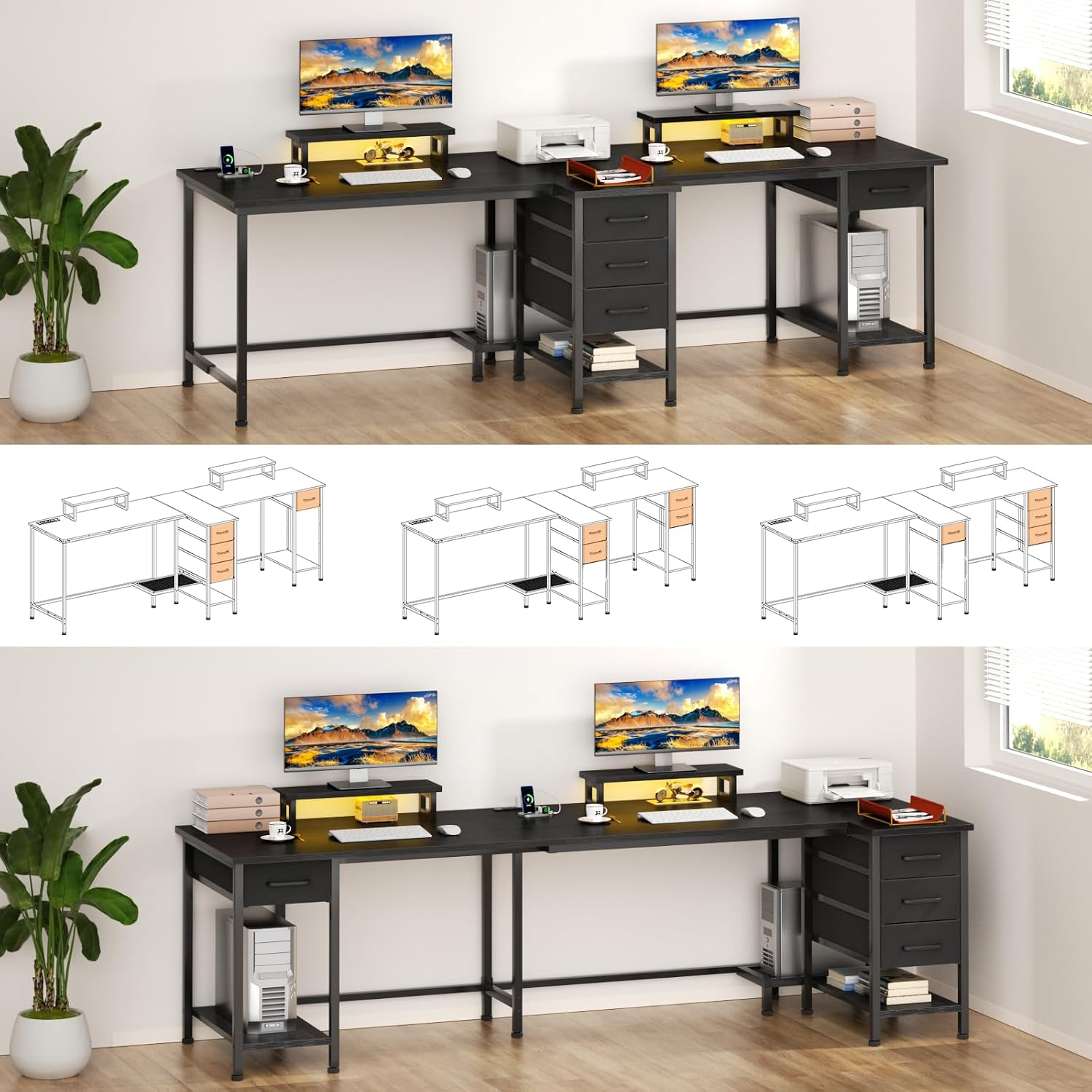
Image 3: Assembly diagram for a straight desk configuration.
5. Operating Instructions
5.1 Power Outlets
The desk is equipped with 3 AC outlets, 1 USB port, and 1 Type-C port. These are integrated into the desktop for convenient charging of smartphones, gaming devices, and other electronics. Simply plug your devices into the appropriate ports.

Image 4: Integrated power outlets for convenient charging.
5.2 LED Lights
The desk includes 2 multi-color adjustable LED light strips. These can be controlled via a remote or a dedicated mobile application. Adjust colors, dynamic modes, brightness levels, and flicker frequencies to customize your workspace or gaming atmosphere.

Image 5: LED lights enhancing the desk environment.
5.3 Removable Monitor Stands
Two removable monitor stands are provided to elevate your screens, promoting a better sitting posture and optimizing screen angles. Their movability allows for flexible placement to suit your multi-screen setup needs.

Image 6: Removable monitor stands for ergonomic setup.
5.4 Storage Drawers
The desk features 4 removable fabric drawers. These drawers offer custom storage space and can be rearranged as needed. The design also allows for sufficient space for an additional computer mainframe if drawers are removed or repositioned.

Image 7: Fabric storage drawers for organization.
6. Maintenance
To maintain the appearance and longevity of your Korfile desk, follow these simple care instructions:
- Cleaning: Wipe the desk surfaces with a damp cloth to remove dust and spills. For stubborn marks, use a mild cleaning solution and then wipe dry immediately.
- Drying: Always wipe surfaces dry with a clean, dry cloth after cleaning to prevent water damage.
- Avoid Harsh Chemicals: Do not use abrasive cleaners, strong chemicals, or solvents, as these can damage the finish.
- Regular Inspection: Periodically check all screws and connections to ensure they remain tight. Retighten if necessary.
7. Troubleshooting
If you encounter any issues with your Korfile desk, refer to the following common solutions:
- Wobbling Desk: Ensure all adjustable feet are properly screwed in and adjusted to compensate for uneven floor surfaces. Verify that all frame connections and desktop screws are securely tightened.
- Holes Not Aligning During Assembly: Double-check that you are using the correct parts for each step as indicated in the manual and assembly video. Sometimes, rotating a component 180 degrees can resolve alignment issues. Do not force parts together.
- LED Lights Not Working: Check the power connection to the LED strips. Ensure the remote control has working batteries and is pointed directly at the receiver. If using an app, ensure Bluetooth connection is active.
- Power Outlets Not Functioning: Verify that the desk's main power cord is securely plugged into a working wall outlet. Check for any tripped circuit breakers.
- Drawers Not Sliding Smoothly: Ensure the drawer rails are correctly installed and free from obstructions. Check that the fabric drawers are assembled properly and not overfilled.
If problems persist, please contact Korfile customer support for assistance.
8. Specifications
| Feature | Detail |
|---|---|
| Brand | Korfile |
| Model Number | DDHK-CD-039-CL-93-1-B |
| Product Dimensions | 30.7"D x 92.81"W x 28.74"H |
| Color | Black |
| Style | Modern |
| Base Material | Metal |
| Top Material Type | Engineered Wood |
| Special Features | Adjustable Height, Built-In USB Outlet, Monitor Stand, LED Lights |
| Power Outlets | 3 AC outlets, 1 USB port, 1 Type-C port |
| Storage Options | 4 fabric drawers |
| Maximum Weight Recommendation | 180 Pounds |
| Assembly Required | Yes |
| Product Care Instructions | Wipe with Damp Cloth, Wipe with Dry Cloth |
9. Warranty and Support
For warranty information, missing parts, or technical support, please refer to the contact details provided with your purchase documentation or visit the official Korfile website. Please have your model number (DDHK-CD-039-CL-93-1-B) and purchase date ready when contacting support.
Ask a question about this manual
Ask about setup, troubleshooting, compatibility, parts, safety, or missing instructions. Manuals+ will review the question and use this page’s manual context to help answer it.