
1. Introduction
Welcome to the instruction manual for your new wheelfun Hg 1/14 4X4 Electric Military Truck. This remote-controlled vehicle is designed for hobby enthusiasts, offering a realistic military truck experience with robust construction and versatile performance. Please read this manual thoroughly before operating the vehicle to ensure safe and optimal use.
Safety Warning: This product is not suitable for children under 14 years of age. Adult supervision is recommended during operation.
2. Package Contents
Ensure all items listed below are present in your package:
- 1x wheelfun Hg 1/14 4X4 Electric Military Truck (Model: TH25118-AMZUS2-S)
- 1x 2.4GHz Full Proportional Pistol-Grip Remote Control
- 1x 7.4V 600mAh Soft-Pack Li-Po Battery (for truck)
- 1x USB Charging Cable
- 1x D Battery (for remote control, included)
- 1x Instruction Manual
3. Product Features
- Durable Construction: Equipped with an alloy driveshaft, alloy wheel hubs, alloy shock absorbers, and an all-metal chassis for enhanced strength and stability.
- 2-Speed Gearbox: Easily switch between high-speed cruising and low-speed crawling modes for varied terrains.
- Realistic 1/14 Scale Design: Precisely replicates real off-road vehicle aesthetics, fully painted and assembled.
- Powerful Performance: Features a 180 high-speed motor (23,000 RPM) and a 7.4V 600mAh Li-Po battery with a 2-in-1 drive board.
- Extended Playtime: Provides approximately 30 minutes of continuous playtime after a 2-hour charge.
- Responsive 2.4GHz Control: Full proportional pistol-grip remote system offers a control range of over 30 meters in open environments.
- Simulated Xenon Headlights: Functional headlights for realistic operation.
- Steering Wheel Linkage: Realistic steering wheel movement synchronized with vehicle turns.
- Exquisite Body Details: Highly detailed body design, including a machine gun accessory.
- Alloy Chassis Skeleton: Robust internal structure for durability.
- Modification Interface: Provides access for potential upgrades or customizations.

Figure 3.1: Front view of the wheelfun Hg 1/14 4X4 Electric Military Truck.

Figure 3.2: Side view of the wheelfun Hg 1/14 4X4 Electric Military Truck, showcasing its detailed exterior.
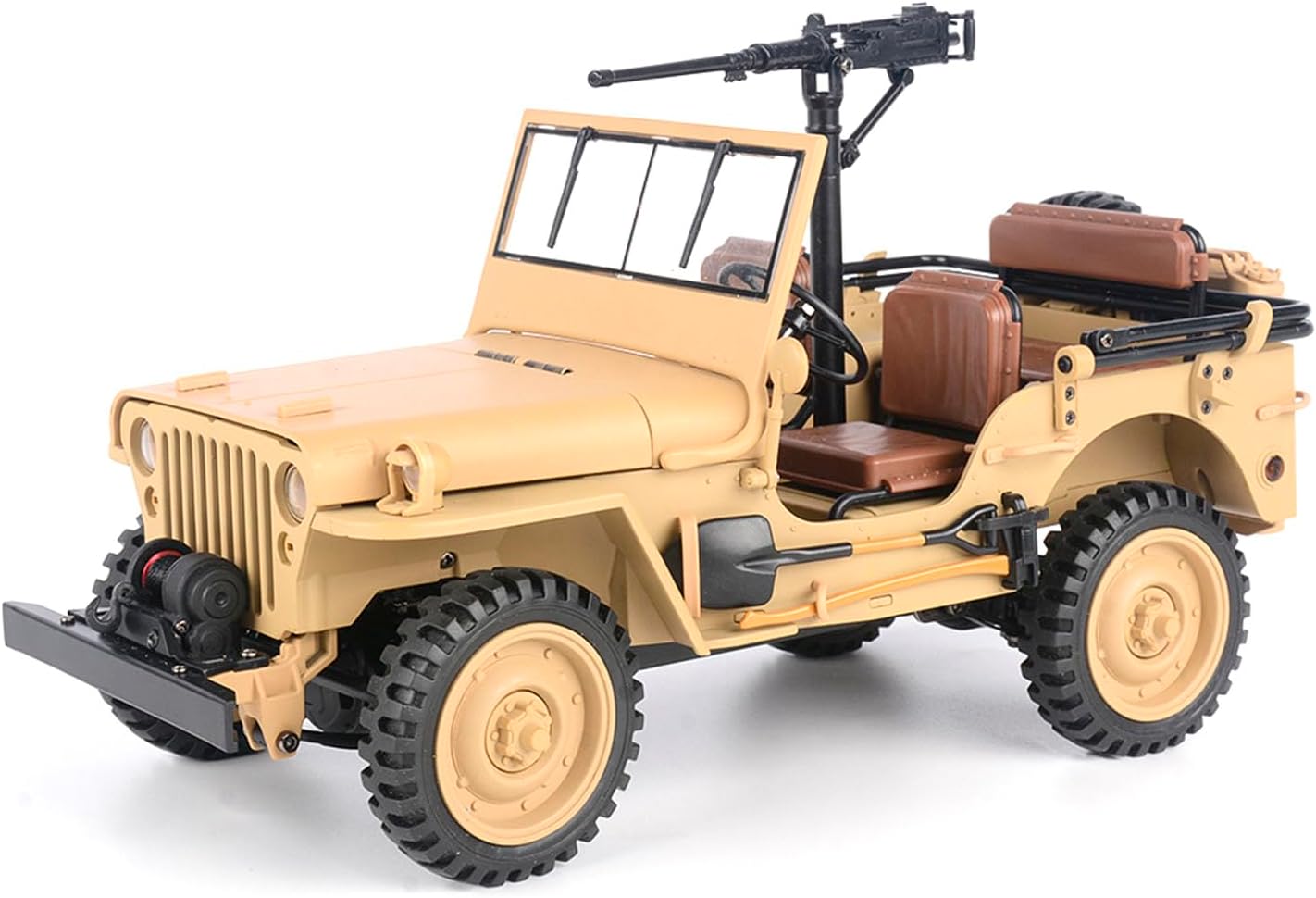
Figure 3.3: Rear view of the wheelfun Hg 1/14 4X4 Electric Military Truck.

Figure 3.4: The military truck with its simulated xenon headlights illuminated.

Figure 3.5: Detailed view of the mounted machine gun accessory.
4. Technical Specifications
| Attribute | Value |
|---|---|
| Brand Name | wheelfun |
| Model Number | TH25118-AMZUS2-S |
| Age Range Description | Adult (Not suitable for children under 14 years) |
| Material Type | Plastic |
| Item Weight | 2.86 Pounds (approx. 1.3 kg) |
| Item Dimensions (L x W x H) | 12 x 8.4 x 6.8 inches (approx. 30.5 x 21.3 x 17.3 cm) |
| Scale | 1/14 |
| Motor | 180 High-Speed Motor (23,000 RPM) |
| Truck Battery | 7.4V 600mAh Soft-Pack Li-Po Battery |
| Remote Control Battery | 1x D Battery (included) |
| Control System | 2.4GHz Full Proportional Pistol-Grip |
| Control Range | Over 30 meters (unobstructed) |
| Charging Time | Approx. 2 hours |
| Playtime | Approx. 30 minutes |
5. Setup Guide
5.1. Charging the Truck Battery
- Locate the 7.4V 600mAh Li-Po battery.
- Connect the battery to the provided USB charging cable.
- Plug the USB charging cable into a suitable USB power source (e.g., computer USB port, USB wall adapter).
- The charging indicator light on the USB cable will show the charging status (refer to cable instructions for specific light indications).
- Charge the battery for approximately 2 hours until fully charged. Do not overcharge.
5.2. Installing Batteries in the Remote Control
- Open the battery compartment cover on the back of the remote control.
- Insert the required D batteries, ensuring correct polarity (+/-).
- Close the battery compartment cover securely.
5.3. Installing the Truck Battery
- Carefully open the hood of the military truck to access the battery compartment.
- Connect the fully charged 7.4V Li-Po battery to the truck's power connector.
- Gently place the battery inside the compartment and close the hood securely.

Figure 5.1: The truck's hood open, revealing the battery and wiring connections.

Figure 5.2: Underside view showing the alloy chassis skeleton and potential modification interface.
5.4. Pairing the Remote Control
- Turn on the power switch on the military truck.
- Turn on the remote control.
- The remote control and truck should automatically pair. A successful pairing is usually indicated by a solid light on both the remote and the truck.
- If pairing fails, turn off both devices and repeat the steps.
6. Operating Instructions
6.1. Basic Controls
- Forward/Reverse: Use the trigger on the pistol-grip remote control. Pull to move forward, push to move backward.
- Steering: Use the steering wheel on the remote control to turn left or right. The truck's steering wheel will also move realistically.
6.2. 2-Speed Gearbox
The truck features a 2-speed gearbox. Refer to your remote control or truck for the specific switch or button to change between high-speed and low-speed modes. Low speed is ideal for crawling over obstacles, while high speed is for faster movement on open terrain.
6.3. Headlights
The simulated xenon headlights can be activated. Check the truck's body for a small switch or refer to the remote control's functions for headlight operation.
6.4. Product in Action
Video 6.1: This video demonstrates the wheelfun Hg 1/14 4X4 Electric Military Truck's climbing ability, realistic steering wheel linkage, functional simulated xenon headlights, exquisite body details, alloy chassis skeleton, and accessible modification interface. It highlights the truck's robust design and detailed features during operation.
7. Maintenance
- Cleaning: After use, especially in dusty or dirty conditions, gently wipe the truck with a soft, dry cloth. Avoid using water or harsh chemicals directly on electronic components.
- Storage: Store the vehicle and remote control in a cool, dry place away from direct sunlight and extreme temperatures. Remove batteries from both the truck and remote control if storing for extended periods to prevent leakage.
- Battery Care: Always allow the Li-Po battery to cool down before recharging. Do not overcharge or completely discharge the battery. Follow all safety guidelines for Li-Po battery handling.
- Inspection: Regularly inspect the driveshaft, wheels, and shock absorbers for any signs of wear or damage. Ensure all screws are tight.

Figure 7.1: A screwdriver being used to access or adjust components on the truck's chassis, indicating potential maintenance points.
8. Troubleshooting
| Problem | Possible Cause | Solution |
|---|---|---|
| Truck not responding to remote control | 1. Truck or remote control is off. 2. Batteries are low or dead. 3. Remote control and truck are not paired. | 1. Ensure both devices are switched ON. 2. Replace/recharge batteries. 3. Re-pair the remote control and truck (refer to Section 5.4). |
| Short playtime | 1. Battery not fully charged. 2. Battery is old or damaged. | 1. Ensure battery is fully charged before use. 2. Consider replacing the battery. |
| Poor control range or interference | 1. Obstructions between remote and truck. 2. Other 2.4GHz devices nearby. | 1. Operate in an open, unobstructed environment. 2. Move away from other wireless devices. |
9. Safety Information
- This product is intended for users aged 14 and above. Adult supervision is strongly recommended.
- Always operate the vehicle in a safe, open area, away from people, pets, and obstacles.
- Do not operate near water, roads, or high-voltage power lines.
- Never touch the moving parts of the vehicle during operation to avoid injury.
- Do not modify or disassemble the vehicle or its components, as this may cause damage or injury and void the warranty.
- Use only original or authorized replacement parts and accessories.
- Dispose of batteries responsibly according to local regulations.
10. Warranty and Support
For any questions or assistance, please contact wheelfun customer support. Our professional after-sales and technical maintenance team is available to provide guidance in English through video or text for repairs and to help resolve any issues you may encounter.
You can typically find contact information by clicking on our store name on the product's retail page or by visiting the official wheelfun website.