
1. Introduction
This manual provides instructions for the BROMECH Digital Commercial Scale, model BPT01AA-200. This high-capacity, high-precision postal scale is designed for various applications, including industrial use, small businesses, and home shipping. It features a durable stainless steel platform, a separate LCD display, and convenient functions like Tare and Hold.

Image: BROMECH Digital Commercial Scale with its separate display unit.
2. Safety Information
- Do not overload the scale beyond its maximum capacity of 200 kg (440 lb).
- Place the scale on a stable, flat surface to ensure accurate measurements.
- Avoid exposing the scale to extreme temperatures, humidity, or direct sunlight.
- Keep the scale away from strong electromagnetic fields.
- Do not immerse the scale or its display unit in water.
- Use only the specified AAA batteries or Type-C charging cable for power.
3. Package Contents
Verify that all items are present in the package:
- BROMECH Digital Commercial Scale Platform
- Separate LCD Display Unit
- Coiled Cable (connecting platform to display)
- 2 x AAA Batteries
- Type-C Charging Cable
- User Manual (this document)
4. Setup
- Unpack the Scale: Carefully remove all components from the packaging.
- Place the Platform: Position the stainless steel weighing platform on a firm, level surface.
- Connect the Display: Connect the coiled cable from the weighing platform to the separate LCD display unit.
- Power Supply:
- Battery Installation: Open the battery compartment on the back of the display unit and insert the 2 AAA batteries, ensuring correct polarity.
- USB-C Power: Alternatively, connect the Type-C charging cable to the display unit and a suitable USB power source (adapter not included).

Image: Detailed view of the LCD display unit, showing the battery compartment and connection port.

Image: Illustration of the two power supply methods: 2 AAA batteries and Type-C USB charging.
- Display Placement: The separate display can be placed on a desktop or mounted on a wall for convenience.
5. Operating Instructions
The display unit features four buttons: Power (ON/OFF), Unit (U), Hold (H), and Tare (T).
Video: Quick start guide demonstrating basic operations like power on/off, unit conversion, tare, and hold functions.
- Power ON/OFF: Press the Power button to turn the scale on or off.
- Unit Conversion: Press the U button to cycle through available units: kilograms (kg), pounds (lb), ounces (oz), and pounds:ounces (lb:oz).

Image: The scale's high-precision sensor and unit conversion options (kg, lb, oz, lb:oz).
- Tare Function: The Tare function allows you to subtract the weight of a container, so you only measure the net weight of its contents.
- Place an empty container on the platform.
- Press the T (Tare) button. The display will reset to zero.
- Add items to the container to measure their net weight.

Image: Step-by-step demonstration of using the Tare function to measure net weight.
- Hold Function: The Hold function locks the displayed weight, which is useful for large or irregularly shaped items that might obscure the display.
- Place an item on the platform.
- Press the H (Hold) button. The weight will be locked on the display.
- You can now remove the item, and the weight will remain displayed for easy reading.
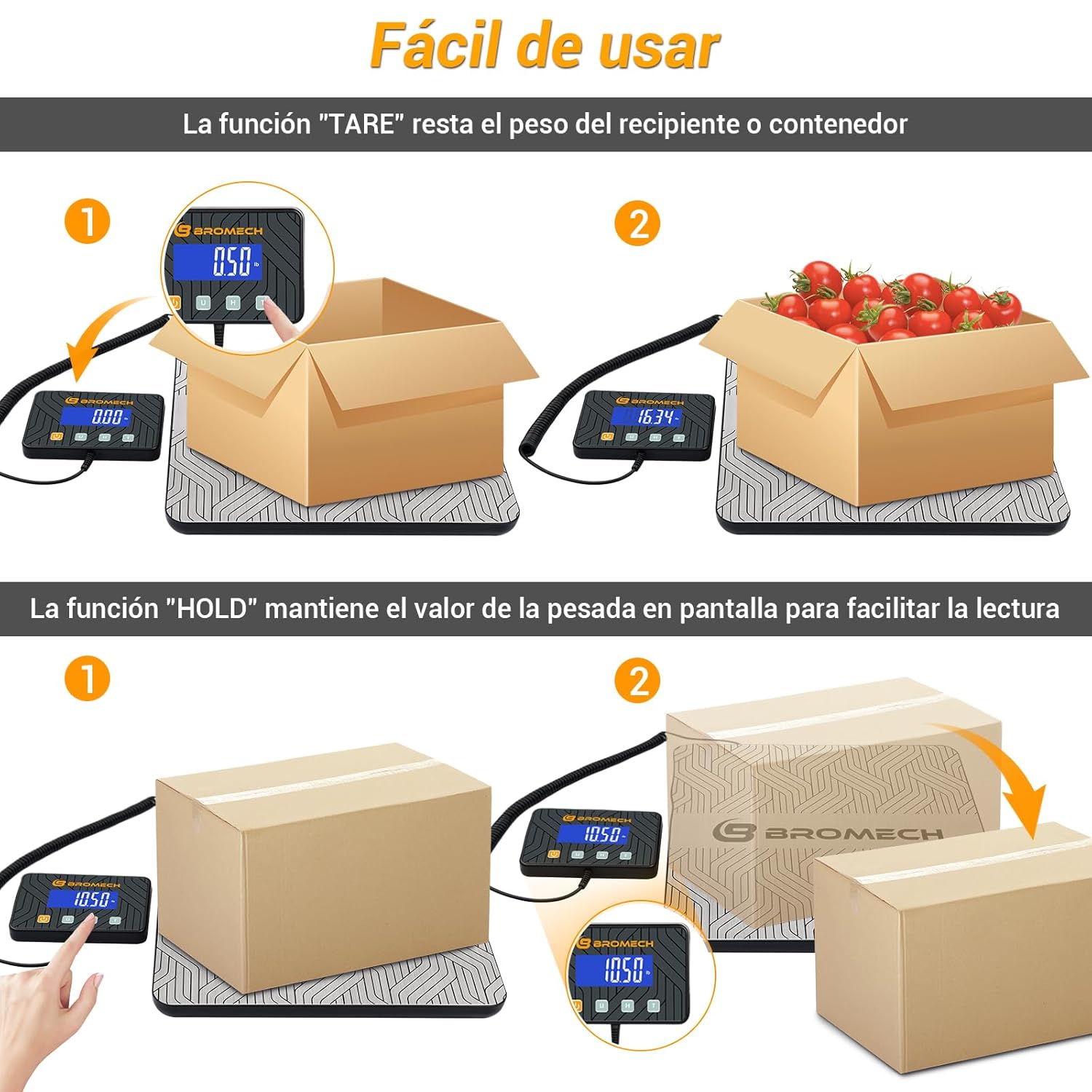
Image: Visual explanation of both Tare and Hold functions for accurate and easy measurements.

Image: Step-by-step demonstration of using the Hold function to retain weight readings.
6. Maintenance
To ensure the longevity and accuracy of your BROMECH Digital Commercial Scale, follow these maintenance guidelines:
- Cleaning: Wipe the stainless steel platform and display unit with a soft, damp cloth. Do not use abrasive cleaners or immerse in water.
- Storage: When not in use, store the scale in a dry, cool place. The compact design allows for easy storage of the display unit under the platform.

Image: The scale's compact design allows for easy storage of the display unit when not in use.
- Battery Replacement: Replace AAA batteries when the low battery indicator appears on the display.
- Avoid Impact: Do not drop the scale or subject it to heavy impacts, as this can damage the internal sensors.
7. Troubleshooting
If you encounter issues with your scale, refer to the following common problems and solutions:
| Problem | Possible Cause | Solution |
|---|---|---|
| Scale does not turn on | Low or dead batteries; Power cable disconnected | Replace batteries or connect Type-C power cable. Ensure connections are secure. |
| Inaccurate readings | Scale not on a flat surface; Overloaded; External vibrations | Place on a stable, level surface. Do not exceed 200kg. Avoid vibrations during measurement. |
| "Lo" displayed | Low battery indicator | Replace batteries or connect to Type-C power. |
| "Err" displayed | Overload warning | Remove excess weight immediately to prevent damage. |

Image: Display indicators for low battery ("Lo") and overload ("Err").
8. Specifications
| Feature | Detail |
|---|---|
| Brand | BROMECH |
| Model | BPT01AA-200 |
| Maximum Weight Capacity | 200 kg (440 lb) |
| Precision / Division | 10g (0.01 kg / 0.35 oz / 0.02 lb) |
| Minimum Weight | 0.04 kg (0.08 lb) |
| Units of Measurement | kg, lb, oz, lb:oz |
| Display Type | LCD (Separate) |
| Material | Stainless Steel Platform |
| Power Source | 2 x AAA Batteries (Included), Type-C USB Cable |
| Product Weight | 1.9 Kilograms |
| Recommended Uses | Shipping, Freight, Small Business, Warehouse, Home Use |

Image: Visual representation of the scale's high precision, capacity (220 kg / 440 lb), division (0.01 kg), and minimum weight (0.04 kg).
9. Warranty & Support
For warranty information and customer support, please refer to the documentation included with your purchase or contact BROMECH customer service directly. Keep your purchase receipt as proof of purchase.
