
WALI TVDVD-7P
WALI Floor TV Stand with Power Outlet Instruction Manual
Model: TVDVD-7P
Introduction
Thank you for choosing the WALI Floor TV Stand with Power Outlet. This manual provides detailed instructions for the safe and proper assembly, operation, and maintenance of your new TV stand. Please read this manual thoroughly before beginning assembly and keep it for future reference.
This floor TV stand is designed to accommodate most 32-70 inch TVs, supporting screens weighing up to 110 lbs with mounting patterns from 75x75mm to 600x400mm. It features integrated power outlets and USB ports for convenience.
Important Safety Information
WARNING: Failure to read and follow all instructions can result in personal injury or damage to the product. If you do not understand these instructions or have doubts about the safety of the installation, please contact WALI customer service.
- Do not exceed the weight capacity of 110 lbs (50 kg) for the TV.
- Ensure the mounting surface is capable of supporting the combined weight of the equipment and all attached hardware.
- Use the provided screws and hardware. Do not overtighten screws.
- Keep children away during assembly. Small parts may be a choking hazard.
- Always use two people to lift and place the TV onto the stand.
- Check all connections periodically to ensure they remain secure.
- Do not plug in the power outlet until the stand is fully assembled and the TV is securely mounted.
Package Contents
Verify that all components are present and undamaged before assembly. If any parts are missing or damaged, contact WALI customer service for assistance.

Image: Overview of the WALI Floor TV Stand components, including the main stand structure, TV mounting bracket, and various hardware pieces.

Image: Detailed view of the universal TV mount hardware kit, showing various sizes of M4, M5, M6, M8 screws, washers, and spacers, neatly organized in a clear case.
The package includes the main floor TV stand assembly (TVDVD-7P) and a universal TV mount hardware kit (UVSP-N) with various bolts, washers, and spacers to fit most TV models.
Setup and Assembly
Follow these steps carefully for proper assembly. It is recommended to have two people for assembly, especially when mounting the TV.
Step 1: Assemble the Base and Support Rod
- Attach the main support rod to the base plate using the provided screws. Ensure the power outlet section of the rod is facing the desired direction.
- Secure all connections firmly but do not overtighten.
Step 2: Attach the VESA Panel to the Support Rod
- Slide the VESA panel onto the support rod.
- Adjust the height of the VESA panel to your desired viewing level. The stand offers 18 height adjustment variations, ranging from 52.3 inches (1329mm) to 62.2 inches (1579mm).
- Secure the VESA panel in place using the locking mechanism or screws as indicated in the diagram.

Image: Diagram illustrating the 18 height adjustment variations for the TV stand, showing adjustable points on the TV bracket, VESA panel, and support rod, with minimum and maximum height measurements.
Step 3: Attach TV Brackets to Your TV
- Identify the correct size screws (M4, M5, M6, or M8) and spacers from the universal hardware kit that fit your TV's VESA mounting holes.
- Attach the two vertical TV brackets to the back of your TV. Ensure they are level and securely fastened.
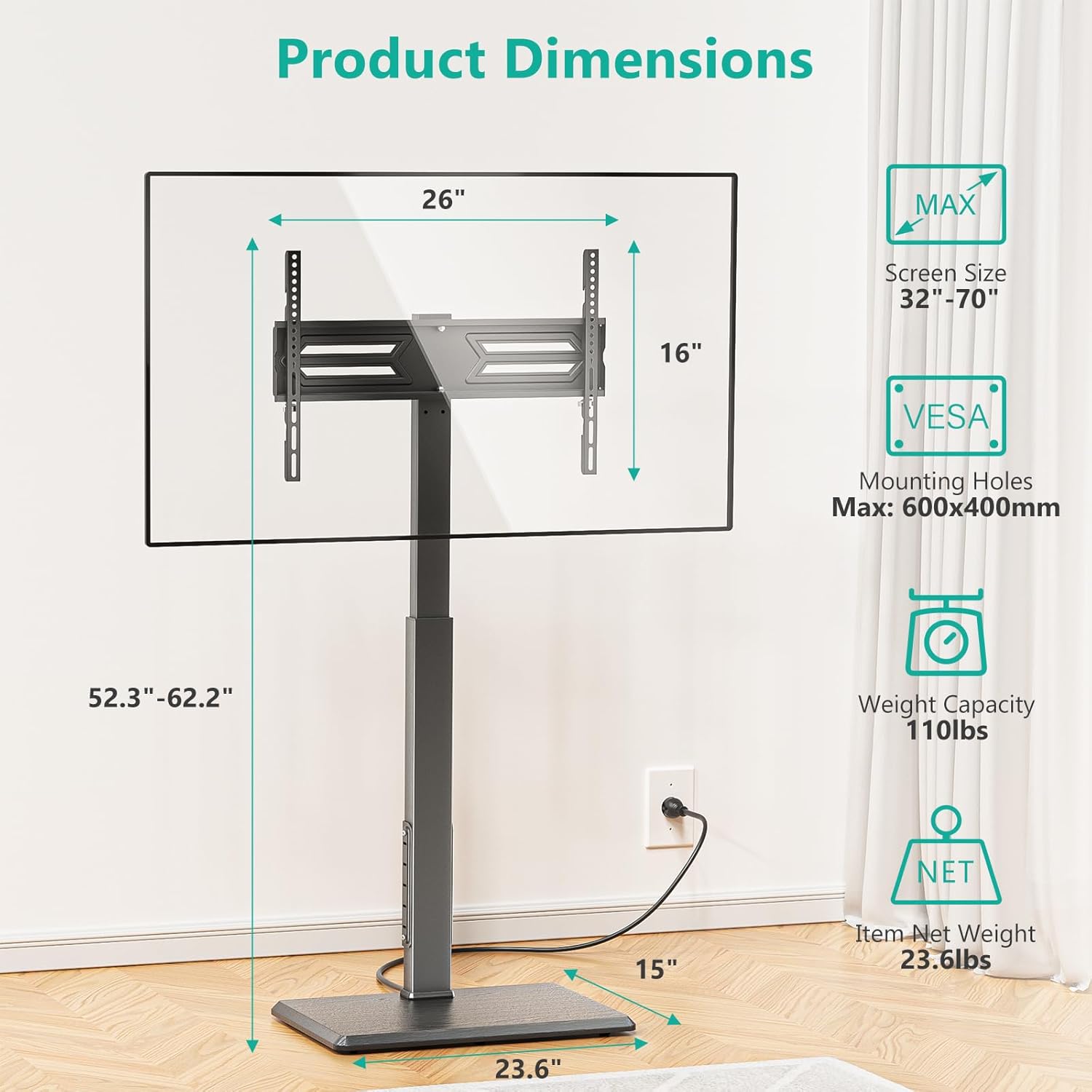
Image: Product dimensions diagram showing the overall height range (52.3"-62.2"), base dimensions (23.6" x 15"), and TV screen size compatibility (32"-70"). It also highlights the maximum VESA mounting holes of 600x400mm and a weight capacity of 110 lbs.
Step 4: Mount the TV onto the Stand
- With assistance, carefully lift the TV and hook the attached TV brackets onto the VESA panel on the stand.
- Ensure the TV is securely seated on the VESA panel.
- Engage any safety locks or screws to prevent the TV from accidentally dislodging.
Operating Instructions
Adjusting TV Height
The WALI Floor TV Stand offers multiple height adjustment points for optimal viewing. You can adjust the height of the support bar, the VESA panel, and the TV bracket itself. Refer to the "18 Height Adjustment Variations" diagram in the Setup section for detailed adjustment points.
Swivel Function
The TV stand allows for a convenient swivel of +/-30° to the right or left. This feature enables you to easily adjust the screen direction to achieve the best viewing angle from various positions in your room without moving the entire stand.

Image: A person using the WALI TV stand, demonstrating the +/-30° swivel capability of the mounted TV, allowing for flexible viewing angles.
Using the Integrated Power Outlet
The stand features an integrated power strip with 2 USB ports (5V/2A) and 3 AC outlets (125V/12A) for convenient power access. A 5.9ft plug cable is provided.
- Once the stand is fully assembled and the TV is securely mounted, plug the stand's power cable into a wall outlet.
- You can now plug your TV, media players, gaming consoles, or other devices into the AC outlets.
- Use the USB ports to charge compatible devices like smartphones or tablets.

Image: Close-up view of the integrated power outlet on the TV stand's support rod, highlighting the two USB ports and three AC outlets, along with the 5.9ft plug cable connected to a wall outlet.
Maintenance
- Cleaning: Wipe the stand with a soft, dry cloth. Do not use abrasive cleaners or solvents.
- Inspections: Periodically check all screws and connections to ensure they are tight and secure. Loose connections can lead to instability.
- Cable Management: Ensure cables are neatly routed and not pinched or strained, especially around the swivel mechanism.
Troubleshooting
| Problem | Possible Cause | Solution |
|---|---|---|
| Stand is wobbly/unstable. | Screws are loose; uneven floor; weight capacity exceeded. | Check and tighten all screws. Move stand to a level surface. Ensure TV weight is within 110 lbs limit. |
| TV not level on stand. | TV brackets not aligned; VESA panel not level. | Re-adjust TV brackets on the TV. Ensure VESA panel is correctly installed and level. |
| Power outlets not working. | Stand not plugged into wall outlet; circuit breaker tripped. | Ensure the stand's power cable is securely plugged into a functioning wall outlet. Check your home's circuit breaker. |
| Difficulty swiveling TV. | Mechanism obstructed; excessive weight. | Check for any cables or objects obstructing the swivel. Ensure TV weight is within limits. |
Specifications
- Model: TVDVD-7P
- Compatible TV Sizes: 32 - 70 inches
- Weight Capacity: 110 lbs (50 kg)
- VESA Compatibility: 75x75mm to 600x400mm
- Height Adjustment: 52.3 inches (1329mm) to 62.2 inches (1579mm)
- Swivel Range: +/- 30 degrees
- Power Outlets: 3 x AC Outlets (125V/12A), 2 x USB Ports (5V/2A)
- Power Cable Length: 5.9 ft
- Base Dimensions: 23.6 inches (Width) x 15 inches (Depth)
Warranty Information
WALI products come with a limited warranty. For specific warranty terms and conditions, please refer to the warranty card included with your product or visit the official WALI website. Keep your purchase receipt as proof of purchase.
Customer Support
If you have any questions, require technical assistance, or need to report missing/damaged parts, please contact WALI customer service:
- Website: www.walielectric.com
- Email: support@walielectric.com
- Phone: (Contact number typically found on product packaging or website)
Please have your model number (TVDVD-7P) and purchase date ready when contacting support.
Related documentsTVDVD-7P

Ask a question about this manual
Ask about setup, troubleshooting, compatibility, parts, safety, or missing instructions. Manuals+ will review the question and use this page’s manual context to help answer it.