
1. Introduction
The CIO NovaPort SLIM QUAD for DESK 67W is an ultra-thin, high-performance USB charger designed for desktop use. It features a compact form factor and offers versatile charging capabilities for a wide range of devices, from laptops to smartphones and gaming consoles. Equipped with CIO's proprietary NovaIntelligence and NovaSafety2.0 technologies, it ensures optimal power distribution and enhanced safety during charging.

Figure 1: NovaPort SLIM QUAD charger in white and black, showcasing its compact design and four charging ports (3x USB-C, 1x USB-A).
2. Safety Information
Please read all safety instructions carefully before using this product to prevent injury or damage to the device.
- Do not expose the charger to water, moisture, or extreme temperatures.
- Avoid dropping or subjecting the charger to strong impacts.
- Do not disassemble, modify, or attempt to repair the charger yourself. Contact qualified service personnel for assistance.
- Ensure the power cable is fully inserted into the wall outlet and the charger.
- Unplug the charger during lightning storms or when unused for extended periods.
- Keep out of reach of children.
- The charger may become warm during operation, especially under heavy load. This is normal. Ensure adequate ventilation.
3. Setup
Follow these steps to set up your NovaPort SLIM QUAD charger:
- Connect the Power Cable: Insert the included 1.5m power cable (figure-8 type) into the charger's power input port.
- Plug into an Outlet: Connect the other end of the power cable to a standard AC wall outlet (100-240VAC, 50/60Hz). The charger features a swing plug for flexible placement, allowing it to fit in narrow spaces or behind furniture.
- Connect Your Devices: Use appropriate USB-C or USB-A cables (not included) to connect your devices to the available charging ports on the NovaPort SLIM QUAD.

Figure 2: The swing plug allows for flexible positioning in tight spaces, such as behind furniture or desks.
4. Operating Instructions
The NovaPort SLIM QUAD is designed for simple and efficient charging.
4.1. Multi-Device Charging
This charger features three USB Type-C ports and one USB Type-A port, allowing you to charge up to four devices simultaneously. The total output can reach up to 65W when multiple devices are connected.

Figure 3: Simultaneous charging of multiple devices, including a laptop, smartphone, smartwatch, and earbuds.
4.2. NovaIntelligence Technology
The NovaPort SLIM QUAD incorporates NovaIntelligence technology, which automatically adjusts power distribution to connected devices. This means you do not need to worry about which port to use for specific devices; the charger will optimize the output for the fastest possible charging.

Figure 4: NovaIntelligence automatically allocates optimal power to each connected device.
4.3. Rapid Charging Quick Reference
Refer to the table below for detailed output specifications when charging one or more devices.
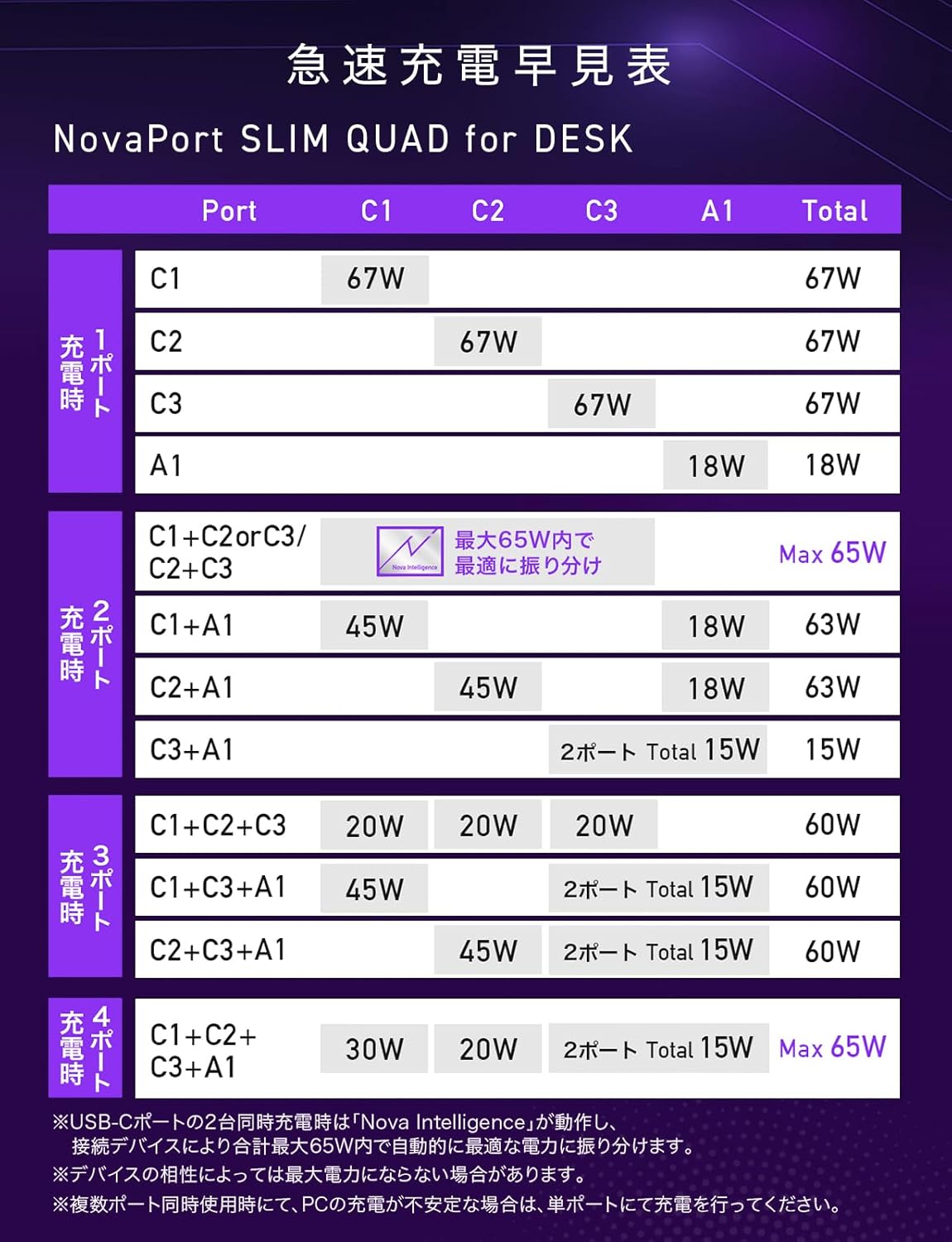
Figure 5: Rapid Charging Quick Reference Table for NovaPort SLIM QUAD, showing power output configurations.
Note: Maximum output may not be achieved for all devices due to compatibility. For PC charging, verify the required voltage and wattage with your PC manufacturer.
5. Maintenance
To ensure the longevity and optimal performance of your NovaPort SLIM QUAD charger, follow these maintenance guidelines:
- Cleaning: Disconnect the charger from the power outlet and all devices before cleaning. Use a soft, dry cloth to wipe the surface. Do not use liquid cleaners or aerosols.
- Storage: Store the charger in a cool, dry place away from direct sunlight and extreme temperatures.
- Anti-slip Base: The charger features an anti-slip silicone base to prevent accidental movement and protect your desk surface.
- Scratch-Resistant Finish: The surface material has a textured finish designed to resist minor scratches, helping to maintain its appearance over time.

Figure 6: The anti-slip silicone base ensures stability and protects surfaces.
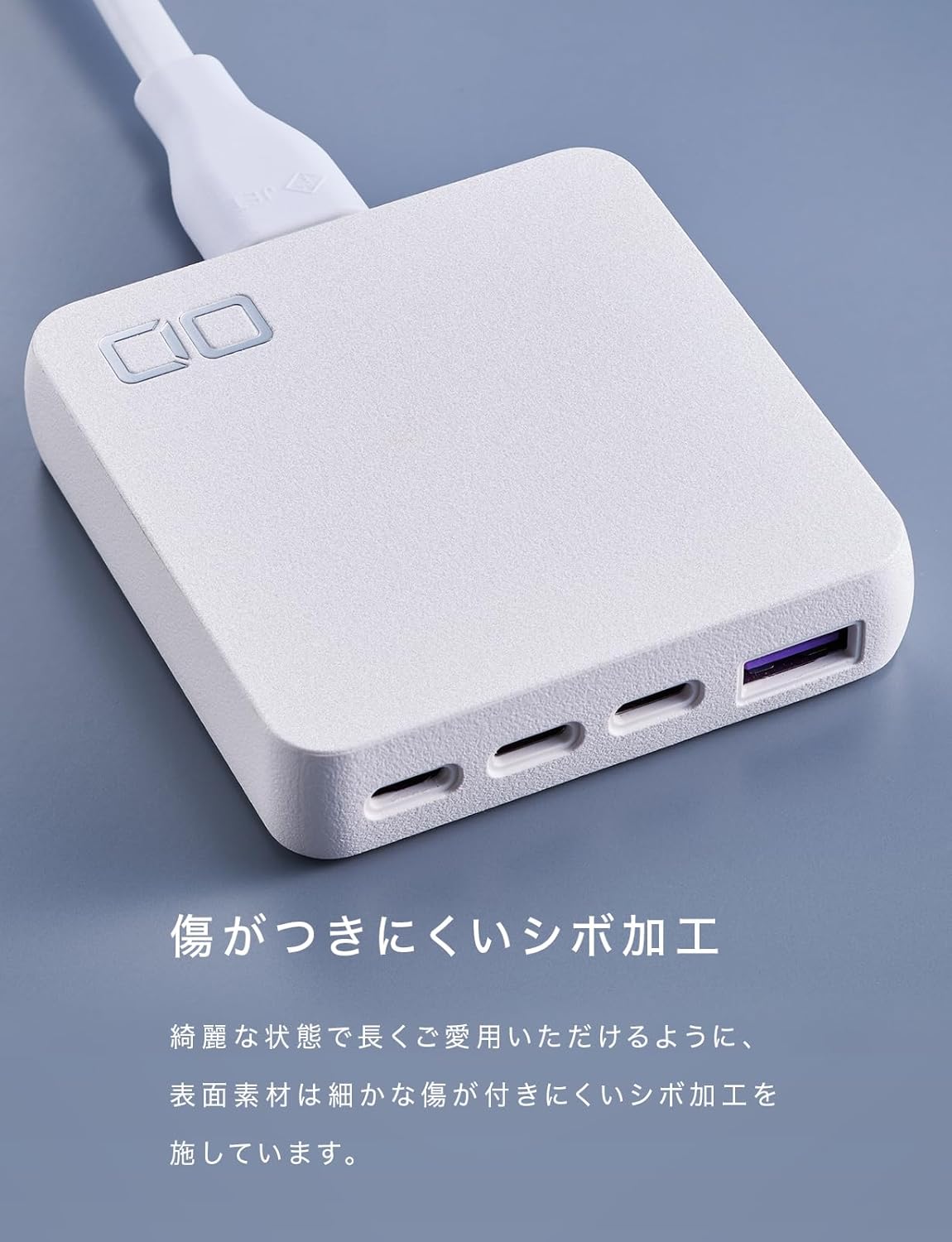
Figure 7: The textured finish helps prevent scratches and maintain the charger's aesthetic.
6. Troubleshooting
If you encounter issues with your NovaPort SLIM QUAD, refer to the following common problems and solutions:
- Device not charging or charging slowly:
- Ensure the charger is properly connected to a power outlet.
- Check that the charging cable is securely connected to both the charger and your device.
- Verify that your device and cable support the charging standards (PD3.0, QC4.0+, PPS) and power output of the charger.
- If charging multiple devices, the power is distributed. For maximum speed on a single device, try charging it alone.
- Charger feels warm:
- It is normal for the charger to become warm during operation, especially when charging multiple devices or high-power devices like laptops.
- Ensure the charger has adequate ventilation and is not covered.
- The NovaSafety2.0 technology monitors product temperature and automatically adjusts power to prevent overheating.
- Power output fluctuates or devices disconnect briefly when a new device is connected:
- This is a normal behavior for multi-port chargers with intelligent power distribution (NovaIntelligence). When a new device is connected, the charger performs a 're-handshake' to re-evaluate and redistribute power optimally among all connected devices. This may cause a brief interruption in charging for other devices.
- PC charging is unstable with multiple devices:
- If you experience unstable charging for your laptop when other devices are also connected, try charging the laptop on a single, dedicated USB-C port for optimal performance.
7. Specifications
Below are the detailed technical specifications for the CIO NovaPort SLIM QUAD for DESK 67W charger.

Figure 8: Detailed product specifications.
| Feature | Detail |
|---|---|
| Model Number | CIO-G67W3C1AD-S |
| Input | 100-240VAC, 50/60Hz, 1.5A |
| USB Ports | 3 x USB Type-C, 1 x USB Type-A (Total 4 ports) |
| USB-C Output (C1/C2/C3) | 5V=3A / 9V=3A / 12V=3A / 15V=3A / 20V=3.35A (Max 67W) PPS:5-11V=5A |
| USB-A Output | 5V=3A / 9V=2A / 12V=1.5A (Max 18W) |
| Multi-Port Output (Example) | USB-(C1+C2/C1+C3/C2+C3): 30W+30W or 45W+20W or 20W+45W (Max 65W) USB-(C1+A/C2+A): 45W+18W (Max 63W) USB-(C1+C2+C3): 20W+20W+20W (Max 60W) USB-(C1+C2+A): 20W+20W+18W (Max 58W) USB-(C1/C2+(C3+A)): 45W+15W (Max 60W) USB-(C3+A): 5V=3A (Max 15W) USB-(C1+C2+(C3+A)): 30W+20W+15W (Max 65W) |
| Supported Fast Charging | PD3.0 / QC4.0+ / PPS |
| Dimensions | Approx. 70 x 72 x 16.8 mm |
| Weight | Approx. 136 g |
| Included Cable Length | 1.5 m |
| Included Cable Weight | Approx. 100 g |
| Color | White (This variant) |
| Features | Multi-device charging, Lightweight design, High-speed charging, NovaIntelligence, NovaSafety2.0 |
8. Warranty & Support
For warranty information and customer support, please refer to the documentation included with your product or visit the official CIO website. The included accessories are an instruction manual (Japanese/English) and a 1.5m power cord.
Contact information for support can typically be found on the manufacturer's website or on the product packaging.

