
1. Introduction
Thank you for choosing the Togo POWER A2000 Portable Power Station. This device is designed to provide reliable power for various applications, including emergency backup, outdoor activities, and home use. Please read this manual thoroughly before operating the unit to ensure safe and optimal performance. Keep this manual for future reference.
2. Safety Instructions
Observe the following safety precautions to prevent injury or damage to the unit:
- Do not disassemble, repair, or modify the unit.
- Do not expose the unit to fire or extreme temperatures.
- Avoid contact with water or other liquids.
- Keep out of reach of children and pets.
- Use only approved accessories and charging cables.
- Ensure proper ventilation during use and charging.
- Do not block the ventilation openings.
- If the unit emits smoke, odor, or unusual noise, discontinue use immediately and contact customer support.
3. Package Contents
Verify that all items are included in your package:
- 1x Togo POWER ADVANCE2000 Portable Power Station
- 1x AC Charging Cable
- 1x Anderson to Car Charger Cable
- 1x User Manual
4. Product Overview
The Togo POWER A2000 features a robust design with multiple input and output options. It includes a clear LCD display for monitoring status and integrated safety features.

Figure 4.1: Front view of the Togo POWER A2000 Portable Power Station, showing the LCD display, AC outlets, USB ports, and control buttons.
4.1 Key Features
- High Capacity: 1799Wh LiFePO4 battery (44.4V/40.5Ah).
- Powerful Output: 2000W AC output (4000W surge).
- Multiple Output Ports: 3 AC outlets, 2 USB-C (Max 120W), 2 USB-A (Max 36W), 2 DC ports, 1 Cigarette Lighter Output.
- Wireless Charging: Built-in 10W wireless charging pad.
- LED Flashlight: Integrated LED light with SOS mode.
- EPS Function: Uninterruptible Power Supply (EPS) mode with 10ms switchover time.
- ECO Mode: Automatic power cut-off after 1 hour of no load to save energy.
- Advanced Battery Management System (BMS): Monitors voltage, current, and temperature for protection.
- Parallel Connection: Supports connecting two units for increased capacity and output.

Figure 4.2: The Togo POWER A2000 powering various electronic devices simultaneously.

Figure 4.3: Detailed view of the wireless charging pad, fast charging capability, SOS flashlight, and cooling vents.
5. Setup
5.1 Initial Charging
Before first use, fully charge the Togo POWER A2000. Connect the provided AC charging cable to the AC input port on the power station and then to a wall outlet. The LCD display will show the charging status. A full charge typically takes approximately 1.5 hours.
5.2 Understanding the LCD Display
The LCD screen provides real-time information:
- Battery Level Indicator
- Estimated Charging Time
- Input/Output Wattage
- Remaining Runtime
- Temperature Alerts
- Low-Battery Warnings
6. Operating Instructions
6.1 Powering On/Off
Press and hold the main power button for a few seconds to turn the unit on or off. The LCD display will illuminate upon activation.
6.2 Using AC Outlets
Press the AC power button to activate the AC outlets. Plug your devices into the 120V/60Hz AC ports. Ensure the total wattage of connected devices does not exceed 2000W (4000W surge).
6.3 Using DC and USB Ports
Press the DC power button to activate the DC and USB ports. Connect your devices to the appropriate USB-A, USB-C, DC, or Cigarette Lighter ports. The wireless charging pad is also activated with the DC power button.
6.4 LED Flashlight and SOS Mode
Press the LED light button to turn on the flashlight. Press again to cycle through brightness levels. To activate SOS mode, press and hold the LED light button for more than 3 seconds.
6.5 EPS (Emergency Power Supply) Mode
When the power station is connected to a main power supply and has devices plugged into its AC outlets, it can function as an EPS. In the event of a power outage, the unit will automatically switch to battery power within 10 milliseconds, providing an uninterrupted power supply to connected devices.

Figure 6.1: The EPS feature provides seamless power backup for essential appliances.
6.6 ECO Mode
The ECO mode is designed to conserve energy. When activated, the unit will automatically shut down after 1 hour of no load (no devices drawing power). This prevents unnecessary battery drain. To disable ECO mode for continuous power to sensitive devices (e.g., CPAP machines, refrigerators), press the ECO button.

Figure 6.2: Explanation of ECO mode functionality.
6.7 Parallel Connection
The Togo POWER A2000 supports parallel connection, allowing two units to be linked together to double the capacity and output. Refer to the separate parallel connection cable manual for detailed instructions on how to set up this configuration.
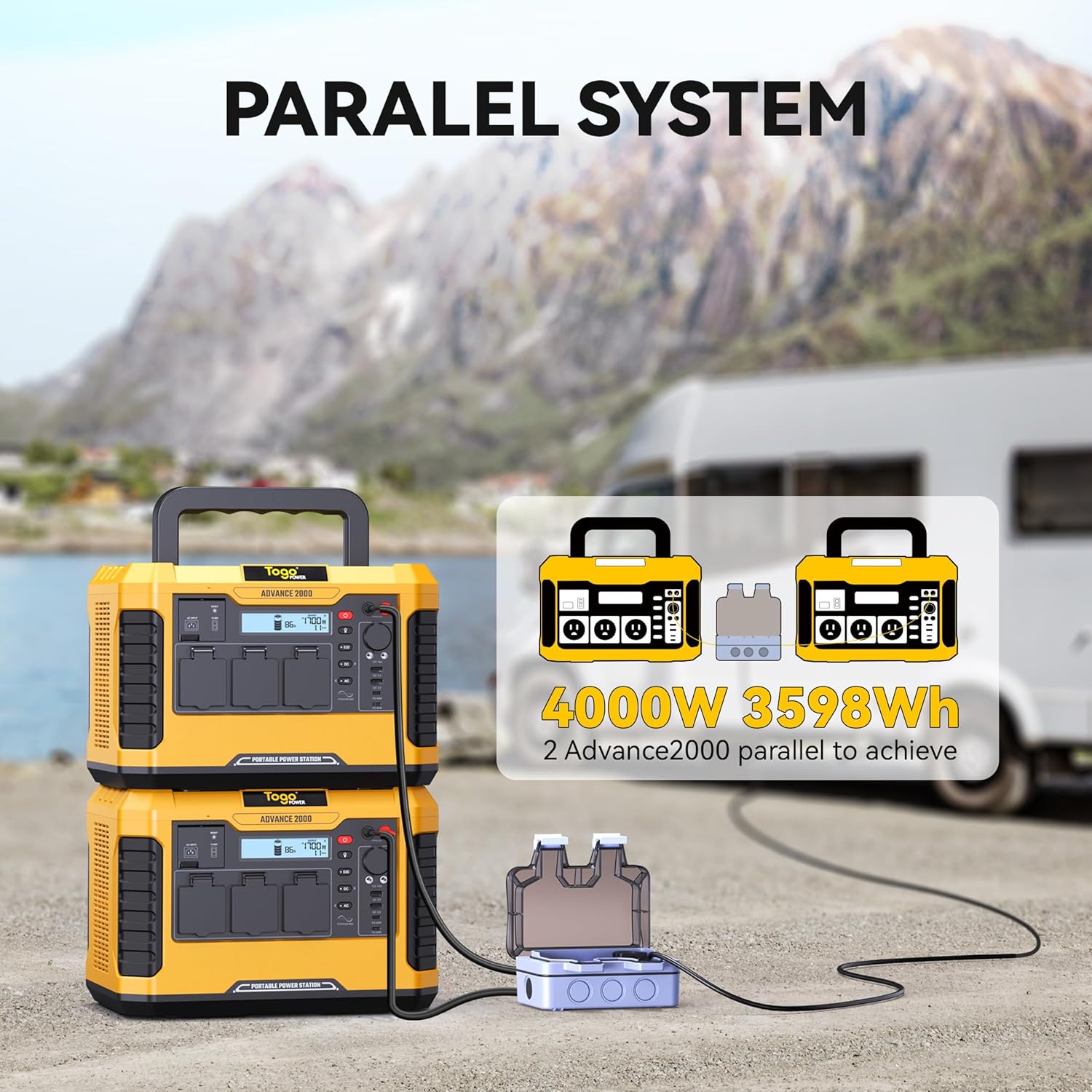
Figure 6.3: Two Togo POWER A2000 units connected in parallel.
7. Charging Methods
The Togo POWER A2000 can be charged using three primary methods:
- AC Wall Charger: Connect the provided AC cable to a standard wall outlet. This method offers fast charging, reaching 100% in approximately 1.5 hours.
- Car Charger: Use the Anderson to Car Charger Cable to charge the unit from your vehicle's 12V car port.
- Solar Panel: Connect compatible solar panels (12-60V, 800W max) to the solar input port. The built-in MPPT controller optimizes solar charging efficiency.

Figure 7.1: Illustration of the three available charging methods: Car Charger, AC Charger, and Solar Charger.
8. Maintenance
8.1 Storage
- Store the unit in a cool, dry place, away from direct sunlight and heat sources.
- For long-term storage, charge the unit to 50-80% every 3-6 months to prolong battery life.
8.2 Cleaning
- Use a dry, soft cloth to clean the exterior of the unit.
- Do not use abrasive cleaners or solvents.
- Keep the ventilation openings free of dust and debris.
8.3 Battery Care
The Togo POWER A2000 uses a LiFePO4 battery, known for its long cycle life. To maximize battery longevity, avoid fully discharging the unit frequently. Recharge promptly after use.
9. Troubleshooting
If you encounter issues with your Togo POWER A2000, refer to the following common problems and solutions:
| Problem | Possible Cause | Solution |
|---|---|---|
| Unit does not turn on | Battery is completely discharged; Power button not pressed correctly. | Charge the unit; Press and hold the power button for a few seconds. |
| AC outlets not working | AC output not enabled; Overload protection activated; Device wattage exceeds limit. | Press the AC power button; Reduce the load; Check device wattage. |
| Unit not charging | Charging cable not connected properly; Charger malfunction; Input source issue. | Ensure cables are securely connected; Try a different charging method/outlet; Contact support if charger is faulty. |
| LCD display shows error code/warning | Over-temperature, low battery, or other system alerts. | Refer to the specific error code in the full manual (if available) or contact customer support. Allow unit to cool down if temperature warning. |
If the problem persists after attempting these solutions, please contact Togo POWER customer support.
10. Specifications
| Specification | Detail |
|---|---|
| Brand | Togo POWER |
| Model | ADVANCE2000 |
| Battery Type | LiFePO4 |
| Capacity | 1799Wh |
| AC Output | 2000W (4000W Peak), 120V/60Hz |
| USB-C Output | 2 ports, Max 120W total |
| USB-A Output | 2 ports, Max 36W total |
| DC Output | 2 ports |
| Cigarette Lighter Output | 1 port |
| Wireless Charging | 10W |
| AC Input | 100-240V |
| Solar Input | 12-60V, 800W Max |
| Dimensions (L x W x H) | 13.78" x 10.43" x 9.45" |
| Weight | 31.1 lbs (14.1 kg) |
| Special Features | Digital Display, Lightweight, Overload Protection, Portable, Super Quiet, EPS, ECO Mode |
11. Warranty and Support
Togo POWER offers a 24-month worry-free assurance for the ADVANCE2000 Portable Power Station, along with friendly lifetime customer support.
11.1 Contact Information
For technical assistance, warranty claims, or general inquiries, please contact Togo POWER customer support through the official website or your purchase platform. Please have your model number (ADVANCE2000) and purchase date available when contacting support.


