
1. Introduction
Thank you for choosing the Kuulaa Qi2 Certified 15W Magnetic Power Bank. This device is designed to provide convenient and fast charging for your compatible mobile devices, featuring both wireless and wired charging capabilities. Please read this manual carefully before use to ensure optimal performance and safety.
Package Contents:
- 1 x Kuulaa Qi2 Magnetic Power Bank (Model YC628)
- 1 x USB-C to USB-C Charging Cable
- 1 x User Manual
2. Safety Information
To prevent damage to the product or injury to yourself and others, please observe the following safety precautions:
- Do not expose the power bank to extreme temperatures, direct sunlight, or fire.
- Do not disassemble, modify, or repair the device.
- Keep the power bank away from water and other liquids.
- Avoid dropping or subjecting the device to strong impacts.
- Use only certified charging cables and adapters.
- Keep out of reach of children.
- If the power bank swells, emits an odor, or becomes excessively hot, discontinue use immediately.
3. Product Overview
The Kuulaa Qi2 Magnetic Power Bank features a slim design and a digital display for battery percentage. It supports both wireless and wired charging.

Image: The Kuulaa Qi2 Magnetic Power Bank, highlighting its compact size and digital battery indicator. A hand holds the power bank to demonstrate its slim profile.
4. Setup
4.1 Initial Charging of the Power Bank
Before first use, fully charge your Kuulaa Qi2 Magnetic Power Bank. Connect the included USB-C cable to the power bank's USB-C port and the other end to a compatible USB-C wall adapter (not included). The digital display will show the charging progress, with the rightmost digit blinking until 100% is reached.

Image: The power bank connected to a wall adapter via a USB-C cable, illustrating the recharging process. The display shows '100' indicating a full charge.
4.2 Checking Battery Level
Press the power button briefly to activate the digital display, which shows the remaining battery percentage. The display will turn off automatically after a few seconds to conserve power.
5. Operating Instructions
5.1 Wireless Charging (MagSafe)
This power bank is Qi2 certified and provides up to 15W wireless charging. For optimal magnetic attachment and charging efficiency, ensure your device is compatible with MagSafe technology (iPhone 12 series and newer) or uses a MagSafe-compatible case.
- Align the power bank with the back of your compatible iPhone. The strong 12N magnetic force will securely attach the power bank.
- Charging will begin automatically. The power bank's display may show charging indicators.
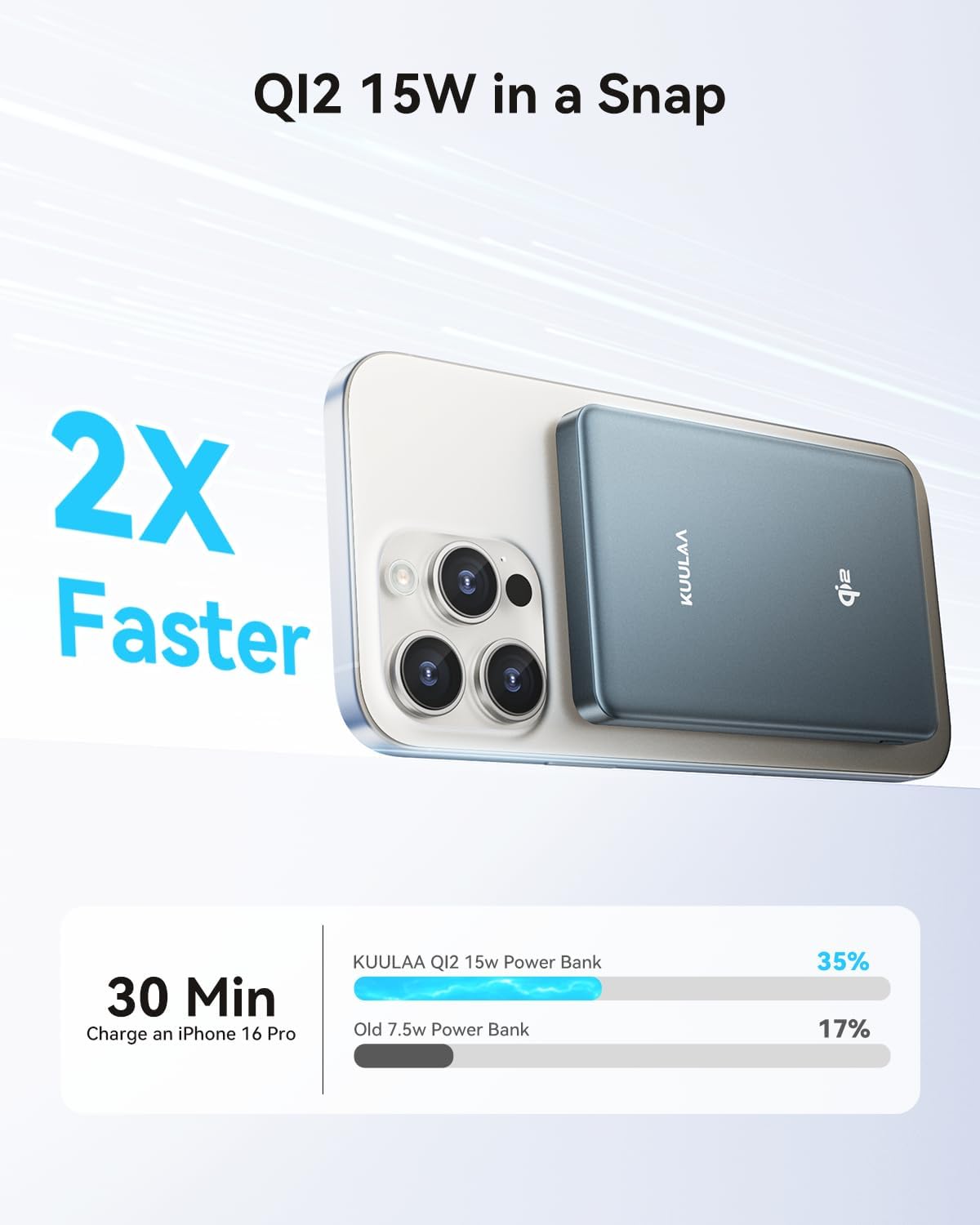
Image: The Kuulaa Power Bank magnetically attached to the back of an iPhone 16 Pro, demonstrating 15W Qi2 wireless charging. A comparison chart shows 2X faster charging than older 7.5W power banks.

Image: An illustration demonstrating the 12N strong magnetic force of the power bank, capable of holding a weight equivalent to approximately 6.5 iPhone 15 Pro devices.
5.2 Wired Charging (USB-C)
The power bank features a USB-C port for fast wired charging, delivering up to 20W output.
- Connect one end of the USB-C cable to the power bank's USB-C port.
- Connect the other end of the USB-C cable to your device's charging port.
- Charging will commence automatically.

Image: The Kuulaa Power Bank connected via a USB-C cable to an iPhone, illustrating 20W Power Delivery (PD) wired charging.
5.3 Compatibility
This power bank is compatible with:
- Wireless Charging: iPhone 12-16 series (best experience with MagSafe cases), AirPods 3/Pro2.
- Wired Charging (USB-C Port): iPhone SE/12/13/14/15/16 Series, iPad Air/Pro Series (USB-C Port), Galaxy S24 Ultra/S24+/S24, and other USB-C compatible devices.

Image: A visual guide showing compatibility with various iPhone models (12-16 series) and AirPods for wireless charging, and a distinction between magnetic and non-magnetic cases.
6. Maintenance
6.1 Cleaning
Wipe the power bank with a soft, dry cloth. Do not use harsh chemicals or abrasive materials.
6.2 Storage
Store the power bank in a cool, dry place away from direct sunlight and extreme temperatures. For long-term storage, it is recommended to charge the power bank to approximately 50-75% every three months to maintain battery health.
7. Troubleshooting
- Power bank not charging: Ensure the USB-C cable is securely connected to both the power bank and the wall adapter. Verify the wall adapter is functioning correctly.
- Device not charging wirelessly: Ensure your device is MagSafe compatible or using a MagSafe-compatible case. Check for any obstructions between the power bank and your device.
- Device not charging via USB-C: Ensure the USB-C cable is properly connected to both the power bank and your device. Try a different USB-C cable if available.
- Slow charging: Ensure you are using a compatible fast-charging wall adapter for recharging the power bank. For device charging, ensure your device supports the charging speeds provided by the power bank.
- Inaccurate battery percentage display: If the battery percentage drops suddenly, fully charge the power bank to 100% and then discharge it completely. Repeat this cycle once or twice to recalibrate the battery meter.
- Power bank gets warm during use: It is normal for the power bank to generate some heat during charging or discharging. If it becomes excessively hot, discontinue use and contact support.
8. Specifications
| Model Number | YC628 |
| Battery Capacity | 10000mAh |
| Wireless Output | Up to 15W (Qi2 Certified) |
| Wired Output (USB-C) | Up to 20W |
| Input (USB-C) | Up to 18W |
| Product Dimensions | 3.5 x 1 x 2.8 inches (8.9 x 2.5 x 7.1 cm) |
| Item Weight | 7.1 ounces (201 grams) |
| Battery Type | Lithium Polymer |
| Special Features | Wireless Charging, Qi2, Power Display, MagSafe, Magnetic |

Image: The power bank highlighting its 10000mAh capacity, capable of charging an iPhone 16 approximately 1.8 times and an iPhone 16 Pro Max 1.3 times. It also indicates airline approval.
9. Warranty and Support
This Kuulaa product comes with a 24-month warranty from the date of purchase. This warranty covers manufacturing defects and workmanship under normal use. It does not cover damage caused by misuse, accidents, unauthorized modifications, or natural disasters.
For warranty claims, technical support, or any questions regarding your product, please contact Kuulaa customer service through the retailer where you purchased the product or visit the official Kuulaa website for contact information.


