
1. Introduction and Overview
The Garmin Forerunner 970 is a premium GPS running and triathlon smartwatch designed for performance-driven athletes. It features a vibrant AMOLED display, a durable sapphire lens, and a lightweight titanium bezel. This smartwatch is equipped with a built-in LED flashlight for enhanced visibility during low-light conditions. It offers advanced metrics to understand overall energy efficiency, running tolerance, and step speed loss (requires HRM 600 monitor, sold separately). With multi-band GPS and full-color, built-in maps, the Forerunner 970 ensures you stay on track during training. It boasts up to 15 days of battery life in smartwatch mode and includes a built-in speaker and microphone for calls when paired with a smartphone.

Image 1.1: The Garmin Forerunner 970 Smartwatch, showcasing its vibrant display and sleek design.
2. Key Features
- AMOLED Touchscreen Display: Brightest display with button controls, titanium bezel, and sapphire lens.
- Built-in LED Flashlight: For increased awareness during early morning or late-night activities.
- Extended Battery Life: Up to 15 days in smartwatch mode and up to 26 hours in GPS mode.
- Advanced Running Metrics: Running economy, step speed loss (with HRM 600), and running tolerance.
- Garmin Coach Training Plans: Personalized and adaptive plans for running and triathlon.
- Smart Connectivity: Built-in microphone and speaker for calls and voice assistant interaction (when paired with smartphone).
- Enhanced Navigation: Full-color, built-in maps, multi-band GPS, and dynamic round-trip routing.
- Training Readiness: Score based on sleep quality, recovery, training load, and HRV status.
- ECG App: Records heart rhythm and checks for signs of atrial fibrillation (for users 22+ years, not available in all countries).
- Multisport Auto-transition: Automatically detects sport changes in multisport activities.
- Wrist-based Running Dynamics & Power: Cadence, stride length, ground contact time, and continuous power measurement.
3. Setup
3.1 Initial Charging
Before first use, fully charge your Forerunner 970 using the provided charging cable. Connect the cable to the charging port on the back of the watch and a USB power source.
3.2 Device Pairing and Garmin Connect App
To unlock the full potential of your smartwatch, pair it with your smartphone and download the Garmin Connect app. The app allows you to track, analyze, and share your health and fitness activities, as well as customize watch settings.

Image 3.1: The Garmin Connect app interface, displaying activity data and training readiness.
4. Operating the Device
4.1 Display and Button Controls
The Forerunner 970 features a responsive AMOLED touchscreen display and intuitive button controls. Use the touchscreen for quick navigation and the physical buttons for reliable control during activities, especially when hands are wet or gloved.
4.2 Starting an Activity
From the watch face, press the Start/Stop button (top right) to access the activity list. Select your desired activity (e.g., Run, Bike, Swim) and press Start/Stop again to begin. The watch will acquire GPS signals if it's an outdoor activity.
4.3 Smart Features (Calls, Texts, Voice Assistant)
When paired with your smartphone, the built-in speaker and microphone allow you to make and receive phone calls directly from your wrist. You can also use your smartphone's voice assistant to respond to text messages and control other watch functions.
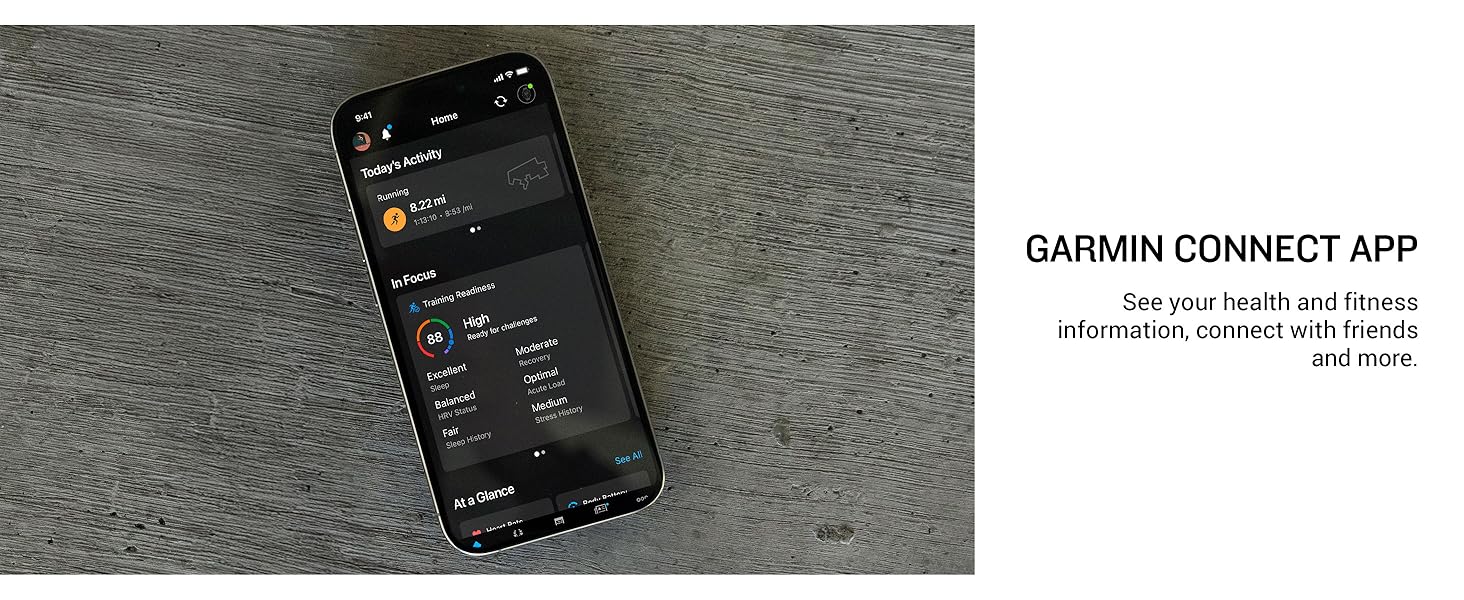
Image 4.1: The Forerunner 970 displaying an incoming call, highlighting its speaker and microphone capabilities.
4.4 Navigation and Mapping
The Forerunner 970 includes full-color, built-in maps and multi-band GPS for superior positioning accuracy. Utilize dynamic round-trip routing to explore new paths with confidence. Simply set your target distance, and the watch will generate a new route.

Image 4.2: The Forerunner 970 displaying full-color mapping for navigation during activities.
4.5 Built-in LED Flashlight
Activate the built-in LED flashlight for increased visibility and safety when running or training in low-light conditions. This feature is easily accessible through the watch controls.

Image 4.3: The Forerunner 970 with its built-in LED flashlight activated, providing illumination.
5. Training and Performance Metrics
5.1 Running Dynamics and Economy
The watch provides wrist-based running dynamics, including cadence, stride length, and ground contact time. Measure your overall energy efficiency with running economy and understand step speed loss (requires HRM 600 monitor, sold separately).

Image 5.1: The Forerunner 970 displaying wrist-based running dynamics, including cadence and stride length.
5.2 Training Readiness and Recovery
Receive a training readiness score based on your sleep quality, recovery, training load, and HRV status. This helps determine if you are prepared for an intense workout or if a rest day is needed. The watch also provides an evening report with reminders for sleep, upcoming workouts, and events.

Image 5.2: The Forerunner 970 showing a training readiness score, indicating optimal recovery.
5.3 Garmin Coach Adaptive Training Plans
Access Garmin Coach training plans that are personalized and adapt based on your performance and recovery. These plans are designed to help you train for events, achieve milestones, or improve overall fitness.

Image 5.3: The Forerunner 970 displaying a Garmin Coach adaptive training plan.
5.4 ECG App
The ECG app can record your heart rhythm and check for signs of atrial fibrillation. This feature is intended for individuals 22 years or older and may not be available in all countries.
5.5 Multisport Profiles
The watch supports multisport auto-transition, automatically detecting sport changes between swimming, biking, and running during triathlon or other multisport activities. This allows you to focus on your performance without manually logging transitions.
6. Maintenance
6.1 Cleaning Your Device
Regularly clean your watch and band to prevent buildup of sweat and other residues. Rinse the watch with fresh water after exposure to chlorine, salt water, sunscreen, cosmetics, alcohol, or other harsh chemicals. Allow the device to dry completely before charging or wearing.
6.2 Charging
To maintain optimal battery performance, ensure the charging contacts are clean and dry before connecting the charging cable. Avoid exposing the charging port to moisture or debris.
7. Troubleshooting
If you encounter any issues with your Forerunner 970, try the following basic troubleshooting steps:
- Restart the Device: A simple restart can often resolve minor software glitches.
- Check for Software Updates: Ensure your watch's software is up to date via the Garmin Connect app or Garmin Express on your computer.
- Verify Bluetooth Connection: For smart features, ensure your watch is properly paired and connected to your smartphone.
- Clean Charging Contacts: If the device is not charging, clean the charging contacts on both the watch and the cable.
- Consult Garmin Support: For persistent issues, visit the official Garmin support website for detailed FAQs and contact options.
8. Specifications
| Feature | Specification |
|---|---|
| Product Dimensions | 9.1 x 9.1 x 9.1 inches |
| Item Weight | 2 Grams (0.071 ounces) |
| Item Model Number | 010-02969-02 |
| Batteries | 1 Nonstandard Battery (included) |
| Standing Screen Display Size | 1.4 Inches |
| Memory Storage Capacity | 32 GB |
| Operating System | Garmin OS |
| Special Features | Activity Tracker, Alarm Clock, GPS, Multisport Tracker, Notifications |
| Battery Capacity | 560 Milliamp Hours |
| Connectivity Technology | Bluetooth, USB |
| Wireless Communication Standard | Bluetooth |
| GPS | Built-in GPS |
| Manufacturer | Garmin |
| Date First Available | May 15, 2025 |
9. What's in the Box
- Forerunner 970 GPS running watch
- Charging Cable
- Documentation
10. Official Product Video
Video 10.1: An official product video from Garmin International showcasing the features and benefits of the Forerunner 970 smartwatch.
11. Warranty and Support
The Garmin Forerunner 970 is manufactured by Garmin. For warranty information, detailed support, and additional resources, please visit the official Garmin website or contact their customer service. Keep your proof of purchase for warranty claims.
For further assistance, please refer to the official Garmin support channels.