
Product Overview
The Kilgone G20 Robot Vacuum and Mop Combo is designed to provide efficient and convenient cleaning for your home. This 2-in-1 device combines powerful vacuuming with effective mopping, making it suitable for various floor types and tackling common household messes, including pet hair. Its smart features allow for easy control via a mobile application or voice commands, integrating seamlessly into modern smart home ecosystems.
Key features include a 230ml water tank for mopping, covering up to 1290 sq ft, and a battery life of up to 120 minutes. The robot is equipped with 2300Pa suction power, a brushless design to prevent hair tangles, and an ultra-thin profile (2.87 inches) to clean under furniture. Smart sensors ensure obstacle avoidance and anti-fall protection, while automatic recharging ensures it is always ready for the next cleaning cycle.
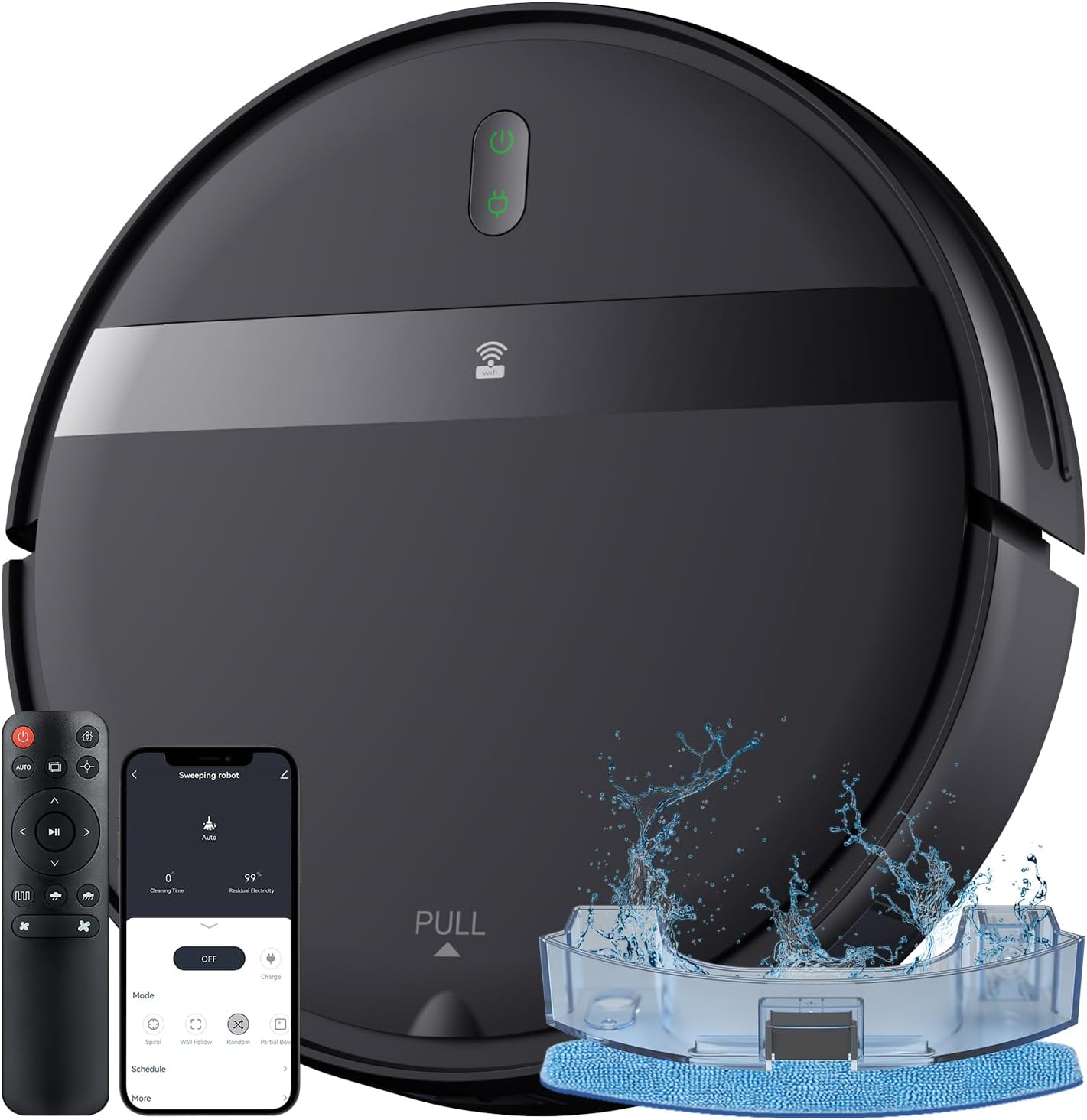
Image: The Kilgone G20 Robot Vacuum and Mop Combo, showcasing its sleek design, remote control, and smartphone application interface.
What's in the Box
Please check the package contents carefully. If any items are missing or damaged, contact customer support.
- 1x Robot Vacuum Cleaner
- 1x Charging Stand
- 4x Side Brushes
- 1x Filter + Sponge Set
- 1x Cleaning Knife
- 1x Remote Control (includes 2x AAA Batteries)
- 1x User Manual
- 1x FQA Guidelines
- 1x Networking Guide

Power Adapter

Side Brushes & Filters

Remote Control

Water Tank

Mop Pads
Setup Guide
1. Charging Dock Placement
Place the charging stand against a wall in an open, uncluttered area. Ensure there is at least 1.6 feet (0.5 meters) of clear space on both sides and 4.9 feet (1.5 meters) in front of the charging stand for optimal navigation and docking.
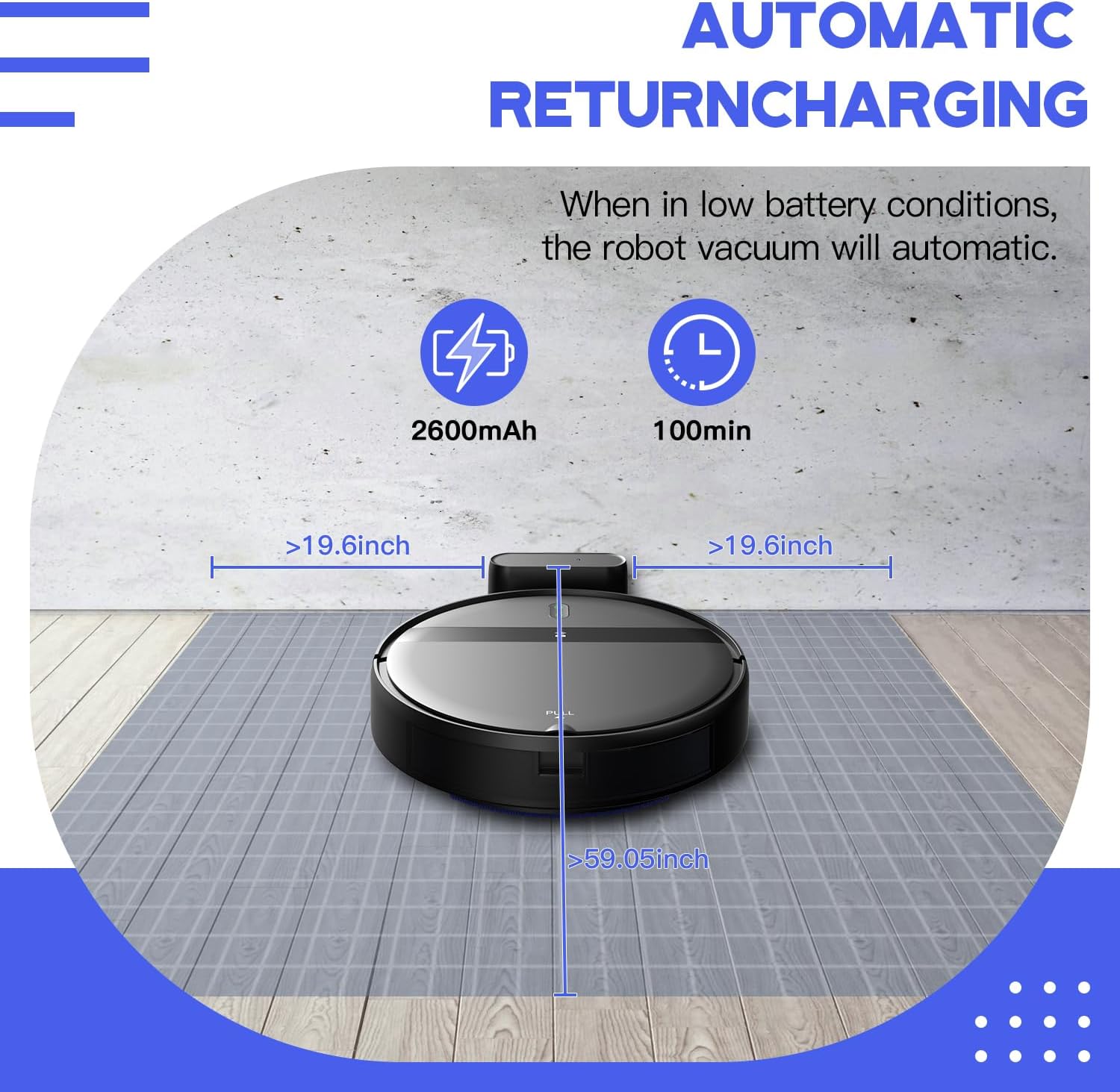
Image: The robot vacuum returning to its charging dock, illustrating proper placement with clear space around it.
2. Initial Charging
Connect the power adapter to the charging stand and plug it into a wall outlet. Place the robot vacuum onto the charging stand. Ensure the charging contacts on the robot align with those on the stand. The indicator light on the robot will show charging status. Fully charge the robot before its first use, which typically takes 4-5 hours.
3. Installing Side Brushes
Attach the side brushes to the corresponding posts on the bottom of the robot by pressing them down until they click into place. Ensure they are securely fastened.
4. App and Voice Control Setup
Download the Kilgone app from your smartphone's app store (Android or iOS). Follow the in-app instructions to connect your robot vacuum to your 2.4GHz Wi-Fi network. Once connected, you can link the robot to Amazon Alexa or Google Assistant for voice control.

Image: A user controlling the robot vacuum via a smartphone app, highlighting compatibility with 2.4GHz Wi-Fi, Google Assistant, and Amazon Alexa.
Operating Instructions
1. Power On/Off
- To power on, press and hold the power button on the robot or use the app/remote control.
- To power off, press and hold the power button until the indicator lights turn off.
2. Cleaning Modes
The Kilgone G20 offers multiple cleaning modes to suit different needs:
- Automatic Cleaning: The robot intelligently navigates and cleans the entire floor area.
- Spot Cleaning: Focuses on a specific dirty area, cleaning in a spiral pattern.
- Edge Cleaning: Cleans along walls and furniture edges.
- Zig-Zag Cleaning: Cleans in a systematic back-and-forth pattern for thorough coverage.
- Schedule Settings: Program specific cleaning times via the app.
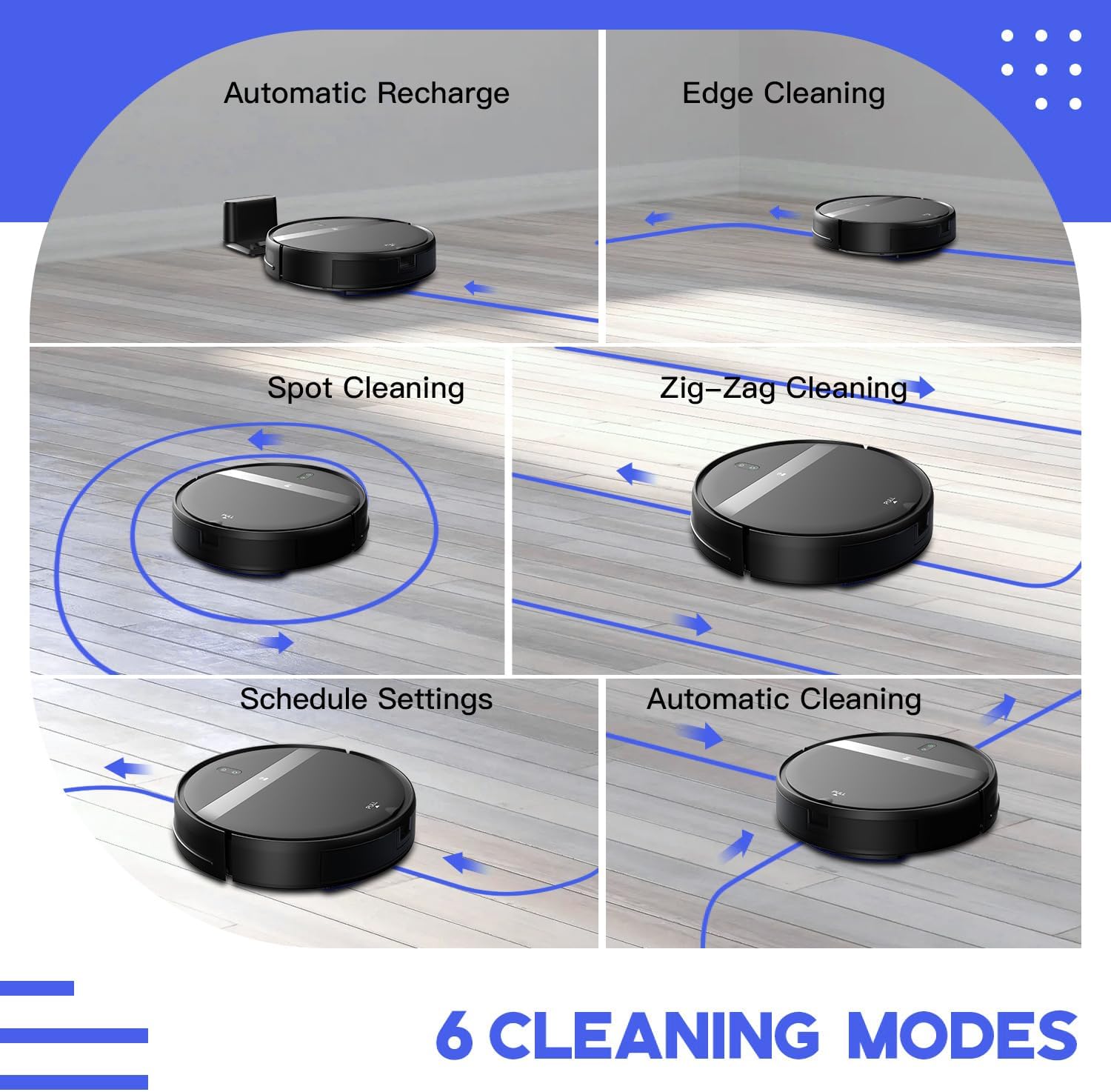
Image: Visual representation of the six available cleaning modes, including automatic recharge, edge cleaning, spot cleaning, zig-zag cleaning, schedule settings, and automatic cleaning.
3. Vacuuming Function
The robot provides powerful 2300Pa suction for effective removal of dust, dirt, and pet hair from various floor surfaces. Ensure the dustbin is empty before starting a vacuuming cycle for optimal performance.

Image: The robot vacuum actively cleaning a floor with debris, illustrating its strong suction capability.
4. Mopping Function
To use the mopping function:
- Remove the water tank from the robot.
- Open the water tank cap and fill it with clean water. Do not use cleaning solutions that are not approved for robot vacuums.
- Securely close the cap and reinsert the water tank into the robot until it clicks into place.
- Attach a clean mop pad to the bottom of the water tank.
- Select the desired water flow level (Low or High) via the mobile app.

Image: An exploded view of the robot vacuum's 2-in-1 vacuum and mopping system, highlighting the 230ml water tank and electronic chip for water flow control.
Maintenance
Regular maintenance ensures optimal performance and extends the lifespan of your Kilgone G20 Robot Vacuum.
1. Emptying the Dustbin
Empty the dustbin after each cleaning cycle or when it is full. Press the release button to remove the dustbin, open it, and discard the collected debris.
2. Cleaning Filters
Remove the filter from the dustbin and tap it gently to remove dust. Rinse the filter under running water if necessary, but ensure it is completely dry before reinserting. Replace filters every 1-3 months depending on usage.
3. Cleaning Side Brushes
Regularly check the side brushes for tangled hair or debris. Use the cleaning knife provided to cut and remove any tangled material. If brushes are worn, replace them with new ones.
4. Cleaning Water Tank and Mop Pad
After mopping, empty any remaining water from the tank and rinse it thoroughly. Remove the mop pad, wash it by hand or machine, and allow it to air dry completely before reuse.
5. Cleaning Sensors and Charging Contacts
Wipe the cliff sensors, anti-collision sensors, and charging contacts on both the robot and the charging stand with a clean, dry cloth. This prevents errors and ensures proper operation.
Troubleshooting
| Problem | Possible Cause | Solution |
|---|---|---|
| Robot does not power on. | Low battery or not charged. | Place the robot on the charging stand and ensure it is fully charged. |
| Robot does not charge. | Charging contacts are dirty or misaligned. | Clean the charging contacts on both the robot and the charging stand. Ensure proper alignment. |
| Robot gets stuck frequently. | Obstacles in the cleaning path (cables, rugs, small objects). | Clear the cleaning area of potential obstacles. Use virtual boundaries if available. |
| Poor cleaning performance. | Dustbin full, filters clogged, or brushes tangled. | Empty the dustbin, clean or replace filters, and remove any tangled hair from brushes. |
| Mopping function not working. | Water tank empty or improperly installed. | Refill the water tank and ensure it is correctly inserted. Check mop pad for proper attachment. |
| App connection issues. | Incorrect Wi-Fi password, 5GHz Wi-Fi, or poor signal. | Ensure you are connecting to a 2.4GHz Wi-Fi network. Verify Wi-Fi password. Restart router and robot. |
Specifications
| Feature | Detail |
|---|---|
| Brand | Kilgone |
| Model Name | G20 Robot Vacuum |
| Special Features | Anti-Collision, Anti-Fall, Low Noise, Scheduling, Wet/Dry Cleaning |
| Color | Black Green |
| Product Dimensions | 11.8"L x 11.8"W x 2.91"H |
| Battery Life | 120 minutes |
| Voltage | 14.4 Volts |
| Water Tank Capacity | 230 Milliliters |
| Control Method | App, Remote, Voice |
| Compatible Devices | Amazon Echo, Google Home, Smartphones |
| Item Weight | 5.51 pounds |
Safety Information
Please read and follow all safety instructions before using your robot vacuum to prevent injury or damage.
- Do not allow children to operate the robot vacuum. Supervise children and pets when the robot is operating.
- Ensure the power adapter is compatible with your local voltage.
- Do not use the robot vacuum on wet surfaces or in areas with standing water.
- Remove any loose cables, small objects, or fragile items from the cleaning path to prevent entanglement or damage.
- Do not block the robot's air vents or exhaust.
- Only use original accessories and replacement parts provided or approved by Kilgone.
- Store the robot vacuum in a cool, dry place when not in use.
Customer Support
For any questions, technical assistance, or warranty inquiries, please contact Kilgone customer support. Refer to the FQA Guidelines and Networking Guide included in your package for additional information.
Please visit the official Kilgone website or refer to your purchase documentation for contact details.


