
1. Introduction
Thank you for choosing the Philips 21W 3000LM Outdoor LED Security Light. This manual provides important information regarding the safe installation, operation, and maintenance of your new security light. Please read these instructions carefully before use and retain them for future reference.
Safety Information:
- Always disconnect power before installation or servicing.
- Installation should be performed by a qualified electrician in accordance with local electrical codes.
- Do not look directly into the LED light source when illuminated.
- Ensure the product is securely mounted to prevent falling.
2. What's in the Box
Please check that all components are present:
- Philips Outdoor LED Security Light (1 unit)
- User Manual (1 copy)
- Screws (for mounting)
3. Product Features
Your Philips security light is designed with advanced features for optimal outdoor illumination and security:
High Brightness and Wide Beam Angle
Emits a cool white light at 5000K, providing 3000 lumens of brightness. The two adjustable heads allow for customizable light distribution over a wide area.

Image: Overview of key product features including durable body, bright light, wired power, adjustable heads, IP54 water resistance, and anti-corrosion.
High Sensitivity PIR Motion Sensor
The PIR sensor detects movement within a range of 0 to 21 meters and an induction angle of 180°. The illumination duration can be set from 1 to 10 minutes.
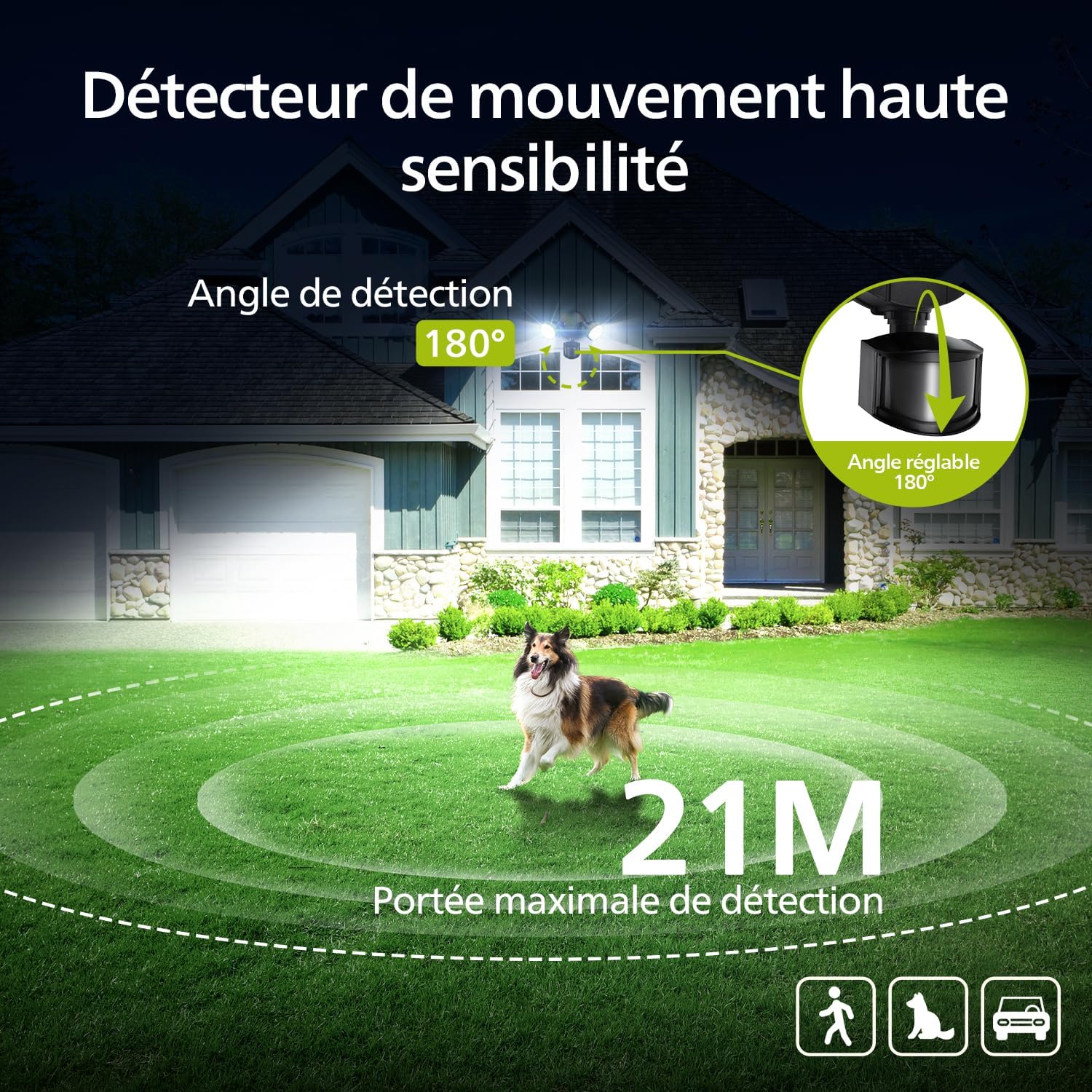
Image: Diagram illustrating the 180-degree detection angle and 21-meter maximum detection range of the motion sensor.
4 Lighting Modes
Choose from Test Mode, Security Mode, Dusk-to-Dawn Mode, and Manual Mode (permanent illumination at 80% brightness for up to 6 hours).

Image: Visual explanation of the four distinct lighting modes: Test, Sensor, Dusk-to-Dawn, and Priority.
Weather Resistant Design (IP54)
Constructed with an aluminum lamp body, tested for corrosion and rust resistance against heavy rain, high humidity, intense sunlight, UV exposure, and extreme temperatures.
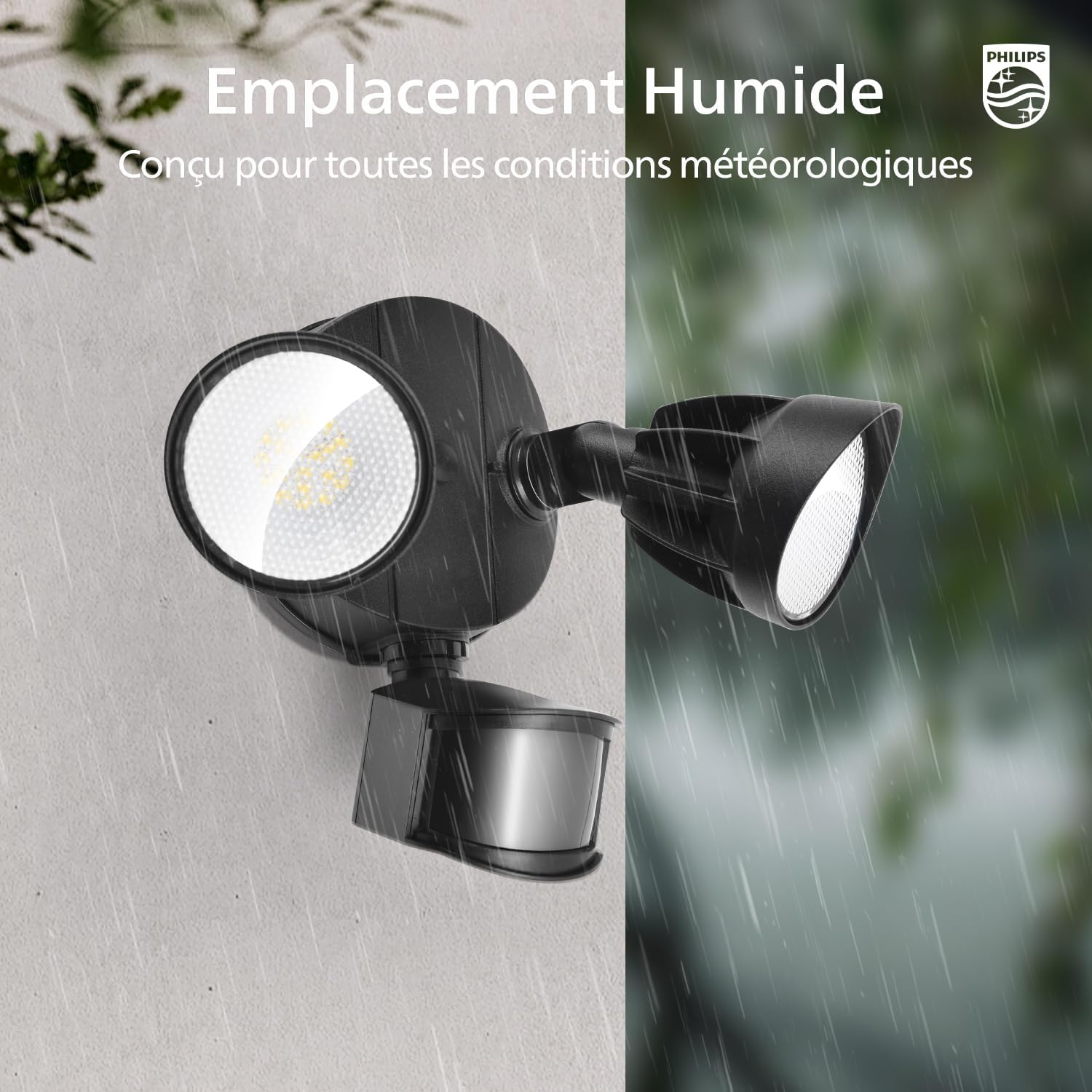
Image: The security light is depicted in both dry and wet environments, highlighting its robust, weather-resistant design for humid locations.
Adjustable Heads
The two light heads are individually adjustable, allowing you to direct light precisely where needed for tailored illumination.

Image: Illustration demonstrating the flexible adjustment of the light heads for precise light direction.
Economical and Energy Efficient
Equipped with integrated LEDs, eliminating the need for bulb replacement and reducing electricity consumption costs.
4. Installation
The security light is pre-assembled for easy installation. All necessary accessories and instructions are included. No complex wiring is required.
Recommended Installation Height: 2.5 meters
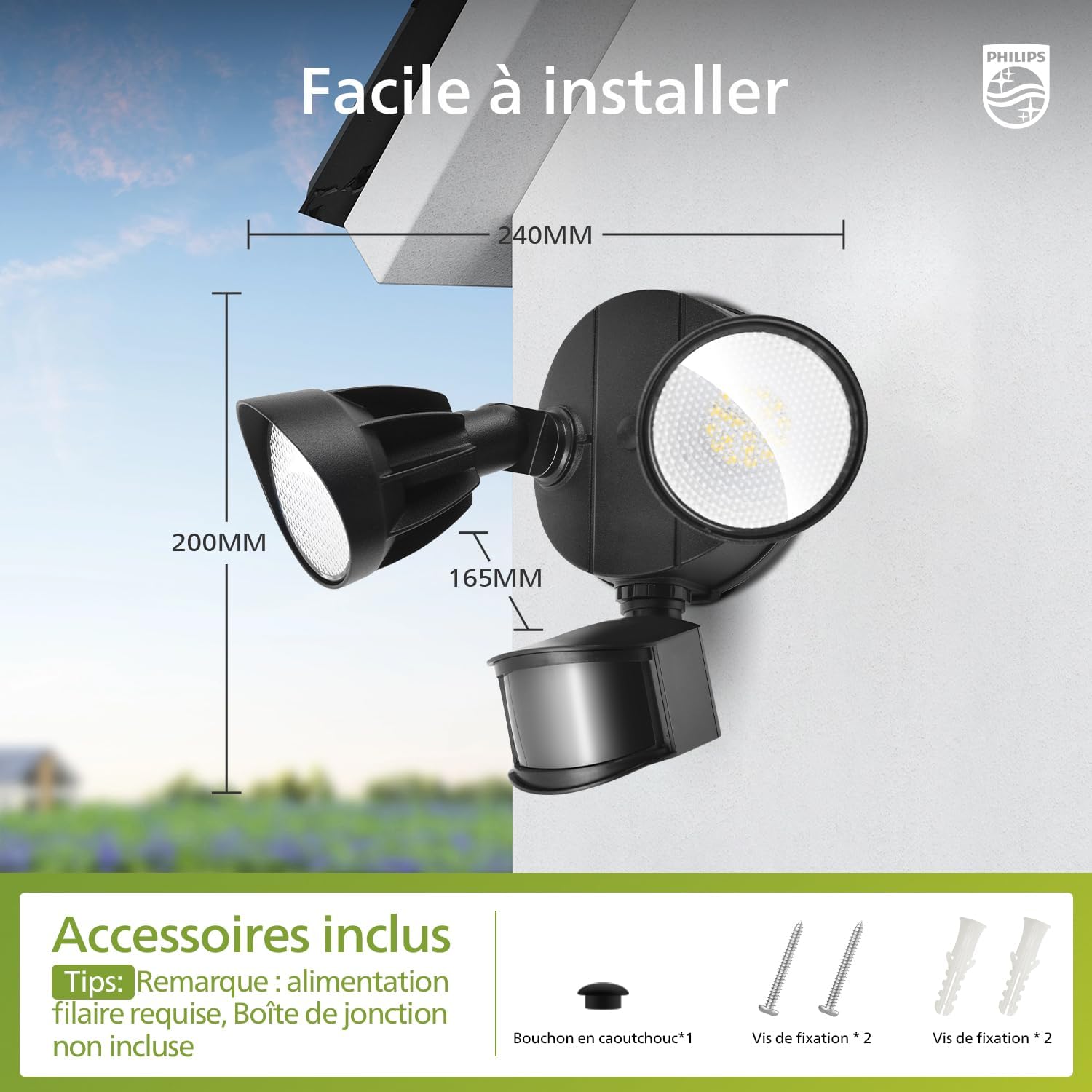
Image: Product dimensions and included accessories for installation.
Mounting Options:
The light supports both wall mounting and soffit mounting.

Image: Examples of soffit mounting and wall mounting. A waterproof seal between the wall and the lamp is recommended for better water resistance. Soffit mounting may slightly reduce detection range.
Installation Steps:

Image: Step-by-step guide for installing the security light.
- Prepare the mounting surface and ensure power is off.
- Separate the mounting base from the light fixture.
- Secure the mounting base to the desired location using the provided screws.
- Connect the electrical wiring (wired power required, junction box not included).
- Attach the light fixture to the mounted base.
- Adjust the light heads and sensor to the desired angles.
5. Operation
The security light offers various modes and adjustable settings for detection range and illumination duration.
Adjusting Detection Range and Illumination Duration:

Image: Controls for adjusting detection range and illumination time.
- DISTANCE: Adjust the dial to set the detection range: L (0-6m), M (0-12m), H (0-21m).
- TIME: Adjust the dial to set the illumination duration after activation: 1 minute, 3 minutes, or 10 minutes.
Lighting Modes:
- Test Mode: Activates day or night. Light turns on for 5 seconds upon motion detection, then turns off. No movement: remains off.
- Security Mode (Sensor Mode): Activates only at night. Light turns on for 1/3/10 minutes upon motion detection, then turns off. No movement: remains off.
- Dusk-to-Dawn Mode: Activates only at night. Automatically turns on at dusk and off at dawn.
- Manual Mode (Priority Mode): Continuous illumination at 80% brightness for up to 6 hours.
Activating/Deactivating Priority Mode:
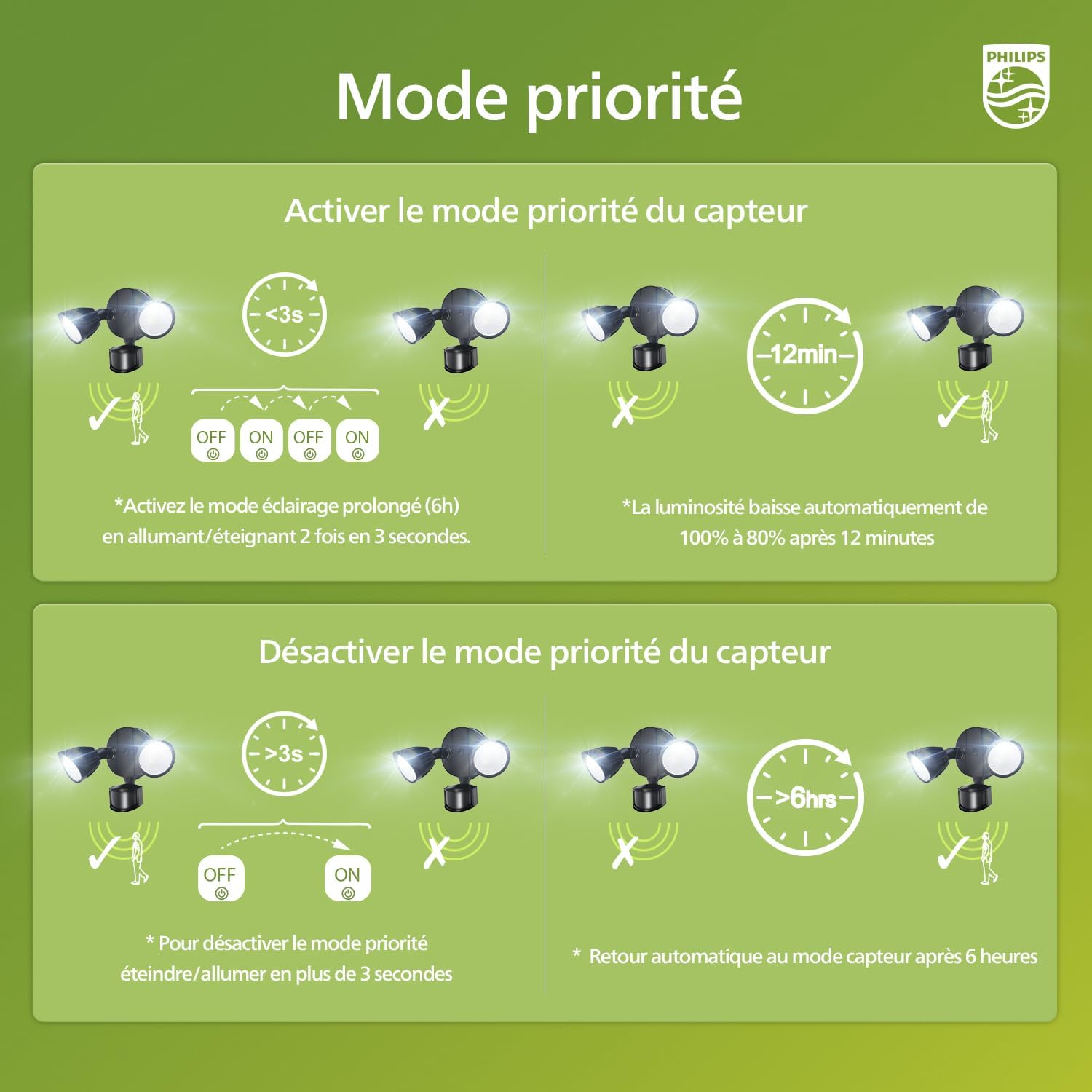
Image: Instructions for activating and deactivating the priority mode.
- To Activate Priority Mode (Prolonged Lighting): Switch the light ON/OFF twice within 3 seconds. The light will stay on at 80% brightness for 6 hours. After 12 minutes, the brightness automatically reduces from 100% to 80%.
- To Deactivate Priority Mode: Switch the light ON/OFF for more than 3 seconds. The light will automatically return to sensor mode after 6 hours.
6. Maintenance
To ensure optimal performance and longevity of your Philips security light, follow these simple maintenance guidelines:
- Cleaning: Periodically wipe the light fixture with a soft, damp cloth to remove dirt and debris. Do not use abrasive cleaners or solvents, as they may damage the finish or electrical components.
- Inspection: Regularly check the mounting hardware for tightness and ensure the light heads and sensor are securely positioned. Inspect the wiring for any signs of wear or damage.
- LEDs: The integrated LEDs are designed for long-term use and do not require replacement. If the light stops functioning, refer to the troubleshooting section or contact customer support.
7. Troubleshooting
If you encounter issues with your Philips security light, please refer to the following common problems and solutions:
| Problem | Possible Cause | Solution |
|---|---|---|
| Light does not turn on at night. | 1. Power supply issue. 2. Sensor settings incorrect. 3. Ambient light too high. | 1. Check power connections and circuit breaker. 2. Ensure sensor is set to a night-only mode (Security or Dusk-to-Dawn). Adjust sensitivity. 3. Relocate the light or adjust sensor angle to avoid interference from other light sources. |
| Light stays on continuously. | 1. Manual/Priority mode activated. 2. Sensor continuously detecting movement. 3. Faulty sensor. | 1. Deactivate Priority Mode as per instructions. 2. Adjust sensor angle or sensitivity to avoid constant detection. 3. Contact customer support if the issue persists. |
| Light flickers or is dim. | 1. Unstable power supply. 2. Loose wiring connection. | 1. Consult an electrician to check power stability. 2. Ensure all wiring connections are secure (power off before checking). |
If the problem persists after trying these solutions, please contact Philips customer support for assistance.
8. Specifications
| Feature | Detail |
|---|---|
| Brand | Philips |
| Model Number | 7601908012 |
| Manufacturer | Signify |
| Color | Black |
| Material | Plastic (Lamp body: Aluminum) |
| Style | Modern |
| Usage | Outdoor (Driveway, Yard, Garage, Garden, Terrace) |
| Power Source | Electric Cable |
| Installation Type | Wall Mount |
| Special Features | Anti-rust, Motion Detector, Foldable, Energy Efficient, Waterproof |
| Control Method | Push Button |
| Bulb Type | LED (Integrated) |
| Number of Bulbs | 60 |
| Voltage | 220 Volts |
| Light Color | Cool White |
| Wattage | 21 Watts |
| Luminous Efficacy | 4200 lm |
| Color Temperature | 5000 Kelvin |
| Max Light Output | 4200 Lumens |
| Waterproof Level | IP54 (Impermeable) |
| Energy Label | D |
| Smart Home Compatibility | Not compatible with smart home systems |
| Country of Origin | China |
9. Warranty and Support
Your Philips security light is covered by a legal guarantee. For detailed information regarding warranty terms and conditions, please refer to the legal guarantee document included with your product or visit the official Philips support website.

Image: Legal Guarantee information for products sold in the European Union.
For more information on your rights, visit: europa.eu/youreurope/guarantees
For technical support or service inquiries, please contact Philips customer service through their official channels.


