
1. Introduction
Thank you for purchasing the XDUOO XD-05 Basic2 Headphone Amplifier DAC. This device is designed to provide high-fidelity audio playback from various digital sources, enhancing your listening experience. It features powerful decoding capabilities, robust headphone driving ability, and a portable design. Please read this manual thoroughly to understand the product's functions and ensure correct operation.
2. Package Contents
Please check the package for the following items:
- XDUOO XD-05 Basic2 Headphone Amplifier DAC Unit
- USB Cable (Type-C to Type-A)
- User Manual (this document)
- Other accessories (may vary by region or package)
If any items are missing or damaged, please contact your retailer or XDUOO customer support.
3. Product Overview
Familiarize yourself with the various parts and controls of your XD-05 Basic2.

Figure 3.1: Front and top view of the XDUOO XD-05 Basic2. Shows the headphone output jack, OLED screen, volume knob, and input selection button.

Figure 3.2: Rear view of the XDUOO XD-05 Basic2. Displays the AUX OUT, USB IN, BAT & EXT switch, POWER button, and DC IN ports.
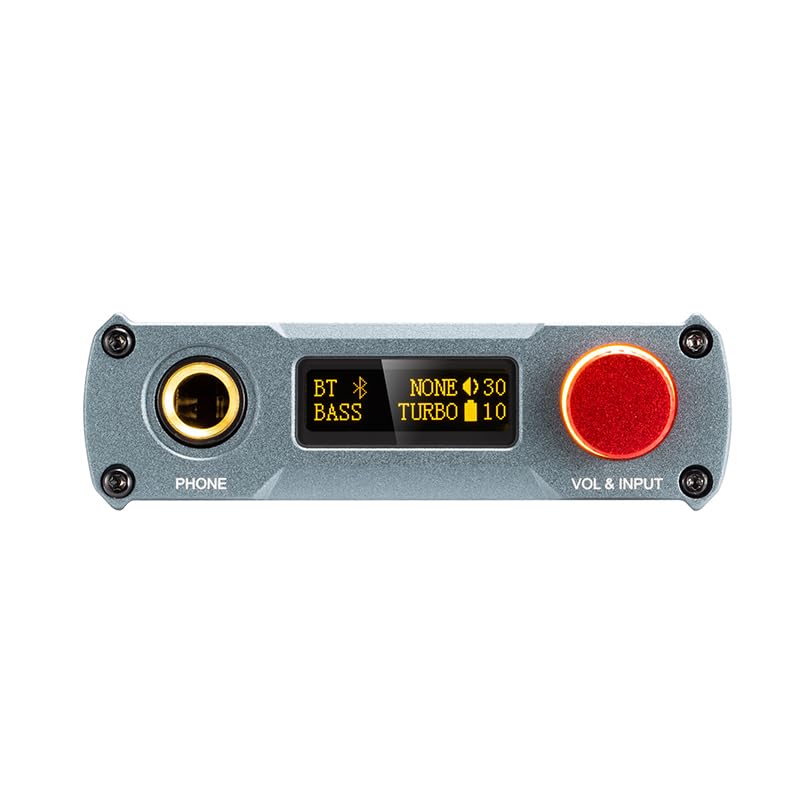
Figure 3.3: Close-up of the front panel, highlighting the 6.35mm headphone output, OLED display, and the red volume/input knob.
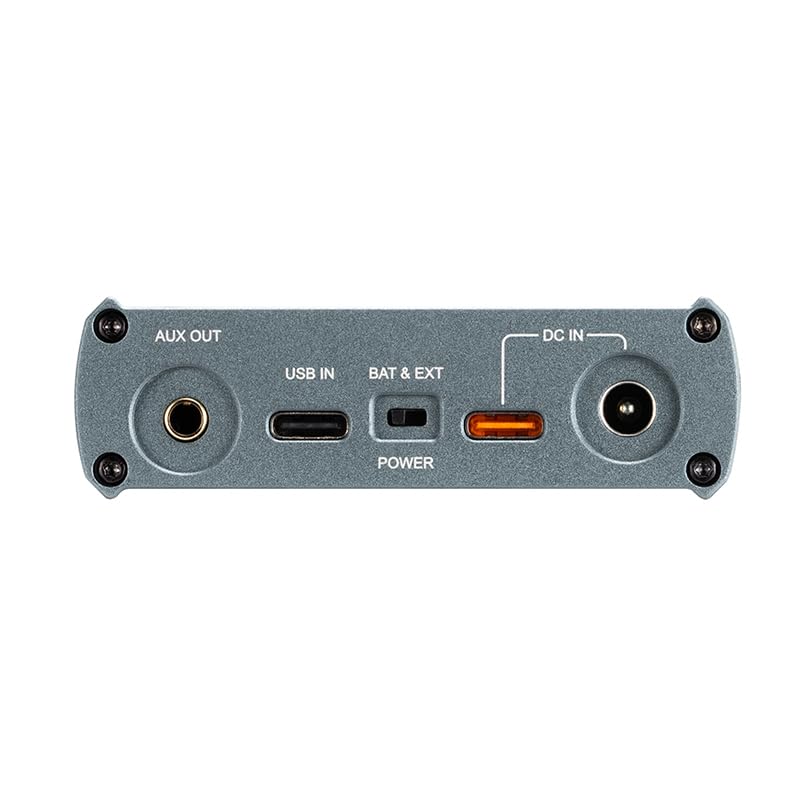
Figure 3.4: Close-up of the rear panel, showing the 3.5mm AUX OUT, USB-C IN, BAT & EXT switch, POWER button, and DC IN port.
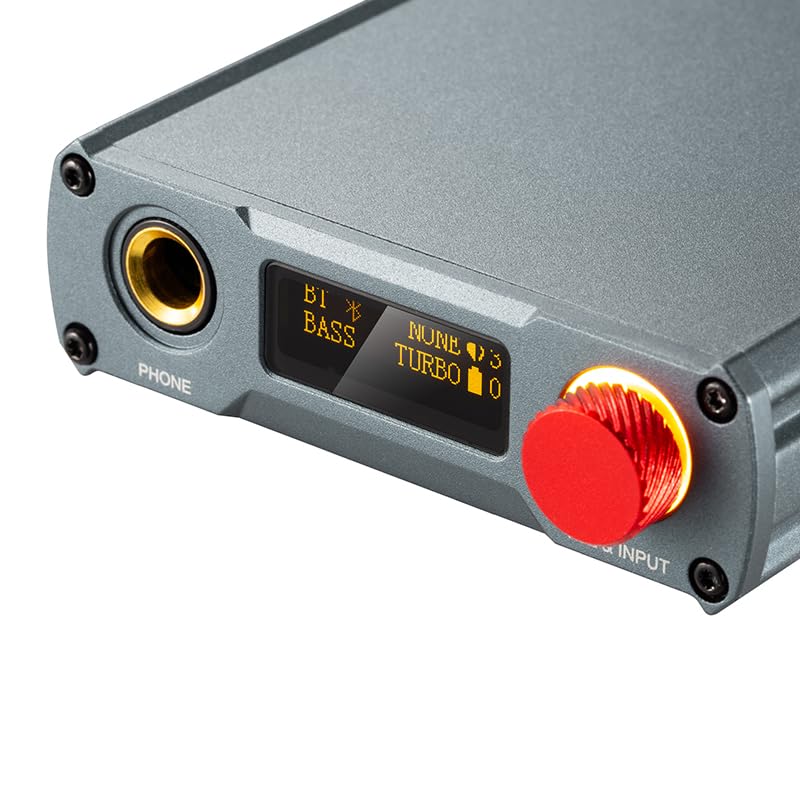
Figure 3.5: Detailed view of the OLED screen displaying current settings such as Bluetooth status, Bass boost, Turbo mode, and volume level.
4. Setup
4.1 Charging the Device
Before first use, fully charge the XD-05 Basic2. Connect the provided USB cable to the USB IN port on the device and to a USB power adapter (not included) or a computer's USB port. The OLED screen will indicate charging status.
- Charging Time: Approximately 3 hours for fast charging, 5 hours for slow charging.
- Battery Life: Approximately 11 hours (USB IN), 15 hours (Bluetooth IN).
4.2 Connecting to Audio Sources
The XD-05 Basic2 supports multiple input methods:
- USB DAC Mode:
Connect the XD-05 Basic2 to your computer, smartphone, or tablet via the USB IN port. The device will function as an external DAC, processing digital audio signals for higher quality output. Ensure your operating system (Windows/Linux/Mac OSX/iOS/Android) is compatible.
- Bluetooth Mode:
Activate Bluetooth on your source device and on the XD-05 Basic2. Pair the devices. The XD-05 Basic2 supports various Bluetooth codecs including SBC, AAC, aptX, aptX_HD, aptX_Adaptive, LDAC, LC3, aptx_Lite, and aptx_AD.
- AUX Output:
The 3.5mm AUX OUT port is for outputting processed audio to another amplifier or active speakers, not for inputting audio to the XD-05 Basic2.
4.3 Connecting Headphones
Connect your headphones to the 6.35mm "PHONE" output jack on the front panel of the XD-05 Basic2.
5. Operating Instructions
5.1 Power On/Off
Press and hold the "POWER" button located on the rear panel to turn the device on or off. The OLED screen will illuminate upon power-on.
5.2 Input Selection
Rotate the "VOL & INPUT" knob on the front panel to cycle through available input sources (e.g., USB, Bluetooth). The selected input will be displayed on the OLED screen.
5.3 Volume Control
Rotate the "VOL & INPUT" knob to adjust the headphone output volume. The volume level will be shown on the OLED screen.
5.4 Gain Adjustment
The XD-05 Basic2 features a gain adjustment function (+0dB/6dB) to match various headphone impedances and sensitivities. Refer to the device's menu or dedicated button (if present, not explicitly mentioned in description) to switch between high and low gain settings. This allows for optimal driving of different headphone types.
5.5 Bass Boost
The device includes a bass boost function (0/+6dB). Activate or deactivate this feature via the device's controls or menu to tailor the sound to your preference. The OLED screen will indicate if Bass boost is active.
5.6 MQA Decoding
The XD-05 Basic2 supports MQA (Master Quality Authenticated) decoding up to 8x unfolding, allowing for playback of high-resolution MQA audio files. When playing MQA content, the device will automatically detect and decode it, displaying relevant information on the screen.
5.7 External Power / Battery Switch
The "BAT & EXT" switch on the rear panel allows you to select between internal battery power or external DC power. Use external DC power for extended listening sessions or when the battery is low.
6. Specifications
Detailed technical specifications for the XDUOO XD-05 Basic2:
| Battery | 3.7V/3000mAh |
| Screen | 0.91 inch OLED |
| Compliant OS | Windows/Linux/Mac OSX/iOS/Android |
| Frequency Response (USB/BT) | 20Hz~20kHz (±0.5dB) |
| Frequency Response (AMP) | 10Hz~80kHz (±0.5dB) |
| Sampling Rate Support (PCM) | 16-32Bit/44.1k-384kHz |
| Sampling Rate Support (DSD) | DSD64-256 |
| Sampling Rate Support (MQA) | 8x |
| Bluetooth (LE Audio) | LC3, aptx_Lite, aptx_AD |
| Bluetooth (Classic Audio) | SBC, AAC, aptX, aptX_HD, aptX_Adaptive (aptX_Low Latency, aptXHigh Quality, aptX_Lossless), LDAC |
| Gain | +0dB/6dB |
| Bass Boost | 0/+6dB |
| Headphone Output Parameters | |
| Output Power | 750mW (32Ω load) |
| THD+N | 0.0006%@1kHz |
| S/N Ratio | 124dB |
| Crosstalk | >74dB |
| AUX Output Parameters | |
| Output Level | 2.0Vrms |
| THD+N | 0.0003%@1kHz |
| SNR | 124dB |
| Crosstalk | ≥107dB |
| Battery Life (USB IN) | 11 hours |
| Battery Life (BT IN) | 15 hours |
| Charging Time (Fast) | 3 hours |
| Charging Time (Slow) | 5 hours |
| Dimensions (L x W x H) | 13.9 x 7.5 x 2.3 cm |
| Weight | 0.30 kg |

Figure 6.1: Image displaying key technical parameters of the XD-05 Basic2.

Figure 6.2: Visual representation of key features including output power, decoding ability, SNR, Bass, Digital Volume, Replaceable Op-amp Chip, Desktop/Portable use, Bluetooth 5.4 LE Audio, and Multiple Audio Inputs.
7. Maintenance
- Cleaning: Use a soft, dry cloth to clean the device. Do not use liquid cleaners or aerosols.
- Storage: Store the device in a cool, dry place away from direct sunlight and extreme temperatures.
- Battery Care: To prolong battery life, avoid fully discharging the battery frequently. Charge the device regularly, even if not in use for extended periods.
- Avoid Impact: Protect the device from drops and impacts, which can damage internal components.
- Water Exposure: Keep the device away from water and moisture.
8. Troubleshooting
| Problem | Possible Cause | Solution |
|---|---|---|
| No power | Battery depleted; Power button not pressed correctly. | Charge the device; Press and hold the power button for a few seconds. |
| No sound from headphones | Headphones not connected properly; Volume too low; Incorrect input selected; Source device not playing audio. | Ensure headphones are fully plugged in; Increase volume; Select the correct input source; Check audio playback on the source device. |
| Poor sound quality / Distortion | Low quality audio source; Incorrect gain setting; Damaged cable. | Use high-quality audio files; Adjust gain setting appropriately for your headphones; Try a different cable. |
| Bluetooth pairing issues | Device not in pairing mode; Out of range; Interference. | Ensure XD-05 Basic2 is in Bluetooth pairing mode; Move devices closer; Avoid sources of strong wireless interference. |
| USB DAC not recognized | Driver issue (Windows); Incorrect USB cable; USB port issue. | For Windows, ensure necessary drivers are installed (usually plug-and-play, but check manufacturer website if issues persist); Try a different USB cable or port. |
9. Warranty and Support
The XDUOO XD-05 Basic2 comes with a standard manufacturer's warranty. Please refer to the warranty card included in your package or visit the official XDUOO website for detailed warranty terms and conditions.
For technical support, service, or inquiries, please contact your local dealer or XDUOO customer service. Contact information can typically be found on the official XDUOO website or in your product documentation.
Manufacturer: XDUOO
Date First Available: May 15, 2025