
1. Introduction
Thank you for choosing the FERIETELF T26 Drone. This user manual provides essential information for the safe operation, setup, and maintenance of your new drone. The T26 is designed for both beginners and experienced users, featuring a 1080P HD camera, extended flight time, and multiple intelligent flight modes. Please read this manual thoroughly before operating the drone to ensure a safe and enjoyable experience.

Image: The FERIETELF T26 Drone in flight, showcasing its sleek design and outdoor usability.
2. Package Contents
Upon opening the package, please verify that all components are present and in good condition. If any items are missing or damaged, contact customer support immediately.
- FERIETELF T26 Drone (1)
- Remote Controller (1)
- Rechargeable Drone Batteries (2)
- Spare Propellers (2 pairs)
- Propeller Protectors (4)
- USB Charging Cable (1)
- Screwdriver (1)
- User Manual (1)

Image: All components included in the FERIETELF T26 Drone package.

Image: Visual representation of the drone and its accessories.
3. Product Features
The FERIETELF T26 Drone is equipped with advanced features for an enhanced flying experience:
- 1080P HD FPV Camera: Provides clear images and live video feed to your smartphone within an 80-meter range. The camera angle is 90° adjustable.
- Extended Flight Time: Two rechargeable batteries offer a total flight time of 20-26 minutes (10-13 minutes per battery). Batteries are easily replaceable and feature over-expansion protection.
- Durable Design: Frosted coating and integrated paddle design enhance stability. High-quality ABS material reduces damage from accidental drops.
- Easy Control Modes: Supports button control, mobile app control, gravitational mode, and voice control.
- Altitude Hold: Automatically hovers stably at a certain height.
- One-Button Functions: One-button take-off, landing, and return for simplified operation.
- Fun Functions: Includes 3D flip, course cruise, gesture photo/video, and left/right split screen.
- Headless Mode: Simplifies control by eliminating the need to adjust the drone's orientation before flight.
- 3-Speed Adjustable Flight Speed: Allows users to choose flight speed based on skill level and environment.
- Low Battery Alarm: Alerts the user when drone or transmitter batteries are low.
- Portable and Foldable: Compact design for easy transport. Folded size: 16x11.5x5.5 cm.

Image: Overview of the drone's key features and functions.
4. Setup Guide
4.1 Charging the Batteries
The drone comes with two rechargeable Lithium Ion batteries. Use the provided USB charging cable to charge them. The battery pack is designed with charge over-expansion protection for safety. Charging time is approximately 2 hours per battery.
4.2 Battery Installation
Drone Battery: Insert the fully charged battery into the designated slot on the drone until it clicks into place.
Remote Controller Batteries: The remote controller requires 3x AAA batteries (not included). Open the battery compartment on the back of the controller and insert the batteries, ensuring correct polarity.

Image: The compact size of the drone and its modular batteries.
4.3 Propeller Installation and Protection
Ensure propellers are securely attached. For added protection, especially for beginners, install the propeller protectors onto each arm of the drone. These guards help reduce damage during accidental collisions.

Image: Propeller guards provide enhanced protection for the drone and user.
4.4 Controller and App Setup
1. Power on the drone and the remote controller.
2. Download the dedicated smartphone app for the T26 drone (refer to the QR code in the quick start guide or search your app store).
3. Connect your smartphone to the drone's Wi-Fi network (usually named 'FERIETELF-T26' or similar).
4. Open the app to view the live FPV feed and access additional control options.

Image: Detailed layout of the remote controller functions.
5. Operating the Drone
5.1 Pre-Flight Calibration
Important: The T26 drone requires recalibration before take-off and if it has tipped on its side. Always take off from a level surface. Failure to calibrate or taking off from an uneven surface may cause the drone to fly diagonally and become uncontrollable, leading to loss.
5.2 Basic Flight Controls
- One-Key Take-off/Landing: Press the designated button on the remote or in the app to automatically launch or land the drone.
- Altitude Hold: The drone will automatically maintain a stable height, making it easier to control.
- Headless Mode: Activates a mode where the drone's orientation is relative to the pilot, simplifying control regardless of the drone's front direction.
- Speed Adjustment: Cycle through 3 different flight speeds (low, medium, high) to match your skill level or flying conditions.

Image: Demonstrating easy flight features for beginners, including 3D flip, one-key take-off/landing, and stable altitude hold.

Image: Visual of the one-key take-off and landing function.
5.3 Advanced Functions
- 3D Flip: Press the 3D flip button and move the right joystick in any direction to perform an aerial flip.
- Gravity Control: Control the drone's flight path by tilting your smartphone in the desired direction.
- Gesture Photo/Video: Perform specific hand gestures in front of the camera to automatically take photos or record videos.
- Line Drawing Flight (Trajectory Flight): Draw a flight path on your smartphone screen, and the drone will follow it automatically.
- Smart Voice Control: Control the drone by simply shouting commands like "FLY" to initiate take-off.
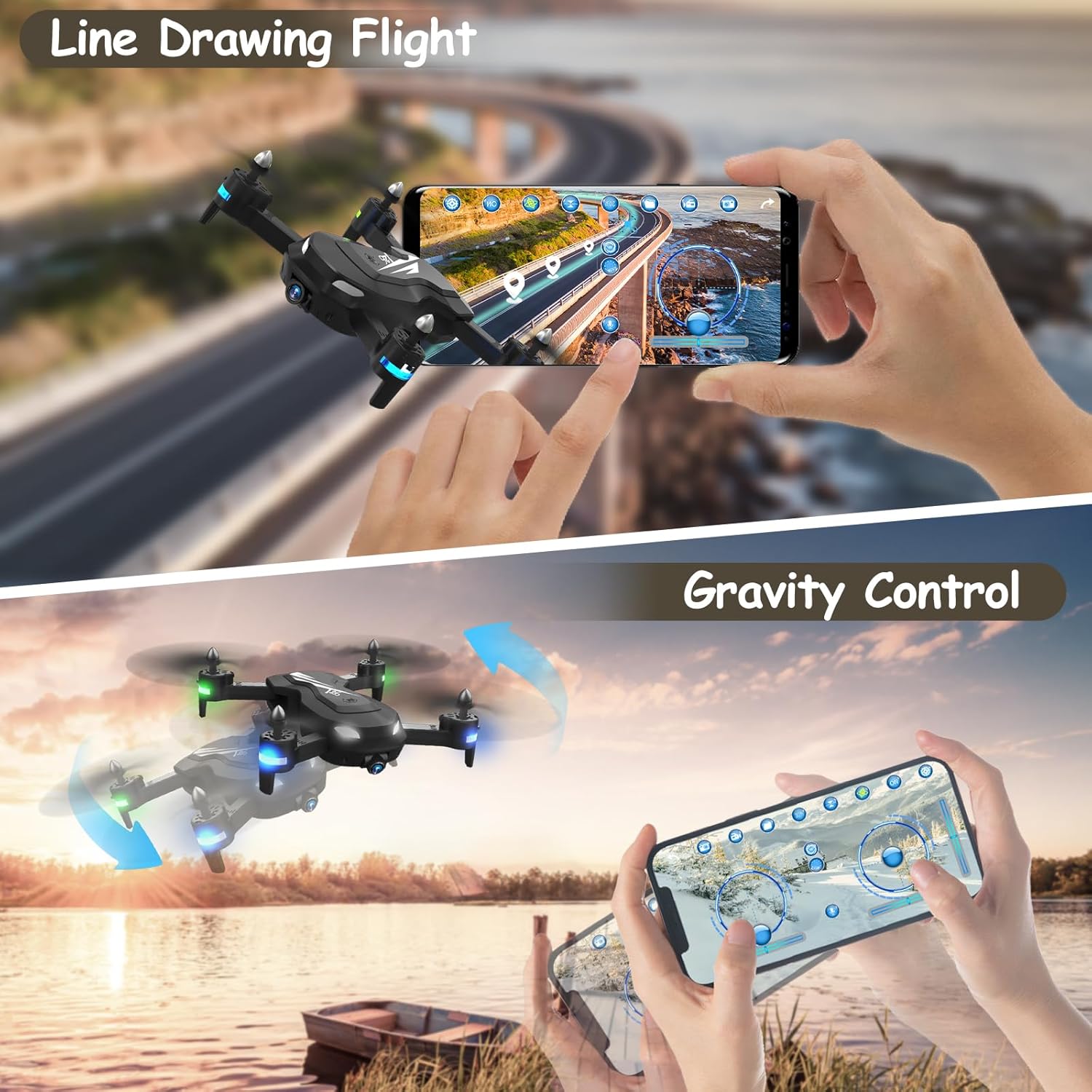
Image: Demonstrating Line Drawing Flight and Gravity Control features.

Image: Smart Voice Control in action, allowing hands-free take-off.

Image: Gesture Selfie feature for automatic photo and video capture.
5.4 Camera Operation
The 1080P HD camera provides a live video feed to your smartphone via the app. Use the app interface to capture photos and videos. The camera's 90° adjustable angle allows for varied perspectives.

Image: Details of the 1080P HD FPV camera and its adjustable angle.
6. Safety Information
Your safety and the safety of others are paramount. Please adhere to the following guidelines:
- Always operate the drone in an open area, free from obstacles, people, and animals.
- Avoid flying in windy conditions, as the lightweight design of the T26 drone makes it susceptible to wind.
- Maintain a safe distance from power lines, buildings, and other structures.
- Do not fly near airports or restricted airspace.
- Ensure the drone is fully charged and calibrated before each flight.
- Supervise children when they are operating the drone.
- If the drone's or transmitter's batteries are low, the LEDs will flash and an alarm will sound. Land the drone immediately.
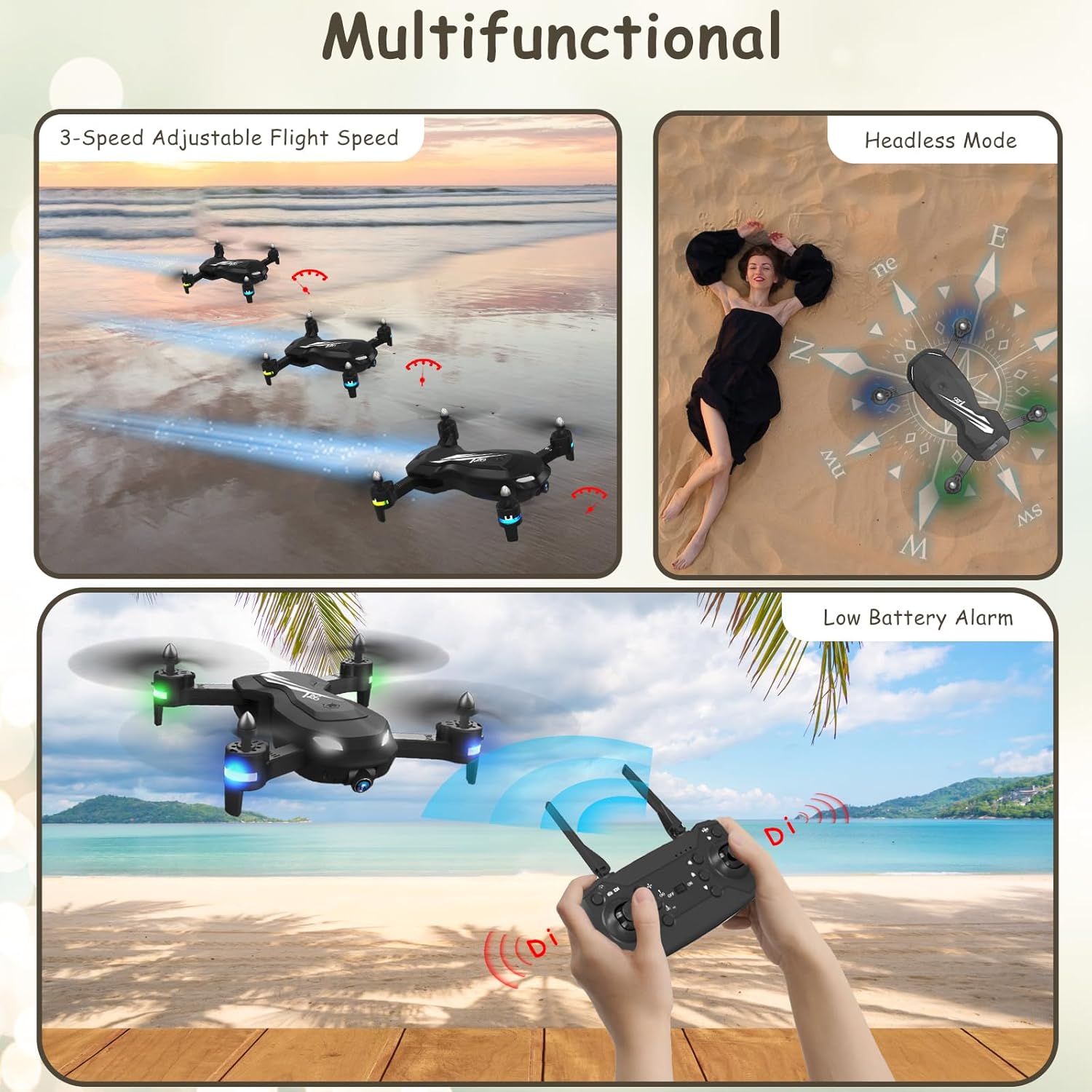
Image: Visual cues for low battery alarm and other flight modes.

Image: The low battery alarm system for safe operation.
7. Maintenance
Regular maintenance ensures the longevity and optimal performance of your FERIETELF T26 Drone:
- Cleaning: Gently wipe the drone with a clean, dry cloth after each use to remove dust and debris. Avoid using harsh chemicals.
- Propellers: Inspect propellers for any damage (cracks, bends) before each flight. Replace damaged propellers immediately using the provided spare parts.
- Motors: Keep the motors free from dust and hair. Do not attempt to lubricate the motors.
- Storage: Store the drone and batteries in a cool, dry place away from direct sunlight and extreme temperatures. Ensure batteries are partially charged (not fully charged or fully depleted) for long-term storage.
- Battery Care: Do not overcharge or over-discharge batteries. Disconnect batteries from the drone and charger when not in use.
8. Troubleshooting
If you encounter issues with your FERIETELF T26 Drone, refer to the following common problems and solutions:
| Problem | Possible Cause | Solution |
|---|---|---|
| Drone does not respond to controller. | Not paired; low battery (drone/controller); interference. | Ensure drone and controller are powered on and paired. Check and replace/charge batteries. Move to an area with less interference. |
| Drone flies diagonally or is unstable. | Not calibrated; uneven take-off surface; damaged propeller. | Perform recalibration on a level surface. Inspect and replace any damaged propellers. |
| Poor camera image/video quality. | Weak Wi-Fi signal; dirty camera lens. | Ensure strong Wi-Fi connection between drone and phone. Clean the camera lens gently. |
| Short flight time. | Battery not fully charged; old battery. | Ensure batteries are fully charged. Consider replacing old batteries if performance degrades significantly. |
| Drone makes unusual noise. | Damaged propeller; debris in motor. | Check and replace damaged propellers. Carefully remove any debris from motors. |
If the problem persists, please contact FERIETELF customer support for further assistance.
9. Specifications
| Feature | Detail |
|---|---|
| Model | T26 |
| Camera Resolution | 1080P (1920*1080) |
| Quadrocopter Weight | 136 g |
| Drone Dimensions (Product) | 17 x 17 x 5 cm |
| Drone Dimensions (Folded) | 16 x 11.5 x 5.5 cm |
| Battery Type | Lithium Ion |
| Battery Capacity | 1200 mAh |
| Number of Batteries | 2 (included) |
| Charging Time | Approx. 2 hours |
| Flying Time | 10-13 minutes per battery (20-26 minutes total) |
| Video Transmission Range | Approx. 50m / 164ft |
| Transmitter Operation Range | Approx. 80m / 262ft |
| Connectivity Technology | App-Controlled, Remote Controlled |
| Special Features | 360 Degree Flip, First Person View (FPV), Foldable, Speed Adjustment |

Image: Detailed specifications and precautions for the T26 drone.
10. Warranty and Support
FERIETELF is committed to providing high-quality products. For any product-related inquiries, technical support, or warranty claims, please contact FERIETELF customer service through the retailer's platform or the official FERIETELF website. Please retain your proof of purchase for warranty purposes.

