
1. Product Overview
The TCL 50T69C is a 50-inch QLED 4K Smart TV featuring Direct LED backlighting and Google TV. It supports HDR formats including Dolby Vision and Atmos for an immersive viewing experience. Designed for both entertainment and gaming, it includes Game Master features for optimized performance.
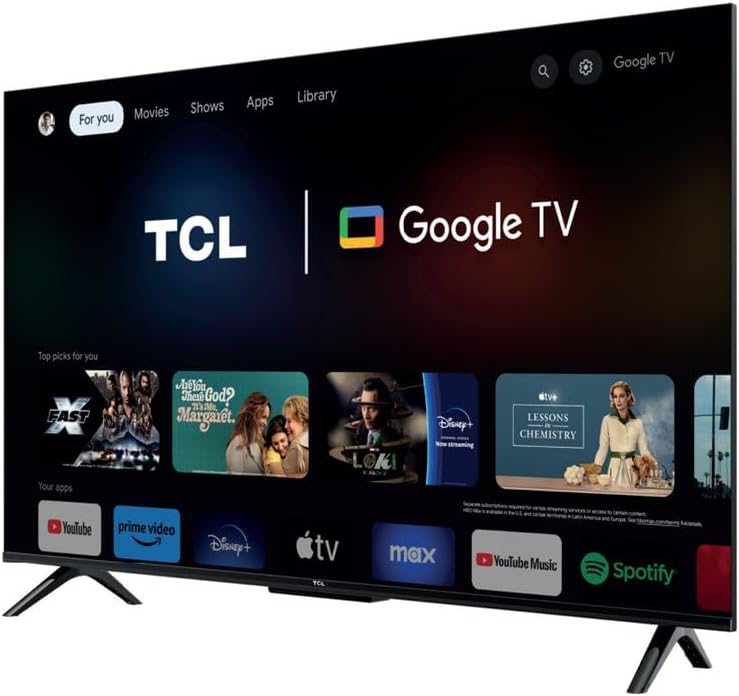
Image 1.1: Front view of the TCL 50T69C 50-inch QLED 4K Smart TV.
Key Features:
- QLED Technology: Delivers over a billion colors and shades for realistic image quality and an ultra-wide color gamut.
- Direct LED: Enhances picture quality and energy efficiency.
- HVA Panel: Offers high contrast, reduced energy consumption, and a wider viewing angle.
- AiPQ Processor: Optimizes 4K content for high quality, smooth motion, and subtle details.
- Multi HDR Format Support: Compatible with HDR10, HLG, HDR11+, and Dolby Vision.
- Game Master: Features HDMI 2.1, ALLM (Auto Low Latency Mode), VRR (Variable Refresh Rate), and Game Accelerator 120 Hz (in FHD resolution) for an enhanced gaming experience.
- Google TV: Integrated smart TV platform with access to apps, Google Assistant, and Alexa compatibility.
2. Setup
2.1 Unpacking
Carefully remove the TV from its packaging. Ensure all components are present: TV unit, power cable, stand, support, and remote control. Retain the packaging for future transport or service needs.
2.2 Stand Installation
If using the included stand, attach the stand components to the bottom of the TV using the provided screws. Ensure the stand is securely fastened before placing the TV on a stable, level surface.
2.3 Wall Mounting
The TCL 50T69C is compatible with VESA standard wall mounts. Refer to your wall mount's instructions for proper installation. Note that the screw attachment points for the TV backplate are located in the lower section of the device. This may require adjusting the wall mount's position to achieve the desired TV height.
2.4 Connections
Connect your external devices to the TV using the appropriate ports:
- HDMI: For high-definition video and audio devices (e.g., Blu-ray players, gaming consoles, set-top boxes).
- USB: For connecting USB storage devices to play media or for service. The TV has 1 USB port.
- Ethernet: For a wired internet connection.
- Power Cable: Connect the power cable to the TV and then to a power outlet.
Wireless connectivity options include Bluetooth and Wi-Fi for network access and connecting compatible accessories.
2.5 Initial Power On and Google TV Setup
After connecting the power, press the power button on the remote control or TV. Follow the on-screen instructions to complete the initial setup, including language selection, network connection (Wi-Fi or Ethernet), and Google TV account setup. This process will guide you through connecting to Google Assistant and other smart features.
3. Operating
3.1 Remote Control
The included remote control provides access to all TV functions. It is designed for ease of use with Google TV, offering dedicated buttons for common applications and voice control via Google Assistant.
3.2 Basic Functions
- Power: Turn the TV on or off.
- Volume: Adjust the sound level.
- Channel: Change TV channels (if connected to an antenna/cable).
- Input: Select the desired input source (HDMI 1, HDMI 2, USB, etc.).
3.3 Smart TV Features (Google TV)
Your TCL 50T69C runs on Google TV, providing a personalized experience with content recommendations, access to a wide range of streaming apps, and smart home integration.
- Apps: Download and manage applications from the Google Play Store.
- Google Assistant: Use voice commands via the remote control to search for content, control smart home devices, and get information.
- Alexa Compatibility: The TV is compatible with Alexa-enabled devices, allowing for voice control through an external Alexa device.
3.4 Picture Settings
Access the picture settings menu to customize your viewing experience:
- Picture Modes: Select from predefined modes (e.g., Standard, Movie, Game, Vivid) or customize settings like brightness, contrast, color, and sharpness.
- HDR: The TV automatically detects and processes HDR content (HDR10, HLG, HDR10+, Dolby Vision) for enhanced contrast and color.
- AiPQ Processor: This processor intelligently optimizes picture quality in real-time.
- Dynamic Contrast Enhancement: Adjusts contrast dynamically for improved depth.
3.5 Sound Settings
Adjust audio settings to suit your preferences:
- Sound Modes: Choose from various sound modes (e.g., Standard, Music, Movie, Voice).
- Dolby Atmos: Experience immersive, multi-dimensional audio with compatible content.
- Equalizer: Fine-tune audio frequencies manually.
3.6 Gaming Features
The TCL 50T69C is equipped with features to enhance your gaming experience:
- Game Master: Automatically optimizes settings for gaming.
- HDMI 2.1: Supports advanced gaming features.
- ALLM (Auto Low Latency Mode): Reduces input lag by automatically switching to a low-latency mode when a game console is detected.
- VRR (Variable Refresh Rate): Synchronizes the TV's refresh rate with the game console's output for smoother gameplay and reduced screen tearing.
- Game Accelerator 120 Hz: Achieves a 120 Hz refresh rate in Full HD resolution for smoother motion.
4. Maintenance
4.1 Cleaning
To clean the screen, gently wipe it with a soft, dry, lint-free cloth. For stubborn marks, slightly dampen the cloth with water or a specialized screen cleaner. Avoid using harsh chemicals or abrasive materials. Clean the TV's frame and stand with a soft, dry cloth.
4.2 Software Updates
Ensure your TV's software is up to date for optimal performance and security. The TV can automatically check for and install updates when connected to the internet. You can also manually check for updates in the TV's settings menu.
5. Troubleshooting
If you encounter issues with your TV, refer to the following common solutions:
- No Power: Ensure the power cable is securely connected to both the TV and the power outlet. Try a different outlet.
- No Picture/Sound: Check the selected input source. Ensure external devices are powered on and connected correctly.
- Remote Control Not Working: Replace the batteries. Ensure there are no obstructions between the remote and the TV's IR sensor.
- Network Connection Issues: Verify your Wi-Fi password or Ethernet cable connection. Restart your router and the TV.
- PS5 Flickering Issue: If experiencing white flickering with gaming consoles like PS5, ensure all game-specific features (Game Master, ALLM, VRR) are disabled in the TV settings and console settings for testing. Try using a different HDMI cable or a different HDMI port on the TV. If the issue persists only with the console and not with streaming applications, consult the console manufacturer's support.
For further assistance, consult the TCL support website or contact customer service.
6. Specifications
| Feature | Specification |
|---|---|
| Brand | TCL |
| Screen Size | 50 Inches |
| Display Technology | QLED |
| Resolution | 4K |
| Refresh Rate | 120 Hertz (Game Accelerator in FHD) |
| Connectivity Technology | Bluetooth, Ethernet, HDMI, USB, Wi-Fi |
| Number of USB Ports | 1 |
| Special Features | Dynamic Contrast Enhancement |
| Included Components | Power Cable, Stand, Support, Remote Control |
| Aspect Ratio | 16:9 |
| Product Dimensions (D x W x H) | 25.4 x 111.1 x 68.4 centimeters |
| Item Model Number | 50T69C |
| Manufacturer | TCL |
| Country of Origin | China |
| Spare Parts Availability | Information not available |
| Guaranteed Software Updates Until | Information not available |
7. Warranty and Support
For information regarding the product warranty, please refer to the warranty card included with your TV or visit the official TCL website. For technical support, product registration, or to download the latest software updates, please visit the TCL support page for your region.


