
Introduction
Thank you for choosing the Vinsetto High Back Ergonomic Office Chair. This manual provides essential information for the safe assembly, operation, and maintenance of your new chair. Please read these instructions carefully before use and retain them for future reference.

Image: The Vinsetto ergonomic office chair in use, demonstrating its comfortable design.
Safety Information
- Assembly is required. Ensure all parts are correctly installed before use.
- Do not exceed the maximum weight capacity of 264 lbs (120 kg).
- Use caution when moving the chair on different floor types to prevent damage or injury.
- Keep children and pets away during assembly.
- Regularly check all bolts and screws for tightness and re-tighten as necessary.
Package Contents
Your Vinsetto office chair package includes all necessary components and hardware for assembly. Please verify that all parts are present and undamaged upon opening the package. Refer to the separate assembly instructions sheet included in the box for a detailed list of parts.

Image: Overview of the Vinsetto ergonomic office chair, showing its main components.
Setup and Assembly
Assembly of the Vinsetto office chair is required. Detailed, step-by-step assembly instructions with diagrams are provided in a separate sheet within your product packaging. Please follow these instructions carefully to ensure correct and safe assembly.
- Unpack all components and lay them out on a clean, soft surface to prevent scratches.
- Identify all parts against the provided parts list in the assembly guide.
- Follow the numbered steps in the assembly guide to connect the base, gas lift, seat, backrest, armrests, and headrest.
- Ensure all screws and bolts are tightened securely after assembly.
Operating Instructions
Your Vinsetto ergonomic office chair offers several adjustment features to customize your seating experience.
1. Seat Height Adjustment
To adjust the seat height, locate the lever under the right side of the seat. While seated, pull the lever up to lower the seat. To raise the seat, stand up slightly and pull the lever up. Release the lever at the desired height to lock it in place.

Image: Illustration of the height adjustment mechanism and lever.
2. Rocking Function
The chair features a rocking function for relaxation. To activate, pull the lever on the left side of the seat outwards. To lock the chair in an upright position, push the lever inwards. The tension of the rocking motion can be adjusted by turning the round knob located under the front of the seat (clockwise for more tension, counter-clockwise for less).

Image: Illustration of the rocking function lever and tension adjustment knob.
3. Adjustable Lumbar Support
The 4D lumbar support can be adjusted to fit your back's natural curve. It moves up, down, forward, and backward. Gently push or pull the lumbar support mechanism on the backrest to find your preferred position.

Image: Visual guide for adjusting the lumbar support vertically and horizontally.
4. Adjustable Headrest
The headrest can be adjusted in height and angle. To adjust the height, gently pull the headrest up or push it down. To adjust the angle, rotate the headrest forward or backward until it provides optimal neck support.

Image: Instructions for adjusting the headrest's height and rotation.
5. Flip-up Armrests
The armrests can be flipped up to allow the chair to slide further under a desk, saving space. Simply lift the armrests upwards until they lock into the vertical position. To return them to the horizontal position, pull them down.

Image: The chair with armrests flipped up, positioned under a desk.
Maintenance
- Cleaning: Wipe clean with a damp cloth. Avoid harsh chemicals or abrasive cleaners that may damage the mesh fabric or frame.
- Inspection: Periodically check all screws, bolts, and moving parts to ensure they are secure and functioning correctly. Tighten any loose fasteners.
- Casters: Keep casters clean and free of debris to ensure smooth movement.

Image: Detailed view of chair materials and construction, highlighting areas for maintenance.
Troubleshooting
If you encounter any issues with your chair, please refer to the following common troubleshooting tips:
- Chair Squeaks: Check all bolts and screws for tightness. Apply a small amount of silicone lubricant to moving parts if necessary.
- Difficulty Adjusting Height: Ensure the gas lift lever is fully engaged. If the issue persists, the gas lift cylinder may need replacement.
- Chair Feels Unstable: Verify that all components are correctly assembled and all fasteners are tightened. Ensure the chair is on a flat, even surface.
- Casters Not Rolling Smoothly: Remove any hair or debris from the caster wheels.
Specifications
| Feature | Detail |
|---|---|
| Model Number | 921-688V00WT |
| Overall Dimensions (W x D x H) | 24.4" x 25.2" x 44.1" - 47.2" (62 x 64 x 112-120 cm) |
| Seat Dimensions (W x D x H) | 19.7" x 19.7" x 16.9" - 20.1" (50 x 50 x 43-51 cm) |
| Weight Capacity | 264 lbs (120 kg) |
| Materials | Foam, Mesh, Nylon, Polyester, Polypropylene |
| Color | White |
| Special Features | Adjustable Headrest, Adjustable Height, Adjustable Lumbar, Ergonomic, Flip-up Arm, High Back, Rocking, Rolling, Space Saving, Swivel |
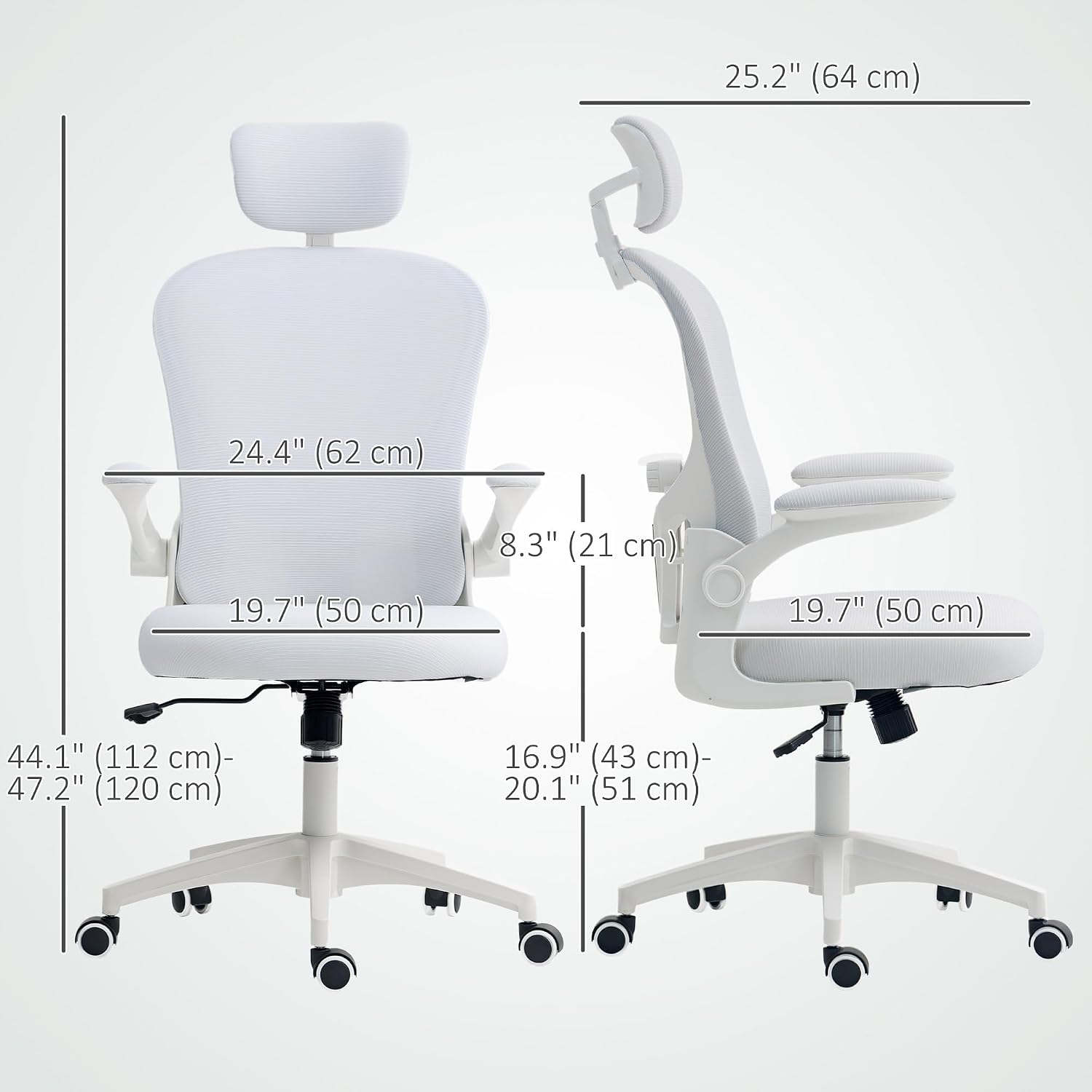
Image: Detailed dimensions of the Vinsetto ergonomic office chair.
Warranty and Support
Warranty: This product comes with a 90-day warranty against manufacturer defects. Please retain your proof of purchase for warranty claims.
Customer Support: For any questions, assistance with assembly, or warranty inquiries, please contact Aosom Canada customer service.
Contact Information:
Aosom Canada
Markham, Ontario, CA
Tel: 1-416-792-6088


