
1. Introduction
Thank you for purchasing the ROBOTIME 3D Wooden Cuckoo Clock. This intricate mechanical model combines the charm of a classic cuckoo clock with modern LED lighting and soothing sounds. Designed for enthusiasts aged 14 and up, this assembly kit offers a rewarding experience that stimulates logical thinking and concentration. Please read this manual carefully before beginning assembly to ensure proper function and enjoyment of your new cuckoo clock.
2. Safety Information
WARNING: This kit contains small parts. Adult supervision is recommended for younger users to prevent choking hazards.
- Keep all parts out of reach of small children.
- Handle wooden parts with care to avoid splinters.
- Do not force parts together; if a part does not fit, recheck the instructions.
- Ensure the assembly area is well-lit and organized.
3. Package Contents
Your ROBOTIME 3D Wooden Cuckoo Clock kit includes:
- Pre-cut wooden sheets (435 precision laser-cut pieces)
- LED light module
- Mechanical clock movement
- Instruction manual (English with detailed illustrations)
- Small accessories (e.g., screws, screwdriver, sandpaper, glue if required)
Please verify all components are present upon opening the package. In case of any missing or defective parts, please contact official support.

Figure 1: Complete ROBOTIME 3D Wooden Cuckoo Clock kit.
4. Assembly Instructions
The assembly process for this 3D wooden puzzle is designed to be engaging and educational, requiring approximately 8 hours of focused effort. Follow the detailed, illustrated instructions provided in the kit.
4.1 General Tips
- Organize your workspace: Lay out all wooden sheets and identify the parts according to the manual.
- Carefully detach parts: Gently push out the laser-cut pieces from their sheets. Use a craft knife if necessary for stubborn connections, but be cautious not to damage the parts.
- Sand edges: Use the provided sandpaper to smooth any rough edges on the wooden pieces for a cleaner fit and finish.
- Follow illustrations: The manual features clear, step-by-step illustrations. Pay close attention to the orientation and connection points of each piece.
- Test fit: Before applying any adhesive (if required), test fit pieces to ensure they align correctly.
4.2 Assembly Overview
The assembly involves constructing the main clock housing, integrating the mechanical cuckoo movement, and installing the LED lighting system. The model features interlocking gears and movable elements that demonstrate physical principles.
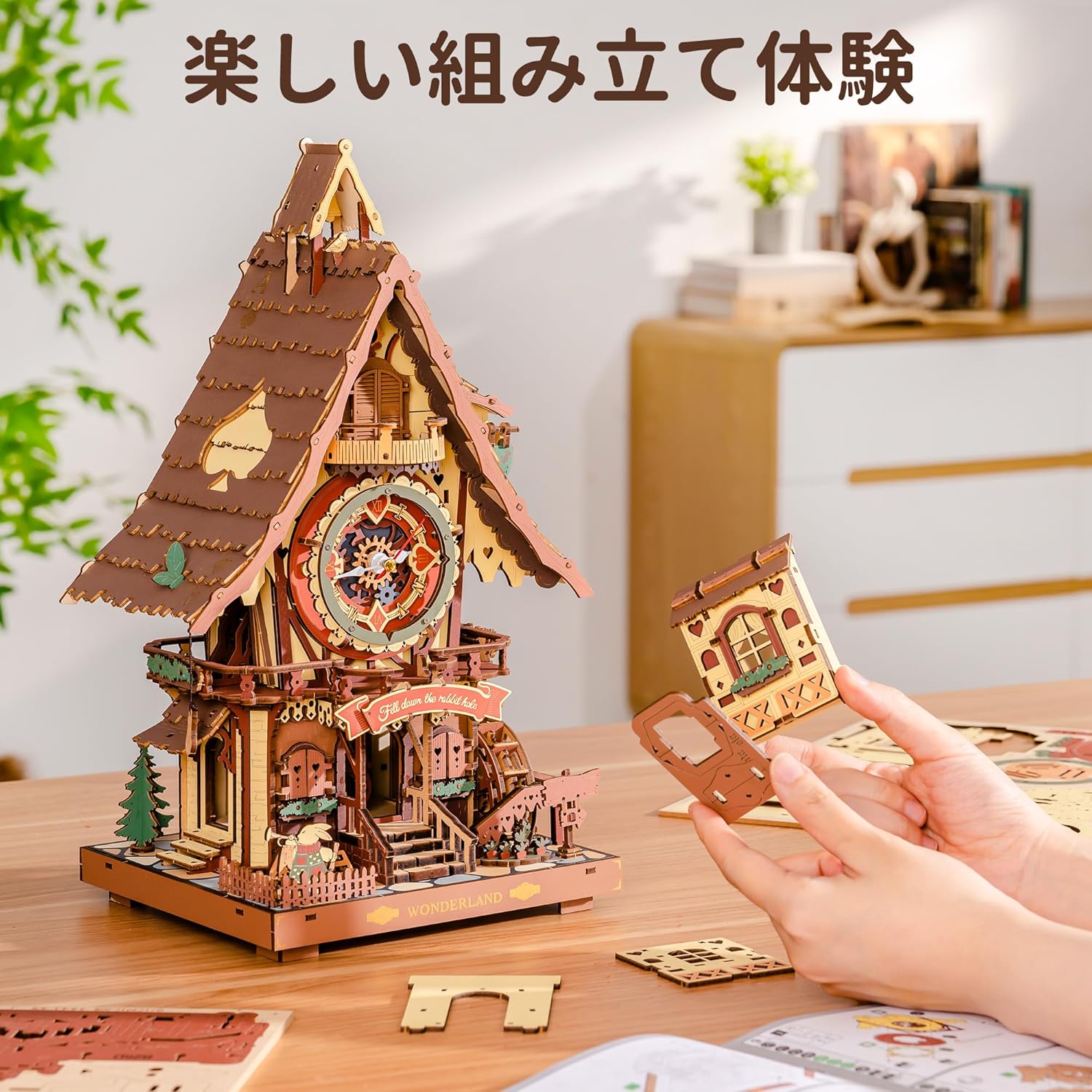
Figure 2: Hands-on assembly of the wooden puzzle components.

Figure 3: Example of laser-cut wooden sheets and the illustrated manual for assembly.
4.3 Key Features During Assembly
- Cuckoo Mechanism: Carefully integrate the cuckoo bird and its movement system. The cuckoo emerges from a small window and flaps its wings.
- LED Lighting: Install the LED light module as instructed. This will illuminate the clock face and interior, creating a magical ambiance.
- Mechanical Gears: Assemble the interlocking gears that drive the clock's functions. This provides insight into basic mechanical engineering.

Figure 4: Detailed view of the cuckoo bird mechanism and the touch switch for activation.

Figure 5: Various close-up views highlighting the intricate mechanical details and craftsmanship.
Video 1: Assembly and demonstration of a similar ROBOTIME Cuckoo Clock model. This video provides a visual guide to the assembly process and showcases the clock's functionality.
5. Operating Instructions
5.1 Power Supply
The cuckoo clock requires power for its LED lights and cuckoo sound/movement features. It supports two power options:
- 3 AAA Batteries: (Not included) Insert 3 AAA batteries into the designated battery compartment.
- Type-C USB Power: (Cable not included) Connect a Type-C USB cable to the port on the clock and to a suitable power source.
5.2 Cuckoo Function
The cuckoo bird emerges from its small window every hour, chirping 'Cuckoo' and flapping its wings. The timing of the cuckoo's appearance can be freely set according to your preference.
5.3 LED Light and Sound Activation
The clock features soft LED lighting that creates a magical atmosphere, especially at night. A touch switch is integrated for activating the soothing sounds and light:
- Single Touch: Press the touch switch once to activate the cuckoo's chirping sound and the LED lights.
- Long Press (2 blinks): A long press will activate the hourly chime function.
- Long Press (4 blinks): A long press will turn off the hourly chime function.

Figure 6: Demonstration of the touch switch functionality for the cuckoo sound and LED lights.

Figure 7: The cuckoo clock showcasing its warm LED lighting in a room setting.
6. Maintenance
- Cleaning: Use a soft, dry cloth to gently wipe the wooden surfaces. Avoid using abrasive cleaners or excessive moisture.
- Dusting: Regularly dust the intricate parts with a soft brush or compressed air to prevent accumulation that could affect mechanical movement.
- Placement: Place the clock in a stable environment, away from direct sunlight, extreme temperatures, and high humidity to preserve the wood and electronic components.
- Battery Replacement: If using batteries, replace them when the lights dim or the cuckoo function becomes inconsistent.
7. Troubleshooting
- Cuckoo not appearing/chirping:
- Check power supply: Ensure batteries are fresh or the Type-C cable is securely connected to a working power source.
- Verify assembly: Recheck the assembly steps for the cuckoo mechanism to ensure all gears and linkages are correctly installed and move freely.
- Touch switch: Ensure the touch switch is functioning correctly.
- LED lights not working:
- Check power supply: As above.
- LED module connection: Ensure the LED module is properly connected to the power source within the clock.
- Parts not fitting:
- Do not force. Recheck the instruction manual for the correct orientation and sequence.
- Use sandpaper to gently smooth edges if a fit is too tight.
- Missing or defective parts:
- In the unlikely event of missing or defective parts, please contact ROBOTIME official support for prompt assistance.
8. Specifications
| Brand | ROBOTIME |
| Model Number | RT-JP1LC |
| Material | Wood |
| Number of Pieces | 435 |
| Assembled Dimensions (approx.) | 34 cm (Height) x 21 cm (Width) x 17 cm (Depth) |
| Recommended Age | 14 years and up |
| Estimated Assembly Time | 8 hours |
| Power Source | 3 AAA Batteries (not included) or Type-C USB (cable not included) |

Figure 8: Visual representation of the product dimensions and piece count.
9. Warranty and Support
ROBOTIME is committed to providing high-quality products. This product is an official, genuine item. In the event of any issues, such as missing or defective parts, please contact ROBOTIME official support for prompt assistance. Please retain your proof of purchase for warranty claims.
For further assistance, please visit the ROBOTIME Official Store on Amazon.


