1. Introduction
This manual provides essential information for the safe and efficient use of your TCL 75T69C 75-inch QLED 4K HDR Google Smart TV. Please read it thoroughly before operating the device and retain it for future reference. This television features QLED technology for vibrant colors, 4K HDR for enhanced contrast and detail, and Google TV for a personalized smart experience with integrated Google Assistant and Alexa compatibility.
Safety Information
- Ensure the TV is placed on a stable surface or securely mounted to a wall.
- Do not block ventilation openings.
- Avoid exposing the TV to rain or moisture.
- Unplug the power cord during lightning storms or when unused for long periods.
- Refer all servicing to qualified service personnel.
2. Setup
What's in the Box
Upon unpacking, verify that all components are present:
- TCL 75T69C 75-inch QLED 4K HDR Google Smart TV
- Power Cable
- Remote Control
- Stand (2 pieces)
- User Manual (this document)
Physical Installation
Stand Installation: Carefully attach the two stand pieces to the designated slots at the bottom of the TV, securing them with the provided screws. Ensure the TV is stable before proceeding.
Wall Mounting: If wall mounting, use a VESA compatible mount (300x300mm) and follow the mount manufacturer's instructions. Ensure the wall can support the TV's weight (27.3 kg).

Image: Dimensions of the TCL 75T69C 75-inch TV, showing its width, height, thickness, and VESA mounting points. The remote control model RC833A is also pictured.
Connecting Power: Plug the power cable into the TV's power input and then into a wall outlet.
Connecting External Devices
Your TCL 75T69C TV offers various ports for connecting external devices:
- HDMI (x3): For connecting Blu-ray players, game consoles, soundbars, etc.
- USB (x2): For connecting USB storage devices to play media or for service.
- LAN (Ethernet): For a wired internet connection.
- Optical (Digital Audio Out): For connecting to external audio systems.
- Cable/Satellite: For connecting antenna or satellite cables.
- CI Slot: For Conditional Access Modules (CAMs) from pay-TV providers.

Image: A visual representation of the various input and output ports available on the TCL 75T69C television.
3. Operating Instructions
Initial Setup and Google TV
After connecting the power, turn on your TV. The first-time setup wizard will guide you through:
- Language Selection: Choose your preferred language.
- Network Connection: Connect to your home Wi-Fi network or use a wired Ethernet connection.
- Google Account Sign-in: Sign in with your Google account to access Google TV features, apps, and personalized recommendations.
- Channel Scan: Scan for available TV channels (if using an antenna or cable).
Google TV organizes movies, shows, live TV, and more from your apps and subscriptions, presenting them in a personalized interface.

Image: The Google TV home screen displaying a selection of popular streaming applications and content.
Key Features and Technologies
Your TCL 75T69C TV incorporates advanced technologies for an enhanced viewing and audio experience:
- QLED Technology: Quantum Dot technology reproduces over a billion shades of color, delivering cinematic color volume and brightness.
- AiPQ Processor: This processor optimizes content in 4K resolution, ensuring smooth images, sharp contrasts, and precise details through AI-driven enhancements for contrast, color, clarity, motion, and HDR.
- HDR Multiformat: Supports HDR10, HLG, HDR10+, and Dolby Vision for exceptional image quality from various sources, ensuring optimal brightness, contrast, and color.
- Dolby Vision & Dolby Atmos: Experience immersive cinematic visuals with Dolby Vision and rich, moving audio with Dolby Atmos.
- HVA Panel: The innovative HVA panel provides sharper contrasts, improved energy saving, and wider viewing angles.
- Motion Clarity (MEMC): Reduces blur and judder in fast-moving scenes, providing smoother and clearer images for sports and action films.
- Game Master: Optimized for gaming with HDMI 2.1, Auto Low Latency Mode (ALLM), Variable Refresh Rate (VRR), and a Game Bar for quick settings adjustments.
- Voice Control: Compatible with Google Assistant and Amazon Alexa. Use your voice to search for content, control playback, adjust volume, and manage smart home devices.
- Google Cast: Easily cast your favorite music, videos, and photos from your smartphone, tablet, or computer directly to your TCL TV.

Image: A visual demonstration of QLED technology, showcasing rich and vibrant colors in a floral image.

Image: A graphic illustrating the AiPQ Processor and its capabilities in enhancing image performance.

Image: An overview of HDR Multiformat support, highlighting compatibility with major streaming platforms.

Image: The Dolby Vision logo alongside a scene from a theater, emphasizing an immersive viewing experience.

Image: The Dolby Atmos logo with a dynamic wave image, illustrating a cinematic audio experience.

Image: A visual representation of the HVA Panel's ability to deliver sharper contrasts and wider viewing angles.

Image: A side-by-side comparison demonstrating the effect of Motion Clarity (MEMC) on fast-moving images.

Image: A depiction of the Game Master feature, illustrating an optimized gaming experience.

Image: A user interacting with the TV using Google Assistant voice commands.

Image: A family enjoying content on the TV, demonstrating compatibility with Alexa voice commands.

Image: A visual representation of Google Cast functionality, allowing content sharing from mobile devices to the TV.
Remote Control
The included remote control (model RC833A) provides full functionality for navigating Google TV, adjusting settings, and controlling connected devices. It features a microphone for voice commands.

Image: The TCL RC833A remote control, showing its layout and buttons.
4. Maintenance
Cleaning the TV
- Screen: Gently wipe the screen with a soft, lint-free cloth. For stubborn marks, use a screen cleaning solution specifically designed for TVs, applied to the cloth, not directly to the screen.
- Body: Wipe the TV frame and stand with a soft, dry cloth. Do not use abrasive cleaners or solvents.
- Always unplug the TV before cleaning.
Software Updates
Your TCL TV may receive automatic software updates to improve performance and add new features. Ensure your TV is connected to the internet to receive these updates. You can also manually check for updates in the TV's settings menu.
5. Troubleshooting
If you encounter issues with your TV, refer to the following common problems and solutions:
| Problem | Possible Solution |
|---|---|
| No Power | Check if the power cable is securely connected to the TV and the wall outlet. Try a different outlet. |
| No Picture / Black Screen | Ensure the correct input source is selected. Check all HDMI/AV cable connections. Try restarting the TV. |
| No Sound | Check the volume level and mute status. Ensure external audio devices are correctly connected and selected as output. |
| Remote Control Not Working | Replace the batteries. Ensure there are no obstructions between the remote and the TV's IR sensor. |
| Network Connection Issues | Restart your router/modem. Check Wi-Fi password. Try a wired Ethernet connection if Wi-Fi fails. |
| Picture Quality Issues | Adjust picture settings (brightness, contrast, color). Ensure the content source is high quality (e.g., 4K). |
If the problem persists, consult the TCL support website or contact customer service.
6. Specifications
Detailed technical specifications for the TCL 75T69C TV:
| Feature | Detail |
|---|---|
| Brand | TCL |
| Model Number | 75T69C |
| Screen Size | 75 Inches |
| Screen Technology | QLED, Direct LED, HVA Panel |
| Resolution | 4K (3840 x 2160 pixels) |
| Refresh Rate | 60 Hz |
| Special Features | AiPQ Processor, HDR Multiformat (HDR10, HLG, HDR10+, Dolby Vision), Game Master, Google TV, Google Assistant, Alexa compatibility |
| Connectivity | Bluetooth, Ethernet, HDMI (x3), USB (x2), Wi-Fi |
| Aspect Ratio | 16:9 |
| Product Dimensions | 166.7 cm (W) x 102.7 cm (H) x 34.9 cm (D) with stand |
| Weight | 27.3 kg |
| Energy Efficiency Class (SDR) | F (115 kWh/1000h) |
| Energy Efficiency Class (HDR) | G (170 kWh/1000h) |
| EPREL Database Link | View EPREL Data |
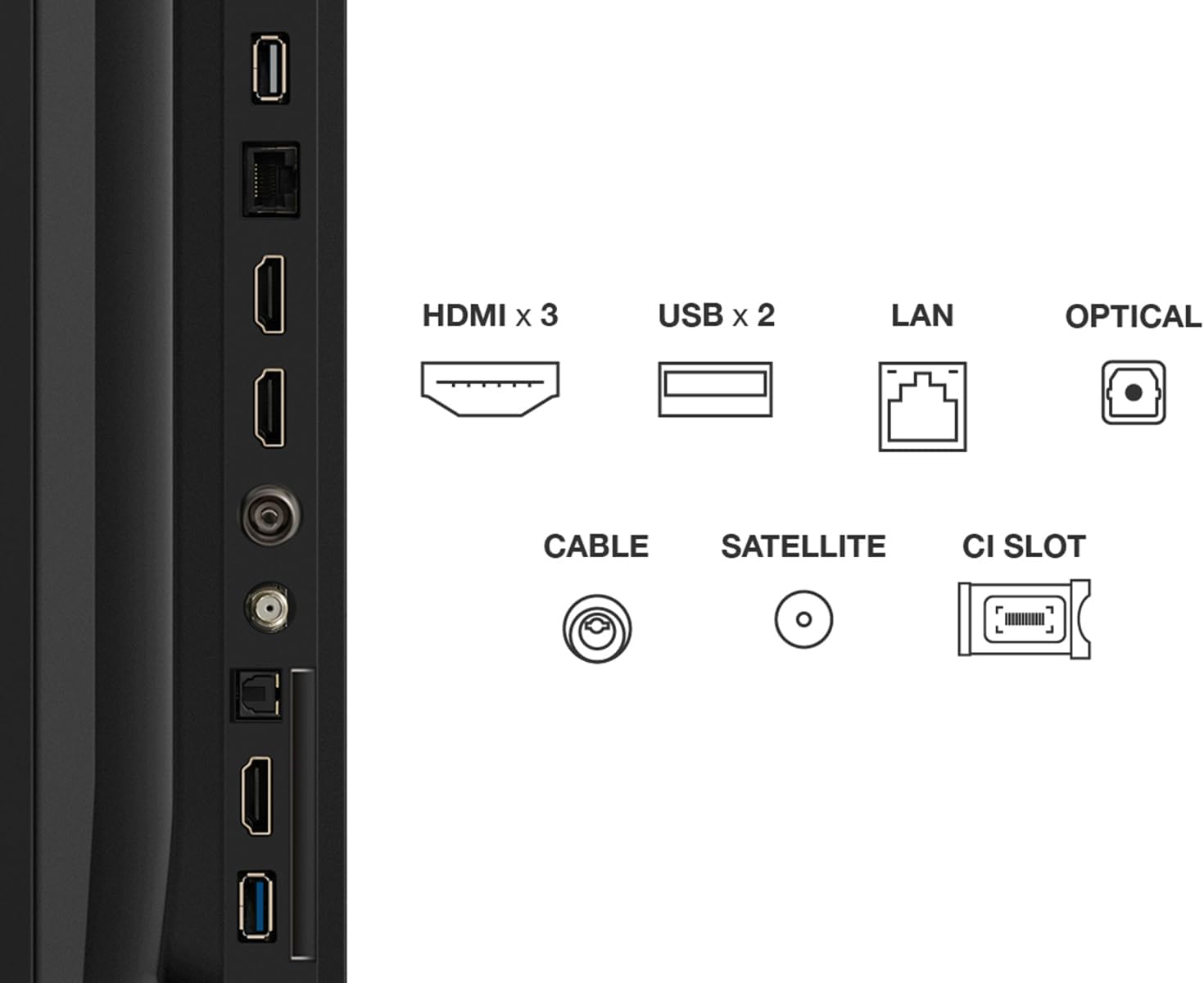
Image: The EU Energy Label for the TCL 75T69C, indicating its energy efficiency ratings.
7. Warranty and Support
Warranty Information
Your TCL 75T69C television comes with a standard manufacturer's warranty of 2 years. Please retain your proof of purchase for warranty claims. The availability of spare parts is guaranteed for 8 years, and product support is available for 8 years.
Customer Support
For technical assistance, troubleshooting beyond this manual, or warranty inquiries, please contact TCL Customer Support. Specialized customer support is available to assist you with any product-related questions.
You can find contact information and additional resources on the official TCL website.