
Introduction
This manual provides essential instructions for the safe and effective use of your LEVELEVE 11FT Multi-Position Extension Ladder. Designed for versatility, this ladder can be configured into various forms to suit a wide range of tasks, both indoors and outdoors. Please read this manual thoroughly before initial use and retain it for future reference.
Safety Information
Your safety is paramount. Always adhere to the following safety guidelines:
- Before each use, inspect the ladder for any damage, loose parts, or wear. Do not use a damaged ladder.
- Ensure all locking mechanisms are fully engaged before climbing.
- Place the ladder on a firm, level, and non-slippery surface.
- Maintain three points of contact (two hands and one foot, or two feet and one hand) while climbing or descending.
- Do not overreach. Keep your body centered between the side rails.
- Do not exceed the maximum load capacity of 330 lbs.
- Avoid using the ladder near electrical wires or in windy conditions.
- Always face the ladder when climbing or descending.
- Review the safety notices and instructions printed on the ladder itself for correct operation.
Setup & Assembly
The LEVELEVE Multi-Position Ladder is designed for easy setup. Follow these steps to configure your ladder:
1. Attaching Stabilizer Bars and Wheels
The ladder comes with two anti-slip balance rods and wheels for enhanced stability and mobility. These should be securely attached before use.

Image: A person attaching a stabilizer bar to the base of the ladder, showing the securement points.
The support rods are equipped with rollers for easy transport. Ensure they are firmly attached to the base of the ladder using the provided hardware.
2. Extending the Ladder Sections
To extend the ladder, locate the U-joint locks on each side. Pull these locks outwards to release the section, then gently pull the section upwards until it clicks into place. Ensure both sides are locked at the desired height.

Image: A close-up view of the ladder's base, highlighting the stabilizer bar, non-slip foot covers, and wheels for easy movement.
This video demonstrates the process of extending the ladder sections and converting between A-frame and extension modes.
Video: A demonstration of the LEVELEVE multi-position ladder, showing how to extend and retract sections, and convert between different configurations like A-frame and extension ladder.
Operating Modes
This ladder offers multiple configurations for various tasks:
1. A-Frame Ladder Mode
To set up as an A-frame, unlock the main hinges and fold the ladder into an 'A' shape. Ensure the hinges lock securely into place. This mode is ideal for tasks requiring a self-supporting ladder.

Image: The LEVELEVE ladder configured as an A-frame, pointing out key features like sturdy U-shaped locks, cut-resistant hand plastic, W-shaped aluminum tubes, and wheels for easy transport.
This video illustrates the setup and use of the ladder in A-frame mode for indoor tasks.
Video: A user demonstrating the A-frame telescoping ladder, showing how to adjust its height and use it for various tasks like changing light fixtures or hanging pictures indoors.
2. Extension Ladder Mode
For maximum reach, fully extend the ladder sections and lock the main hinges into a straight position. Lean the ladder against a stable surface, ensuring a safe angle (approximately 75 degrees).
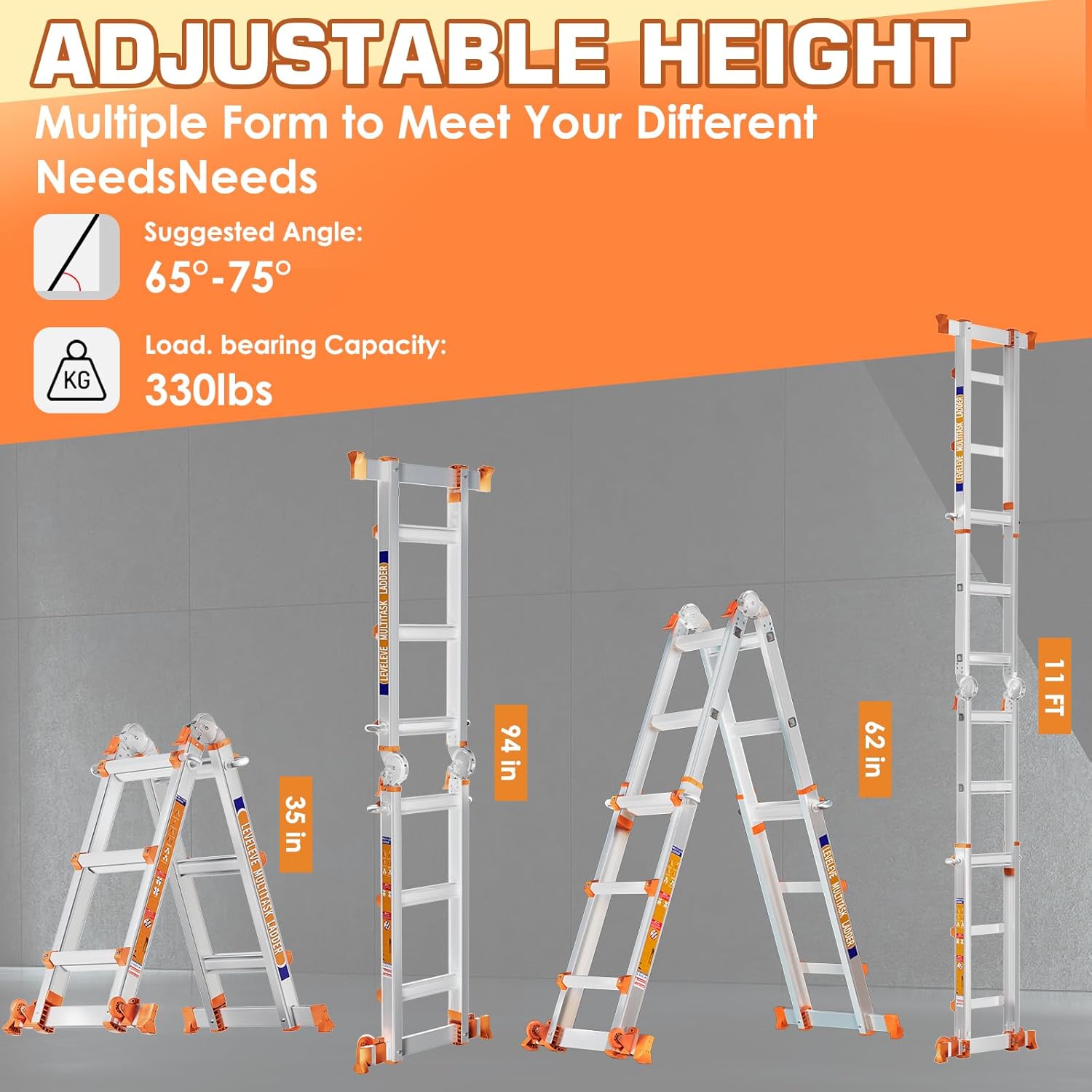
Image: A visual guide displaying the adjustable height and multiple forms of the LEVELEVE ladder, including its compact A-frame, extended A-frame, and full extension, with a suggested angle of 65°-75° and a load capacity of 330 lbs.
This video shows the transformation of the ladder into an extension ladder and its use for outdoor tasks.
Video: A demonstration of the LEVELEVE A-frame ladder, showcasing its ability to convert into a straight extension ladder and its use for reaching high places on a building exterior.
3. Stair A-Frame Mode
This mode allows the ladder to be used on uneven surfaces, such as stairs. Adjust each side of the A-frame to different heights, ensuring stability before climbing.

Image: The LEVELEVE multitask ladder shown in three different configurations: as an A-frame for indoor tasks, as an extension ladder for exterior work, and adapted for use on stairs.
4. Scaffold Mode
The ladder can be configured as a scaffold by fully extending both sides horizontally and placing a suitable platform across the rungs (platform sold separately). Ensure the ladder is stable and on a level surface.

Image: A comprehensive diagram showcasing the adjustable height and multiple configurations of the LEVELEVE ladder, including its use as an A-frame, extension ladder, and scaffold, indicating a load-bearing capacity of 330 lbs.
Maintenance
Regular maintenance ensures the longevity and safety of your ladder:
- Clean the ladder regularly with a damp cloth to remove dirt, grease, or other debris. Avoid harsh chemicals.
- Lubricate moving parts, such as hinges and locking mechanisms, periodically with a silicone-based lubricant to ensure smooth operation.
- Store the ladder in a dry, protected area away from direct sunlight and extreme temperatures.
- Check all rivets, bolts, and nuts for tightness. Tighten any loose fasteners.
- Inspect the non-slip feet and rungs for wear or damage. Replace worn parts immediately.
Troubleshooting
If you encounter issues with your ladder, refer to the following common solutions:
- Difficulty Extending/Retracting: Ensure all locking pins are fully disengaged. Clean any dirt or debris from the telescoping sections and lubricate with silicone spray.
- Unstable Ladder: Verify that the ladder is placed on a firm, level surface. Ensure all locking mechanisms are fully engaged for the chosen configuration. Check stabilizer bars for proper attachment.
- Damaged Parts: Do not attempt to repair damaged structural components. Contact customer support for replacement parts or professional repair advice.
Specifications
| Feature | Detail |
|---|---|
| Brand | LEVELEVE |
| Model | 3STEP |
| Material | Aluminum |
| Color | Silver |
| Maximum Height (Extension) | 11 Feet |
| Load Capacity | 330 Pounds |
| Product Dimensions (Folded) | 17.7"W x 70"H |
| Special Features | Stabilizer Bar, Wheels, W-shaped reinforced non-slip steps, Thickened joints, Polished metal edges |
Warranty & Support
For warranty information, technical support, or to order replacement parts, please contact LEVELEVE customer service through your original purchase channel. Keep your proof of purchase for warranty claims.