
Introduction
Thank you for choosing the ANENG B19 Voltage Tester with Screwdriver. This device is designed for safe and efficient electrical testing and minor repair tasks. It combines non-contact AC voltage detection, live/null wire identification, breakpoint finding, and a dual-purpose screwdriver into one compact tool. Please read this manual thoroughly before use to ensure proper operation and safety.
Important Safety Information
WARNING: Electrical shock hazard. Failure to follow these instructions may result in serious injury or death.
- Always assume circuits are live until proven otherwise.
- Do not use the device if it appears damaged or is not operating correctly.
- Do not exceed the specified voltage range (AC 11V/30V-1000V).
- Wear appropriate personal protective equipment (PPE), such as insulated gloves and safety glasses.
- This device is intended for use by qualified personnel or under their direct supervision.
- Keep out of reach of children.
- Do not attempt to repair or modify the device.
Product Features
- Non-Contact Voltage (NCV) Detection: Safely detects AC voltage without direct contact.
- Dual AC Voltage Range: Supports 30V-1000V and 11V-450V for various applications.
- Live/Null Wire Identification: Distinguishes between live and neutral wires.
- Breakpoint Finder: Helps locate breaks in electrical circuits.
- LCD Display: Clear digital readout for real-time voltage, frequency, and status.
- Buzzer Alarm & LED Indicators: Provides audible and visual alerts for voltage presence.
- Integrated Screwdriver: Includes interchangeable crosshead and flathead magnetic bits (4mm diameter, 24mm length).
- Backlight Display: Improves visibility in dim environments.
- Automatic Shut-off: Conserves battery life when not in use.
- Enhanced Safety Design: Smart chip, slip-resistant handle, and fully insulated body.

Image: The ANENG B19 Voltage Tester, showcasing its dual screwdriver and voltage detection capabilities.
Package Contents
Verify that all items are present in your package:
- 1 x ANENG B19 Voltage Tester (Crosshead Screwdriver)
- 1 x ANENG B19 Voltage Tester (Flathead Screwdriver)
- User Manual (this document)
Setup
Battery Installation
- Locate the battery compartment cover on the back of the tester handle.
- Slide or unclip the cover to open the compartment.
- Insert the required batteries (typically AAA, refer to the battery compartment for specific type and polarity) ensuring correct polarity (+/-).
- Close the battery compartment cover securely.

Image: Illustration of the battery compartment and proper battery insertion.
Operating Instructions
Power On/Off
- The device typically powers on automatically when a voltage is detected or when the NCV button is pressed.
- It features an automatic shut-off function to conserve battery life after a period of inactivity.

Image: The ANENG B19 detecting voltage from an electrical outlet, illustrating the on/off detection feature.
Non-Contact Voltage (NCV) Detection
- Press the NCV button (if available) or simply bring the tip of the tester close to the wire, outlet, or circuit you wish to test.
- The LCD display will show voltage readings, and the device will emit a buzzer alarm and illuminate LED indicators if AC voltage is detected.
- A green backlight typically indicates a weak electric field, while a red backlight indicates a strong electric field.
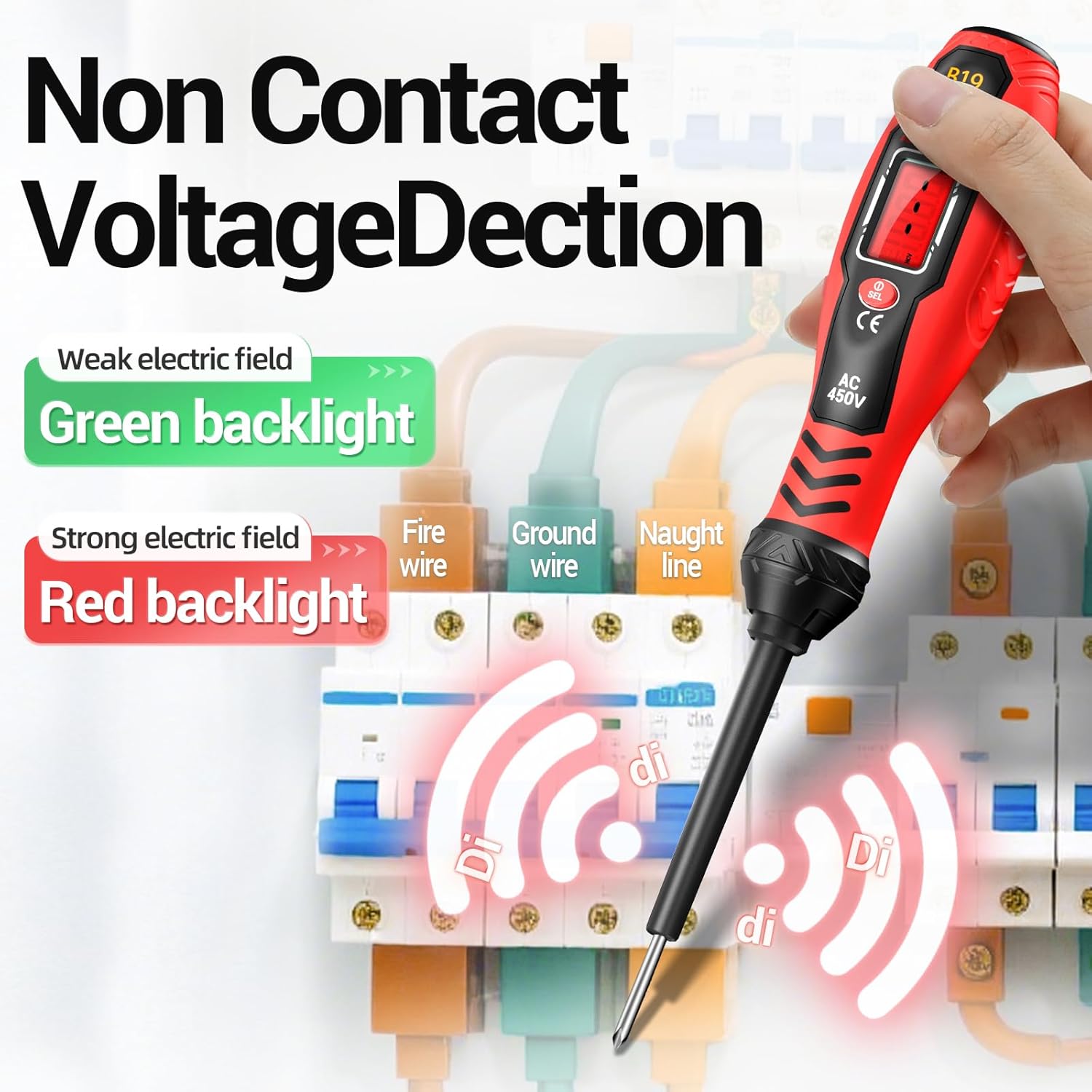
Image: The ANENG B19 performing non-contact voltage detection on a circuit breaker panel, showing green and red backlight indicators for weak and strong electric fields.

Image: A close-up of the ANENG B19's NCV detection, indicating voltage presence with visual cues.
Live/Null Wire Identification
- Insert the metal tip of the tester into the live wire or the live slot of an outlet. The LCD will display voltage, and the buzzer will sound.
- Insert the metal tip into the null (neutral) wire or the neutral slot of an outlet. The LCD will typically show a lower or zero voltage, and the buzzer may not sound or will be less intense.

Image: The ANENG B19 demonstrating live and null wire detection in an electrical outlet, showing different responses for each.
Breakpoint Finder
- To locate a breakpoint in a live wire, slowly move the tip of the tester along the insulated wire.
- The tester will indicate voltage up to the point of the break. Beyond the break, the voltage indication will cease.
Screwdriver Functionality
- The ANENG B19 comes with interchangeable crosshead and flathead magnetic screwdriver bits.
- To use, ensure the bit is securely inserted into the tester's tip.
- The magnetic tip helps hold screws in place for easier operation.
- Use for small repair and maintenance tasks.

Image: Close-up of the magnetic crosshead and flathead screwdriver bits, highlighting their 4mm diameter and 24mm length.
Maintenance
- Cleaning: Wipe the device with a dry, clean cloth. Do not use abrasive cleaners or solvents.
- Storage: Store the tester in a cool, dry place, away from direct sunlight and extreme temperatures.
- Battery Replacement: Replace batteries promptly when the low battery indicator appears on the LCD. Remove batteries if the device will not be used for an extended period to prevent leakage.
Troubleshooting
| Problem | Possible Cause | Solution |
|---|---|---|
| Device does not power on. | Dead or incorrectly installed batteries. | Check battery polarity and replace batteries if necessary. |
| Inaccurate voltage readings. | Interference from other electrical fields; device malfunction. | Move away from other electrical devices. If problem persists, discontinue use and contact support. |
| No NCV detection. | No AC voltage present; device malfunction. | Verify the circuit is live using another method if possible. Ensure the NCV sensor is clean. |
Specifications
| Feature | Detail |
|---|---|
| Brand | ANENG |
| Model | B19 |
| AC Voltage Range | Dual Range: 30V-1000V / 11V-450V |
| Power Source | Battery Powered |
| Screwdriver Bit Diameter | 4mm |
| Screwdriver Bit Length | 24mm |
| Display | LCD with Backlight |
| Safety Features | Insulated body, slip-resistant handle, smart chip |
| Automatic Shut-off | Yes |
| Dimensions (approx.) | 8.03 x 1.93 x 1.42 inches |
| Weight (approx.) | 5.61 ounces |
Warranty and Support
ANENG products are designed for reliability and performance. For warranty information, technical support, or service inquiries, please refer to the contact information provided with your purchase or visit the official ANENG website. Keep your purchase receipt as proof of purchase.
For further assistance, you may visit the ANENG Store on Amazon.


