Introduction
The Belkin 15W Qi Wireless Charging Pad provides a simple and efficient solution for wirelessly charging compatible phones and wireless earbuds. This Qi-certified pad delivers up to 15W of power, ensuring your devices are powered and ready for use without the need for multiple cables. Its slim and stylish design integrates seamlessly into any environment, from a desktop to a nightstand.
This product is designed with sustainability in mind, featuring housing made from a minimum of 75% post-consumer recycled plastic (excluding cable and silicone components) and packaged in 100% plastic-free materials.
What's in the Box
- 1 x Belkin 15W Wireless Charging Pad
- 1 x 20W Power Supply Unit (PSU)
- 1 x 5ft (1.5m) USB-C to USB-C Cable

Image: Contents of the Belkin 15W Qi Wireless Charging Pad package, including the white charging pad, a white 20W power supply unit, and a white USB-C to USB-C cable.
Setup Guide
- Connect the Power Supply: Plug the 5ft (1.5m) USB-C to USB-C cable into the 15W Wireless Charging Pad and the 20W Power Supply Unit (PSU).
- Plug into Power: Insert the 20W PSU into a wall outlet.
- Placement: Place the charging pad on a flat, stable surface such as a desk or nightstand. Ensure there is adequate space around the pad for proper heat dissipation.

Image: The Belkin Wireless Charging Pad is shown connected to a 20W power adapter plugged into a wall outlet, with a smartphone charging on the pad. This illustrates the 'Charge Right Out of the Box' feature.

Image: A smartphone is wirelessly charging on the Belkin pad, highlighting the 5ft (1.5m) USB-C cable for flexible placement.
Operating Instructions
- Place Your Device: Center your Qi-compatible smartphone or wireless earbuds on the charging pad.
- Confirm Charging: An LED light indicator on the pad will provide feedback. A white LED indicates a device is charging. No light means the charger is in standby. An amber LED indicates a foreign object has been detected. Your device's screen should also show a charging confirmation.
- Case Compatibility: The charging pad is designed to charge through most lightweight phone cases up to 5mm thick.

Image: A smartphone is shown wirelessly charging on the Belkin pad, displaying a 75% charge. Below, estimated charging times to 50% are shown for an iPhone 16 (59 min) and Galaxy S24 (52 min).

Image: Visual representation of the LED light indicator states: White LED for charging, No Lights for standby, and Amber LED for foreign object detection.
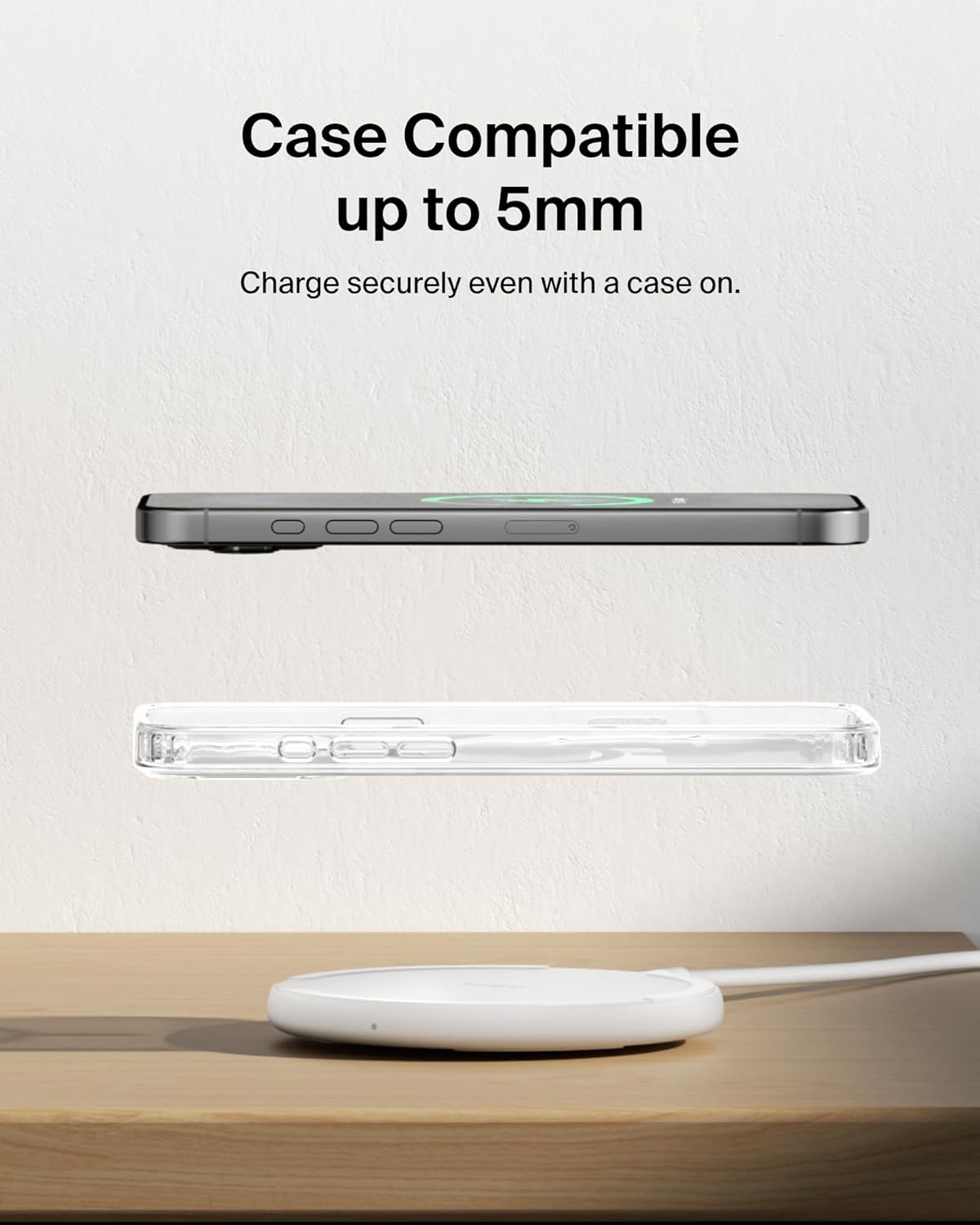
Image: A smartphone with and without a protective case is shown above the charging pad, illustrating its compatibility with cases up to 5mm thick.
Charging Capabilities
The Belkin 15W Qi Wireless Charging Pad intelligently delivers optimal power to various compatible devices:
- Up to 15W: For Samsung Galaxy S24 and newer, and other Qi-enabled EPP/BPP devices.
- 9W: For Samsung Galaxy S23 and older.
- 7.5W: For iPhone models (iPhone 8 and later).
- 5W: For wireless earbuds, including Apple AirPods and Belkin SoundForm Play.
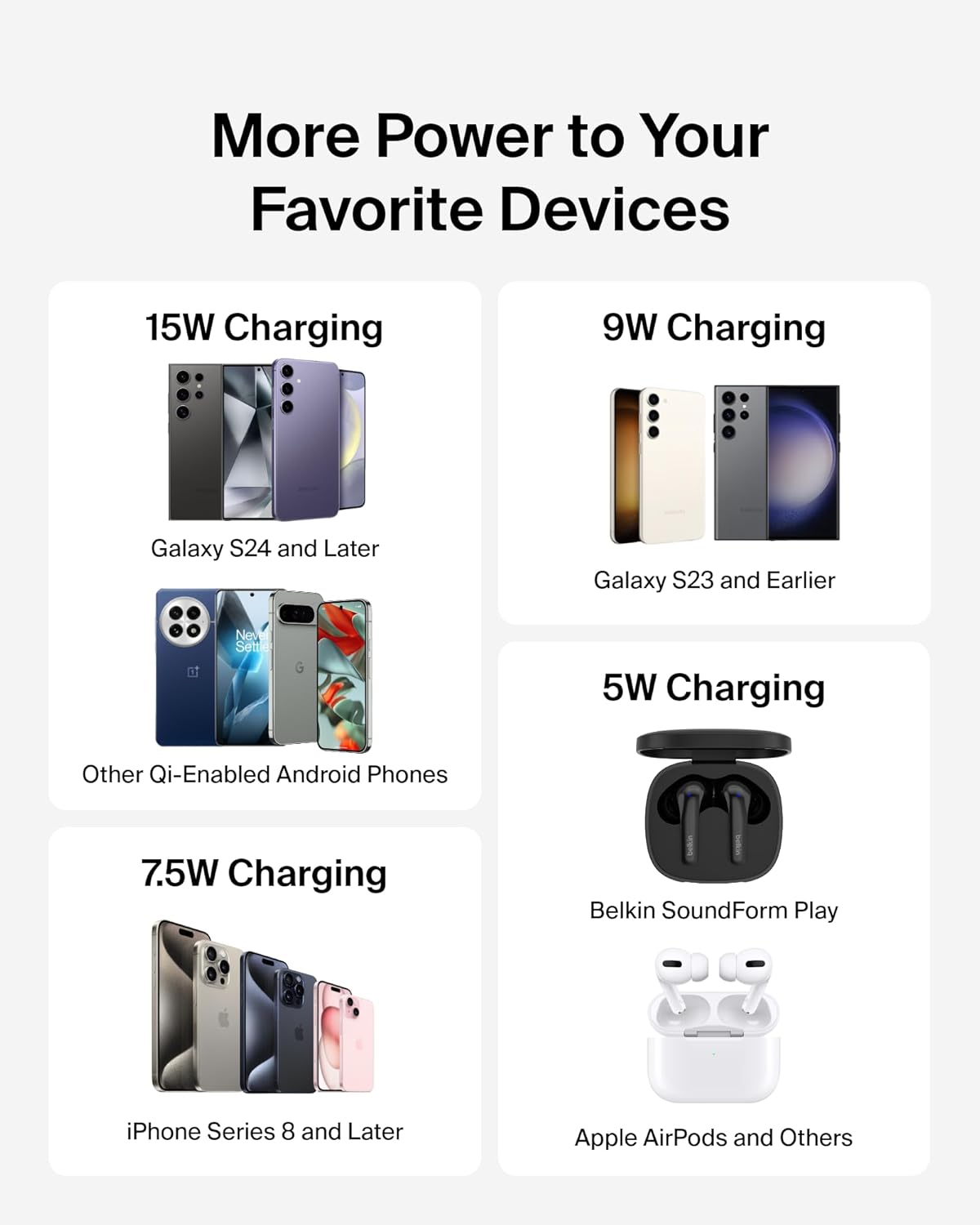
Image: A visual chart detailing the charging wattage provided by the Belkin pad for different device types, including 15W for newer Galaxy phones, 9W for older Galaxy phones, 7.5W for iPhones, and 5W for earbuds.
Safety Features (Belkin SmartProtect)
Your safety and the protection of your devices are paramount. The Belkin 15W Qi Wireless Charging Pad incorporates Belkin SmartProtect standards through rigorous testing, offering multiple layers of protection:
- Temperature Monitoring: Prevents overheating of the charger and your device.
- Over-Voltage Protection: Safeguards against power surges.
- Current Detection: Monitors current flow to ensure safe charging levels.
- Overload Protection: Protects against excessive power draw.
- Foreign Object Detection: Prevents charging when metal objects are placed on the pad, reducing heat and potential damage.
- Fire Resistant Materials: Constructed with materials designed to resist fire.

Image: An exploded view diagram of the Belkin Wireless Charging Pad highlighting its internal components and six intelligent sensors for continuous safety assurance, including current detection, foreign object detection, overload protection, over-voltage protection, fire-resistant materials, and temperature monitoring.
Care and Maintenance
- Cleaning: Disconnect the charger from power before cleaning. Use a soft, dry cloth to wipe the surface. Avoid liquid cleaners or abrasive materials.
- Storage: Store the charging pad in a cool, dry place when not in use. Its compact size makes it suitable for travel.
- Handling: Avoid dropping the device or exposing it to extreme temperatures or moisture.

Image: The compact Belkin Wireless Charging Pad is shown being placed into a bag and next to a smartphone, illustrating its travel-friendly design and small dimensions (59.6mm x 13.2mm, 75g).
Troubleshooting
- Device Not Charging:
- Ensure your device is Qi-compatible.
- Verify the device is centered on the charging pad.
- Check for any foreign objects (e.g., metal, credit cards) between the device and the pad.
- Confirm the charging pad is properly connected to the power supply and the wall outlet.
- Remove any thick phone cases (over 5mm) that might interfere with charging.
- Slow Charging:
- Ensure you are using the included 20W PSU and USB-C cable for optimal performance.
- Verify your device supports fast wireless charging.
- Close any unnecessary background applications on your device.
- LED Indicator Behavior:
- White LED: Device is charging.
- No Light: Charger is in standby mode.
- Amber LED: Foreign object detected. Remove the object and re-attempt charging.
Specifications
| Feature | Detail |
|---|---|
| Model Number | WIA012 |
| Brand | Belkin |
| Wattage | 15 watts (Max) |
| Input Voltage | 12 Volts |
| Connector Type | USB Type C |
| Cable Length | 5ft (1.5m) |
| Case Compatibility | Up to 5mm thick |
| Special Features | Case Compatible, Fast Charging, LED Light Indicator, Slim Design, Travel, Belkin SmartProtect |
| Item Weight | 7.4 ounces |
| Color | White |
| Compatible Devices | iPhone 17, iPhone 16, iPhone 15, iPhone 14, iPhone 13, iPhone 12, iPhone 11, iPhone X, iPhone 8 Series, Apple AirPods Pro 2nd gen, Apple AirPods 2nd gen, Google Pixel 4 XL, Samsung Galaxy S25, S24, S23, S8, S9, Note Series, LG G7, LG V30, and other Qi-enabled devices. |
Warranty and Support
Belkin stands by the quality of its products. The 15W Qi Wireless Charging Pad comes with:
- 2-Year Limited Warranty: Covers defects in materials and workmanship under normal use.
- $2,500 Connected Equipment Warranty (CEW): If your device is damaged by an electrical charge while properly connected to the Belkin charging pad, Belkin will repair or replace it up to a value of $2,500 US/AU.
For further support, please visit the official Belkin website or contact their customer service.
Product Video
Video: A brief overview of the Belkin Qi2 15W Charging Pad, demonstrating its fast charging capabilities for smartphones and compatibility with various devices. This video highlights the product's sleek design and ease of use.
Environmental Commitment
Belkin is committed to reducing its environmental impact. The charging pad's housing is made from a minimum of 75% post-consumer recycled plastic (excluding cable and silicone components), and its packaging is 100% plastic-free.

Image: Belkin's 'Everyday Impact' graphic illustrating their commitment to people, planet, and products, with renewable energy matching goals for 2020 (25%), 2021 (35%), 2023 (60%), and 2030 (100%).


