
Deaf Bonce ABR-800.1
Avatar ABR-800.1 Power Amplifier User Manual
Model: ABR-800.1 | Brand: Deaf Bonce
Introduction
This manual provides detailed instructions for the installation, operation, and maintenance of your Avatar ABR-800.1 monoblock car amplifier. Please read this manual thoroughly before attempting to install or operate the amplifier to ensure proper use and to prevent damage to the unit or your vehicle's audio system. Keep this manual for future reference.
The Avatar ABR-800.1 is a compact and powerful monoblock car amplifier designed to deliver up to 800 watts of clean power to your subwoofer. Built for car audio enthusiasts, this Class AB amplifier provides reliable performance with smooth sound quality and minimal distortion. It offers a flexible and affordable solution for upgrading your stock system or adding extra bass. With high- and low-level inputs, it easily integrates with various head units, while 2-ohm stability ensures compatibility with a wide range of subwoofers. Its small footprint allows for easy installation in tight spaces. The amplifier also features protection circuits for overheating, overload, and short circuit, ensuring safe and stable operation.
Safety Information
Always observe the following safety precautions during installation and operation:
- Disconnect the vehicle's negative battery terminal before beginning any installation.
- Ensure all wiring is properly routed and secured to prevent pinching or damage.
- Use appropriate gauge wiring for power and ground connections to handle the amplifier's current draw.
- Do not mount the amplifier in areas exposed to direct sunlight, excessive heat, moisture, or dust.
- Ensure adequate ventilation around the amplifier for proper heat dissipation.
- Never operate the amplifier with damaged wiring or components.
- Seek professional assistance if you are unsure about any installation steps.
What's in the Box
Upon opening the package, verify that all components are present:
- Avatar ABR-800.1 Power Amplifier
- Bass knob (remote level control)
- Mounting screws
- User Manual (this document)
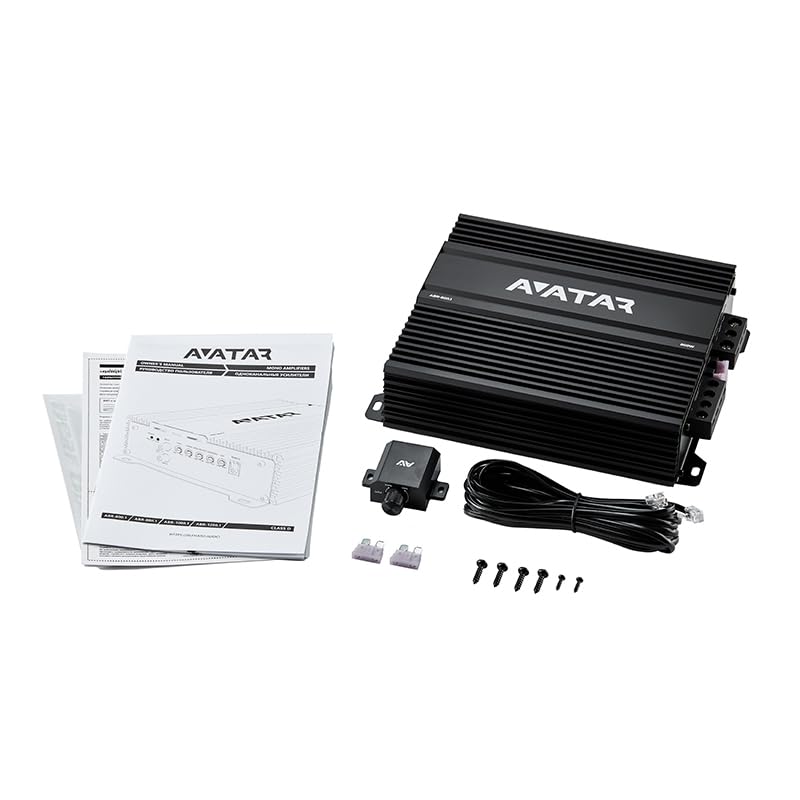
Image: The package contents include the Avatar ABR-800.1 amplifier, a remote bass knob, mounting screws, and the user manual.
Setup and Installation
Mounting the Amplifier
Choose a mounting location that is dry, well-ventilated, and away from direct heat sources. Ensure the amplifier is securely fastened to a solid surface to prevent movement during vehicle operation. Common locations include under a seat, in the trunk, or behind a panel.
Wiring Connections
Proper wiring is crucial for optimal performance and safety. Refer to the diagram below for terminal locations.
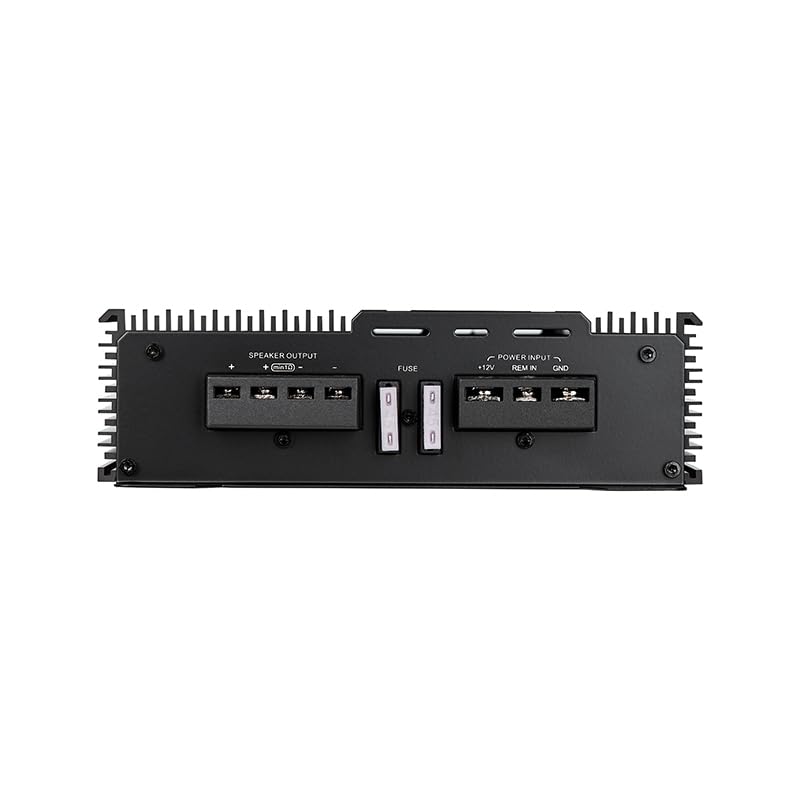
Image: Rear panel of the amplifier displaying the power input (+12V, REM IN, GND), fuse slots, and speaker output terminals.
- Power Connection (+12V): Connect a heavy-gauge power cable (recommended 8 AWG or larger) directly from the vehicle's positive battery terminal to the +12V terminal on the amplifier. Install an inline fuse holder (not included) within 18 inches (45 cm) of the battery.
- Ground Connection (GND): Connect a heavy-gauge ground cable (same gauge as power) from the GND terminal on the amplifier to a clean, unpainted metal surface on the vehicle's chassis. Ensure a good electrical connection.
- Remote Turn-On (REM IN): Connect a remote turn-on wire from your head unit's remote output to the REM IN terminal on the amplifier. This wire signals the amplifier to turn on when the head unit is active.
- Speaker Output: Connect your subwoofer(s) to the SPEAKER OUTPUT terminals. Observe correct polarity (+ to + and - to -) for optimal sound. The ABR-800.1 is stable at 2 Ohms.
Input Connections
The ABR-800.1 supports both low-level (RCA) and high-level inputs.
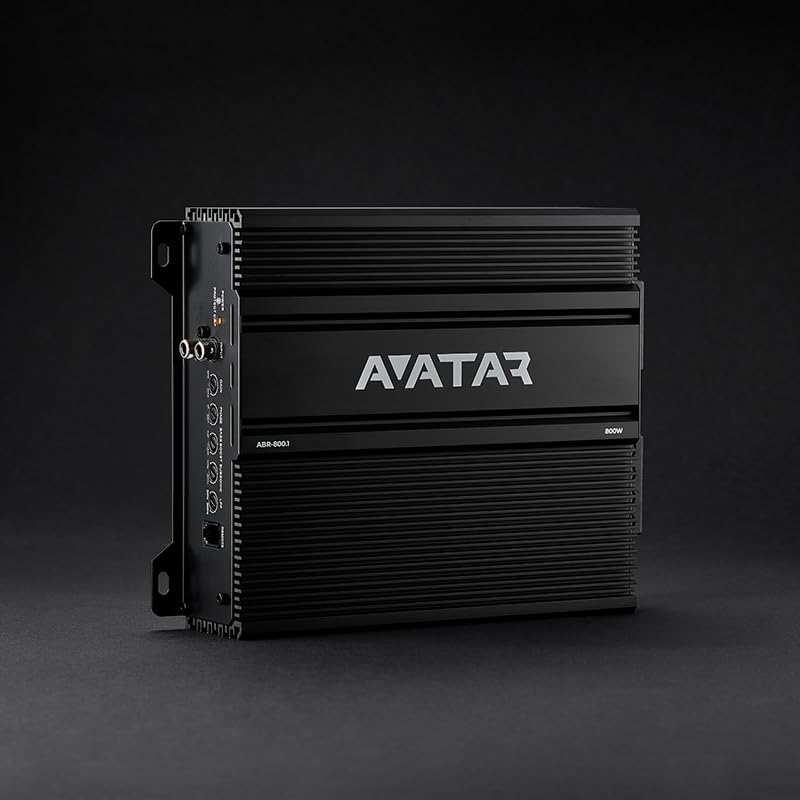
Image: Front panel of the amplifier, detailing the RCA input jacks, gain control, phase switch, bass boost, subsonic filter, low pass filter, and remote bass knob port.
- Low-Level Input (RCA): For aftermarket head units with RCA pre-outs, connect RCA cables from the head unit's subwoofer output to the INPUT RCA jacks on the amplifier.
- High-Level Input: If your head unit does not have RCA outputs, you can use a high-level input converter (not included) or connect directly to the speaker wires if the amplifier supports it (consult a professional if unsure). The ABR-800.1 is designed primarily for low-level RCA inputs.
Operating the Amplifier
The ABR-800.1 features several controls to fine-tune your audio system. Familiarize yourself with these adjustments for optimal sound.
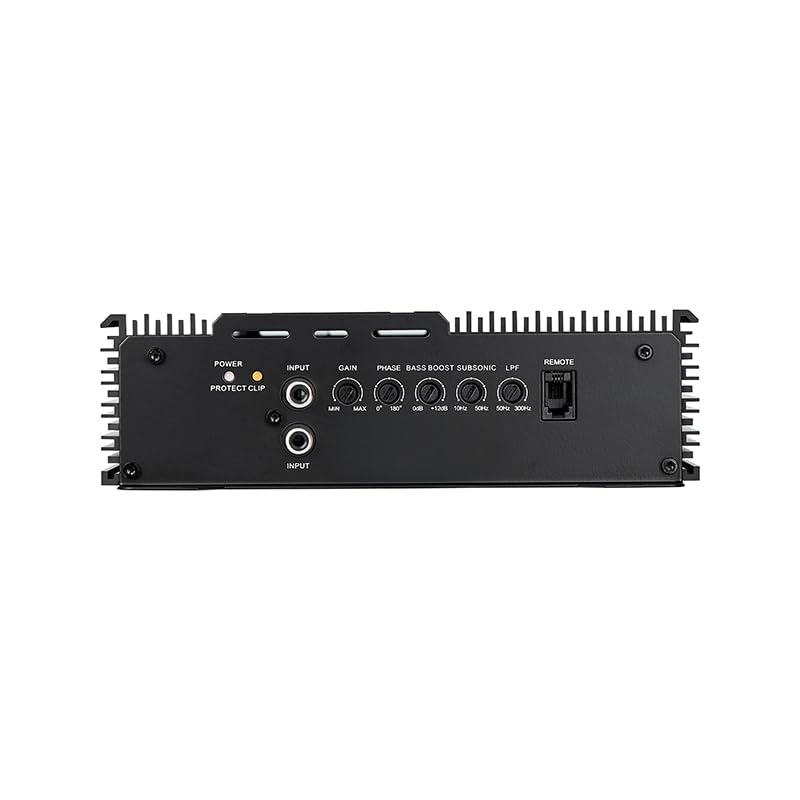
Image: Detailed view of the amplifier's control panel, highlighting the Gain, Phase, Bass Boost, Subsonic, and LPF (Low Pass Filter) knobs, along with the Power and Protect/Clip indicators.
- POWER Indicator: Illuminates green when the amplifier is powered on and operating normally.
- PROTECT/CLIP Indicator: Illuminates red when the amplifier enters protection mode due to overheating, short circuit, or low voltage. It may also indicate clipping (signal distortion) if the input gain is set too high.
- GAIN Control: Adjusts the input sensitivity of the amplifier to match the output level of your head unit. Start with the gain at minimum and slowly increase until desired volume is achieved without distortion.
- PHASE Switch (0°/180°): Adjusts the phase of the subwoofer output. Experiment with both settings to find the one that provides the most cohesive bass response with your main speakers.
- BASS BOOST Control (0-12dB @ 50Hz): Provides an adjustable bass equalization boost at 50Hz. Use sparingly to avoid distortion and potential speaker damage.
- SUBSONIC Filter (10Hz-50Hz): Filters out extremely low frequencies that are below the audible range and can cause damage to subwoofers without producing sound. Set it slightly below your subwoofer's resonant frequency or port tuning frequency.
- LPF (Low Pass Filter) Control (50Hz-200Hz): Filters out frequencies above the set point, allowing only low frequencies to pass to the subwoofer. Adjust this to blend the subwoofer's output seamlessly with your main speakers.
- REMOTE Port: Connect the included remote bass knob here for convenient level control from the driver's seat.
Maintenance
To ensure the longevity and optimal performance of your Avatar ABR-800.1 amplifier, follow these simple maintenance guidelines:
- Cleaning: Periodically wipe the amplifier's exterior with a soft, dry cloth to remove dust and dirt. Do not use harsh chemicals or abrasive cleaners.
- Ventilation: Ensure that the amplifier's heatsink fins are free from obstructions to allow for proper airflow and cooling.
- Fuse Replacement: The amplifier is equipped with internal fuses for protection. If a fuse blows, replace it only with a fuse of the same type and rating (refer to specifications). Always disconnect power before replacing fuses.
Troubleshooting
If you experience issues with your amplifier, consult the following troubleshooting guide before seeking professional service:
| Problem | Possible Cause | Solution |
|---|---|---|
| No Power (POWER indicator off) |
|
|
| No Sound |
|
|
| Distorted Sound |
|
|
| Amplifier Overheating (PROTECT/CLIP indicator on) |
|
|
Specifications
| Feature | Detail |
|---|---|
| Amplifier Type | Monoblock Class AB |
| Max Power Output | 800 Watts |
| Stable Impedance | 2 Ohm |
| Number of Channels | 1 |
| Mounting Type | Freestanding |
| Package Dimensions | 15 x 10 x 2.5 inches |
| Item Weight | 4.9 Pounds |
| Model Number | ABR-800.1 |
| Manufacturer | Deaf Bonce |
Warranty and Support
For warranty information, please refer to the specific terms and conditions provided at the time of purchase or contact your authorized Deaf Bonce dealer. General product support and additional resources may be available through the official Deaf Bonce website or by contacting their customer service.
You can visit the official Deaf Bonce store on Amazon for more information: Deaf Bonce Amazon Store
Related documentsABR-800.1


Ask a question about this manual
Ask about setup, troubleshooting, compatibility, parts, safety, or missing instructions. Manuals+ will review the question and use this page’s manual context to help answer it.