
SUPRENT HC586TX
Contents
SUPRENT Professional Hair Clippers & Trimmer Combo User Manual
Model: HC586TX
1. Safety Information
For safe operation and to prevent injury, please read and adhere to the following guidelines:
- Keep blades away from face and eyes during operation.
- Do not ingest or inhale small parts. Ensure all components are securely attached before use.
- Clean and store the clippers and trimmer properly after each use to maintain hygiene and performance.
- Adult supervision is required when children are near or using the device.
- Always ensure the device is turned off before cleaning or maintenance.
- Do not immerse the device in water.
- Use only the provided charging cables and stands.
2. Package Contents
Verify that all items listed below are included in your package:
- 1x Hair Clipper
- 1x Hair Trimmer
- 6x Magnetic Clipper Guards (various sizes)
- 4x Trimmer Guards (various sizes)
- 2x Charging Stands
- 2x Charging Cables (Type-C)
- 1x Blade Oil
- 1x Cleaning Brush
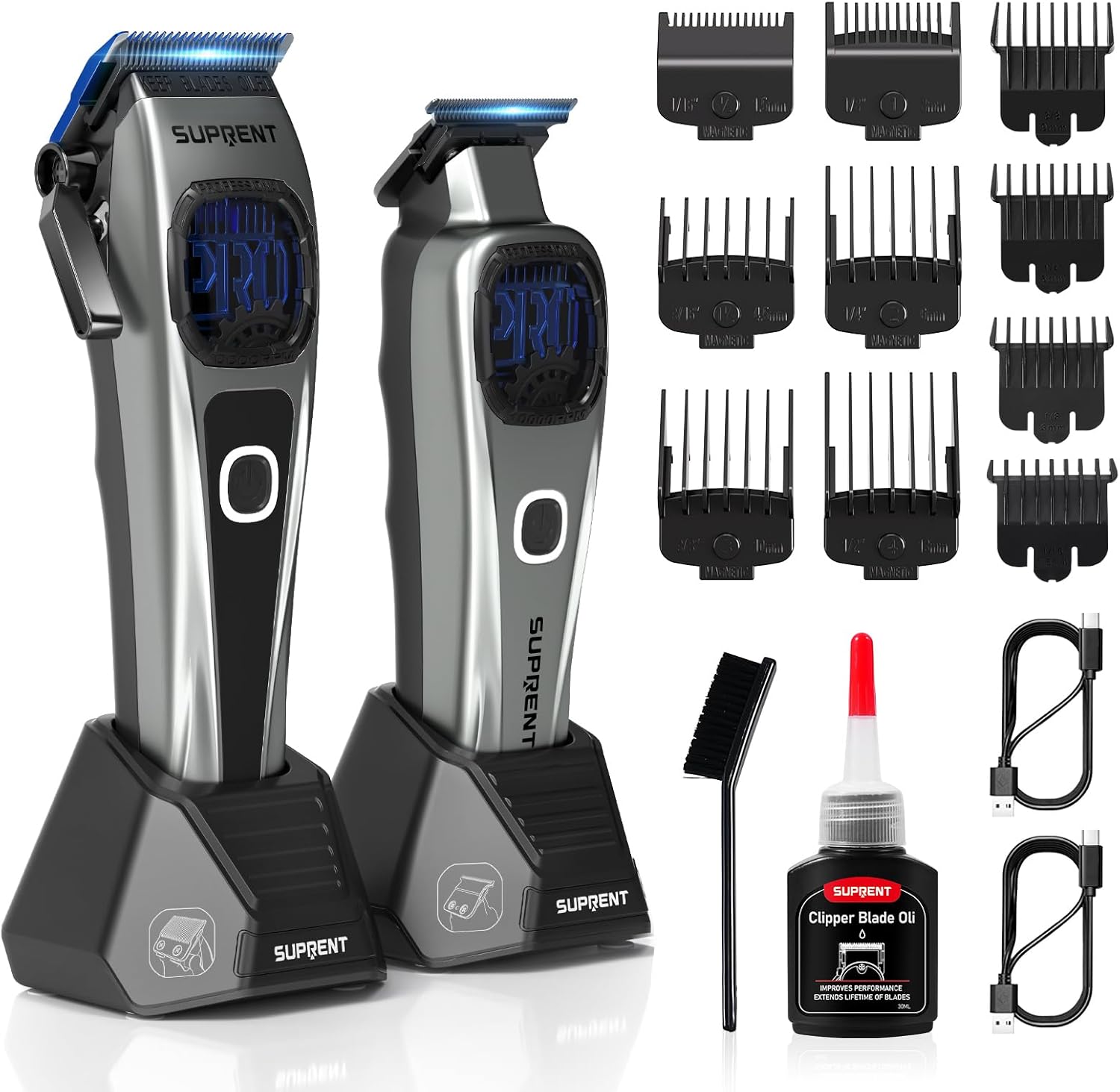
Image: SUPRENT Professional Hair Clipper and Trimmer Combo with all included accessories.
3. Setup
3.1 Initial Charging
Before first use, fully charge both the hair clipper and trimmer. Connect the Type-C charging cables to their respective charging stands or directly to the devices, then plug into a suitable power source. The battery indicator will show charging progress.

Image: SUPRENT Hair Clipper and Trimmer on their charging stands, illustrating dual charging methods.
3.2 Attaching Guide Combs
Select the desired magnetic guide comb for your clipper. Align the comb with the clipper blade and gently snap it into place. Ensure it is securely attached before use. For the trimmer, slide the appropriate guard onto the blade until it clicks.

Image: Close-up of the SUPRENT Hair Clipper demonstrating the attachment of a magnetic guide comb.
4. Operating Instructions
4.1 Powering On/Off and Speed Settings
Press the power button to turn the device on. Both the clipper and trimmer feature two adjustable speed settings. Press the power button again to cycle between the high-speed mode (for debulking and fading) and low-speed mode (for sensitive areas or intricate detailing).

Image: SUPRENT Hair Clipper displaying its two adjustable speed settings for different cutting needs.
4.2 Clipper Blade Adjustment
The hair clipper features a 5-level adjustable blade (0.5mm to 3.5mm) via a click taper lever. Adjust the lever to achieve your desired cutting length without a comb, or to fine-tune the length when using a comb.

Image: Diagram illustrating the adjustable taper lever on the SUPRENT Hair Clipper.
4.3 Trimmer Zero-Gapping
The trimmer comes with a zero-gap tool for precise blade alignment, allowing for extremely close cuts and sharp lines. To zero-gap, remove the trimmer blade, place it in the zero-gap tool, align the blades, and then reattach to the trimmer. Refer to the maintenance section for detailed blade removal/installation.
Video: A user demonstrating the zero-gapping process for the trimmer blades. This video shows the trimmer in use and highlights its precision capabilities.
5. Maintenance
5.1 Cleaning the Blades
After each use, turn off the device and remove any attached guide combs. Use the provided cleaning brush to remove loose hair from the blades. For a more thorough cleaning, the trimmer blades can be removed (see 5.2 Blade Removal/Installation).
5.2 Oiling the Blades
Regular oiling is crucial for maintaining blade sharpness and smooth operation. Apply 1-2 drops of the included blade oil to the teeth of the blades after every few uses or as needed. Turn the device on for a few seconds to distribute the oil evenly. Wipe off any excess oil with a soft cloth.
5.3 Trimmer Blade Removal and Installation
To remove the trimmer blade for cleaning or zero-gapping, carefully unscrew the two screws holding the blade assembly in place. Gently detach the blade. When reinstalling, ensure the fixed blade and moving blade are properly aligned before tightening the screws. Do not let the moving blade exceed the range of the fixed blade.
Video: Detailed instructions on how to remove, align, and install the trimmer blades, including the zero-gap tool usage and oiling.
6. Troubleshooting
| Problem | Possible Cause | Solution |
|---|---|---|
| Device not turning on. | Low battery or charging issue. | Ensure the device is fully charged using the provided cable and stand. Check power outlet. |
| Blades pulling hair or cutting unevenly. | Dull blades, lack of oil, or hair buildup. | Clean blades thoroughly with the brush. Apply blade oil. Ensure blades are properly aligned. |
| Device making unusual noise. | Lack of lubrication or foreign object. | Oil the blades. Check for any hair or debris obstructing the blades or motor. |
| Battery not holding charge. | Battery degradation or faulty charger. | Ensure proper charging. If issues persist, contact customer support. |
7. Specifications
- Model Number: HC586TX
- Motor Speed: Up to 10,000 RPM
- Blade Material (Clipper): Blue Titanium-Coated Fixed Blade, Ceramic Moving Blade
- Blade Material (Trimmer): Diamond-like Carbon-Coated Blades
- Clipper Blade Adjustment: 5 levels (0.5mm to 3.5mm)
- Battery: 2500mAh (Integrated/Built-in Rechargeable)
- Run Time: Approximately 5-6 haircuts per charge
- Charging Type: USB Type-C, Charging Stands
- Included Guards: 6 Magnetic Clipper Guards, 4 Trimmer Guards
8. Warranty and Support
SUPRENT products are designed for quality and durability. For warranty information, product support, or to inquire about replacement parts, please visit the official SUPRENT website or contact our customer service team. Keep your purchase receipt as proof of purchase.
For further assistance, you may also refer to the "Help" section on Amazon's home page and select "Need more help - Contact Us."
Ask a question about this manual
Ask about setup, troubleshooting, compatibility, parts, safety, or missing instructions. Manuals+ will review the question and use this page’s manual context to help answer it.