
1. Introduction
The DOOGEE Fire 3 Pro is a robust and versatile rugged smartphone designed for durability and high performance. Featuring the latest Android 15 operating system and integrated Gemini AI, it offers a smooth, secure, and intelligent user experience. Its compact 5.5-inch HD+ IPS display provides comfortable viewing, while the powerful 8350mAh battery ensures extended usage. Equipped with a UNISOC T7200 octa-core processor, 16GB RAM (4GB + 12GB virtual), and 128GB ROM (expandable up to 2TB), the Fire 3 Pro handles multitasking with ease and provides ample storage. The device also boasts a 16MP main camera, 8MP front camera, and comprehensive connectivity options including NFC and multi-system GPS for reliable navigation. Its IP68/IP69K and MIL-STD-810H ratings confirm its resistance to water, dust, and drops, making it an ideal companion for demanding environments.

Figure 1.1: Front and back view of the DOOGEE Fire 3 Pro, showcasing its key specifications.
2. Package Contents
Upon opening your DOOGEE Fire 3 Pro package, please verify that all the following items are included:

Figure 2.1: All items included in the DOOGEE Fire 3 Pro retail package.
- 1 x Fire 3 Pro Rugged Phone
- 1 x Type-C USB Cable
- 1 x Charger (18W Fast Charging)
- 1 x Protective Film (Pre-applied)
- 1 x Thickened Screen Protector
- 1 x Card Slot Opener
- 1 x Packing Box
- 1 x User Manual
- 1 x Service Card
3. Setup
3.1 SIM and TF Card Installation
The DOOGEE Fire 3 Pro supports dual SIM cards and a TF (microSD) card for expanded storage up to 2TB. To install:
- Locate the SIM card tray on the side of the phone.
- Insert the provided card slot opener into the small hole next to the tray and gently push until the tray ejects.
- Place your Nano-SIM cards and/or TF card into the designated slots on the tray, ensuring correct orientation.
- Carefully push the tray back into the phone until it clicks into place.
3.2 First Power On and Charging
Before first use, it is recommended to fully charge your DOOGEE Fire 3 Pro. The device supports 18W fast charging.
- Connect the Type-C USB cable to the phone's charging port and the other end to the provided 18W charger.
- Plug the charger into a power outlet. The charging indicator will appear on the screen.
- Once fully charged, disconnect the charger.
- To power on, press and hold the Power button (usually on the side) until the DOOGEE logo appears.

Figure 3.1: Battery and charging specifications for extended use.
4. Operating Your Phone
4.1 Basic Operations
- Power On/Off: Press and hold the Power button. Select 'Power off' or 'Restart' from the menu.
- Screen Lock/Unlock: Press the Power button briefly to lock/unlock the screen. Use fingerprint or face recognition for quick access.
- Volume Control: Use the Volume Up/Down buttons on the side to adjust media, call, and alarm volumes.
4.2 Display and Visuals
The Fire 3 Pro features a 5.5-inch HD+ IPS display, offering clear and comfortable viewing. It includes eye care features and a dark mode to reduce eye strain during prolonged use.

Figure 4.1: Details of the 5.5-inch HD+ IPS display.
4.3 Camera Features
Capture high-quality photos and videos with the 16MP AI main camera and 8MP front camera. The AI scene recognition feature automatically optimizes settings for various environments, ensuring stunning shots even for beginners.

Figure 4.2: Camera specifications and example usage.

Figure 4.3: AI Scene Recognition in action.
4.4 Connectivity and Navigation
The Fire 3 Pro supports 4G LTE, 2.4G/5G WiFi for stable internet, and NFC for mobile payments and device pairing. Its multi-system positioning (GPS+GLONASS+Galileo+BeiDou) ensures precise navigation for outdoor activities.

Figure 4.4: Connectivity and navigation features.
4.5 Android 15 and Gemini AI
Experience enhanced privacy and a smoother operating experience with Android 15. The integrated Gemini AI offers multi-dimensional interactions, assisting with document drafting, image analysis, code debugging, and language learning.
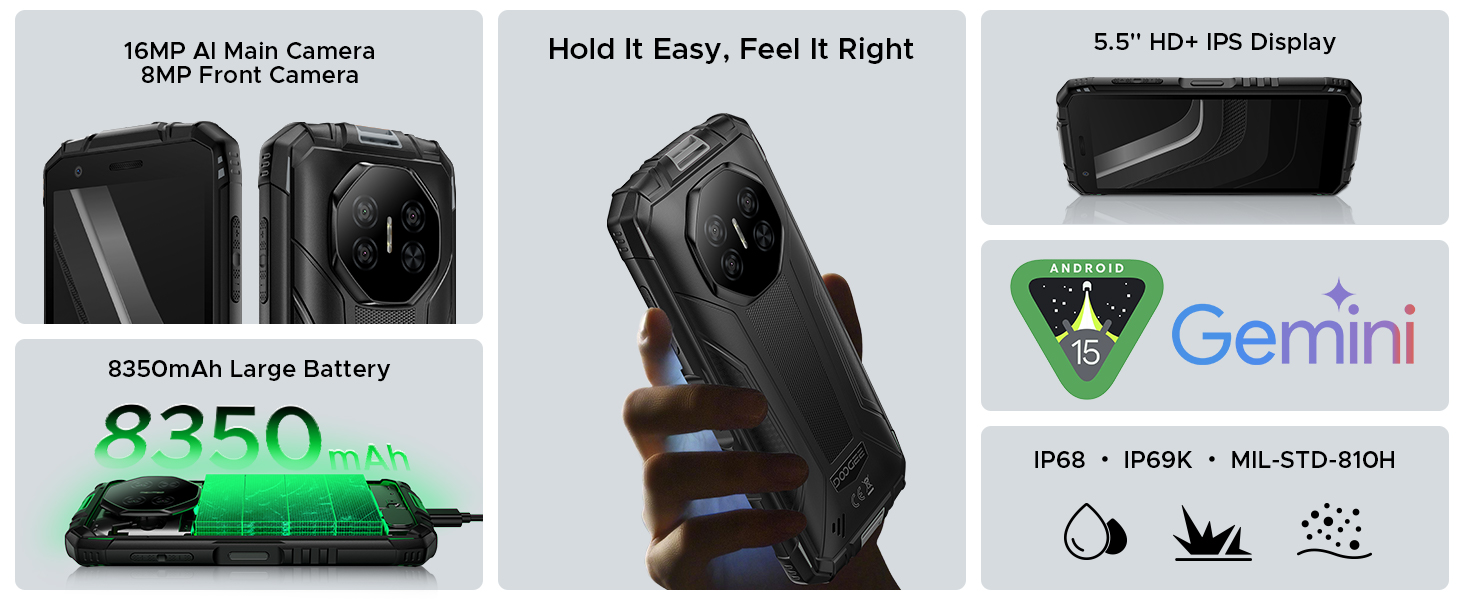
Figure 4.5: Gemini AI capabilities.

Figure 4.6: Android 15 OS features.
4.6 Security Features
Unlock your device quickly and securely using face recognition or the side-mounted fingerprint sensor.
4.7 Digital Toolkit
The Fire 3 Pro includes a suite of useful tools for outdoor and professional use, such as a compass, sound meter, protractor, and more.

Figure 4.7: Overview of the built-in Digital Toolkit.
4.8 Product Overview Video
Video 4.1: An official overview of the DOOGEE Fire 3 Pro, highlighting its compact design, display, and rugged features. This video provides a visual demonstration of the phone's physical attributes and user interface elements.
5. Maintenance
To ensure the longevity and optimal performance of your DOOGEE Fire 3 Pro, follow these maintenance guidelines:
- Cleaning: Use a soft, lint-free cloth to clean the screen and body. For stubborn dirt, dampen the cloth slightly with water. Avoid harsh chemicals or abrasive materials.
- Water and Dust Resistance: While the phone is IP68/IP69K rated, ensure all port covers are securely closed before exposing it to water or dust. Do not intentionally submerge the phone in corrosive liquids or saltwater.
- Temperature: Avoid exposing the phone to extreme temperatures (very hot or very cold) as this can affect battery life and internal components.
- Battery Care: For optimal battery health, avoid frequently draining the battery completely or keeping it at 100% charge for extended periods. Use the original charger and cable.
- Storage: When storing the phone for extended periods, ensure it is partially charged (around 50%) and stored in a cool, dry place.

Figure 5.1: The DOOGEE Fire 3 Pro's ruggedness features.
6. Troubleshooting
If you encounter issues with your DOOGEE Fire 3 Pro, try the following common solutions:
| Problem | Possible Solution |
|---|---|
| Phone does not turn on | Ensure the battery is charged. Connect to charger for at least 30 minutes. Press and hold the Power button for 10-15 seconds to force restart. |
| Phone not charging | Check if the charger and USB cable are securely connected. Try a different outlet or charger. Ensure the charging port is clean and free of debris. |
| Poor network signal | Check if SIM card is properly inserted. Move to an area with better network coverage. Restart the phone. Verify APN settings with your carrier. |
| Apps crashing or freezing | Close the app and reopen it. Clear the app's cache and data in Settings. Update the app to the latest version. Restart the phone. |
| Fingerprint/Face ID not working | Ensure your finger/face is clean and dry. Re-register your fingerprint/face ID. Ensure the sensor/camera is clean. |
| Touchscreen unresponsive | Restart the phone. If the issue persists, a factory reset might be necessary (back up data first). |
If the problem persists after trying these solutions, please contact DOOGEE customer support for further assistance.
7. Specifications
Detailed technical specifications for the DOOGEE Fire 3 Pro:
| Feature | Specification |
|---|---|
| Brand | DOOGEE |
| Model Name | FIRE3PRO |
| Item Model Number | Fire3 Pro |
| Operating System | Android 15 |
| Processor | UNISOC T7200 Octa-Core (1.6 GHz) |
| RAM Memory Installed Size | 16 GB (4GB Basic + 12GB Virtual) |
| Memory Storage Capacity | 128 GB |
| Expandable Storage | Up to 2TB via TF card (sold separately) |
| Screen Size | 5.5 Inches |
| Max Screen Resolution | 720*1440 Pixels (HD+ IPS) |
| Battery | 8350mAh Lithium Polymer (included) |
| Charging | 18W Fast Charging, Reverse Charging |
| Main Camera | 16MP AI Main Camera |
| Front Camera | 8MP Front Camera |
| Wireless Carrier | Unlocked for All Carriers |
| Cellular Technology | 4G TDD: B34/38/39/40/41; FDD: B1/2/3/4/5/7/8/18/19/20/25/26/28A/28B/66; 3G WCDMA: 1/2/4/5/8; 2G GSM: B2/3/5/8 |
| Connectivity | 2.4G/5G WiFi, NFC, Bluetooth |
| Navigation | GPS+GLONASS+Galileo+BeiDou |
| Security | Face ID, Fingerprint Unlock |
| Durability | IP68/IP69K Waterproof, Dustproof, MIL-STD-810H Drop-proof |
| Item Weight | 10.2 ounces |
| Product Dimensions | 3.05 x 0.7 x 6.4 inches |
| Color | Yellow |
8. Warranty and Support
Your DOOGEE Fire 3 Pro comes with a Service Card included in the package, which outlines the warranty terms and conditions. Please refer to this card for specific details regarding your product's warranty period and coverage.
For technical support, troubleshooting assistance beyond this manual, or warranty claims, please visit the official DOOGEE website or contact their customer service through the channels provided on the Service Card or their website. Ensure you have your product model number (Fire3 Pro) and purchase details ready when seeking support.


