
Introduction
This manual provides detailed instructions for the assembly, operation, and maintenance of your HOOOWOOO Vanity Desk with Mirror and Lights, Model 01. Please read this manual thoroughly before assembly and use to ensure proper function and safety. Keep this manual for future reference.
Important Safety Information: This product includes an anti-tip safety device. It is crucial to install this device to secure the vanity to the wall, preventing accidental tipping, especially in households with children. Failure to install the anti-tip device may result in injury.

Figure 1: Overview of the HOOOWOOO Vanity Desk with Mirror and Lights. This image displays the complete vanity desk setup, including the lighted mirror, storage shelves, drawers, and the accompanying stool.
Setup and Assembly
Before beginning assembly, ensure all components are present and undamaged. It is recommended to assemble the vanity on a soft, clean surface to prevent scratches.
Package Contents:
- Vanity Desk components (panels, hardware)
- LED Lighted Mirror unit
- Matching Stool
- Anti-tip safety device
- Assembly instructions (refer to included paper manual for detailed steps)
Assembly Steps (General Overview):
- Unpack all parts and identify them using the parts list in the included paper manual.
- Assemble the main desk frame according to the diagrams.
- Attach the storage cabinets and shelves.
- Install the sliding drawer mechanisms and drawers.
- Mount the LED lighted mirror unit securely.
- Assemble the accompanying stool.
- Install the Anti-Tip Safety Device: Securely attach the anti-tip strap to the back of the vanity and to a wall stud using appropriate hardware. This step is critical for safety.
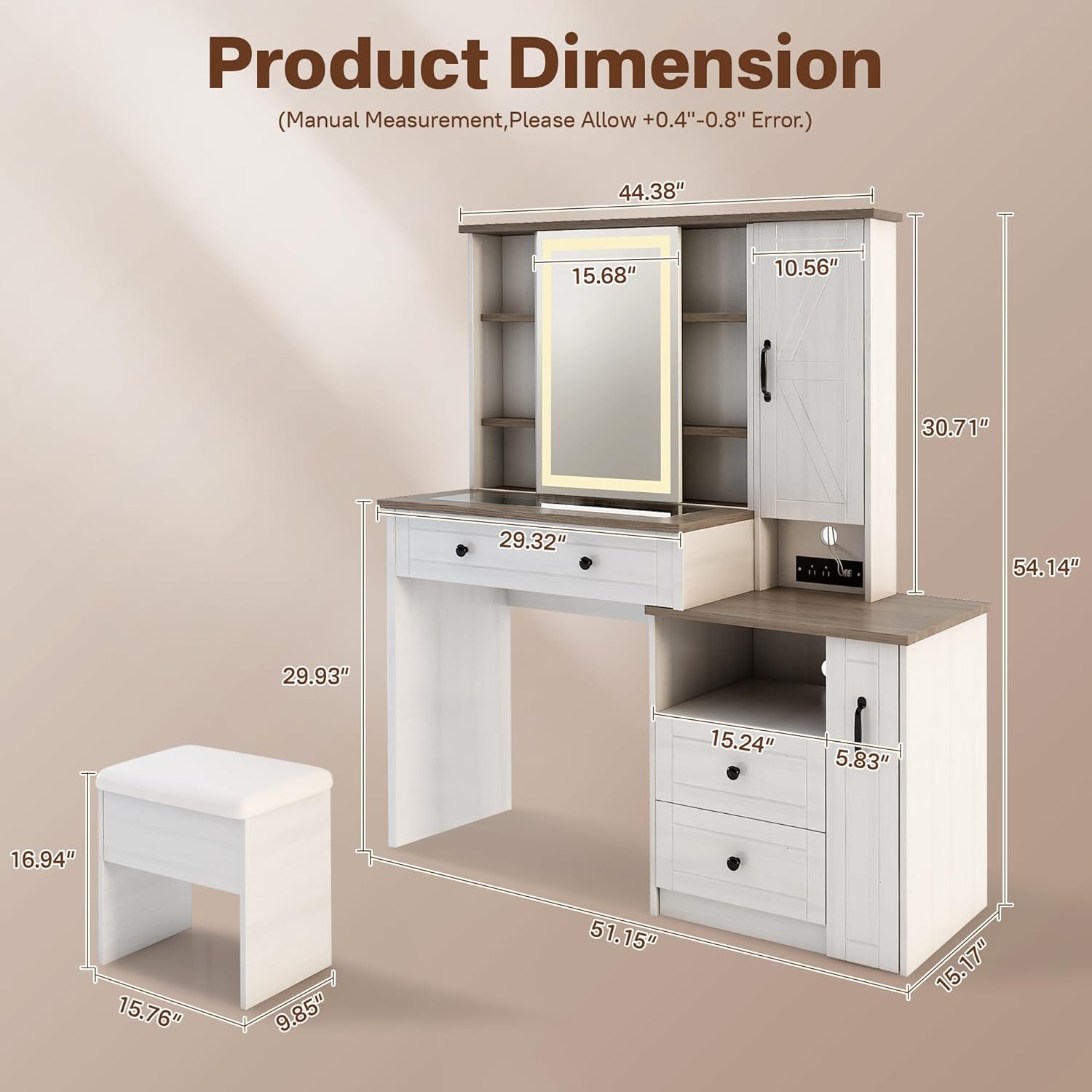
Figure 2: Product Dimensions. This diagram illustrates the overall measurements of the vanity desk and the accompanying stool, providing key height, width, and depth specifications.

Figure 3: Cosmetic Storage Features. This image highlights the various storage options available on the vanity desk, such as the top storage area, mirrored storage cabinet, jewelry storage cabinet, sliding drawers, and a side cabinet with shelving.
Operating Instructions
LED Lighted Mirror:
The central mirror features built-in LED lighting. To operate, locate the touch control sensor on the mirror surface. Tap the sensor to turn the lights on or off. Press and hold the sensor to adjust the brightness or switch between light color temperatures (if applicable to your model).
Storage Compartments:
- Sliding Drawer: Pull the drawer handle to open. The drawer is designed for smooth operation.
- Side Cabinet: Open the cabinet door to access internal shelving.
- Open Shelves: Utilize the open shelves for frequently used items or decorative displays.
- Visible Glass Tabletop: The glass section of the tabletop allows for easy viewing and organization of cosmetics and accessories stored beneath.

Figure 4: Glass Tabletop Feature. This close-up image demonstrates the visible glass tabletop, which allows users to easily locate and access cosmetics and accessories stored in the compartments below.
Convenient Charging Station:
The vanity desk includes a built-in charging station. Connect your electronic devices to the available power outlets or USB ports. Ensure the vanity is plugged into a functional wall outlet for the charging station to operate.

Figure 5: Charging Station. This image shows the integrated charging station with power outlets and USB ports, demonstrating a smartphone being charged.
Maintenance and Care
Cleaning the Vanity Desk:
- Wipe surfaces with a soft, damp cloth. Avoid abrasive cleaners or harsh chemicals, which can damage the finish.
- For the mirror, use a glass cleaner and a lint-free cloth. Do not spray cleaner directly onto the mirror; apply it to the cloth first.
- Regularly dust all surfaces to prevent buildup.
Stool Care:
- Spot clean the upholstered stool with a mild fabric cleaner as needed.
- Avoid prolonged exposure to direct sunlight to prevent fading.
General Care:
- Avoid placing hot items directly on the surface. Use coasters or protective pads.
- Do not overload drawers or shelves beyond their capacity.
- Periodically check all screws and fasteners to ensure they remain tight.
Troubleshooting
If you encounter issues with your vanity desk, refer to the following common problems and solutions:
- LED Mirror Lights Not Working:
- Ensure the vanity is properly plugged into a functional power outlet.
- Check the power connection to the mirror unit.
- Verify the touch sensor is clean and unobstructed.
- Drawers Sticking or Not Sliding Smoothly:
- Check for any obstructions within the drawer slides.
- Ensure the drawer slides are properly aligned and securely fastened.
- Do not overload the drawers.
- Vanity Feels Unstable:
- Confirm all assembly screws are tightened.
- Ensure the anti-tip safety device is correctly installed and secured to a wall stud.
- Place the vanity on a level surface.
- Charging Station Not Functioning:
- Verify the main power cord for the vanity is securely plugged into a live outlet.
- Test the charging station with different devices and cables to rule out device-specific issues.
For issues not covered here, please contact customer support.
Specifications
| Feature | Detail |
|---|---|
| Brand | HOOOWOOO |
| Model Number | 01 |
| Product Dimensions (D x W x H) | 15.17" x 51.15" x 54.14" |
| Item Weight | 137 pounds |
| Color | White |
| Furniture Finish | Ivory |
| Frame Material | Metal |
| UPC | 725086356987 |
Warranty and Support
For warranty information, please refer to the documentation included with your purchase or contact HOOOWOOO customer support directly. HOOOWOOO is committed to providing quality products and support.
Customer Support: If you have any questions, require assistance with assembly, or need to report a missing or damaged part, please contact HOOOWOOO customer service. You can often find contact information on the manufacturer's website or through your retailer.
Visit the official HOOOWOOO Store for more products and information: HOOOWOOO Store