
1. Introduction
Thank you for choosing the HARDELL Engraving Pen. This versatile, cordless electric engraving tool is designed for precision work on a variety of materials, including metal, wood, glass, and plastic. Featuring a powerful brushless motor, six-speed settings, and a long-lasting rechargeable battery, it is suitable for both DIY enthusiasts and professionals. Please read this manual thoroughly to ensure safe and optimal use of your engraving pen.
2. Package Contents
The HARDELL Engraving Pen kit includes the following items:
- Engraving Pen x 1
- USB-C Charging Cable x 1
- Rechargeable Lithium Ion Battery (2000mAh) x 1
- Diamond Bits x 6 (various shapes for engraving)
- Polishing Bits x 3
- Sanding Paper (20 pieces) & Rod x 1
- Stencils x 4 (various designs including letters, numbers, and patterns)
- Replacement Screws x 4
- L-shaped Wrench x 1
- Spanner x 1

Figure 2.1: Complete HARDELL Engraving Pen kit with all included accessories.
3. Product Features
- Upgraded Brushless Motor: Features dual-bearing stability and a 4V brushless motor for vibration-free operation, offering 8X longer lifespan, 30% less energy consumption, 15% weight reduction, and 40% reduced operational volume.
- Long Battery Life: Equipped with a large 2000mAh lithium-ion battery, providing hours of continuous use.
- 6 Speed Settings: Easily switch between six speed settings, from 18,000 to 38,000 RPM, for optimal control across various materials.
- Durable and Portable Design: Perfectly weighted, all-metal body ensures fatigue-free handling and stability. USB-C charging allows for portability without messy cords.
- Versatile Accessories: Includes 41 accessories for engraving, grinding, polishing, and even nail grooming on materials like wood, metal, glass, plastic, and leather.
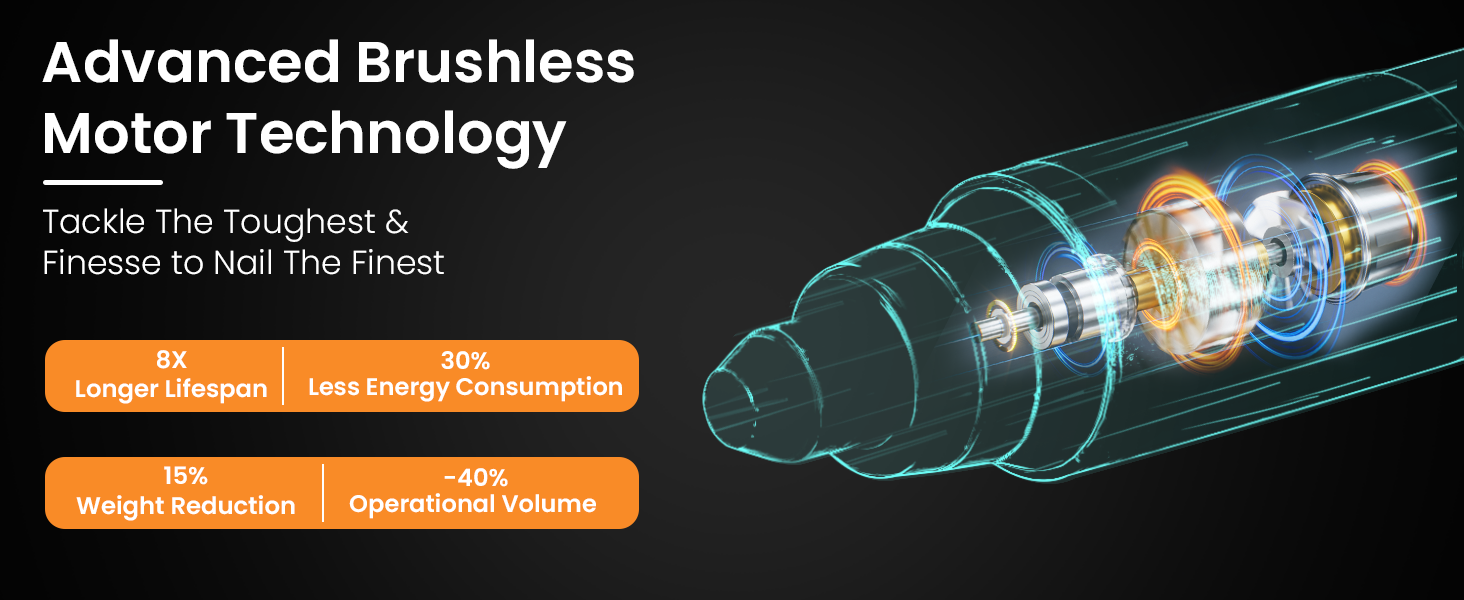
Figure 3.1: Advanced brushless motor technology for enhanced performance.

Figure 3.2: Six adjustable speed settings for various materials.
4. Setup
4.1. Inserting the Engraving Bit
- Unscrew the front section of the engraving pen to expose the chuck.
- Select the desired engraving bit and insert its shaft into the chuck.
- Use the provided L-shaped wrench to tighten the set screw on the chuck, securing the bit firmly in place. Ensure the bit is centered and stable.
- Screw the front section back onto the pen.

Figure 4.1: Quick installation steps for the engraving bit.
4.2. Battery Installation
- Unscrew the middle section of the engraving pen to access the battery compartment.
- Insert the provided 2000mAh lithium-ion battery, ensuring the positive (+) and negative (-) terminals align correctly with the markings inside the compartment.
- Screw the middle section back onto the pen until it is securely closed.
5. Charging the Device
The HARDELL Engraving Pen is equipped with a USB-C charging port for convenience. To charge the device:
- Locate the USB-C port on the engraving pen.
- Plug the included USB-C cable into the pen's charging port.
- Connect the other end of the USB-C cable to any standard USB charger, laptop, or power bank.
- The indicator light on the pen will show the charging status. A full charge provides extended operating time.

Figure 5.1: USB-C charging port and internal battery for extended use.
6. Operating Instructions
6.1. Power On/Off and Speed Adjustment
- To power on the pen, press and hold the power button located on the body.
- To adjust the speed, short press the power button. The large LCD display will indicate the current speed setting (1-6).
- To power off the pen, press and hold the power button again.

Figure 6.1: Power and speed control on the engraving pen.
6.2. Engraving Techniques and Applications
Hold the pen like a regular writing instrument for comfortable and precise control. Experiment with different bits and speed settings to achieve desired effects on various materials.
- Glass Engraving: Use lower speeds and fine diamond bits for delicate designs on glass.
- Metal Engraving: Higher speeds and robust diamond bits are suitable for engraving on metal surfaces.
- Wood Carving: Adjust speed based on wood hardness; use various bits for detailing and shaping.
- Plastic & Leather: Lower speeds are generally recommended to prevent melting or tearing.
- Polishing & Sanding: Utilize the included polishing and sanding bits for finishing touches.

Figure 6.2: Examples of engraving, polishing, and nail grooming applications.
Video 6.1: Demonstration of the HARDELL Engraving Pen's capabilities on various materials like glass, metal, leather, wood, and clay, including drilling and sanding functions.
7. Maintenance
- Cleaning: After each use, gently wipe the pen body with a soft, dry cloth. Remove any dust or debris from the chuck and bit area.
- Bit Care: Clean engraving bits regularly to maintain their sharpness and effectiveness. Store bits in their protective case when not in use.
- Battery Care: Store the battery in a cool, dry place. Avoid fully discharging the battery frequently to prolong its lifespan.
- Storage: Store the engraving pen and all accessories in a dry, safe place away from direct sunlight and extreme temperatures.
8. Troubleshooting
| Problem | Possible Cause | Solution |
|---|---|---|
| Pen does not turn on | Low battery or incorrect battery insertion. | Charge the battery fully. Ensure the battery is inserted with correct polarity. |
| Bit is loose or wobbles | Chuck screw is not tightened sufficiently. | Use the L-shaped wrench to securely tighten the chuck screw. |
| Poor engraving performance | Worn-out bit, incorrect speed setting, or unsuitable bit for material. | Replace the bit if worn. Adjust speed setting. Use appropriate bit for the material. |
| Pen overheats | Prolonged continuous use. | Allow the pen to cool down before resuming use. Avoid excessive pressure. |
9. Specifications
| Feature | Detail |
|---|---|
| Model Number | DKB22501BLAHD-1 |
| Motor Type | 4V Brushless Motor |
| Speed Settings | 6 Speeds (18,000 - 38,000 RPM) |
| Battery Capacity | 2000mAh Lithium Ion |
| Charging Port | USB-C |
| Item Weight | 13.1 ounces |
| Product Dimensions | 6.3 x 8.7 x 1.8 inches |
10. Warranty and Support
This HARDELL Engraving Pen comes with a 1 Year Manufacturer Warranty. For any questions, technical support, or warranty claims, please contact HARDELL customer service through your Amazon purchase platform or refer to the contact information provided in your product packaging. Please have your purchase details readily available.