1. Introduction
This manual provides essential information for the safe operation, maintenance, and troubleshooting of your POXURIO 4000W Inverter Generator. Please read this manual thoroughly before operating the generator to ensure proper use and to prevent injury or damage.

Image: Front-right view of the POXURIO 4000W Inverter Generator, showcasing its compact design and control panel.
2. Safety Information
WARNING: Carbon Monoxide Hazard
Generator exhaust contains carbon monoxide, a colorless, odorless, poisonous gas. Breathing carbon monoxide can cause nausea, dizziness, fainting, or death. Operate the generator outdoors in a well-ventilated area, far away from windows, doors, and vents. Never operate the generator inside any building, garage, basement, crawlspace, or other enclosed or partially enclosed area.
- Fuel Safety: Gasoline is highly flammable and its vapors are explosive. Store fuel in an approved container in a well-ventilated area. Do not refuel while the engine is running or hot.
- Electrical Safety: Do not operate the generator in wet conditions. Ensure all electrical connections are secure and properly grounded. Avoid overloading the generator.
- Hot Surfaces: The generator's engine and muffler become very hot during operation and remain hot for a period after shutdown. Avoid contact with hot surfaces to prevent burns.
- Children and Pets: Keep children and pets away from the generator at all times.
- Maintenance: Always turn off the engine and allow it to cool before performing any maintenance or inspections.
3. Product Components and Features
Familiarize yourself with the key components of your POXURIO Inverter Generator:
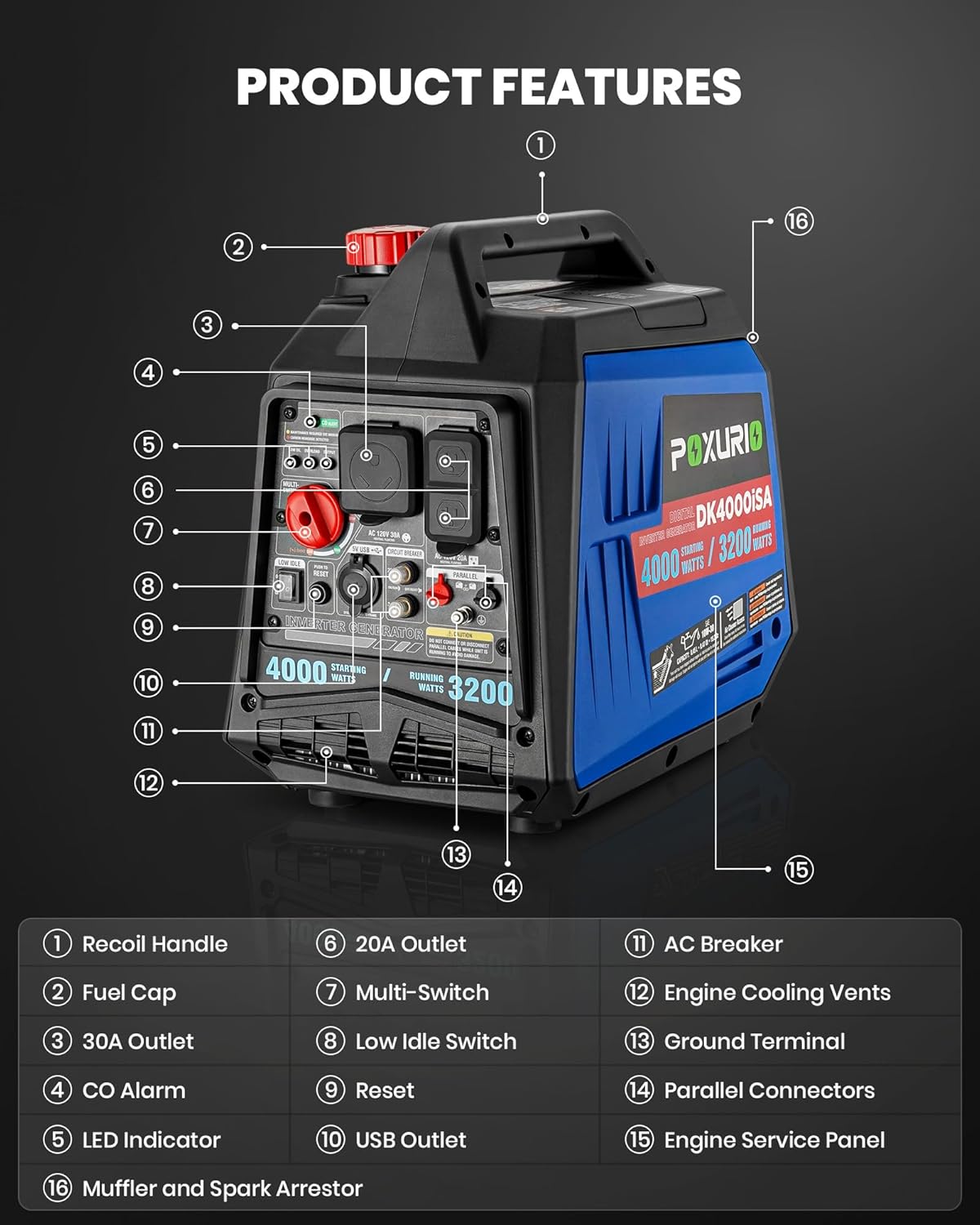
Image: Labeled diagram illustrating the various parts of the POXURIO Inverter Generator, including the control panel and outlets.
- Recoil Handle
- Fuel Cap
- 30A Outlet
- CO Alarm (Carbon Monoxide Alarm)
- LED Indicator
- 20A Outlet
- Multi-Switch
- Low Idle Switch
- Reset Button
- USB Outlet
- AC Breaker
- Engine Cooling Vents
- Ground Terminal
- Parallel Connectors
- Engine Service Panel
- Muffler and Spark Arrestor
Key Features:
- 4000W Starting Power / 3200W Running Power: Provides ample power for various electrical appliances.
- Low Noise Operation: Advanced sound reduction technology results in approximately 62 decibels during operation at 25% load.
- Gasoline Powered: Designed for convenient and accessible gasoline fuel.
- 3.6L Fuel Tank: Offers a run time of up to 6 hours at 25% load.
- Lightweight Design: Weighs approximately 53.6 pounds for portability.
- Pure Sine Wave Output: Delivers stable and clean power suitable for sensitive electronics.
- Parallel Capable: Allows connection of two inverter generators for increased power output.
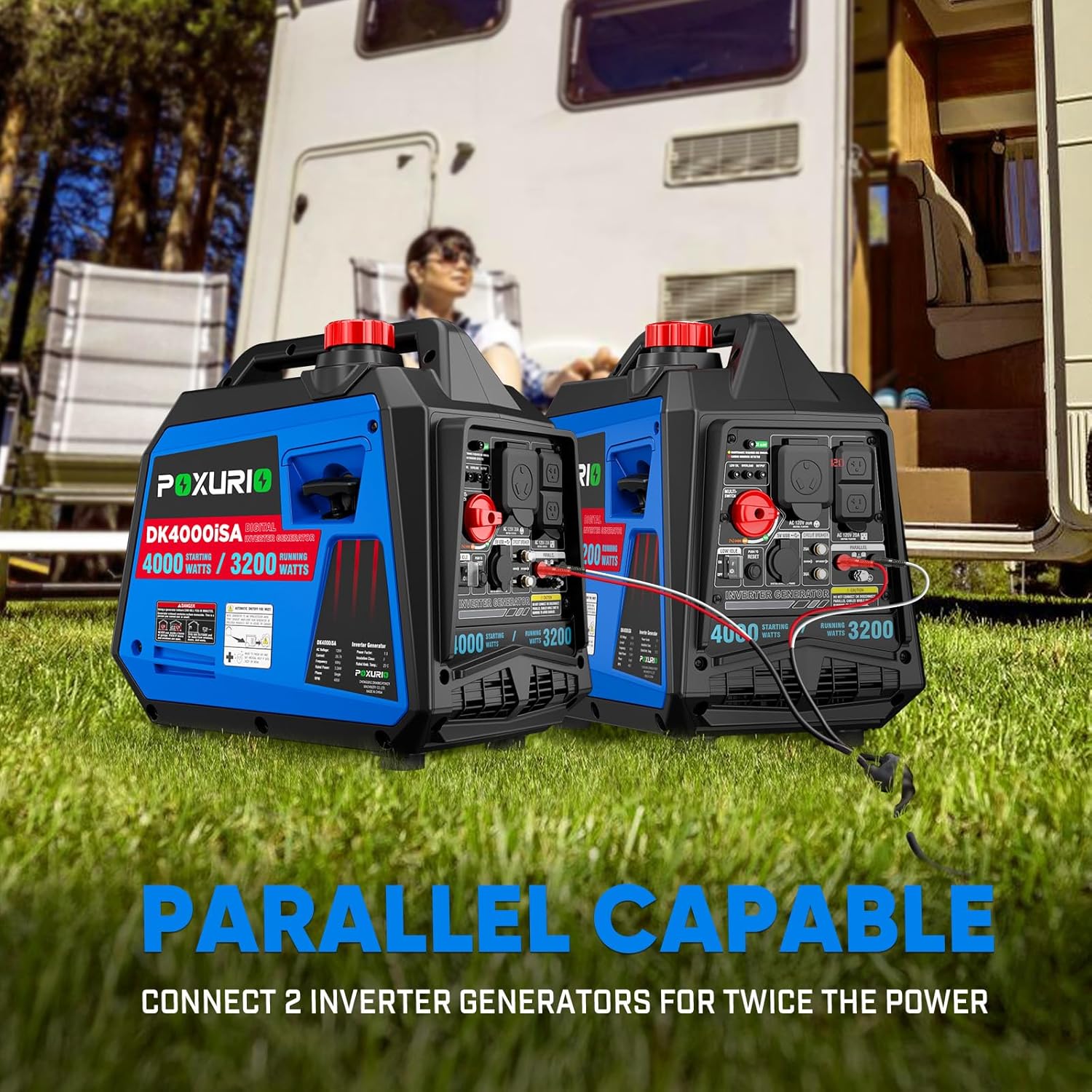
Image: Two POXURIO Inverter Generators shown connected, demonstrating their parallel capability for enhanced power.

Image: A graphic representation of pure sinusoidal current, indicating the generator's stable power output.

Image: A visual comparison of operating decibel levels, highlighting the generator's low noise performance.
4. Setup and First Use
Before starting the generator for the first time, perform the following steps:
- Add Engine Oil:
The generator is shipped without engine oil. You must add the correct amount of engine oil before starting. Refer to the specifications for the recommended oil type (SAE 10W/30) and capacity (0.45 Liters). Ensure the oil level is completely full, but do not overfill. An oil filler spout/funnel is typically included to assist with this process. Insufficient oil will prevent the generator from starting.
- Add Fuel:
Fill the fuel tank with fresh, unleaded gasoline. The tank capacity is 3.6 liters. Do not overfill. Ensure the fuel cap is securely tightened after filling.

Image: The POXURIO Inverter Generator positioned next to a 3.6L fuel can, illustrating its fuel capacity.
- Position the Generator:
Place the generator outdoors in a well-ventilated area, away from any combustible materials, windows, doors, or vents to prevent carbon monoxide accumulation.
5. Operating Instructions
Starting the Generator:
- Ensure the generator is on a level surface.
- Turn the fuel cap vent to the "ON" position (if applicable).
- Set the Multi-Switch to the "START" position.
- Recoil Start: Pull the recoil handle firmly and smoothly until the engine starts.
Electric Start (if equipped): Press and hold the electric start button until the engine starts. - Once the engine starts, slowly move the Multi-Switch to the "RUN" position.
- Allow the generator to warm up for a few minutes before connecting electrical loads.
Connecting Electrical Loads:
- Plug your appliances into the appropriate AC 120V outlets (20A or 30A) or USB outlets.
- Do not exceed the generator's rated running wattage (3200W) or starting wattage (4000W).
- The generator provides pure sine wave output, making it safe for sensitive electronics.
Stopping the Generator:
- Disconnect all electrical loads from the generator.
- Set the Multi-Switch to the "STOP" or "OFF" position.
- Turn the fuel cap vent to the "OFF" position (if applicable) for storage.
6. Maintenance
Regular maintenance ensures optimal performance and extends the lifespan of your generator.
- Engine Oil: Check the engine oil level before each use. Change the oil according to the schedule in the full owner's manual (not provided here).
- Air Filter: Inspect and clean the air filter regularly. Replace if damaged.
- Spark Plug: Inspect the spark plug periodically and replace if necessary.
- Fuel System: If storing the generator for an extended period (more than 30 days), drain the fuel tank and carburetor to prevent fuel degradation and clogging. Alternatively, use a fuel stabilizer.
- Cleaning: Keep the generator clean and free of debris. Ensure cooling vents are unobstructed.
7. Troubleshooting
| Problem | Possible Cause | Solution |
|---|---|---|
| Engine does not start or starts then stops. |
|
|
| No power output. |
|
|
| Engine runs rough or stalls. |
|
|
8. Specifications

Image: Detailed product parameter table for the POXURIO Inverter Generator.
| Parameter | Value |
|---|---|
| Brand | POXURIO |
| Model Number | 2025 Upgraded-4000W Gas Generator |
| Starting Wattage | 4000 Watts |
| Running Wattage | 3200 Watts |
| Voltage | 120 Volts |
| Rated Frequency | 60 Hz |
| Fuel Type | Gasoline |
| Fuel Tank Volume | 3.6 Liters |
| Engine Type | 4-stroke, OHV |
| Displacement | 145 cc |
| Lubricating Oil Model | SAE 10W/30 |
| Lubricating Oil Capacity | 0.45 Liters |
| Starting Method | Recoil Start, Electric Start |
| Noise Level (at 7m, 25% load) | 62 dB |
| Run Time (at 25% load) | Up to 6 hours |
| Item Weight | 53.6 Pounds |
| Product Dimensions (L x W x H) | 18.9" x 20.08" x 12.6" |
| Total Power Outlets | 2 AC outlets, USB outlets |
9. Warranty and Support
For warranty information or technical support, please refer to the documentation included with your purchase or contact POXURIO customer service. While specific warranty details are not provided in this manual, it is recommended to retain your proof of purchase for any warranty claims.
Note: For best results, refer to the official contact methods provided by POXURIO for support inquiries.