
Introduction
This manual provides detailed instructions for the assembly, operation, and maintenance of your TRIUMPHKEY Electric Lift Desk, Model 0788. Please read this manual thoroughly before installation and use to ensure safe and efficient operation. Keep this manual for future reference.
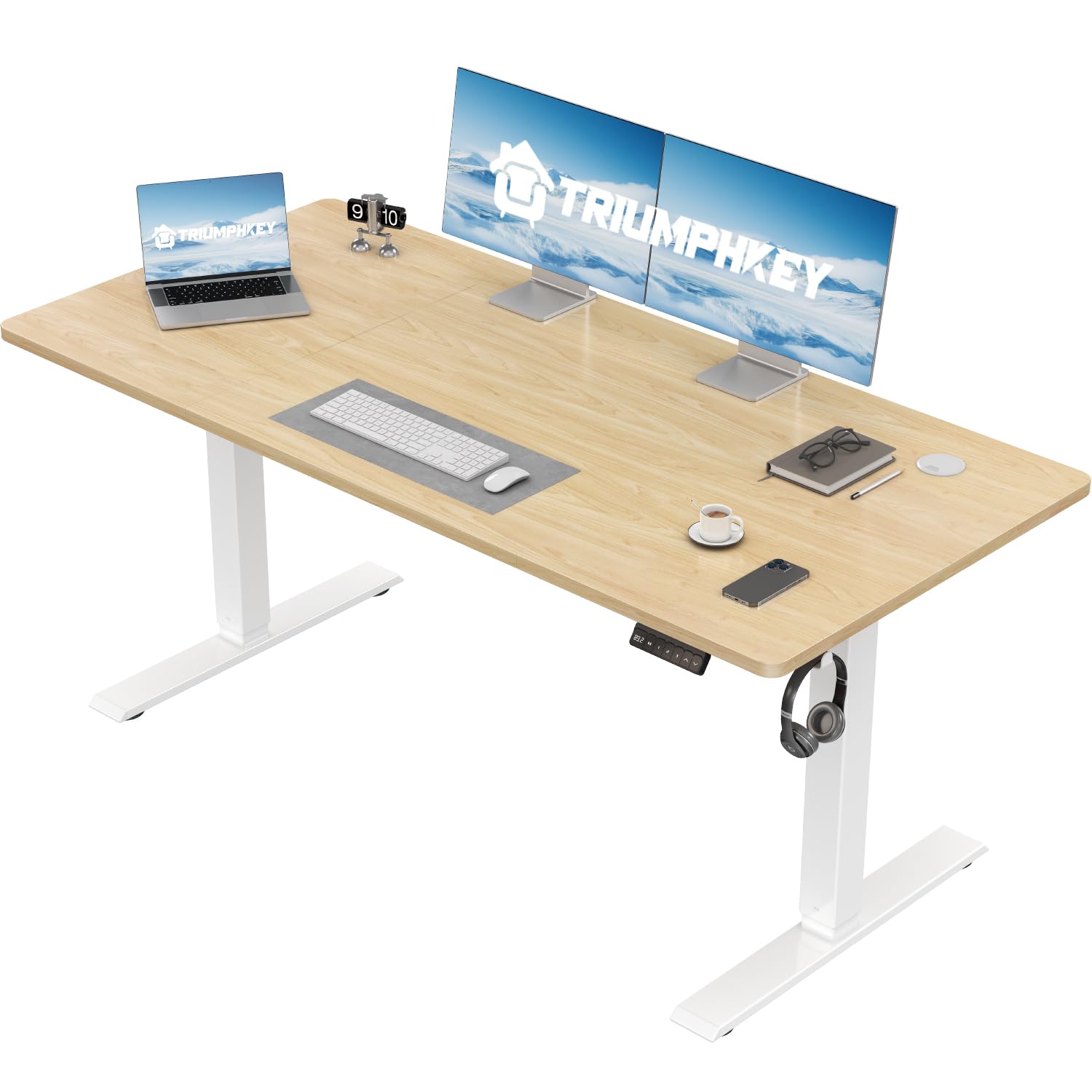
Figure 1: The TRIUMPHKEY Electric Lift Desk (Model 0788) featuring a maple tabletop and white legs, set up with a laptop, dual monitors, and various office accessories, demonstrating its spacious and functional design.
Safety Information
- Ensure all components are present and undamaged before assembly.
- Do not allow children to operate the desk without supervision.
- Keep hands and objects clear of moving parts during height adjustment.
- Do not overload the desk. The maximum load capacity is 80 kg (176 lbs).
- Only use the provided power adapter.
- If any unusual noise or movement occurs, discontinue use and consult the troubleshooting section.
Key Features
The TRIUMPHKEY Electric Lift Desk is designed with several features to enhance your workspace:
- Adjustable Height: Seamlessly switch between sitting and standing positions with an electric lifting mechanism.
- Memory Presets: Three programmable height settings for quick adjustments to your preferred positions.
- LED Display: Digital display shows the current desk height for precise control.
- Quiet Operation: Motor operates at less than 50 dB, ensuring a peaceful work environment.
- Robust Construction: Industrial steel frame supports up to 80 kg for stability.
- Integrated Headphone Hook: A convenient hook to keep your headphones or bag organized.
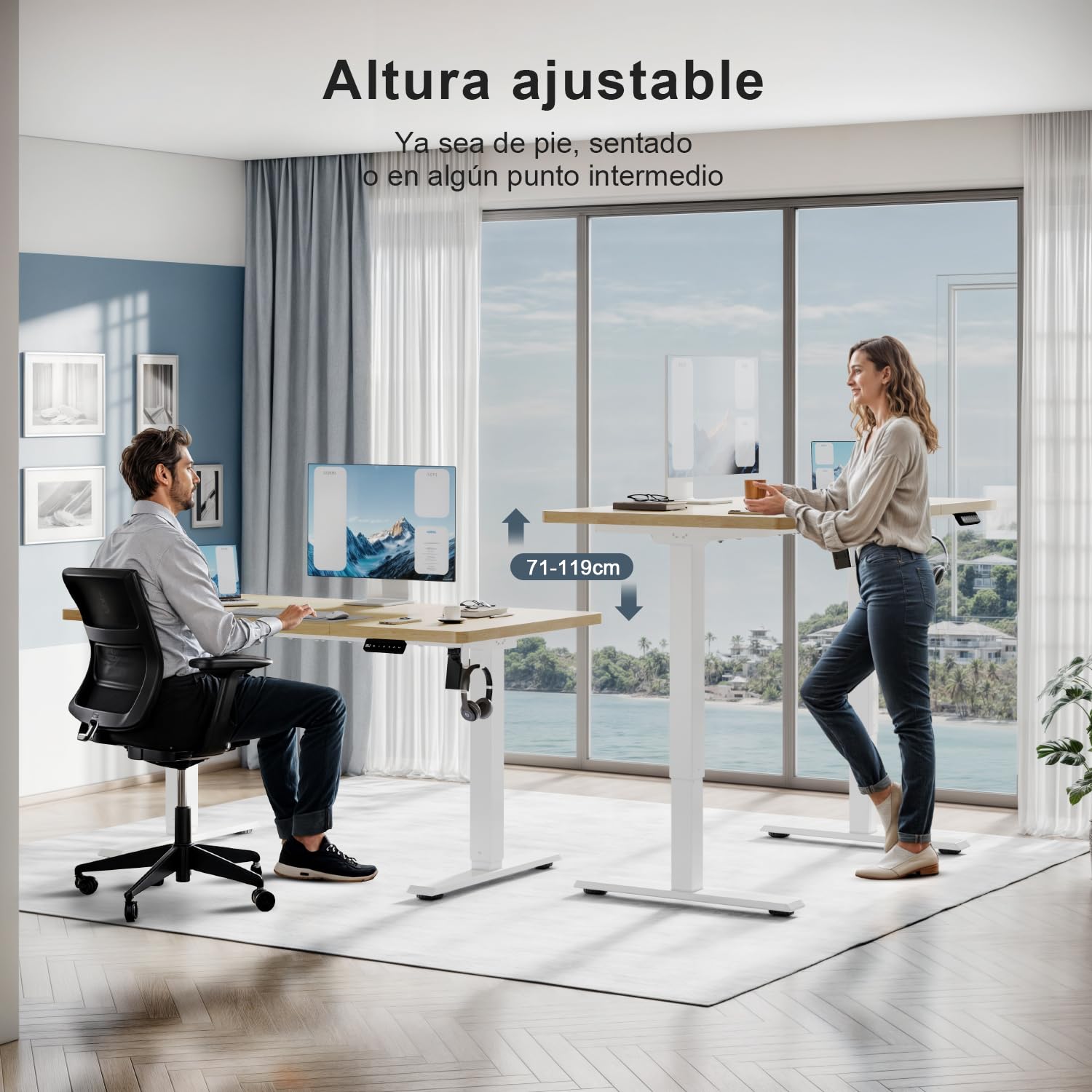
Figure 2: This image illustrates the adjustable height feature of the TRIUMPHKEY Electric Lift Desk, showing a user comfortably seated at one desk and another user standing at an elevated desk, highlighting the versatility for different working postures. The height range of 71-119cm is also indicated.
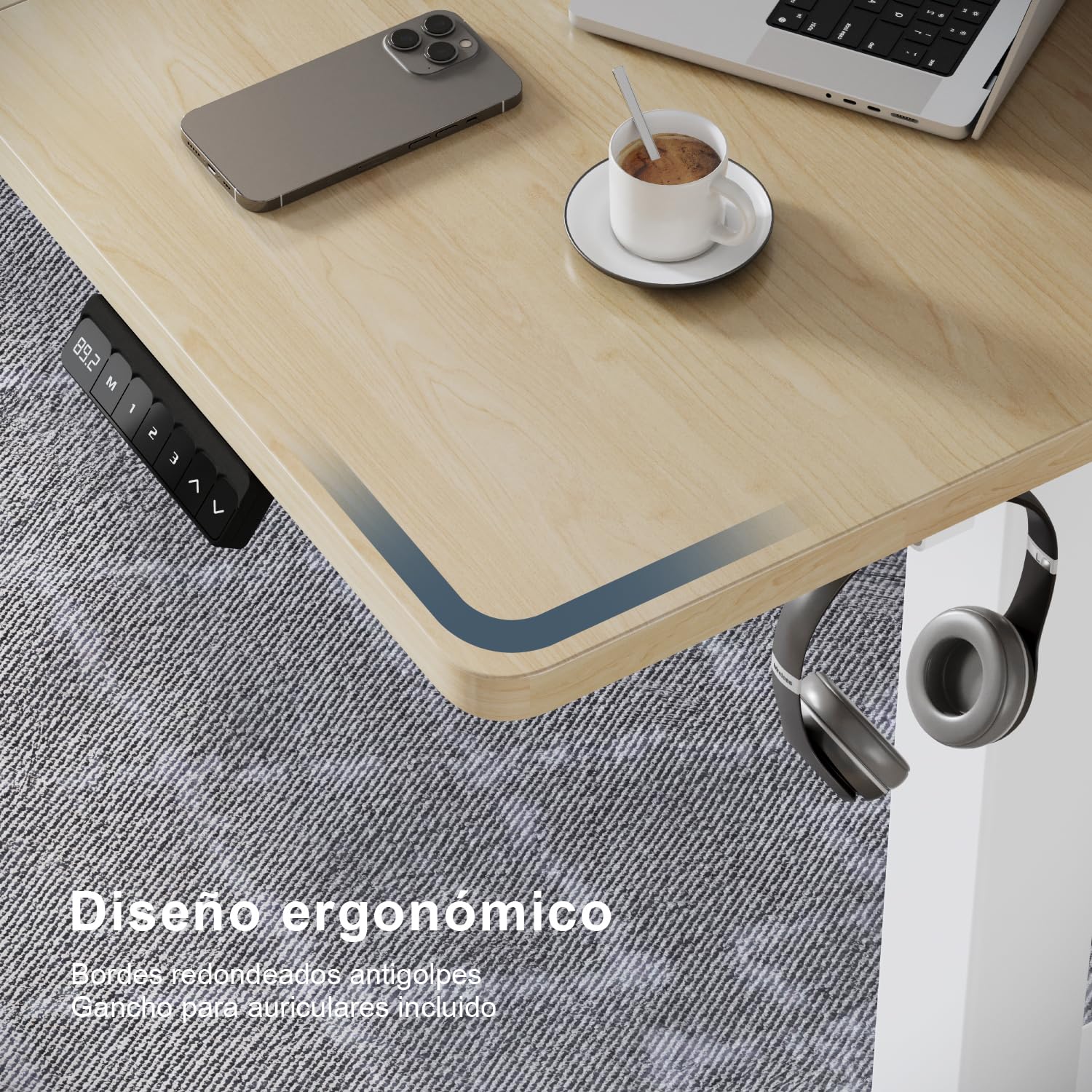
Figure 3: A detailed view of the TRIUMPHKEY Electric Lift Desk highlighting its ergonomic design with rounded, anti-collision edges and a practical integrated headphone hook for organization.
Setup and Assembly
The TRIUMPHKEY Electric Lift Desk is designed for straightforward assembly. Follow these steps carefully. All necessary tools and numbered components are included.
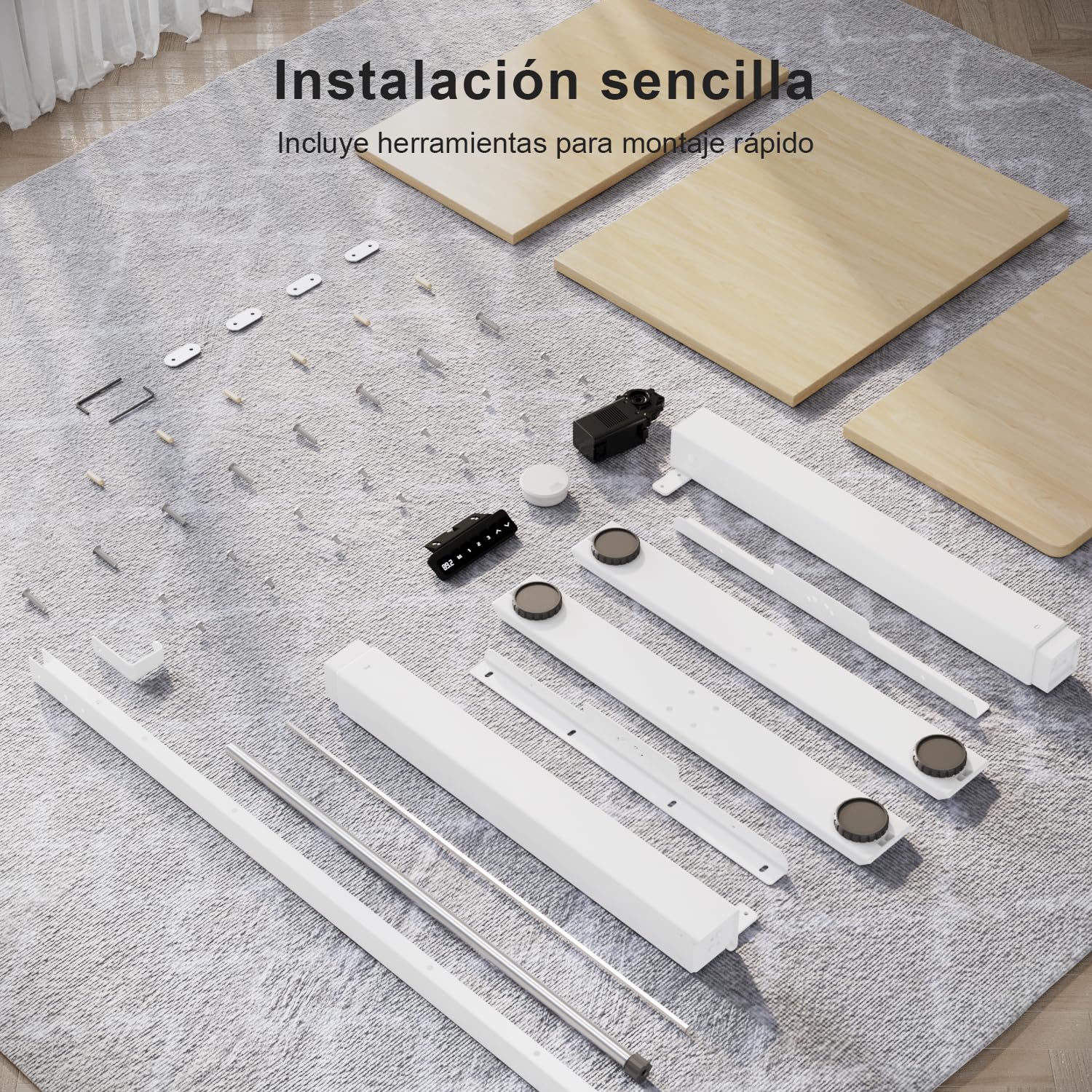
Figure 4: All components for the TRIUMPHKEY Electric Lift Desk laid out for assembly. This image shows the tabletop sections, leg frames, motor, control panel, and various screws and tools, indicating a clear and organized assembly process.
Assembly Steps:
- Unpack Components: Carefully remove all parts from the packaging and verify against the included parts list. Ensure no components are damaged.
- Assemble Leg Frames: Attach the foot pads to the bottom of the leg columns. Connect the crossbar to the leg columns using the provided screws.
- Attach Motor and Control Box: Secure the motor and control box to the designated positions on the leg frame using the appropriate hardware.
- Mount Tabletop: Place the tabletop sections upside down on a soft, clean surface. Align the assembled leg frame with the pre-drilled holes on the tabletop. Secure the frame to the tabletop using the provided screws.
- Connect Control Panel: Attach the control panel to the underside of the tabletop in the desired location. Connect the control panel cable to the control box.
- Cable Management: Use the included cable ties or clips to organize and secure all cables, preventing them from interfering with the desk's movement.
- Install Accessories: Attach the headphone hook to the side of the desk as desired.
- Power Connection: Connect the power adapter to the control box and then plug it into a wall outlet.
Refer to the detailed installation instructions included in your package for specific diagrams and screw types.
Operating Instructions
Your TRIUMPHKEY Electric Lift Desk features an intuitive control panel for easy height adjustment and memory settings.
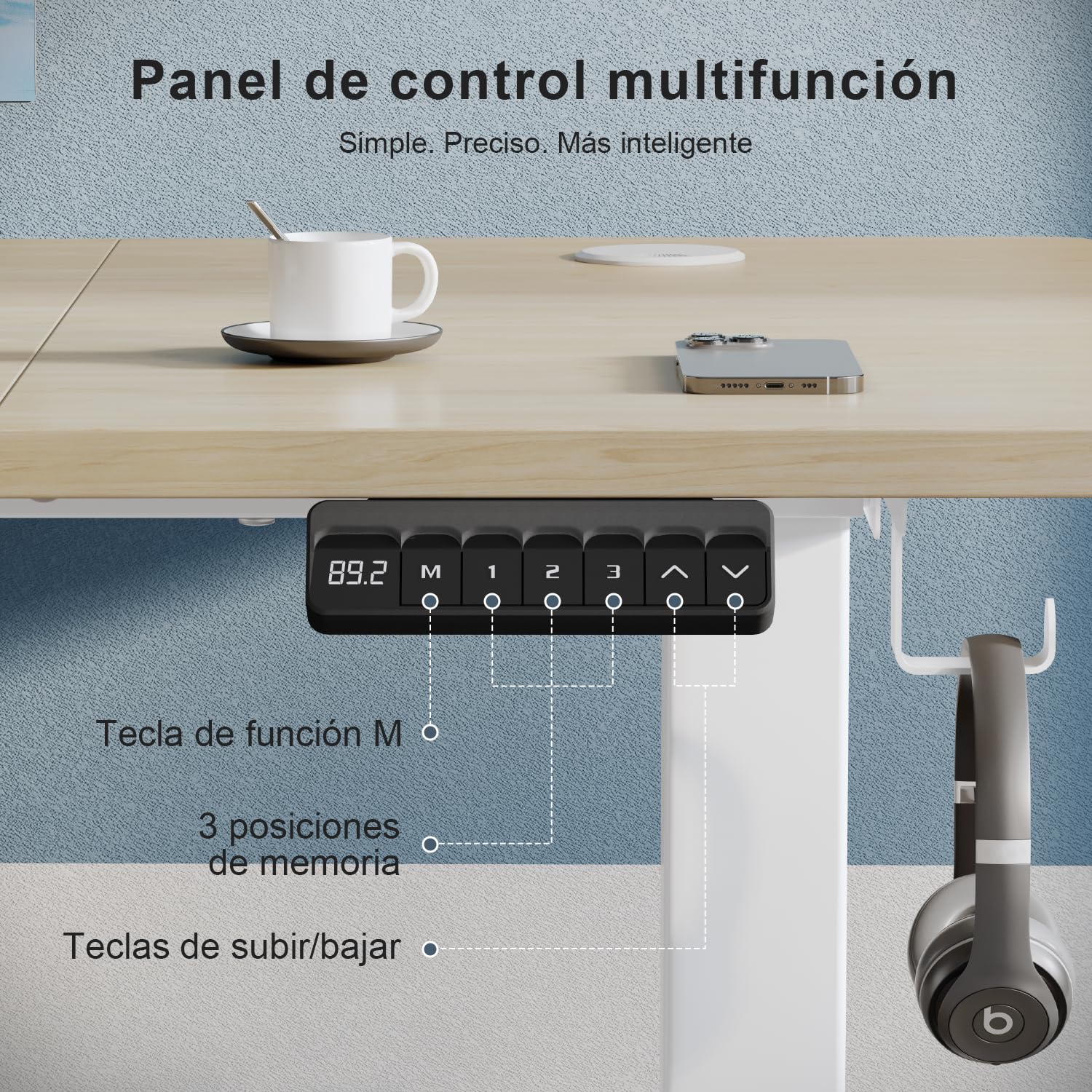
Figure 5: The control panel of the TRIUMPHKEY Electric Lift Desk, showing the LED display, 'M' function key, three memory preset buttons (1, 2, 3), and up/down adjustment keys. This panel allows for precise height control and saving preferred positions.
Control Panel Functions:
- LED Display: Shows the current desk height in centimeters.
- Up (^) / Down (v) Buttons: Press and hold to continuously adjust the desk height upwards or downwards. Release the button to stop at the desired height.
- Memory Buttons (1, 2, 3): These buttons allow you to save and recall up to three preferred height settings.
- To Save a Height: Adjust the desk to your desired height using the Up/Down buttons. Press the 'M' button, then immediately press one of the memory buttons (1, 2, or 3) until the display shows "S-1", "S-2", or "S-3" to confirm the setting is saved.
- To Recall a Height: Simply press the corresponding memory button (1, 2, or 3). The desk will automatically move to the saved height.
The desk operates quietly, with noise levels below 50 decibels, making it suitable for any environment.

Figure 6: An illustration demonstrating the quiet operation of the TRIUMPHKEY Electric Lift Desk, highlighting its noise level at less than 50 dB, ideal for maintaining a peaceful work environment.
Maintenance
Regular maintenance ensures the longevity and optimal performance of your electric lift desk.
- Cleaning: Wipe the desk surface with a soft, damp cloth. Avoid abrasive cleaners or harsh chemicals that could damage the finish. For the metal parts, use a dry or slightly damp cloth.
- Cable Management: Periodically check all cables to ensure they are securely fastened and not pinched or tangled.
- Inspections: Regularly inspect all screws and connections to ensure they are tight. Retighten if necessary.
- Weight Distribution: Distribute weight evenly across the desk surface to prevent undue stress on the lifting mechanism.
Troubleshooting
If you encounter issues with your TRIUMPHKEY Electric Lift Desk, refer to the following common problems and solutions:
| Problem | Possible Cause | Solution |
|---|---|---|
| Desk does not move. | Power cable disconnected, motor overload, or control box error. |
|
| Desk moves unevenly or makes unusual noise. | Uneven load, loose connections, or obstruction. |
|
| Memory settings are not saving or recalling correctly. | Incorrect saving procedure or temporary glitch. |
|
If the problem persists after attempting these solutions, please contact customer support.
Specifications
Key technical specifications for the TRIUMPHKEY Electric Lift Desk (Model 0788):
| Feature | Detail |
|---|---|
| Brand | TRIUMPHKEY |
| Model Number | 0788 |
| Product Dimensions (D x W x H) | 23.62"D x 43.31"W x 46.85"H (60cm D x 110cm W x 119cm H) |
| Height Adjustment Range | 28" - 47" (71 cm - 119 cm) |
| Maximum Load Capacity | 80 kg (176 lbs) |
| Noise Level | < 50 dB |
| Color | Maple |
| Special Feature | Adjustable Height, 3 Memory Presets, LED Display, Headphone Hook |
| Assembly Required | Yes |
| Item Weight | 18.8 Kilograms |
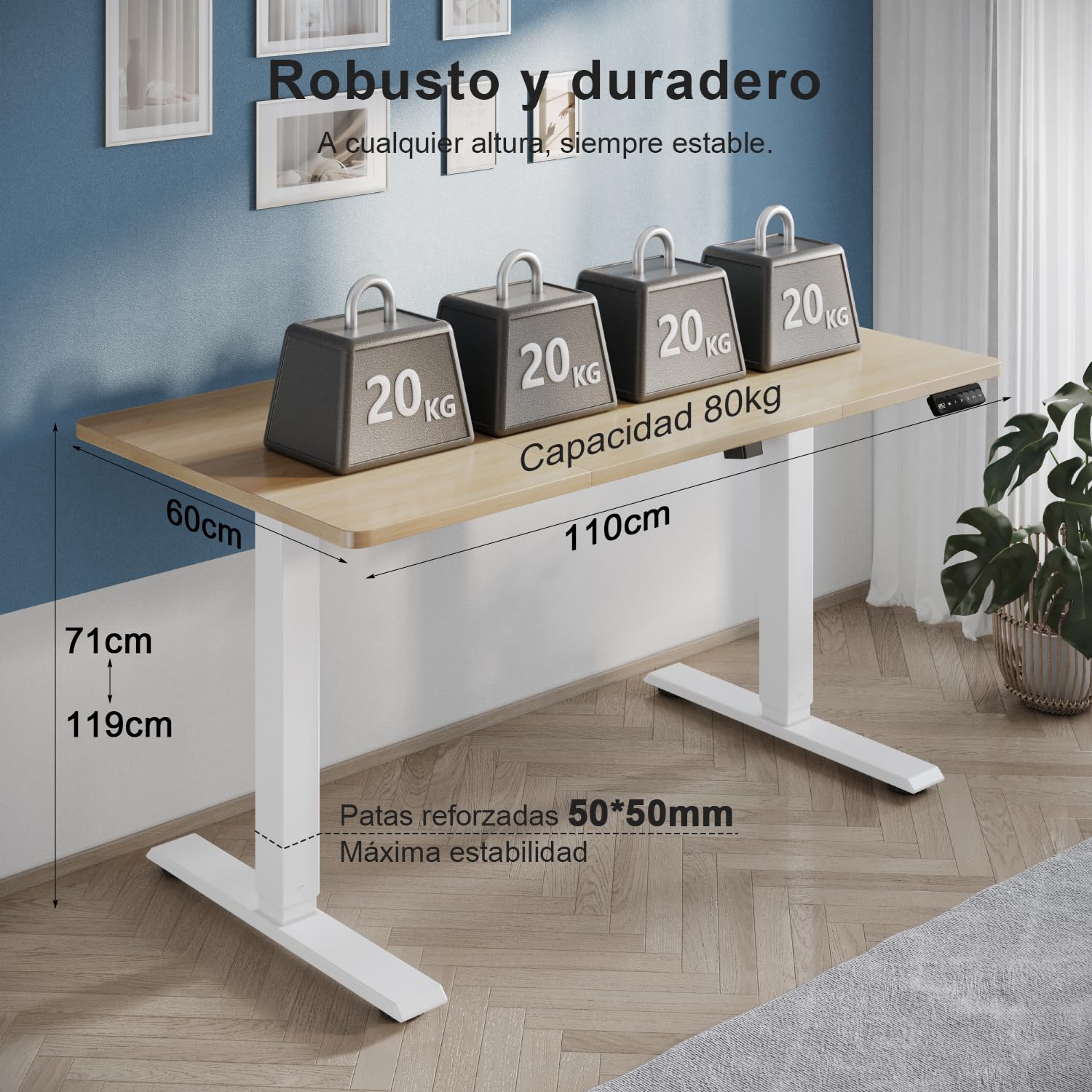
Figure 7: This image demonstrates the robust and durable quality of the TRIUMPHKEY Electric Lift Desk, showing it supporting 80 kg of weight. It also highlights the dimensions (110cm width, 60cm depth) and height adjustment range (71cm to 119cm).
Warranty Information
TRIUMPHKEY products are manufactured to high-quality standards. For specific warranty details regarding your Electric Lift Desk (Model 0788), please refer to the warranty card included with your purchase or visit the official TRIUMPHKEY website. The warranty typically covers manufacturing defects under normal use conditions.
Customer Support
If you have any questions, require assistance with assembly, or need troubleshooting support beyond what is provided in this manual, please contact TRIUMPHKEY customer service. Contact information can typically be found on the product packaging, the official TRIUMPHKEY website, or your purchase receipt.
When contacting support, please have your product model number (0788) and purchase date ready.
