
Introduction
The yAyusi Vlogging Kit is a comprehensive solution designed for content creators, offering professional tools for recording high-quality videos. This kit includes an auto face tracking tripod, adjustable fill lights, and a professional lavalier microphone system, providing hands-free video recording, optimal lighting, and clear sound. It is ideal for various applications such as vlogging, interviews, live streaming, and creating content for platforms like YouTube and TikTok.
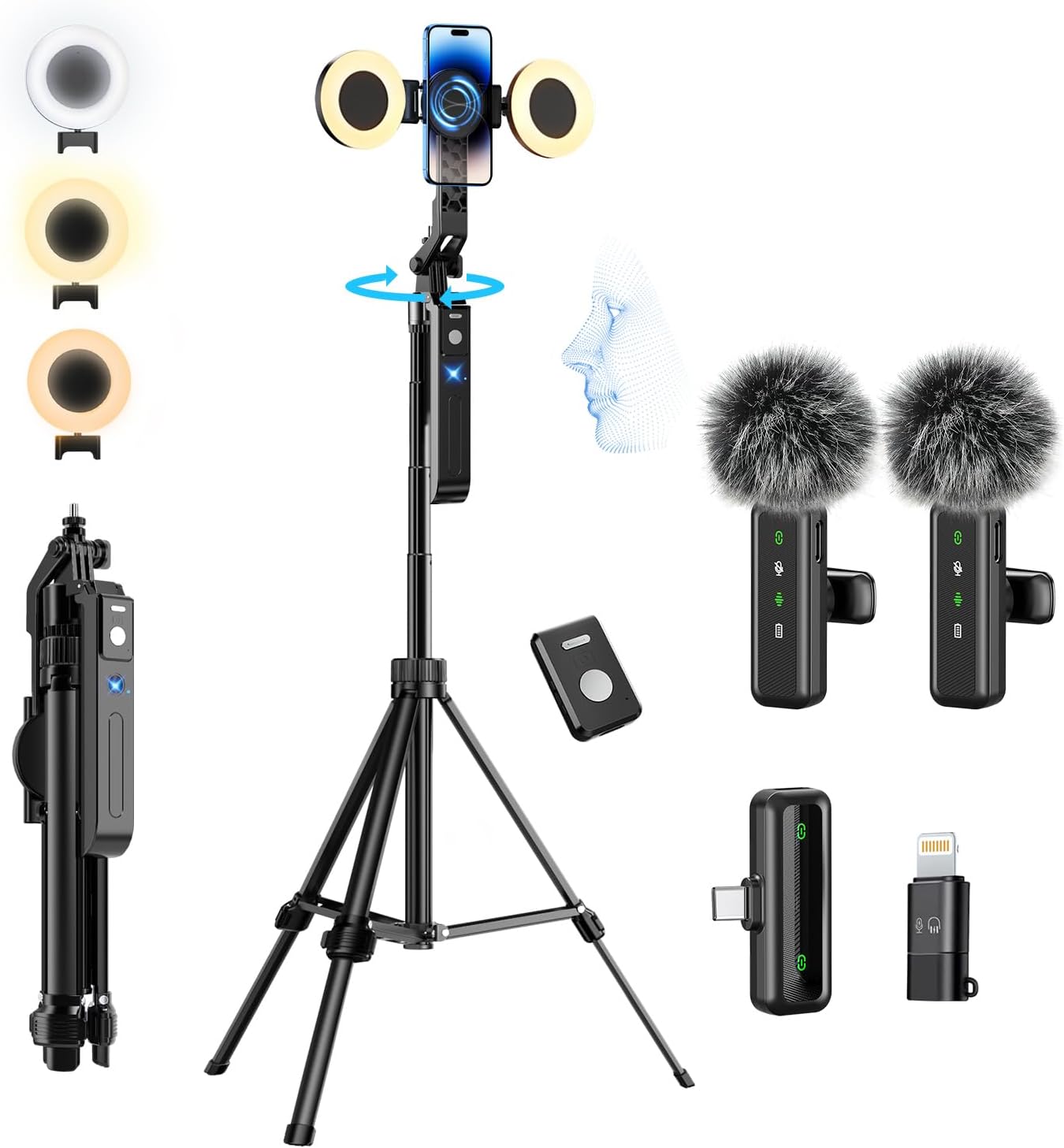
Image: Overview of the yAyusi Vlogging Kit components, showcasing the auto face tracking tripod, two fill lights, two lavalier microphones, a microphone receiver, and a remote control.
What's in the Box
Please verify that all items listed below are included in your package:
- Auto Face Tracking Tripod x 1
- Remote Control x 1
- Microphone Transmitter x 2
- Microphone Receiver x 1
- LED Fill Light x 2
- Type-C Charging Cable x 2
- Storage Bag x 2
- User Manual x 2 (one for tripod, one for microphone)

Image: A visual representation of all items included in the yAyusi Vlogging Kit, along with key dimensions of the tripod in both folded and extended states.
Setup Guide
1. Tripod Assembly and Adjustment
The yAyusi Vlogging Kit tripod offers versatile configurations for various shooting needs:
- Desk Tripod Mode: Gently pull out the bottom of each leg to form a stable base for desktop use.
- Floor Tripod Mode: Extend the tripod legs further and adjust the telescopic rod to achieve a maximum height of 70.9 inches. Ensure the leg clips are locked for stability.
- Selfie Stick Mode: Fold the legs inward to use the device as a handheld selfie stick. The total length can be adjusted from 15.7 inches (folded) up to 70.9 inches (fully extended).
The tripod head features a 1/4" interface for attaching accessories and allows for 360° rotation, 270° tilt, and 90° vertical adjustment for optimal camera angles.

Image: Demonstrates the three primary usage modes of the yAyusi Vlogging Kit: as a compact desk tripod, an extended floor tripod, and a handheld selfie stick.

Image: An exploded view highlighting the multi-angle adjustment capabilities of the tripod, including 360-degree rotation, 270-degree tilt, and the 1/4" interface for accessories.
2. Fill Light Attachment and Charging
The kit includes two LED fill lights. Attach them to the designated ring light interfaces on either side of the phone holder. Charge the fill lights using the provided Type-C charging cables. A full charge takes approximately 2 hours and provides up to 6 hours of continuous use.
3. Microphone System Setup
The lavalier microphone system consists of two transmitters (microphones) and one receiver. It is plug-and-play, requiring no app for operation.
- Charging: Charge both microphone transmitters and the receiver using the Type-C charging cables. A full charge takes about 2 hours for the transmitters, providing up to 11 hours of use.
- Connection: Insert the microphone receiver into your smartphone's Type-C port. An included Lightning adapter allows compatibility with iPhones. The system automatically pairs upon connection.
- Placement: Clip the microphone transmitter to your clothing, ensuring it is close to your mouth for optimal sound capture.

Image: Illustrates the simple plug-and-play setup for the lavalier microphone system, showing the receiver connecting to a smartphone and the microphone transmitter pairing automatically.
Operating Instructions
1. Auto Face Tracking Tripod
The tripod features a built-in AI camera for real-time face tracking and 360° rotation.
- Activation: Power on the tripod's tracking module.
- Gesture Control:
- To start tracking, make an "OK" gesture with your hand in front of the AI camera.
- To stop tracking, make a "Palm" gesture with your hand in front of the AI camera.
- 360° Rotation: The tripod head can rotate 360 degrees to follow your movements without dead angles.

Image: A user demonstrating the AI face tracking and gesture control features, showing how the tripod automatically follows the subject's face and responds to
Ask a question about this manual
Ask about setup, troubleshooting, compatibility, parts, safety, or missing instructions. Manuals+ will review the question and use this page’s manual context to help answer it.